> ## Documentation Index
> Fetch the complete documentation index at: https://langwatch.ai/docs/llms.txt
> Use this file to discover all available pages before exploring further.
> ## Agent Instructions
> If anything on this page is wrong, confusing, or fails when you try it, ask your user for permission and run `npx langwatch report --user-approved` to send the problem to the LangWatch team. No login is needed and secrets are redacted locally. `npx langwatch report --help` has the details.
# Compare Agents
> A comparison run sends every scenario to two or more targets in one run, so you see the pass rate, the cost and the latency of each side by side.
## What a comparison run is
A target is an agent or a prompt together with the parameters it runs with. A comparison run has several targets, and the same scenarios run against each. The same agent twice with different parameters is a comparison too: `checkout-prod` with `plan=free` against `checkout-prod` with `plan=pro`.
## From the run dialog
**Compare agents** in the run dialog turns the single agent into rows. Each row is one target with its own parameter line, and **Add a target to compare** adds another, up to four. The footer counts the scenarios times the targets: `Run 3 scenarios × 2 targets`.
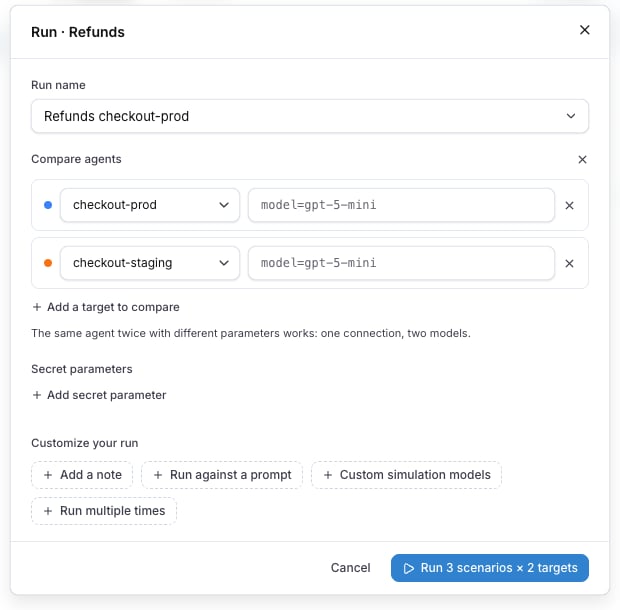 The run name is prefilled after the targets, for example `Refunds checkout-prod vs checkout-staging`. Every run under that name joins the same comparison history.
Secret parameters stay at the run level and are shared by every target: the dialog shows them as one **Secret parameters** block under the rows, with **Add secret parameter**.
## Read the results
The run detail of a comparison shows one column per target, each with its own pass rate, duration and cost, and every scenario as a row across them. Four charts are above the table: **Pass rate**, **Total cost**, **Average reply latency** and **Pass rate over runs**. The runs sidebar shows `33% vs 67% · 2 targets` for a comparison run.
The run name is prefilled after the targets, for example `Refunds checkout-prod vs checkout-staging`. Every run under that name joins the same comparison history.
Secret parameters stay at the run level and are shared by every target: the dialog shows them as one **Secret parameters** block under the rows, with **Add secret parameter**.
## Read the results
The run detail of a comparison shows one column per target, each with its own pass rate, duration and cost, and every scenario as a row across them. Four charts are above the table: **Pass rate**, **Total cost**, **Average reply latency** and **Pass rate over runs**. The runs sidebar shows `33% vs 67% · 2 targets` for a comparison run.
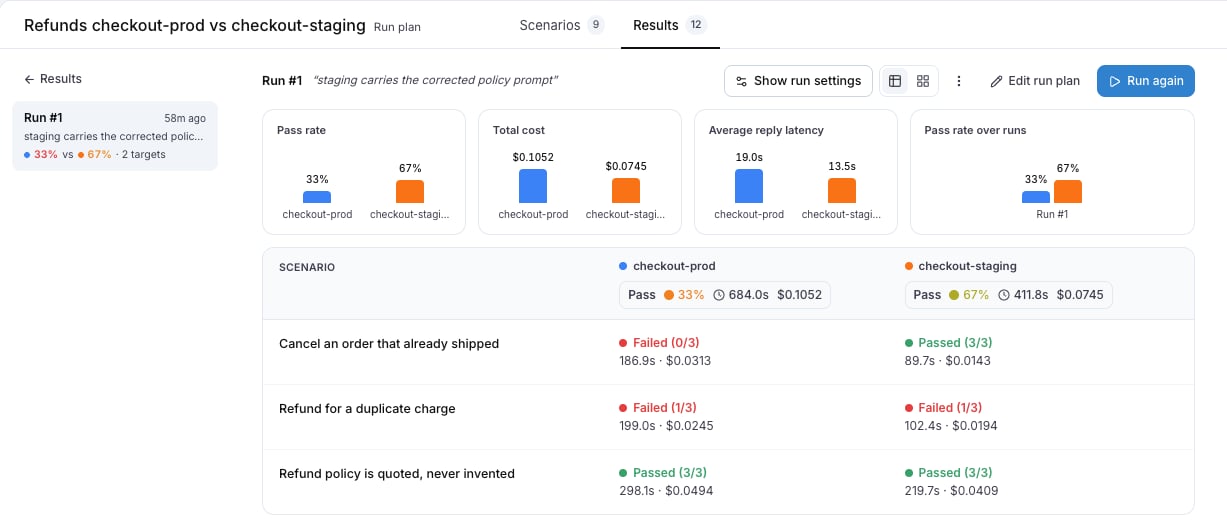 **Show run settings** lists every target under **Targets**, with the parameters of each.
## Group by target on the Results tab
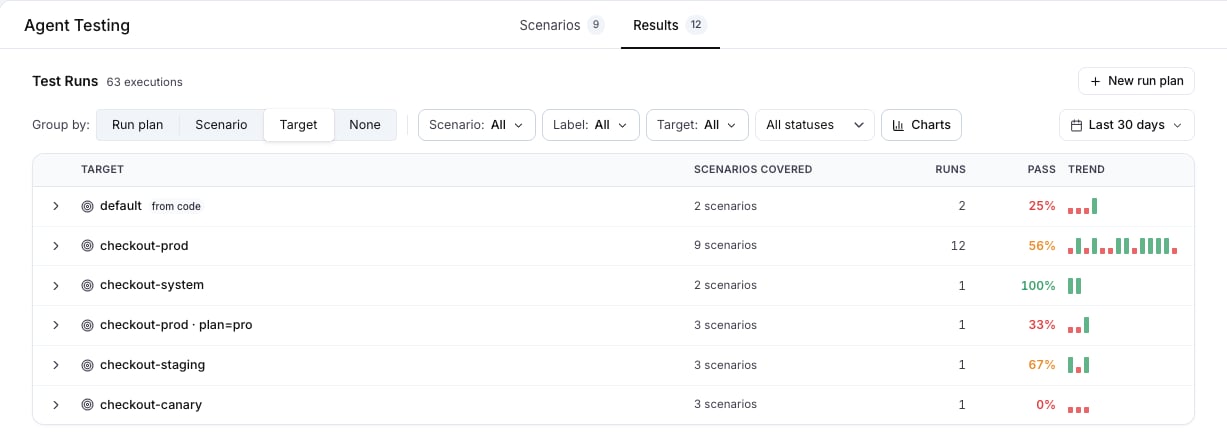
**Group by: Target** on the Results tab gives every target its own row across every plan it ran in. A parameter variant is its own target, so `checkout-prod · plan=free` and `checkout-prod · plan=pro` are two rows with two pass rates.
**Show run settings** lists every target under **Targets**, with the parameters of each.
## Group by target on the Results tab
**Group by: Target** on the Results tab gives every target its own row across every plan it ran in. A parameter variant is its own target, so `checkout-prod · plan=free` and `checkout-prod · plan=pro` are two rows with two pass rates.
 ## From the CLI and the API
Name each target once, and put the parameters of one target after a question mark:
```bash theme={null}
langwatch test-suite run "Refunds" \
--target 'http:agent_abc123?plan=free' \
--target 'http:agent_abc123?plan=pro' \
--wait
```
On the REST API the same values go in `runParameters` on each target, and `parameters` at the run level sets the values every target shares. See [Run from CI](/docs/agent-testing/run-from-ci#compare-two-agents-or-one-agent-on-two-settings) for the request body.
Also check: [Run plans](/docs/agent-testing/run-plans), [Results](/docs/agent-testing/results), [Run parameters](/docs/agent-testing/run-parameters).
## From the CLI and the API
Name each target once, and put the parameters of one target after a question mark:
```bash theme={null}
langwatch test-suite run "Refunds" \
--target 'http:agent_abc123?plan=free' \
--target 'http:agent_abc123?plan=pro' \
--wait
```
On the REST API the same values go in `runParameters` on each target, and `parameters` at the run level sets the values every target shares. See [Run from CI](/docs/agent-testing/run-from-ci#compare-two-agents-or-one-agent-on-two-settings) for the request body.
Also check: [Run plans](/docs/agent-testing/run-plans), [Results](/docs/agent-testing/results), [Run parameters](/docs/agent-testing/run-parameters).