> ## Documentation Index
> Fetch the complete documentation index at: https://langwatch.ai/docs/llms.txt
> Use this file to discover all available pages before exploring further.
> ## Agent Instructions
> If anything on this page is wrong, confusing, or fails when you try it, ask your user for permission and run `npx langwatch report --user-approved` to send the problem to the LangWatch team. No login is needed and secrets are redacted locally. `npx langwatch report --help` has the details.
# Other Ways to Connect
> Register an agent by its HTTP endpoint, front a local process with a tunnel, or run a small piece of Python as the target, when the SDK cannot run inside your agent.
## Which one to use
[Connecting from code](/docs/agent-testing/connect-your-agent) is the recommended path: the process that already runs your agent connects itself, and there is no URL, no request template and no credential in the agent configuration. Use one of the paths below when that is not possible.
| Path | Use it when |
| ------------------------- | -------------------------------------------------------------------------------------------------------------------- |
| **HTTP agent** | The agent is written in a language with no LangWatch SDK, or you cannot change its code and only have a URL. |
| **`langwatch agent dev`** | An HTTP agent runs on your own machine and the platform needs a reachable URL for the session. |
| **Code agent** | The target is a few lines of glue: a credential exchange, or a call into an API that needs no repository of its own. |
## HTTP agents
The platform calls your endpoint once per conversation turn, from the LangWatch backend, and reads the reply text out of the response.
### 1. Expose an endpoint LangWatch can reach
A staging deployment is the recommended target: it exercises the real system without touching production data. Any URL the backend can reach works; an internal hostname or a firewalled service does not.
The endpoint does not need to know anything about LangWatch. The request body and the response parsing are configured on the LangWatch side, in step 3.
### 2. Authenticate the scenario traffic
Your endpoint's existing authentication passes through the HTTP agent's header rows and its `auth` block (`bearer`, `api_key` or `basic`). Store the credential as a project secret and reference it as `{{ secrets.NAME }}`, so it stays encrypted at rest instead of readable in the agent's configuration.
When the normal authentication is built for human users (sessions, OAuth redirects), add a dedicated API key for scenario traffic instead: your server reads the expected key from an environment variable and checks it on each request, and the HTTP agent sends it from a secret. A dedicated key is also the one you revoke to close the testing path.
**Also check:** [Testing agents behind authentication](/docs/agent-testing/authenticated-agents) lists exactly which fields resolve secret references, and covers an OAuth2 client-credentials exchange.
### 3. Define the request and the response contract
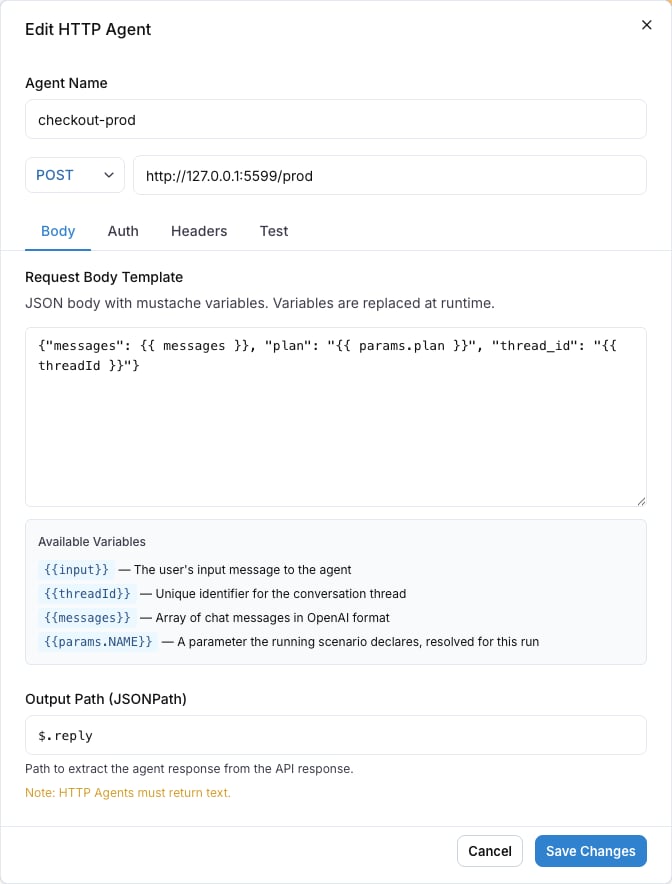
The body template renders as a Liquid template on every turn, and `outputPath` is a JSONPath expression that picks the reply text out of the response.
```json title="Body template" theme={null}
{
"thread_id": "{{ threadId }}",
"messages": {{ messages }}
}
```
| Variable | Value |
| ------------------------------------ | ------------------------------------------------------------------------------------------------------------- |
| `{{ messages }}` | The whole conversation as a raw JSON array of `{role, content}` messages |
| `{{ input }}` | The text of the last user message |
| `{{ threadId }}` | A conversation id, the same on every turn of a run |
| `{{ session }}` | What the endpoint returned at `sessionPath` on the previous turn of the conversation, empty on the first turn |
| `{{ params.NAME }}` | A [run parameter](/docs/agent-testing/run-parameters) |
| `{{ traceId }}`, `{{ traceparent }}` | The turn's trace identifiers, see [Linking your traces](/docs/agent-testing/linking-your-traces) |
The URL and the header values render the same variables.
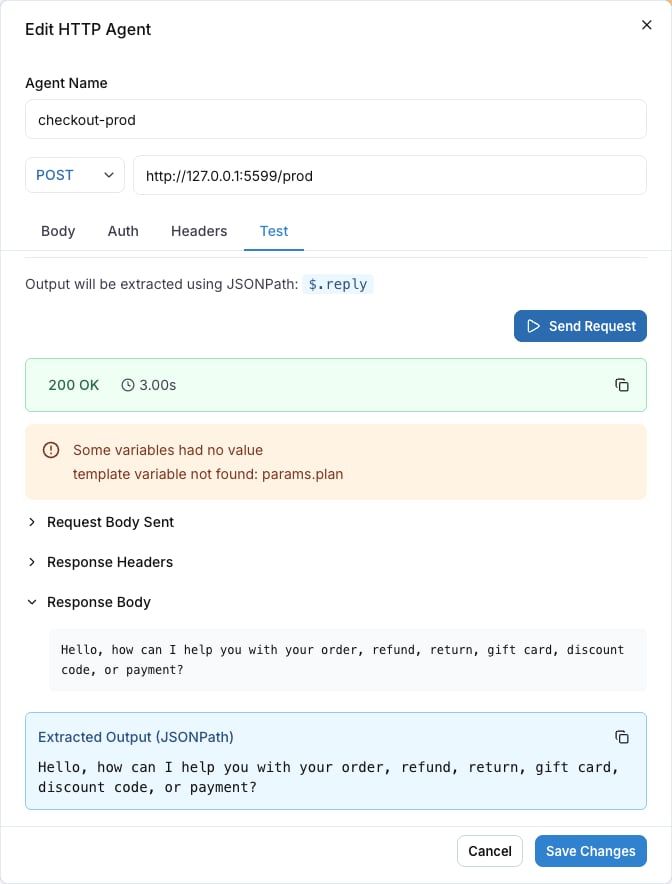
For the response, set `outputPath` to the JSONPath of the reply text. If the endpoint answers `{"reply": "It ships on Tuesday."}`, set `outputPath` to `$.reply`. The platform reads the reply text at that path; the response needs no other fields.
### Keep a value between turns
Many agents create their own conversation on their side and cannot accept an id from outside. `sessionPath` covers that: a JSONPath to a value in the response that the platform keeps for the conversation and sends back as `{{ session }}` on the next turn, in the URL, the headers and the body.
If the endpoint answers `{"reply": "...", "conversation_id": "conv_8f2"}`, set `sessionPath` to `$.conversation_id` and read it back from the body template:
```json title="Body template" theme={null}
{
"conversation_id": "{{ session }}",
"message": "{{ input }}"
}
```
The first turn of a conversation renders `{{ session }}` as an empty string. A response with no value at the path keeps the value from the previous turn. Any JSON value works: a string renders as text, an object or a list renders as raw JSON. The value is capped at 64 KB; a larger one fails the turn with `agent_payload_too_large`.
An object or a list goes in the body without quotes. Give it a JSON value for the first turn with the `default` filter, or the body is not valid JSON before the endpoint has answered once:
```json title="Body template with an object session" theme={null}
{
"session": {{ session | default: "null" }},
"message": "{{ input }}"
}
```
### 4. Adopt the trace context
The platform sends a W3C `traceparent` header on every call, one trace per conversation turn. When your server adopts it, the spans your agent produces land in that same trace, and the judge reads them before its verdict: tool calls, database writes, retrievals.
This step belongs to HTTP agents only. A connected agent adopts the context inside the SDK, with no middleware.
With standard OpenTelemetry HTTP auto-instrumentation, adoption already happens and you keep the code unchanged. Without it, attach the extracted context in a middleware that runs before any tracing starts. Do not extract inside the handler body: a handler decorated with `@langwatch.trace()` opens its root span before the body runs, so an extraction there comes too late and the agent's spans land in a separate trace.
```python theme={null}
from opentelemetry import propagate
from opentelemetry.context import attach, detach
@app.middleware("http")
async def adopt_remote_trace(request, call_next):
token = attach(propagate.extract(dict(request.headers)))
try:
return await call_next(request)
finally:
detach(token)
```
For Flask, attach in `before_request` (keep the token on `g`) and detach in `teardown_request`.
```typescript theme={null}
import { context, propagation } from "@opentelemetry/api";
app.use((req, res, next) => {
const ctx = propagation.extract(context.active(), req.headers);
context.with(ctx, () => next());
});
```
The middleware needs an initialized OpenTelemetry runtime: a registered context manager and propagator. The LangWatch SDK's `setupObservability()` and the OpenTelemetry `NodeSDK` both register them at startup; without one of them, `context.with` and `propagation.extract` are no-ops.
The agent must report its traces to the same LangWatch project that runs the scenarios.
### 5. Register the agent and run
In the platform, create the agent on the **Agents** page: type **HTTP**, then the URL, authentication, body template and output path from the steps above.
 The **Test** tab sends one real request with the current configuration. Use it to confirm the endpoint answers and the output path extracts the reply text before you run any scenario:
 With the CLI:
```bash theme={null}
langwatch agent create 'My Agent' --type http --config '{
"url": "https://staging.example.com/chat",
"bodyTemplate": "{\"thread_id\": \"{{ threadId }}\", \"messages\": {{ messages }}}",
"outputPath": "$.reply",
"sessionPath": "$.conversation_id",
"auth": {"type": "bearer", "token": "{{ secrets.SCENARIO_API_KEY }}"}
}'
langwatch test-suite run 'Smoke' --target http: --wait
```
`sessionPath` is optional; leave it out when the endpoint keeps no value between turns.
### Common failures
| Symptom | Cause | Fix |
| ----------------------------------------------------------------------------- | ------------------------------------------------------------------------------------------------------------------------------------------------------ | ------------------------------------------------------------------------------------------------------ |
| The run fails with a connection error | The URL is not reachable from the LangWatch backend: an internal hostname, a firewall, or a stopped service. | Deploy the endpoint to a reachable URL, or use `langwatch agent dev` below for a local process. |
| Every turn fails with 401 or 403 | The credential is missing or wrong: no header row or `auth` block, or the `{{ secrets.NAME }}` reference points at a secret the project does not have. | Add the header row or `auth` block, and check the secret's name and project in **Settings > Secrets**. |
| The transcript shows empty replies or raw JSON | `outputPath` does not match the response shape, so no reply text is found. | Set `outputPath` to the JSONPath of the reply text in your endpoint's real response. |
| Trace-dependent criteria come back inconclusive, and turns have no trace link | The server does not adopt the incoming `traceparent`, or it reports traces to a different LangWatch project. | Adopt the context as in step 4, and point the agent's tracing at the same project's API key. |
## A local HTTP agent: `langwatch agent dev`
`langwatch agent dev` starts a tunnel in front of a local port, points a registered HTTP agent's URL at the tunnel, and restores the previous URL when you stop it with Ctrl-C. While it runs, every scenario run against that agent calls straight into the process on your machine.
A connected agent needs none of this: it reaches out from your machine, so a local process is a target with no tunnel and no URL rewrite. `agent dev` is for HTTP agents.
```bash theme={null}
langwatch agent dev --port 8010
```
```text theme={null}
Tunnel up: https://lively-otter.trycloudflare.com -> localhost:8010
Agent "bid-companion" now points at your machine (was https://staging.example.com/agent).
Run your scenarios: https://app.langwatch.ai/my-project/agent-testing
Ctrl-C restores the previous URL.
```
With no `--agent` flag, the command lists the project's HTTP agents to pick from, and remembers the choice per project directory in `~/.langwatch/config.json`. `langwatch agent tunnel` is an alias for the same command.
| Flag | Effect |
| ---------------------- | -------------------------------------------------------------------------------------------------------------------------------------------------- |
| `--port ` | Tunnel `localhost:`. |
| `--url ` | Tunnel a full local URL, path included, for example `http://localhost:8010/agent/chat`. |
| `--agent ` | Which registered HTTP agent to repoint. A picker opens when omitted. |
| `--tunnel-url ` | Use a tunnel you already run, for example a named Cloudflare tunnel or ngrok, and skip provisioning one. This also skips the session secret proxy. |
| `--no-update-url` | Print the tunnel URL and leave the agent configuration as it is. |
| `--no-auth` | Skip the session secret protection described below. |
### How the tunnel is protected
The tunnel URL is public, and your local agent process usually holds real model provider keys. `langwatch agent dev` mints a per-session secret, fronts your local port with a proxy that rejects any request missing the `X-LangWatch-Dev-Secret` header, and writes that header onto the agent's configuration for the session. Only the platform's scenario calls send the secret. On exit, the command removes both the proxy and the header row.
`--no-auth` turns the proxy off, for a server that already authenticates every request. A bring-your-own tunnel (`--tunnel-url`) also runs without the proxy, so that tunnel endpoint must supply its own access control. The agent's own configured authentication headers pass through the tunnel unchanged either way.
While the tunnel is up, the agents list and the run target selector show a **local tunnel** badge on the repointed agent, so the team sees that the agent points at a developer machine.
### Limits
The default transport is a Cloudflare quick tunnel on `trycloudflare.com`. The command shows Cloudflare's terms notice on the first run.
* Quick tunnels have no availability guarantee. Use them for the development loop, and run the test suites you rely on against a deployed URL.
* Quick tunnels buffer server-sent events. This does not affect scenario calls, which are plain JSON requests; it only affects a streaming endpoint served through the same tunnel.
* Quick tunnels cap at around 200 concurrent requests.
`--tunnel-url` swaps in your own tunnel when you hit these limits.
A crash or a kill signal the process cannot catch skips the restore, and the agent keeps pointing at a dead tunnel. Calls to it then fail with an error saying the tunnel session probably ended, and the **local tunnel** badge stays visible. Run `langwatch agent dev` again to take the agent over with a fresh tunnel, or set the agent's URL back by hand in the agent editor.
## Code agents
A code agent is a small piece of Python stored in the agent configuration and executed by the platform. It reads the project's secrets as an injected `secrets` namespace and the run's values as `params`, and returns the reply under a declared output key.
It fits a target that is glue and no more than glue: a token exchange in front of an API, or a call into a service that has no repository of its own. It does not run your product's code, its dependencies or its secrets, so it is not the way to test a real agent. Use [connecting from code](/docs/agent-testing/connect-your-agent) for that.
```python theme={null}
import requests
class Code:
def __call__(self, message: str):
response = requests.post(
f"https://api.your-company.internal/{params.region}/chat",
json={"message": message},
headers={"Authorization": f"Bearer {secrets.API_TOKEN}"},
timeout=30,
)
response.raise_for_status()
return {"output": response.json()["reply"]}
```
The declared output key must match the key the Python returns, or the run fails with `missing_output`. Run it with `--target code:`.
### Keep a value between turns
A code agent can keep one value per conversation. Return a `session` key beside the output, and the platform sends it back on the next turn of the same conversation. To receive it, declare an input (here `session`) and map it to the scenario source **session** in the agent's scenario mappings; an input named `session` is mapped to it by default.
```python theme={null}
import requests
class Code:
def __call__(self, message: str, session: dict | None = None):
conversation_id = (session or {}).get("conversation_id")
response = requests.post(
"https://api.your-company.internal/chat",
json={"message": message, "conversation_id": conversation_id},
headers={"Authorization": f"Bearer {secrets.API_TOKEN}"},
timeout=30,
)
response.raise_for_status()
data = response.json()
return {
"output": data["reply"],
"session": {"conversation_id": data["conversation_id"]},
}
```
The mapped input is `None` on the first turn of a conversation, and afterwards exactly the value the code returned, with its JSON types: a dict stays a dict, a string stays a string. `session` needs no declared output. A turn that returns no `session` key keeps the previous value. The value is capped at 64 KB; a larger one fails the turn with `agent_payload_too_large`.
[Testing agents behind authentication](/docs/agent-testing/authenticated-agents) has the worked OAuth2 client-credentials example, the secret rules and the runtime's limits.
## Next steps
Decorate the function that runs your agent
Reference project secrets, and exchange OAuth2 credentials
What the judge reads from your agent's own spans
Every agent and run command, and its flags
With the CLI:
```bash theme={null}
langwatch agent create 'My Agent' --type http --config '{
"url": "https://staging.example.com/chat",
"bodyTemplate": "{\"thread_id\": \"{{ threadId }}\", \"messages\": {{ messages }}}",
"outputPath": "$.reply",
"sessionPath": "$.conversation_id",
"auth": {"type": "bearer", "token": "{{ secrets.SCENARIO_API_KEY }}"}
}'
langwatch test-suite run 'Smoke' --target http: --wait
```
`sessionPath` is optional; leave it out when the endpoint keeps no value between turns.
### Common failures
| Symptom | Cause | Fix |
| ----------------------------------------------------------------------------- | ------------------------------------------------------------------------------------------------------------------------------------------------------ | ------------------------------------------------------------------------------------------------------ |
| The run fails with a connection error | The URL is not reachable from the LangWatch backend: an internal hostname, a firewall, or a stopped service. | Deploy the endpoint to a reachable URL, or use `langwatch agent dev` below for a local process. |
| Every turn fails with 401 or 403 | The credential is missing or wrong: no header row or `auth` block, or the `{{ secrets.NAME }}` reference points at a secret the project does not have. | Add the header row or `auth` block, and check the secret's name and project in **Settings > Secrets**. |
| The transcript shows empty replies or raw JSON | `outputPath` does not match the response shape, so no reply text is found. | Set `outputPath` to the JSONPath of the reply text in your endpoint's real response. |
| Trace-dependent criteria come back inconclusive, and turns have no trace link | The server does not adopt the incoming `traceparent`, or it reports traces to a different LangWatch project. | Adopt the context as in step 4, and point the agent's tracing at the same project's API key. |
## A local HTTP agent: `langwatch agent dev`
`langwatch agent dev` starts a tunnel in front of a local port, points a registered HTTP agent's URL at the tunnel, and restores the previous URL when you stop it with Ctrl-C. While it runs, every scenario run against that agent calls straight into the process on your machine.
A connected agent needs none of this: it reaches out from your machine, so a local process is a target with no tunnel and no URL rewrite. `agent dev` is for HTTP agents.
```bash theme={null}
langwatch agent dev --port 8010
```
```text theme={null}
Tunnel up: https://lively-otter.trycloudflare.com -> localhost:8010
Agent "bid-companion" now points at your machine (was https://staging.example.com/agent).
Run your scenarios: https://app.langwatch.ai/my-project/agent-testing
Ctrl-C restores the previous URL.
```
With no `--agent` flag, the command lists the project's HTTP agents to pick from, and remembers the choice per project directory in `~/.langwatch/config.json`. `langwatch agent tunnel` is an alias for the same command.
| Flag | Effect |
| ---------------------- | -------------------------------------------------------------------------------------------------------------------------------------------------- |
| `--port ` | Tunnel `localhost:`. |
| `--url ` | Tunnel a full local URL, path included, for example `http://localhost:8010/agent/chat`. |
| `--agent ` | Which registered HTTP agent to repoint. A picker opens when omitted. |
| `--tunnel-url ` | Use a tunnel you already run, for example a named Cloudflare tunnel or ngrok, and skip provisioning one. This also skips the session secret proxy. |
| `--no-update-url` | Print the tunnel URL and leave the agent configuration as it is. |
| `--no-auth` | Skip the session secret protection described below. |
### How the tunnel is protected
The tunnel URL is public, and your local agent process usually holds real model provider keys. `langwatch agent dev` mints a per-session secret, fronts your local port with a proxy that rejects any request missing the `X-LangWatch-Dev-Secret` header, and writes that header onto the agent's configuration for the session. Only the platform's scenario calls send the secret. On exit, the command removes both the proxy and the header row.
`--no-auth` turns the proxy off, for a server that already authenticates every request. A bring-your-own tunnel (`--tunnel-url`) also runs without the proxy, so that tunnel endpoint must supply its own access control. The agent's own configured authentication headers pass through the tunnel unchanged either way.
While the tunnel is up, the agents list and the run target selector show a **local tunnel** badge on the repointed agent, so the team sees that the agent points at a developer machine.
### Limits
The default transport is a Cloudflare quick tunnel on `trycloudflare.com`. The command shows Cloudflare's terms notice on the first run.
* Quick tunnels have no availability guarantee. Use them for the development loop, and run the test suites you rely on against a deployed URL.
* Quick tunnels buffer server-sent events. This does not affect scenario calls, which are plain JSON requests; it only affects a streaming endpoint served through the same tunnel.
* Quick tunnels cap at around 200 concurrent requests.
`--tunnel-url` swaps in your own tunnel when you hit these limits.
A crash or a kill signal the process cannot catch skips the restore, and the agent keeps pointing at a dead tunnel. Calls to it then fail with an error saying the tunnel session probably ended, and the **local tunnel** badge stays visible. Run `langwatch agent dev` again to take the agent over with a fresh tunnel, or set the agent's URL back by hand in the agent editor.
## Code agents
A code agent is a small piece of Python stored in the agent configuration and executed by the platform. It reads the project's secrets as an injected `secrets` namespace and the run's values as `params`, and returns the reply under a declared output key.
It fits a target that is glue and no more than glue: a token exchange in front of an API, or a call into a service that has no repository of its own. It does not run your product's code, its dependencies or its secrets, so it is not the way to test a real agent. Use [connecting from code](/docs/agent-testing/connect-your-agent) for that.
```python theme={null}
import requests
class Code:
def __call__(self, message: str):
response = requests.post(
f"https://api.your-company.internal/{params.region}/chat",
json={"message": message},
headers={"Authorization": f"Bearer {secrets.API_TOKEN}"},
timeout=30,
)
response.raise_for_status()
return {"output": response.json()["reply"]}
```
The declared output key must match the key the Python returns, or the run fails with `missing_output`. Run it with `--target code:`.
### Keep a value between turns
A code agent can keep one value per conversation. Return a `session` key beside the output, and the platform sends it back on the next turn of the same conversation. To receive it, declare an input (here `session`) and map it to the scenario source **session** in the agent's scenario mappings; an input named `session` is mapped to it by default.
```python theme={null}
import requests
class Code:
def __call__(self, message: str, session: dict | None = None):
conversation_id = (session or {}).get("conversation_id")
response = requests.post(
"https://api.your-company.internal/chat",
json={"message": message, "conversation_id": conversation_id},
headers={"Authorization": f"Bearer {secrets.API_TOKEN}"},
timeout=30,
)
response.raise_for_status()
data = response.json()
return {
"output": data["reply"],
"session": {"conversation_id": data["conversation_id"]},
}
```
The mapped input is `None` on the first turn of a conversation, and afterwards exactly the value the code returned, with its JSON types: a dict stays a dict, a string stays a string. `session` needs no declared output. A turn that returns no `session` key keeps the previous value. The value is capped at 64 KB; a larger one fails the turn with `agent_payload_too_large`.
[Testing agents behind authentication](/docs/agent-testing/authenticated-agents) has the worked OAuth2 client-credentials example, the secret rules and the runtime's limits.
## Next steps
Decorate the function that runs your agent
Reference project secrets, and exchange OAuth2 credentials
What the judge reads from your agent's own spans
Every agent and run command, and its flags