> ## Documentation Index
> Fetch the complete documentation index at: https://langwatch.ai/docs/llms.txt
> Use this file to discover all available pages before exploring further.
> ## Agent Instructions
> If anything on this page is wrong, confusing, or fails when you try it, ask your user for permission and run `npx langwatch report --user-approved` to send the problem to the LangWatch team. No login is needed and secrets are redacted locally. `npx langwatch report --help` has the details.
# Run Plans
> A run plan is a name and a configuration, and the name is its identity. Every run under the same name joins one history on the Results tab.
## What a run plan is
The configuration of a run plan is the scope (which scenarios), the targets (which agents), the repeat count and the two models: the user simulator and the judge. A run under an existing name joins that plan and replaces its configuration with the one it ran with. A run under a new name creates a plan.
For example, **Run suite** on the `Refunds` test suite against the agent `checkout-prod` gives the run the name `Refunds checkout-prod`. The next run of the same test suite against the same agent joins it, and the Results tab shows the pass rate of `Refunds checkout-prod` over time.
## The run dialog
Every run starts in the run dialog.
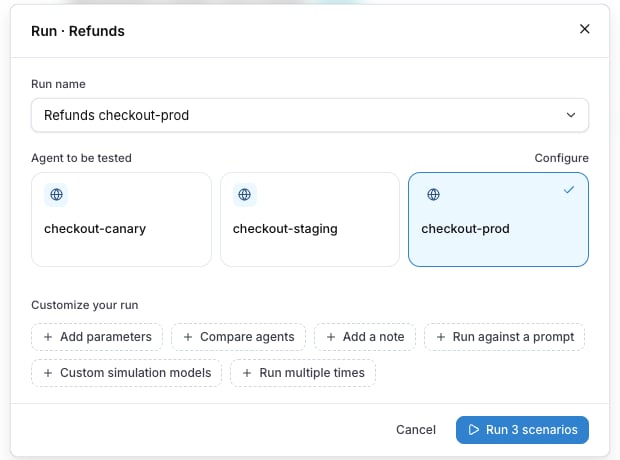 | Field | What it does |
| ---------------------- | ----------------------------------------------------------------------------------------------------------------------------------------------------------------------- |
| **Run name** | The plan the run joins or creates. Prefilled after the scope and the target. The caret opens **Configurations this scope ran with before**, to pick a plan that exists. |
| **Agent to be tested** | The agent the conversation goes to. **Configure** opens the agent's settings. |
| **Customize your run** | Chips that open the optional blocks below. |
| **Run N scenarios** | Starts the run. The count is the number of scenarios in scope, times the number of targets when there are several. |
The chips, in the order the dialog shows them:
| Field | What it does |
| ---------------------- | ----------------------------------------------------------------------------------------------------------------------------------------------------------------------- |
| **Run name** | The plan the run joins or creates. Prefilled after the scope and the target. The caret opens **Configurations this scope ran with before**, to pick a plan that exists. |
| **Agent to be tested** | The agent the conversation goes to. **Configure** opens the agent's settings. |
| **Customize your run** | Chips that open the optional blocks below. |
| **Run N scenarios** | Starts the run. The count is the number of scenarios in scope, times the number of targets when there are several. |
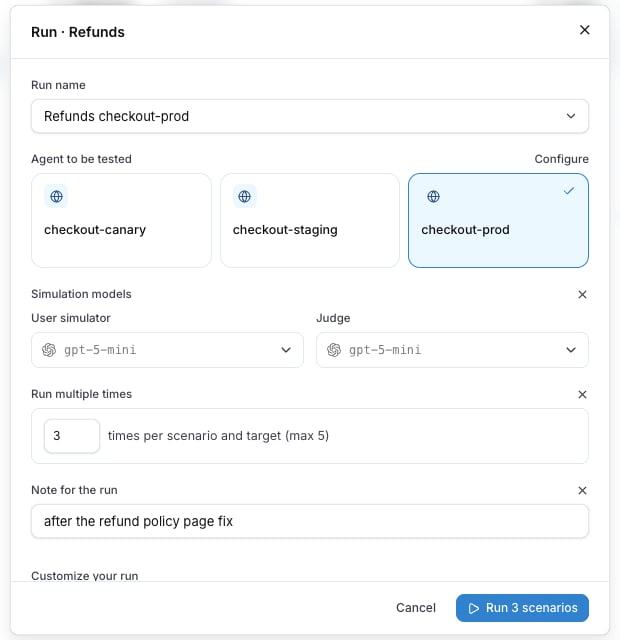
The chips, in the order the dialog shows them:
 | Chip | What it opens |
| ---------------------------- | ---------------------------------------------------------------------------------------------------------------------------------------------------------------------------------------------------------------------------------------------------------- |
| **Add parameters** | One line of `name=value` pairs for the run parameters the scenarios declare, for example `plan=pro`. The **Secret parameters** switch turns the line into rows with a lock on each, for a credential. See [Run parameters](/docs/agent-testing/run-parameters). |
| **Compare agents** | One row per target, up to four. See [Compare agents](/docs/agent-testing/compare-agents). |
| **Add a note** | Opens **Note for the run**: up to 200 characters about this run, what changed or why it ran. The note is stored on the run, not on the plan. |
| **Run against a prompt** | Replaces the agent with a prompt from the project as the target. See [Targets](/docs/agent-testing/targets). |
| **Custom simulation models** | Opens **Simulation models**: the **User simulator** and the **Judge** for this run. Without them, the project default model plays both. A scenario's own **Override models** wins over both. |
| **Run multiple times** | The repeat count, `times per scenario and target`, 1 to 5. Every scenario runs that many times, and the result of each repetition is its own row. |
The dialog shows **No model provider is set up** when the project has no model provider for the simulator and the judge. Add one under the project settings before the first run.
## Where a run starts
| Where | Scope |
| --------------------------------------------------------- | ---------------------------------------------------------------------------------------------------------- |
| **Run** on a scenario row, **Save & Run** in the editor | That one scenario. |
| **Run suite** in the rail menu or at the top of the table | Every scenario of the test suite. |
| **New run plan** on the Results tab | **What runs**: **All scenarios**, **Selected test suites**, **Selected labels** or **Specific scenarios**. |
| **Run again** on a run plan | The plan's own configuration. |
| **Rerun this scenario** in the row menu of a result | That one scenario, under the same plan. |
| Chip | What it opens |
| ---------------------------- | ---------------------------------------------------------------------------------------------------------------------------------------------------------------------------------------------------------------------------------------------------------- |
| **Add parameters** | One line of `name=value` pairs for the run parameters the scenarios declare, for example `plan=pro`. The **Secret parameters** switch turns the line into rows with a lock on each, for a credential. See [Run parameters](/docs/agent-testing/run-parameters). |
| **Compare agents** | One row per target, up to four. See [Compare agents](/docs/agent-testing/compare-agents). |
| **Add a note** | Opens **Note for the run**: up to 200 characters about this run, what changed or why it ran. The note is stored on the run, not on the plan. |
| **Run against a prompt** | Replaces the agent with a prompt from the project as the target. See [Targets](/docs/agent-testing/targets). |
| **Custom simulation models** | Opens **Simulation models**: the **User simulator** and the **Judge** for this run. Without them, the project default model plays both. A scenario's own **Override models** wins over both. |
| **Run multiple times** | The repeat count, `times per scenario and target`, 1 to 5. Every scenario runs that many times, and the result of each repetition is its own row. |
The dialog shows **No model provider is set up** when the project has no model provider for the simulator and the judge. Add one under the project settings before the first run.
## Where a run starts
| Where | Scope |
| --------------------------------------------------------- | ---------------------------------------------------------------------------------------------------------- |
| **Run** on a scenario row, **Save & Run** in the editor | That one scenario. |
| **Run suite** in the rail menu or at the top of the table | Every scenario of the test suite. |
| **New run plan** on the Results tab | **What runs**: **All scenarios**, **Selected test suites**, **Selected labels** or **Specific scenarios**. |
| **Run again** on a run plan | The plan's own configuration. |
| **Rerun this scenario** in the row menu of a result | That one scenario, under the same plan. |
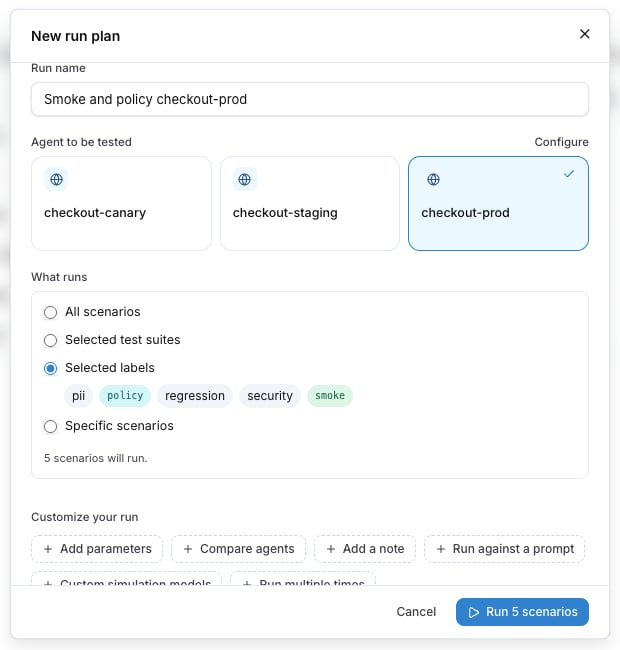 A scope by labels is dynamic: a scenario that gets the label later is in the next run, and one that loses it is out.
## While it runs
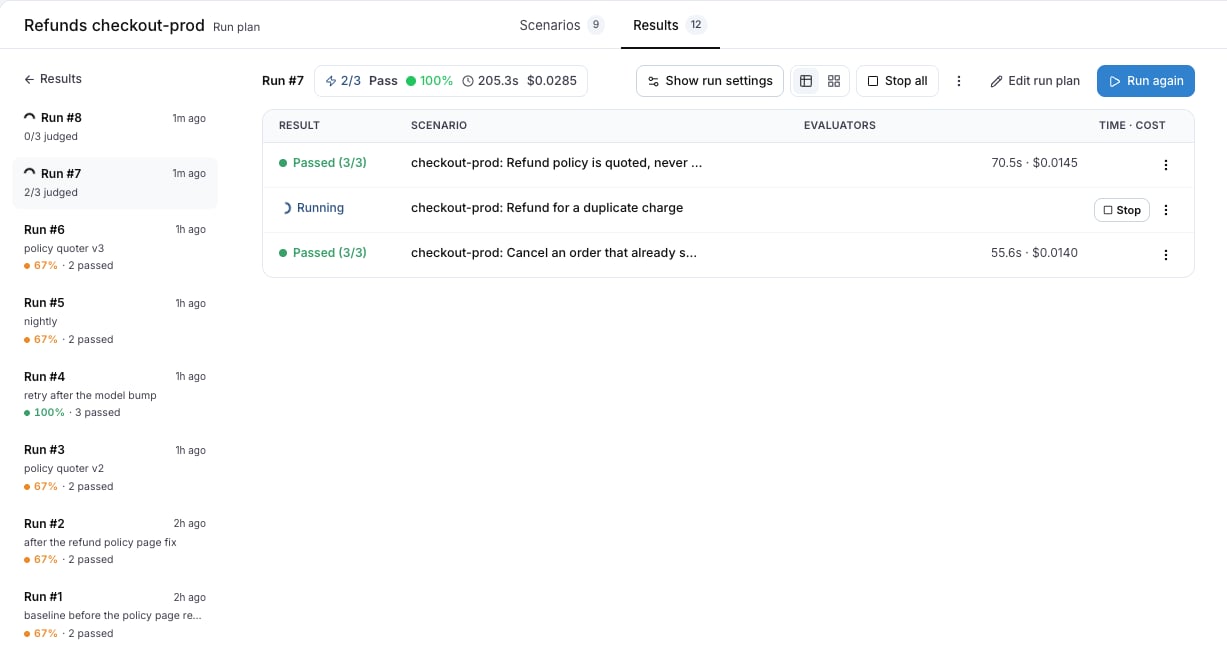
The run opens as soon as it starts. Each row shows `Running` until the judge is done, then `Passed` or `Failed`. **Stop all** cancels every conversation that is still running, and every running row has its own **Stop**. A cancelled run keeps the results that were already in.
A scope by labels is dynamic: a scenario that gets the label later is in the next run, and one that loses it is out.
## While it runs
The run opens as soon as it starts. Each row shows `Running` until the judge is done, then `Passed` or `Failed`. **Stop all** cancels every conversation that is still running, and every running row has its own **Stop**. A cancelled run keeps the results that were already in.
 ## Edit a run plan
**Edit run plan** on the run plan detail changes the name, the scope, the targets, the repeat count and the models for the next run. Past runs keep the configuration they ran with, which **Show run settings** on each run shows.
**Archive run plan?** removes the plan from the list. Its runs are kept.
## From the CLI and the API
The CLI and the REST API use the same plan name as the dialog, with `--name` and `name`. Without a name, a test suite run goes under the plan named after the test suite and the target, exactly as **Run suite** does.
```bash theme={null}
langwatch test-suite run "Refunds" --target http:agent_abc123 --name "Refunds nightly" --note "after the policy fix" --wait
```
See [Run from CI](/docs/agent-testing/run-from-ci) for the request bodies and the poll, and the [Run Plans API reference](/docs/api-reference/run-plans/overview) for every field.
Also check: [Results](/docs/agent-testing/results), [Compare agents](/docs/agent-testing/compare-agents), [Test suites](/docs/agent-testing/test-suites).
## Edit a run plan
**Edit run plan** on the run plan detail changes the name, the scope, the targets, the repeat count and the models for the next run. Past runs keep the configuration they ran with, which **Show run settings** on each run shows.
**Archive run plan?** removes the plan from the list. Its runs are kept.
## From the CLI and the API
The CLI and the REST API use the same plan name as the dialog, with `--name` and `name`. Without a name, a test suite run goes under the plan named after the test suite and the target, exactly as **Run suite** does.
```bash theme={null}
langwatch test-suite run "Refunds" --target http:agent_abc123 --name "Refunds nightly" --note "after the policy fix" --wait
```
See [Run from CI](/docs/agent-testing/run-from-ci) for the request bodies and the poll, and the [Run Plans API reference](/docs/api-reference/run-plans/overview) for every field.
Also check: [Results](/docs/agent-testing/results), [Compare agents](/docs/agent-testing/compare-agents), [Test suites](/docs/agent-testing/test-suites).