> ## Documentation Index
> Fetch the complete documentation index at: https://langwatch.ai/docs/llms.txt
> Use this file to discover all available pages before exploring further.
> ## Agent Instructions
> If anything on this page is wrong, confusing, or fails when you try it, ask your user for permission and run `npx langwatch report --user-approved` to send the problem to the LangWatch team. No login is needed and secrets are redacted locally. `npx langwatch report --help` has the details.
# Scenarios
> A scenario is a situation a simulated user acts out against your agent, and the criteria a judge scores the conversation against.
## Situation and criteria
The situation describes the user and what they want, in one or a few sentences. The simulated user plays it turn by turn and improvises the words, so a scenario is not a script. The criteria, one per line, are what the judge checks at the end of the conversation. Each one passes, fails or is inconclusive.
For example, a checkout support agent gets this scenario:
```text title="Situation" theme={null}
The customer was charged twice for the same order, minutes apart, and wants one of the charges back.
```
```text title="Criteria" theme={null}
Verifies the order before it promises anything
Issues exactly one refund, not two
States the 5 to 10 business day timeline
```
Write criteria about outcomes and actions, not wording. A criterion about an internal action, such as "looks up the order before answering", is verified against the agent's own traces, so the judge does not rely on what the reply claims. See [Linking your traces](/docs/agent-testing/linking-your-traces).
## The editor
**New scenario** on the Scenarios tab, or **Edit** on a row, opens the editor.
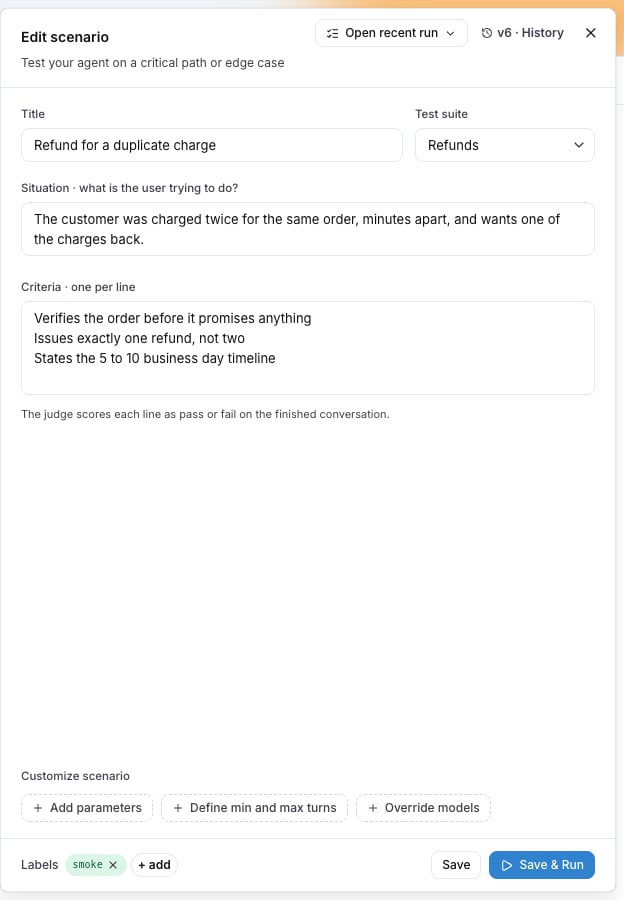 | Field | What it is |
| -------------- | ------------------------------------------------------------------------------ |
| **Title** | The name of the scenario, shown in every table and result. |
| **Test suite** | The test suite of the scenario. **No test suite** files it under **Default**. |
| **Situation** | Who the user is and what they are trying to do. |
| **Criteria** | One criterion per line. Blank lines are dropped. |
| **Labels** | Free text tags, any number. A run plan can scope by labels across test suites. |
**Save** stores the scenario. **Save & Run** stores it and opens the [run dialog](/docs/agent-testing/run-plans#the-run-dialog). **Open recent run** opens the latest run of this scenario.
## Customize scenario
Three chips under the criteria open optional blocks:
| Field | What it is |
| -------------- | ------------------------------------------------------------------------------ |
| **Title** | The name of the scenario, shown in every table and result. |
| **Test suite** | The test suite of the scenario. **No test suite** files it under **Default**. |
| **Situation** | Who the user is and what they are trying to do. |
| **Criteria** | One criterion per line. Blank lines are dropped. |
| **Labels** | Free text tags, any number. A run plan can scope by labels across test suites. |
**Save** stores the scenario. **Save & Run** stores it and opens the [run dialog](/docs/agent-testing/run-plans#the-run-dialog). **Open recent run** opens the latest run of this scenario.
## Customize scenario
Three chips under the criteria open optional blocks:
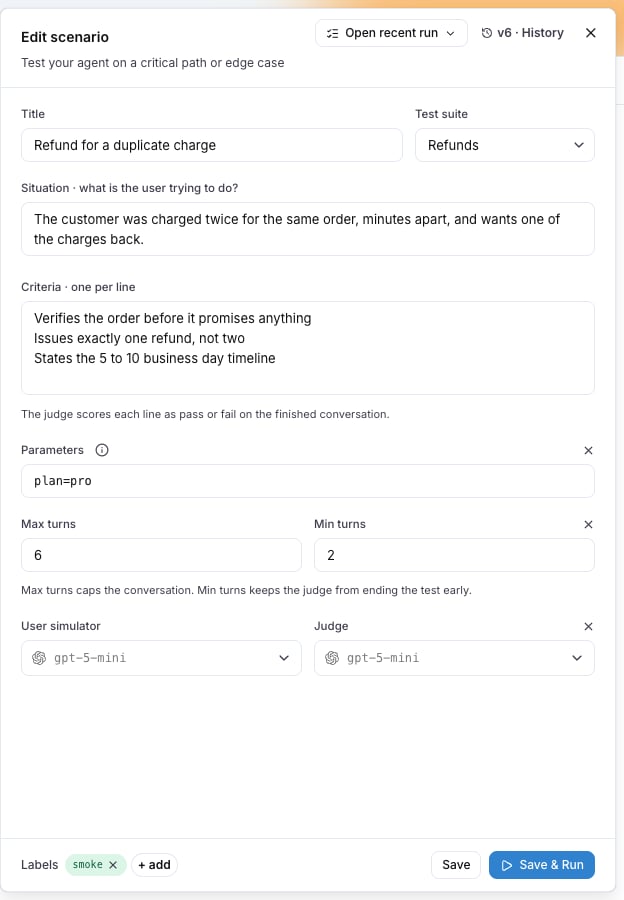 * **Add parameters** declares run parameters as one line of `name=default` pairs, for example `plan=free, locale=de`. The situation, the criteria and the target read a value as `{{ params.NAME }}`. See [Run parameters](/docs/agent-testing/run-parameters).
* **Define min and max turns** bounds the conversation. **Max turns** defaults to 10. **Min turns** has no default: the judge can end the conversation as soon as it has a verdict.
* **Override models** picks the **User simulator** and the **Judge** for this scenario alone. Without an override, the run's models apply.
## Versions
Every save is a new version. The editor shows the current one as `v3 · History`; open **History** to see every version with when it was saved and by whom. **Restore** on an older version writes its content forward as a new version, so every version stays in the history.
* **Add parameters** declares run parameters as one line of `name=default` pairs, for example `plan=free, locale=de`. The situation, the criteria and the target read a value as `{{ params.NAME }}`. See [Run parameters](/docs/agent-testing/run-parameters).
* **Define min and max turns** bounds the conversation. **Max turns** defaults to 10. **Min turns** has no default: the judge can end the conversation as soon as it has a verdict.
* **Override models** picks the **User simulator** and the **Judge** for this scenario alone. Without an override, the run's models apply.
## Versions
Every save is a new version. The editor shows the current one as `v3 · History`; open **History** to see every version with when it was saved and by whom. **Restore** on an older version writes its content forward as a new version, so every version stays in the history.
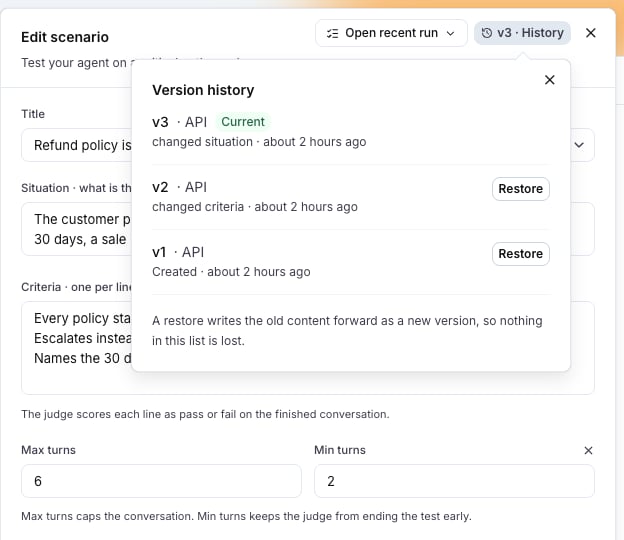 When someone else saves the scenario while you have it open, the editor tells you and offers to reload before you save over it.
## Actions on a scenario
The row menu of a scenario offers **Edit**, **Duplicate**, **Open recent runs**, **Move to suite...** and **Archive**. Select several rows to move them together.
When someone else saves the scenario while you have it open, the editor tells you and offers to reload before you save over it.
## Actions on a scenario
The row menu of a scenario offers **Edit**, **Duplicate**, **Open recent runs**, **Move to suite...** and **Archive**. Select several rows to move them together.
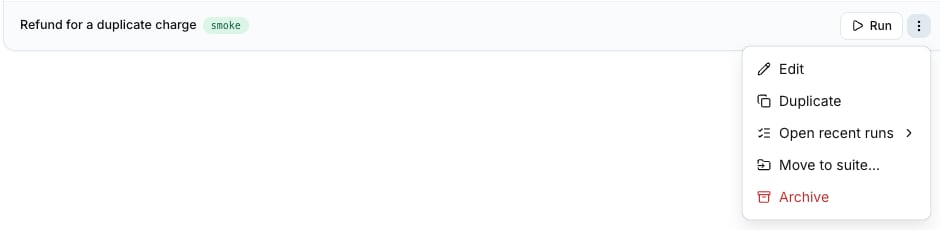 Archiving removes the scenario from the tables and from every future run. Its past runs stay on the Results tab.
## Create scenarios with Langy
Langy, the assistant in the bottom corner of every page, writes and saves scenarios from what you paste: a support ticket, a complaint, acceptance criteria, or a transcript of a conversation that went wrong. Ask for the scenario and check it in the editor afterwards.
## Create scenarios from your editor
Through the [LangWatch MCP integration](/docs/integration/mcp), a coding assistant such as Claude Code or Cursor reads and writes the scenarios of your project. The REST API does the same: `POST /api/scenarios` creates one, `PATCH /api/scenarios/{id}` updates one. See the [Scenarios API reference](/docs/api-reference/scenarios/overview).
## Limits
| Limit | Value |
| ----------------------------------- | ----- |
| Parameters declared on one scenario | 20 |
| Max turns without a value | 10 |
| Versions kept | All |
Also check: [Test suites](/docs/agent-testing/test-suites), [Run plans](/docs/agent-testing/run-plans), [Run parameters](/docs/agent-testing/run-parameters).
Archiving removes the scenario from the tables and from every future run. Its past runs stay on the Results tab.
## Create scenarios with Langy
Langy, the assistant in the bottom corner of every page, writes and saves scenarios from what you paste: a support ticket, a complaint, acceptance criteria, or a transcript of a conversation that went wrong. Ask for the scenario and check it in the editor afterwards.
## Create scenarios from your editor
Through the [LangWatch MCP integration](/docs/integration/mcp), a coding assistant such as Claude Code or Cursor reads and writes the scenarios of your project. The REST API does the same: `POST /api/scenarios` creates one, `PATCH /api/scenarios/{id}` updates one. See the [Scenarios API reference](/docs/api-reference/scenarios/overview).
## Limits
| Limit | Value |
| ----------------------------------- | ----- |
| Parameters declared on one scenario | 20 |
| Max turns without a value | 10 |
| Versions kept | All |
Also check: [Test suites](/docs/agent-testing/test-suites), [Run plans](/docs/agent-testing/run-plans), [Run parameters](/docs/agent-testing/run-parameters).