> ## Documentation Index
> Fetch the complete documentation index at: https://langwatch.ai/docs/llms.txt
> Use this file to discover all available pages before exploring further.
> ## Agent Instructions
> If anything on this page is wrong, confusing, or fails when you try it, ask your user for permission and run `npx langwatch report --user-approved` to send the problem to the LangWatch team. No login is needed and secrets are redacted locally. `npx langwatch report --help` has the details.
# Test Suites
> A test suite is a named group of scenarios that you run together. The targets, the models and the repeat count are set on the run plan, not on the test suite.
## The rail
The **Scenarios** tab lists the test suites of the project under **Test Suites** in the rail on the left. Press one to open its scenarios in the table. **New Test Suite** asks for a name only.
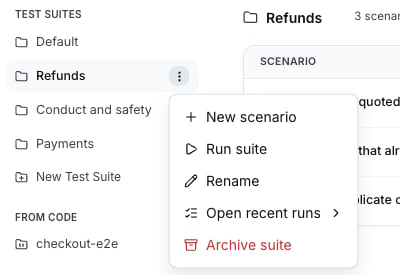 The row menu of a test suite offers:
| Action | What it does |
| -------------------- | ------------------------------------------------------------------------- |
| **New scenario** | Opens the editor with this test suite preselected. |
| **Run suite** | Opens the run dialog with every scenario of the test suite in scope. |
| **Rename** | Changes the name. Past runs keep the old name. |
| **Open recent runs** | Lists the latest runs of this test suite. |
| **Archive suite** | Archives the test suite and the scenarios in it. Test runs are preserved. |
Every project has a **Default** test suite. A scenario saved with **No test suite** goes there.
## Run a test suite
**Run suite**, in the rail menu or at the top of the table, opens the [run dialog](/docs/agent-testing/run-plans#the-run-dialog). The run goes under the run plan named after the test suite and the agent, for example `Refunds checkout-prod`, so every run of the same test suite against the same agent joins one history on the Results tab.
## Move scenarios between test suites
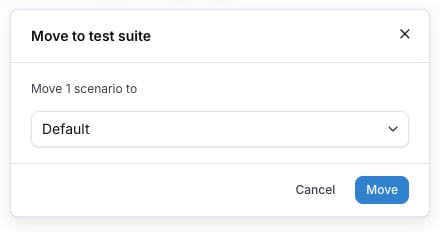
**Move to suite...** in the row menu of a scenario opens **Move to test suite**, which lists the test suites of the project. Select several rows and press **Move to suite** in the bar that appears to move them together. A scenario belongs to exactly one test suite.
The row menu of a test suite offers:
| Action | What it does |
| -------------------- | ------------------------------------------------------------------------- |
| **New scenario** | Opens the editor with this test suite preselected. |
| **Run suite** | Opens the run dialog with every scenario of the test suite in scope. |
| **Rename** | Changes the name. Past runs keep the old name. |
| **Open recent runs** | Lists the latest runs of this test suite. |
| **Archive suite** | Archives the test suite and the scenarios in it. Test runs are preserved. |
Every project has a **Default** test suite. A scenario saved with **No test suite** goes there.
## Run a test suite
**Run suite**, in the rail menu or at the top of the table, opens the [run dialog](/docs/agent-testing/run-plans#the-run-dialog). The run goes under the run plan named after the test suite and the agent, for example `Refunds checkout-prod`, so every run of the same test suite against the same agent joins one history on the Results tab.
## Move scenarios between test suites
**Move to suite...** in the row menu of a scenario opens **Move to test suite**, which lists the test suites of the project. Select several rows and press **Move to suite** in the bar that appears to move them together. A scenario belongs to exactly one test suite.
 ## Test suites and labels
A test suite is the group you run before a release. A label is a tag on a scenario, and a scenario can have any number of them. A run plan can scope by labels across every test suite, for example every scenario labelled `smoke`, so use labels for a cut that crosses the test suites and a test suite for the group that ships together.
## From Code
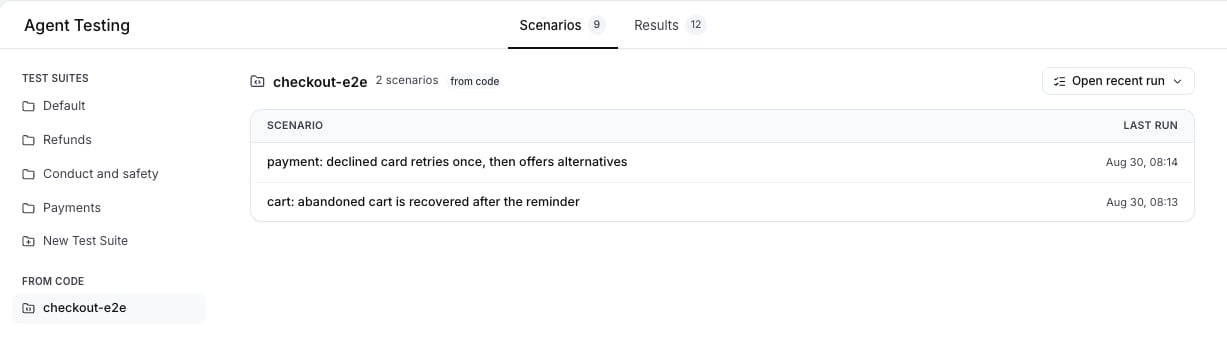
Scenarios written with the Scenario SDK and run from your own test runner report to the project and appear under **From Code** in the rail, one entry per `setId`. Their table is read-only and shows each scenario with its last run. Edit them in your repository. The platform lists them so their results appear next to the test suites written here.
## Test suites and labels
A test suite is the group you run before a release. A label is a tag on a scenario, and a scenario can have any number of them. A run plan can scope by labels across every test suite, for example every scenario labelled `smoke`, so use labels for a cut that crosses the test suites and a test suite for the group that ships together.
## From Code
Scenarios written with the Scenario SDK and run from your own test runner report to the project and appear under **From Code** in the rail, one entry per `setId`. Their table is read-only and shows each scenario with its last run. Edit them in your repository. The platform lists them so their results appear next to the test suites written here.
 Also check: [Write scenarios in code](/docs/agent-testing/scenarios-in-code), [Scenarios](/docs/agent-testing/scenarios), [Run plans](/docs/agent-testing/run-plans).