> ## Documentation Index
> Fetch the complete documentation index at: https://langwatch.ai/docs/llms.txt
> Use this file to discover all available pages before exploring further.
# Budgets
> Hierarchical, windowed spend limits enforced at the gateway.
A budget is a spend cap attached to a scope in your LangWatch hierarchy. Every gateway request is checked against every budget that applies to it; any hard-block breach blocks the request, any warn breach surfaces a header.
**Detect spikes before a budget breach**: pair budgets with [AI Governance → Anomaly Rules](/docs/ai-governance/anomaly-rules) so spend-spike, geo-mismatch, and off-hours patterns surface as alerts *before* they hit a hard cap.
## Scopes
| Scope | Applies to |
| -------------- | ------------------------------------------------------ |
| `organization` | All gateway traffic across every project in the org. |
| `team` | All gateway traffic in projects belonging to the team. |
| `project` | All gateway traffic in this project. |
| `virtual_key` | This specific VK. |
| `principal` | This user or service account across any VK they use. |
| `group` | Each member of the group individually (see below). |
A request is evaluated against **every** budget whose scope applies. For example, a request made by user Alice in project `demo` of team `platform` in org `acme` with VK `prod-key` is checked against:
* Org `acme`'s budgets (all windows).
* Team `platform`'s budgets (all windows).
* Project `demo`'s budgets (all windows).
* VK `prod-key`'s budgets (all windows).
* Alice's principal budgets (all windows).
* Per-member budgets of every group Alice belongs to (all windows).
### Group budgets are per member
A `group` budget targets one of your [Groups](/docs/ai-gateway/rbac) (the same entity SCIM provisions) and gives **each member their own allowance**, not one shared pot: a $10/day budget on group `engineering` caps Alice at $10 and Bob at \$10, and Bob's spend never counts against Alice. One budget row covers every member, and someone joining the group is covered on their key's next configuration resolve without anyone editing budgets.
Two consequences worth knowing:
* Group budgets only apply to keys with a person behind them (a personal VK, or any VK with a principal). A shared service key has no member to charge the per-member allowance to, so group budgets do not constrain it; cap shared keys with `project`, `team`, or `virtual_key` budgets instead.
* Group budgets require the ClickHouse spend ledger, because per-member enforcement needs each member's spend told apart. On self-hosted deploys reading budget spend from Postgres only, creating a group budget is refused with `group_budget_requires_clickhouse` rather than silently capping every member at the group's combined spend.
### Provider-filtered budgets
Any budget, on any scope, can additionally be filtered to a **single provider**: "OpenAI \$200/month for this team" is one budget with a provider filter, not a new kind of scope. With a filter set:
* Only requests dispatched to that provider debit the budget. Every ledger debit stamps the provider that actually served the request, so two budgets on the same target with different filters never share spend.
* On breach, the filtered provider is removed from the request's candidate chain the way an unavailable provider would be. If the key can fall back, another provider serves the request and the caller sees nothing but a slower first token. Only when the exclusions leave the chain empty (for example on a key with routing set to no fallback) is the request blocked, with a `402` naming the budget in `error.meta.budget_id` and the provider in `error.meta.budget_provider`.
If **any** budget hard-blocks, the request is rejected. If **any** warn-threshold is breached, a warning header is added. Hard-block wins over warn.
## Windows
* `minute`, `hour`, `day`, `week`, `month`, `total`.
* Calendar-aligned and computed in **UTC**: `day` resets at 00:00 UTC, `week` starts Monday 00:00 UTC (ISO-8601), `month` resets on day 1 at 00:00 UTC. The `timezone` column exists on the API for forward compatibility but enforcement does not honor it yet, so the UI states UTC and offers no timezone choice.
* `total` never resets, useful for one-off grant-style budgets.
## on\_breach
* `block`, hard-cap. The next request after `spent_usd >= limit_usd` returns `402 budget_exceeded` with an OpenAI-compatible error envelope.
* `warn`, soft-cap. The request passes but the response gains `X-LangWatch-Budget-Warning: :`. Multiple soft caps can fire on one request.
## Creating a budget
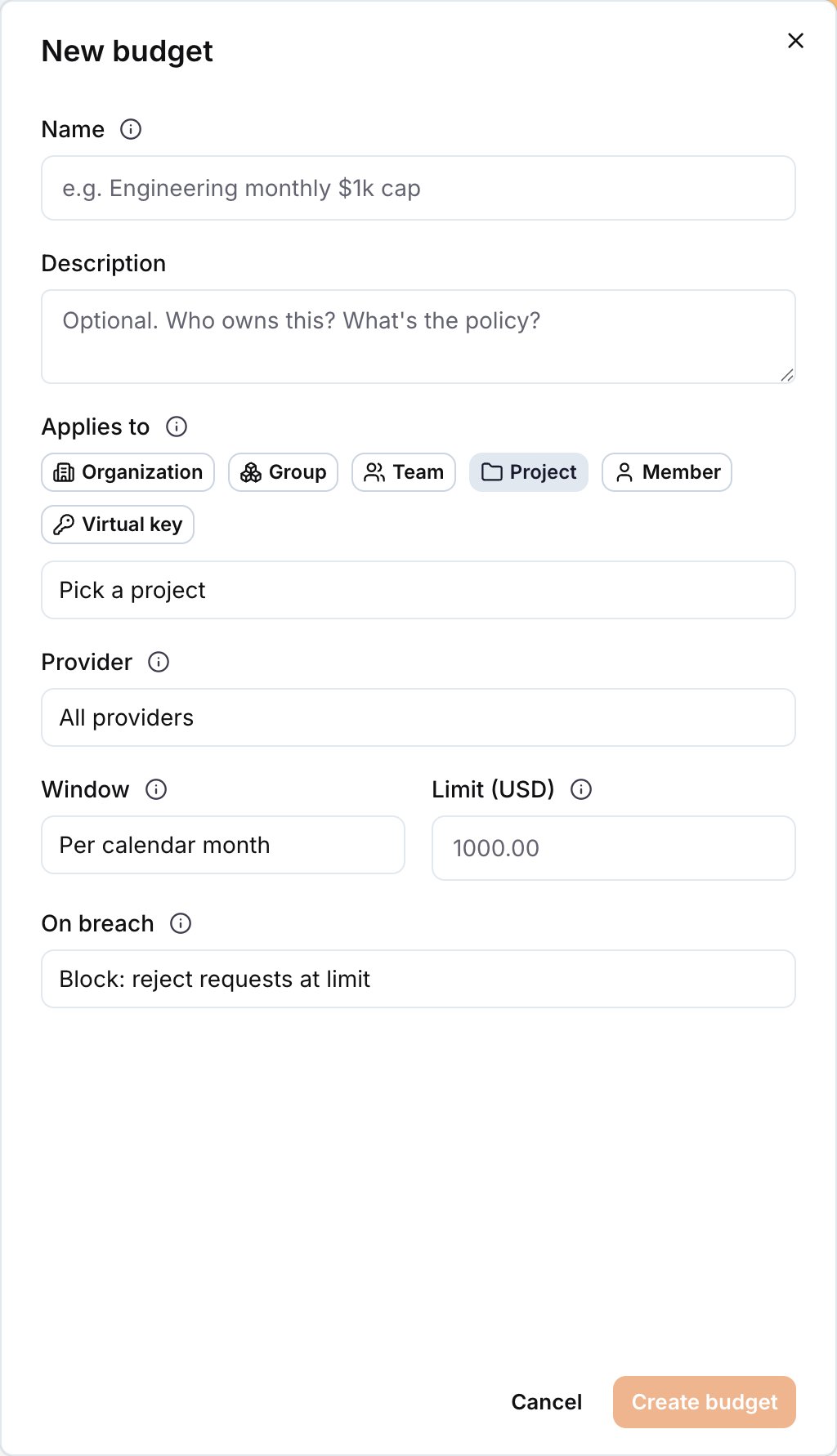
**AI Gateway → Budgets → New budget.**
| Field | Example |
| ----------- | ---------------------------------------------------------------------- |
| Name | `eng-team-monthly` |
| Applies to | `organization`, `group`, `team`, `project`, `member`, or `virtual key` |
| Target | `platform` team |
| Provider | `All providers` (default), or a single provider to filter to |
| Window | `month` |
| Limit (USD) | `5000` |
| on\_breach | `warn` at 80%, `block` at 100% (see "Multiple tiers" below) |
Save. The budget is in force immediately; the next request counts against it.
 ## Multiple tiers on the same scope
A single scope can carry multiple budgets with different `on_breach` values. Common pattern:
* Budget A: `team`, `month`, `$4000`, `warn`. Surfaces `X-LangWatch-Budget-Warning: team:80` once 80% of the real ceiling is spent.
* Budget B: `team`, `month`, `$5000`, `block`. Hard-caps at \$5k.
The UI surfaces this as "Warning thresholds" on a single budget row; each threshold is stored as its own `GatewayBudget` row in the schema for simplicity.
## Debit model
Gateway operations are debited **after** the response completes, using the provider-reported token counts. Every debit carries a `gateway_request_id` (ULID) and is **idempotent** by that id so gateway retries and trace replays never double-bill.
Debit flow:
1. Gateway streams the response to the client.
2. When the response closes, the gateway captures the provider's token counts and emits an OTel span carrying `gen_ai.usage.*` plus `langwatch.virtual_key_id` and `langwatch.gateway_request_id`.
3. The gateway also posts a post-response debit event to the control plane for the primary ledger path.
4. The control plane recomputes USD cost from `tokens × pricing catalog` (the gateway-side cost is authoritative only when it short-circuits without a provider call, e.g. `blocked_by_guardrail`) and writes a ledger row in a transaction that also increments `spent_usd` on every affected scope (org, team, project, VK, principal).
5. In parallel, the trace-processing pipeline reads the same span, resolves the applicable budgets, and writes one row per budget to the ClickHouse ledger (`gateway_budget_ledger_events`, rolled up into `gateway_budget_scope_totals` by a materialised view). This CH path is idempotent by `(tenant, budget, gateway_request_id)` on the underlying ReplacingMergeTree.
The ClickHouse path is the primary read when CH is enabled (SaaS and any self-host with the LangWatch CH cluster wired up); the Postgres `spentUsd` column remains as the read fallback for self-hosted installs without CH. Both write paths run in parallel today; the Postgres write path retires in a follow-up. Customer-visible behaviour is unchanged, a $1 budget still blocks at $1 of spend during and after the cutover.
## Pre-request check
Before dispatching to the provider, the gateway runs a **purely local precheck**. There is no control-plane round trip on the hot path.
The gateway evaluates the VK's in-memory budget snapshot, which arrives baked into the cached bundle and is refreshed via the `/changes` long-poll. For each applicable scope it compares `spent_usd` against `limit_usd`:
* `on_breach: block` and nothing remaining → reject with `402 budget_exceeded`, saving the provider spend and the wall-clock round-trip entirely.
* `on_breach: warn` and at or over 90% used → allow, flagged as a warn verdict.
* Otherwise → allow.
This costs \~0 μs: it's an in-process map lookup.
```
request → precheck against cached snapshot (always, ~0μs)
→ hard breach on a block scope? → 402 (saved provider spend)
→ otherwise → dispatch
```
Rejections are counted by `gateway_budget_blocks_total{scope}`, the single gateway-side signal that enforcement fired.
### The stale-snapshot trade-off
Because the check is local and the snapshot lags the ledger by one `/changes` refresh, two replicas can each see `spent=$24.90 / limit=$25.00` and both admit a $0.50 request, producing $25.80 against a \$25 cap. This is a deliberate trade: a control-plane call on every near-limit request would put the gateway's availability and latency at the mercy of the control plane, and the overshoot is bounded by one refresh interval of traffic.
Precheck is permissive by design. A stale or missing snapshot allows requests through rather than rejecting them, so a control-plane outage degrades enforcement accuracy, never availability. Spend reconciles once the ledger catches up.
## What "USD cost" means
Token × unit-price lookup, computed per provider using their published pricing. Updates land as provider pricing changes (pricing table is a separate Prisma table owned by LangWatch).
Cache reads, writes are priced **separately** per provider, Anthropic cache reads are \~10% of regular input tokens, Anthropic cache writes are 125%. The gateway respects these. See [Caching Passthrough](/docs/ai-gateway/caching-passthrough).
## Viewing budget spend (UI)
## Multiple tiers on the same scope
A single scope can carry multiple budgets with different `on_breach` values. Common pattern:
* Budget A: `team`, `month`, `$4000`, `warn`. Surfaces `X-LangWatch-Budget-Warning: team:80` once 80% of the real ceiling is spent.
* Budget B: `team`, `month`, `$5000`, `block`. Hard-caps at \$5k.
The UI surfaces this as "Warning thresholds" on a single budget row; each threshold is stored as its own `GatewayBudget` row in the schema for simplicity.
## Debit model
Gateway operations are debited **after** the response completes, using the provider-reported token counts. Every debit carries a `gateway_request_id` (ULID) and is **idempotent** by that id so gateway retries and trace replays never double-bill.
Debit flow:
1. Gateway streams the response to the client.
2. When the response closes, the gateway captures the provider's token counts and emits an OTel span carrying `gen_ai.usage.*` plus `langwatch.virtual_key_id` and `langwatch.gateway_request_id`.
3. The gateway also posts a post-response debit event to the control plane for the primary ledger path.
4. The control plane recomputes USD cost from `tokens × pricing catalog` (the gateway-side cost is authoritative only when it short-circuits without a provider call, e.g. `blocked_by_guardrail`) and writes a ledger row in a transaction that also increments `spent_usd` on every affected scope (org, team, project, VK, principal).
5. In parallel, the trace-processing pipeline reads the same span, resolves the applicable budgets, and writes one row per budget to the ClickHouse ledger (`gateway_budget_ledger_events`, rolled up into `gateway_budget_scope_totals` by a materialised view). This CH path is idempotent by `(tenant, budget, gateway_request_id)` on the underlying ReplacingMergeTree.
The ClickHouse path is the primary read when CH is enabled (SaaS and any self-host with the LangWatch CH cluster wired up); the Postgres `spentUsd` column remains as the read fallback for self-hosted installs without CH. Both write paths run in parallel today; the Postgres write path retires in a follow-up. Customer-visible behaviour is unchanged, a $1 budget still blocks at $1 of spend during and after the cutover.
## Pre-request check
Before dispatching to the provider, the gateway runs a **purely local precheck**. There is no control-plane round trip on the hot path.
The gateway evaluates the VK's in-memory budget snapshot, which arrives baked into the cached bundle and is refreshed via the `/changes` long-poll. For each applicable scope it compares `spent_usd` against `limit_usd`:
* `on_breach: block` and nothing remaining → reject with `402 budget_exceeded`, saving the provider spend and the wall-clock round-trip entirely.
* `on_breach: warn` and at or over 90% used → allow, flagged as a warn verdict.
* Otherwise → allow.
This costs \~0 μs: it's an in-process map lookup.
```
request → precheck against cached snapshot (always, ~0μs)
→ hard breach on a block scope? → 402 (saved provider spend)
→ otherwise → dispatch
```
Rejections are counted by `gateway_budget_blocks_total{scope}`, the single gateway-side signal that enforcement fired.
### The stale-snapshot trade-off
Because the check is local and the snapshot lags the ledger by one `/changes` refresh, two replicas can each see `spent=$24.90 / limit=$25.00` and both admit a $0.50 request, producing $25.80 against a \$25 cap. This is a deliberate trade: a control-plane call on every near-limit request would put the gateway's availability and latency at the mercy of the control plane, and the overshoot is bounded by one refresh interval of traffic.
Precheck is permissive by design. A stale or missing snapshot allows requests through rather than rejecting them, so a control-plane outage degrades enforcement accuracy, never availability. Spend reconciles once the ledger catches up.
## What "USD cost" means
Token × unit-price lookup, computed per provider using their published pricing. Updates land as provider pricing changes (pricing table is a separate Prisma table owned by LangWatch).
Cache reads, writes are priced **separately** per provider, Anthropic cache reads are \~10% of regular input tokens, Anthropic cache writes are 125%. The gateway respects these. See [Caching Passthrough](/docs/ai-gateway/caching-passthrough).
## Viewing budget spend (UI)
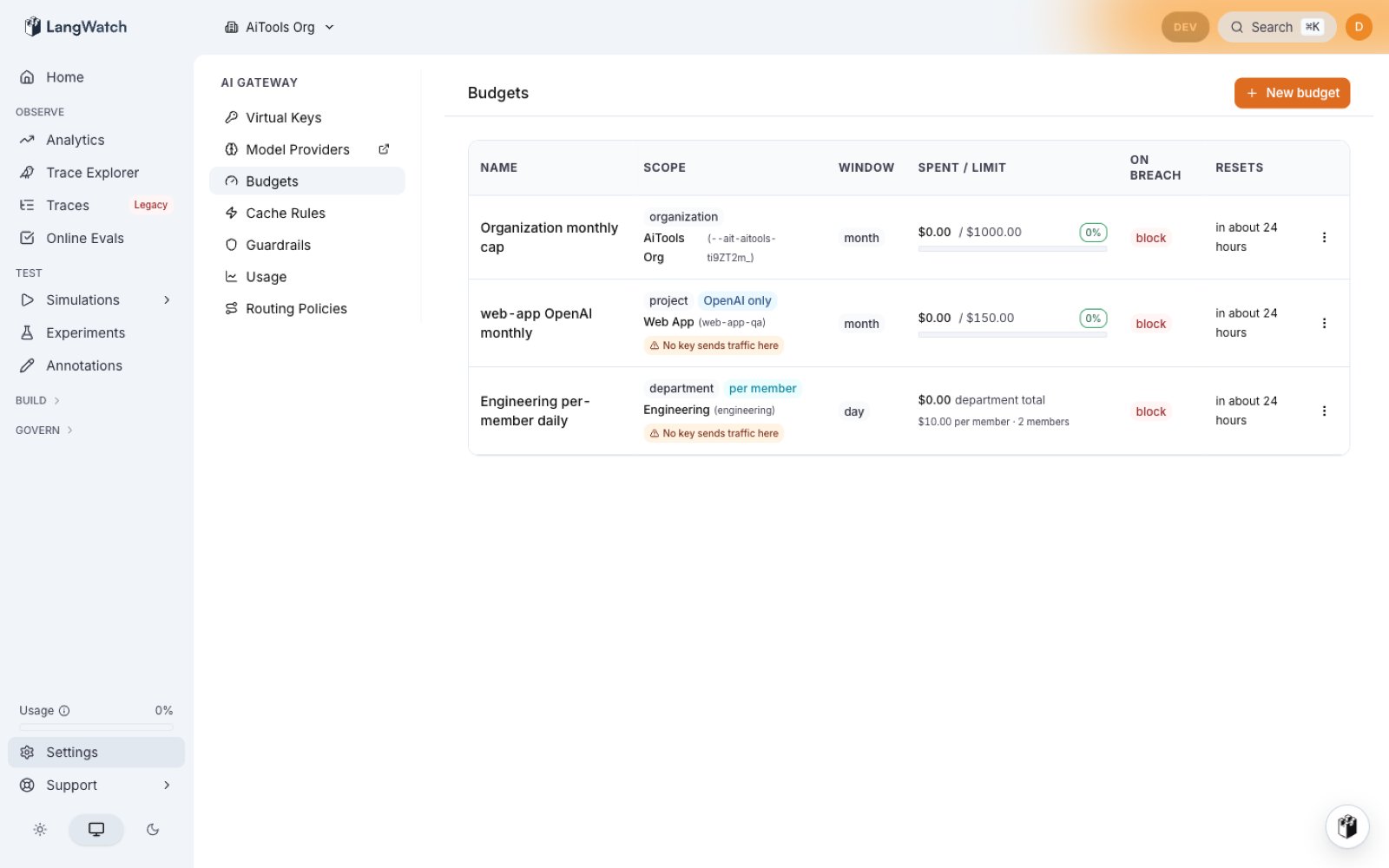 The **/gateway/budgets** list shows every budget with a utilization bar, hard cap, and remaining amount:
* **Spent/Limit column** carries a colored progress bar and a matching %-badge (green ≤ 50%, orange 50-80%, red ≥ 80%/100%) so scanning "which budgets are hot" is a one-glance read.
* **Window column** wraps `hour`, `day`, `week`, `month`, `total` in a subtle gray identifier badge matching the rest of the product.
* **Resets column** shows a humanised relative time ("in 3 days", "in 11 hours", "in 15 minutes") with a hover tooltip for the exact UTC timestamp. `total`-window budgets render a muted `never`.
* **Scope column** resolves the raw scope id into the target's human name and link: `organization acme-demo`, `team platform`, `virtual_key prod-openai` (linking to the VK detail page), `principal user@example.com`. Resolution is batched per scope type so the column adds no per-row DB cost.
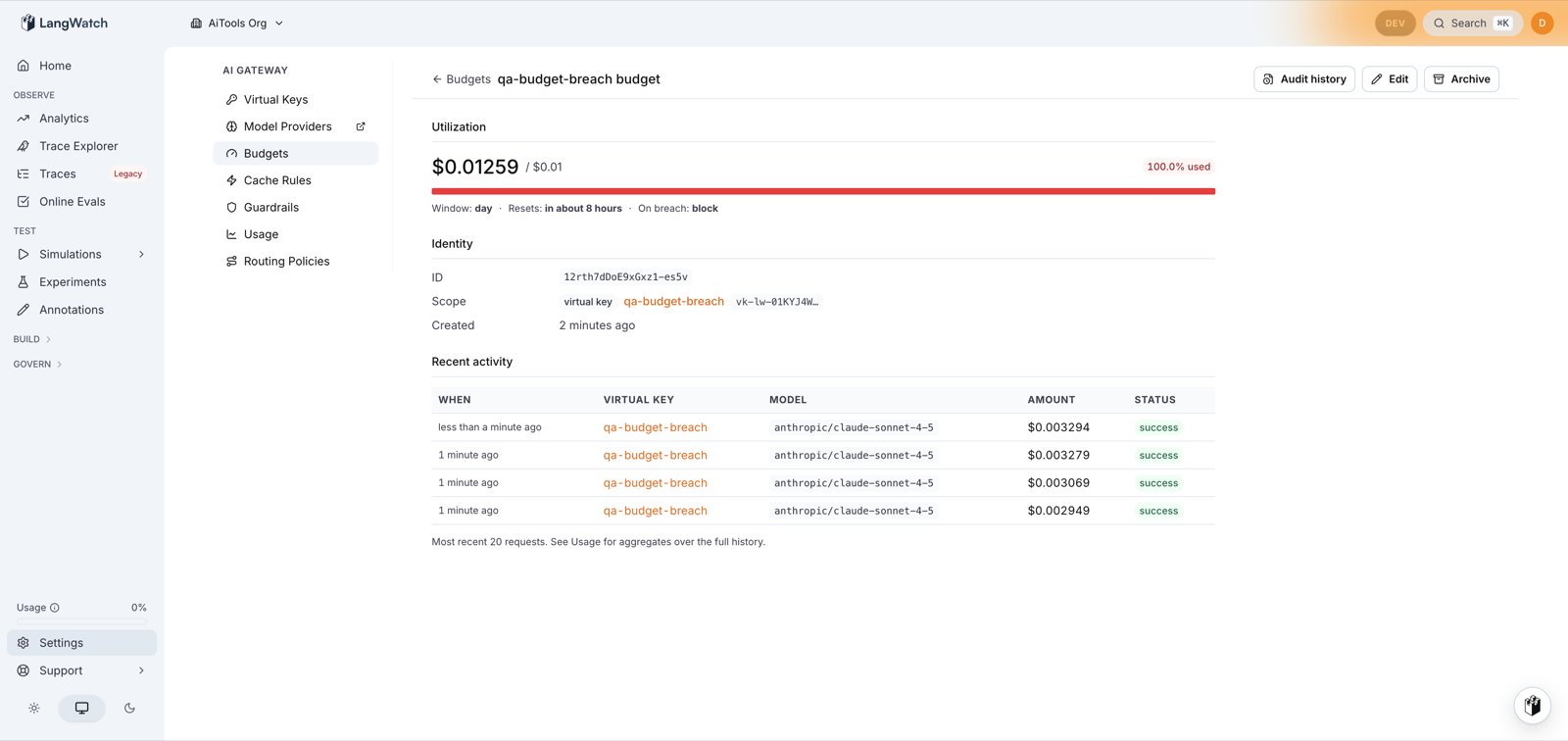
Clicking a row opens **/gateway/budgets/\[id]**: a detail page mirroring the VK detail layout:
* **Header action bar**: **Audit history** (deep-links to `/settings/audit-log?targetKind=budget&targetId=` pre-filtered to this budget's events; stays visible on archived budgets so forensic investigations can start from the archived state), **Edit**, **Archive**.
* **Utilization header**: hard cap, spent, remaining, `on_breach` mode.
* **Identity**: name, description, window, timezone, created/updated timestamps.
* **Resolved scope target**: same resolution as the list Scope column, plus a full-width link card to the target resource.
* **Recent 20 debits**: each row shows When (humanised relative + hover-for-exact), Amount (smart-decimals, e.g. `$0.0183`, not `$0.02`), Model, originating VK (deep-linked to the VK detail page), and the `gateway_request_id` for trace search.
The **/gateway/budgets** list shows every budget with a utilization bar, hard cap, and remaining amount:
* **Spent/Limit column** carries a colored progress bar and a matching %-badge (green ≤ 50%, orange 50-80%, red ≥ 80%/100%) so scanning "which budgets are hot" is a one-glance read.
* **Window column** wraps `hour`, `day`, `week`, `month`, `total` in a subtle gray identifier badge matching the rest of the product.
* **Resets column** shows a humanised relative time ("in 3 days", "in 11 hours", "in 15 minutes") with a hover tooltip for the exact UTC timestamp. `total`-window budgets render a muted `never`.
* **Scope column** resolves the raw scope id into the target's human name and link: `organization acme-demo`, `team platform`, `virtual_key prod-openai` (linking to the VK detail page), `principal user@example.com`. Resolution is batched per scope type so the column adds no per-row DB cost.
Clicking a row opens **/gateway/budgets/\[id]**: a detail page mirroring the VK detail layout:
* **Header action bar**: **Audit history** (deep-links to `/settings/audit-log?targetKind=budget&targetId=` pre-filtered to this budget's events; stays visible on archived budgets so forensic investigations can start from the archived state), **Edit**, **Archive**.
* **Utilization header**: hard cap, spent, remaining, `on_breach` mode.
* **Identity**: name, description, window, timezone, created/updated timestamps.
* **Resolved scope target**: same resolution as the list Scope column, plus a full-width link card to the target resource.
* **Recent 20 debits**: each row shows When (humanised relative + hover-for-exact), Amount (smart-decimals, e.g. `$0.0183`, not `$0.02`), Model, originating VK (deep-linked to the VK detail page), and the `gateway_request_id` for trace search.
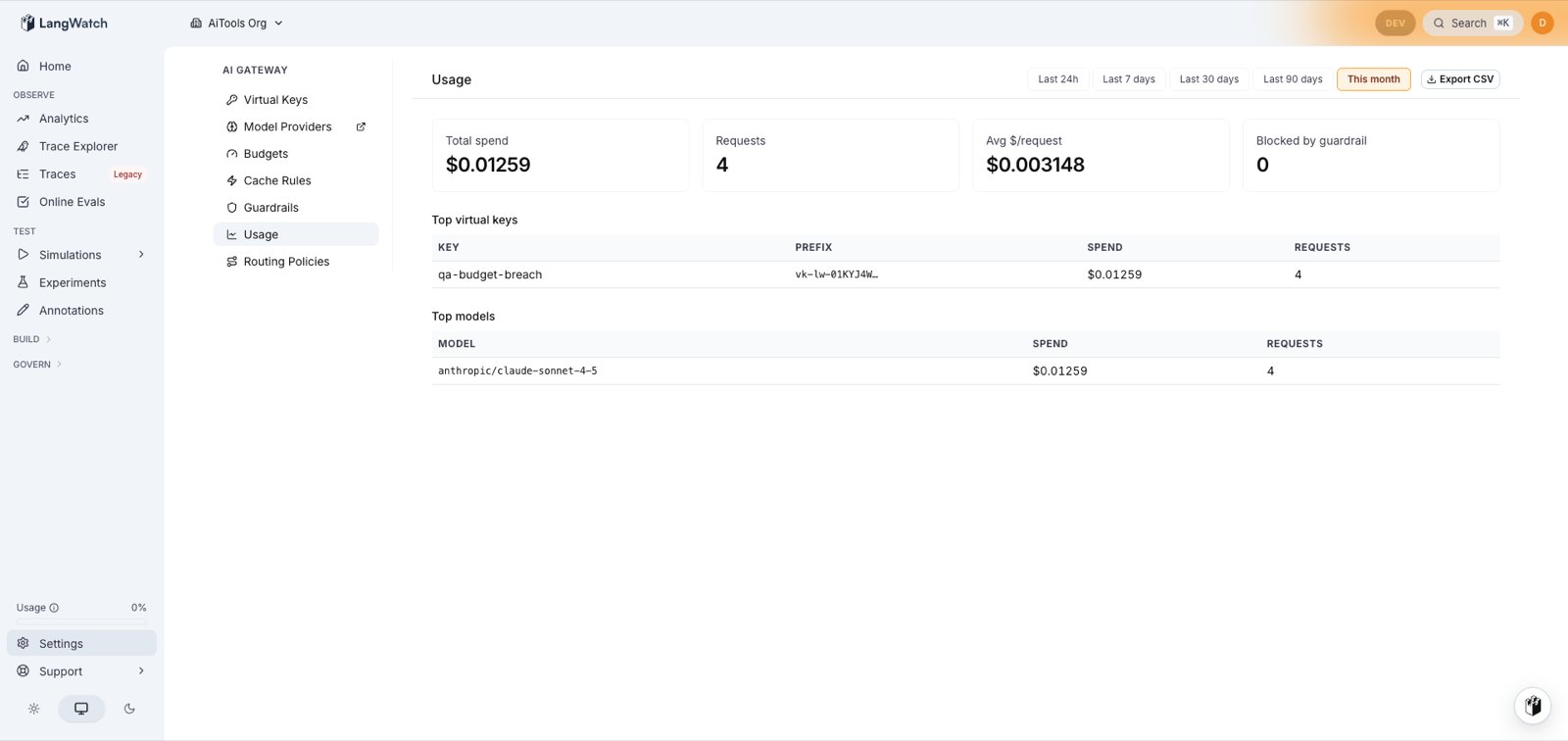
 Paired with **/gateway/usage**, which shows a byDay sparkline between the stat tiles and "Top virtual keys". The sparkline is gated on ≥ 2 data buckets so the 24-hour preset doesn't render a single-point chart. Top-VK rows link to each VK's detail page for drill-down. The **This month** preset covers the same UTC month-to-date window the keys list's spend column reports, which is where that column's click-through lands.
 Programmatic equivalent:
```bash theme={null}
# List budgets
langwatch gateway-budgets list
# Spend detail (same data the UI detail page renders)
curl -sS https://app.langwatch.ai/api/gateway/v1/budgets/ \
-H "Authorization: Bearer $LANGWATCH_API_KEY"
```
The REST response includes the resolved scope-target fields the UI uses; the `gatewayBudgets.get` tRPC procedure powers both surfaces from a shared service method.
## Permissions
| Action | Permission |
| ---------------- | ----------------------- |
| View budgets | `gatewayBudgets:view` |
| Create | `gatewayBudgets:create` |
| Edit | `gatewayBudgets:update` |
| Delete | `gatewayBudgets:delete` |
| All of the above | `gatewayBudgets:manage` |
See [RBAC](/docs/ai-gateway/rbac).
## Trace attributes
* `langwatch.cost_usd`, cost of this single request.
* `langwatch.budget.breached_scope`, present when the request was blocked; format `scope:window` (e.g. `project:month`).
* `langwatch.budget.warnings`, comma-separated list of `scope:pct_used` entries for soft breaches.
Programmatic equivalent:
```bash theme={null}
# List budgets
langwatch gateway-budgets list
# Spend detail (same data the UI detail page renders)
curl -sS https://app.langwatch.ai/api/gateway/v1/budgets/ \
-H "Authorization: Bearer $LANGWATCH_API_KEY"
```
The REST response includes the resolved scope-target fields the UI uses; the `gatewayBudgets.get` tRPC procedure powers both surfaces from a shared service method.
## Permissions
| Action | Permission |
| ---------------- | ----------------------- |
| View budgets | `gatewayBudgets:view` |
| Create | `gatewayBudgets:create` |
| Edit | `gatewayBudgets:update` |
| Delete | `gatewayBudgets:delete` |
| All of the above | `gatewayBudgets:manage` |
See [RBAC](/docs/ai-gateway/rbac).
## Trace attributes
* `langwatch.cost_usd`, cost of this single request.
* `langwatch.budget.breached_scope`, present when the request was blocked; format `scope:window` (e.g. `project:month`).
* `langwatch.budget.warnings`, comma-separated list of `scope:pct_used` entries for soft breaches.