> ## Documentation Index
> Fetch the complete documentation index at: https://langwatch.ai/docs/llms.txt
> Use this file to discover all available pages before exploring further.
# Virtual Keys
> Mint, rotate, revoke, and scope virtual API keys for the LangWatch AI Gateway.
A **virtual key** (VK) is a LangWatch-issued credential that a downstream client (SDK, coding CLI, production app) presents to the gateway in place of a provider-native API key. The gateway resolves the VK to an owning organisation, a set of scope rows (`VirtualKeyScope[]` at any combination of ORGANIZATION, TEAM, PROJECT), a set of provider credentials, a routing policy, a cache policy, guardrails, blocked patterns, and budgets, everything the VK is allowed to do and how it is observed.
VKs replace raw provider keys in your applications. The provider keys themselves stay inside LangWatch (configured under **Settings → Model Providers**, the same surface you already use for evaluators and playground) and are never shared with downstream clients.
Create a VK, call `/v1/chat/completions`, read correlation headers.
OpenAI, Anthropic SDK drop-in, just swap `base_url` and `api_key`.
Route coding-assistant traffic through the gateway for budget + audit.
`langwatch virtual-keys create | list | rotate | revoke`, scriptable.
## Format
`vk-lw-{live|test}_<26-char-ULID>`, 40 characters total.
* `vk-lw-`, fixed prefix, grep-friendly, scans well in DLP, GitGuardian.
* `live` or `test`, environment prefix. Prevents accidentally using a test key against production or vice versa.
* 26-char Crockford-base32 ULID, time-prefixed, monotonic, renders sensibly in the dashboard and in your logs.
The secret is shown **exactly once** at creation. After you dismiss the creation dialog it can never be retrieved again, only the first 12 characters (`vk-lw-01HZX9`) are visible in the list.
Server-side, the secret is stored as `hex(hmac_sha256(server_pepper, secret))`. Peppered HMAC-SHA256 is the right primitive for API keys (as opposed to passwords), the VK body already carries 130 bits of entropy as a ULID, so argon2id-style stretching would just add 50–100 ms of pointless latency on every cold resolve-key call. A short prefix is stored alongside for grep/lookup.
## Creating a VK
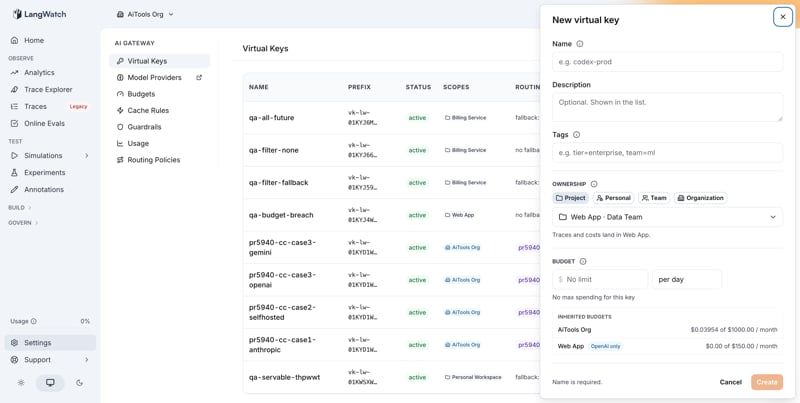
Under **AI Gateway → Virtual Keys** click **New virtual key**. The drawer walks four decisions, top to bottom: where the key lives, what it may spend, which providers it may reach, and whether it fails over.
 ### Ownership
Who can see and manage the key, and where its traces and costs land:
* **Project** (default): the key belongs to one project, and the drawer states the consequence inline: "Traces and costs land in ``".
* **Personal**: your own key. Traces and costs land in your personal workspace, and your per-member and principal budgets apply to it.
* **Team** / **Organization** (for roles that can create shared keys): shared keys valid across the team or the whole org. A shared key still needs one project for its traces and costs to land in, and the drawer requires that choice before it lets you create the key: spend that lands nowhere could not be capped by any budget. The destination is stored as the key's `trace_project_id`, not as a scope: it decides where traces land and nothing else, so administering that project grants no visibility into the key and no right to change it. The drawer always requires the choice; the API additionally accepts omission, in which case traces land in the org's governance project, and refuses creation only when no destination resolves at all.
Ownership decides which budgets the key inherits and which providers it can reach; changing it re-resolves both live in the drawer.
### Budget
A dollar amount and a period (`per day`, `per week`, `per month`). Leave it empty for no cap on the key itself. The annotation states exactly what a filled budget does, for example "Max \$30/day, resets 00:00 UTC" (resets are computed in UTC; see [Budgets → Windows](/docs/ai-gateway/budgets#windows)).
Creating the key with a budget creates both in one transaction, so the key never exists without the cap its creator asked for. Clearing the field later, or revoking the key, archives the budget instead of deleting it: its ledger stays as the audit trail of what the key cost.
Under the field, **Inherited budgets** lists every budget that already constrains the draft key, each with its limit, period, and current spend. A provider-filtered budget is badged with which provider it counts ("OpenAI only") and a per-member group budget is badged "per member". The list is resolved by the same code the gateway enforces from, so it cannot promise a constraint that will not apply or miss one that will. Group budgets appear only when the draft key carries a principal, the person behind the key; personal ownership is the usual way a draft gains one, but any key with a principal qualifies. A shared service key has no member to charge a per-member allowance to.
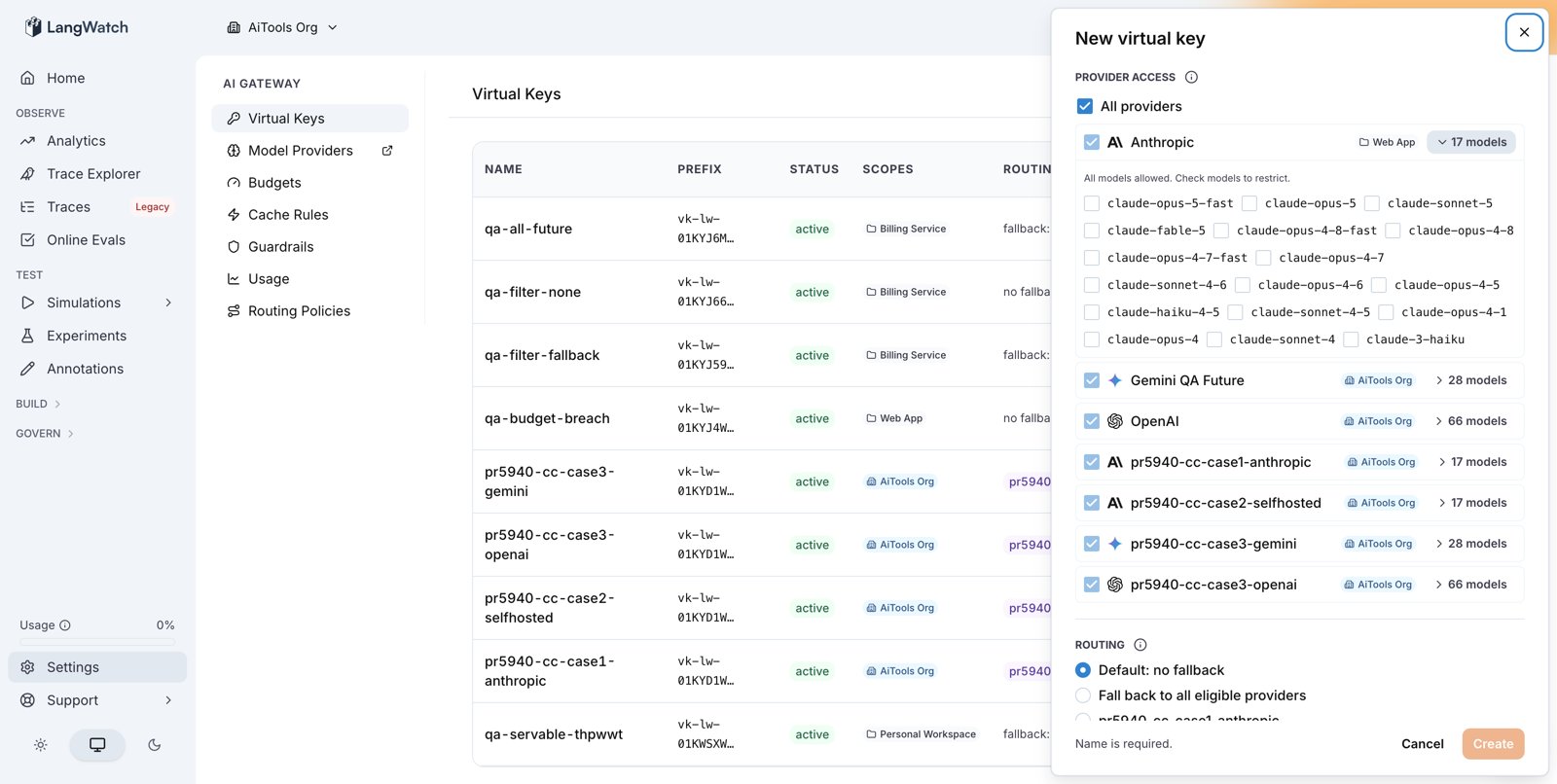
### Provider access
A checkbox list of every provider the key's ownership can reach, each with a chip naming where the provider is configured.
* **All providers** (default) persists as the absence of a list: providers added to the key's scope later become reachable **without editing the key**. This is what keeps a long-lived key current.
* An explicit selection stays exactly as picked: a provider added later is not reachable until someone edits the key. At least one provider must stay selected.
* Expanding a provider row shows its models; checking models restricts the key to exactly those. The restriction is per **vendor**, not per provider row: two providers of the same vendor (say, two Anthropic accounts) share one model list, and the drawer mirrors a change made under either row in both. A per-row restriction for same-vendor providers is not supported yet.
### Ownership
Who can see and manage the key, and where its traces and costs land:
* **Project** (default): the key belongs to one project, and the drawer states the consequence inline: "Traces and costs land in ``".
* **Personal**: your own key. Traces and costs land in your personal workspace, and your per-member and principal budgets apply to it.
* **Team** / **Organization** (for roles that can create shared keys): shared keys valid across the team or the whole org. A shared key still needs one project for its traces and costs to land in, and the drawer requires that choice before it lets you create the key: spend that lands nowhere could not be capped by any budget. The destination is stored as the key's `trace_project_id`, not as a scope: it decides where traces land and nothing else, so administering that project grants no visibility into the key and no right to change it. The drawer always requires the choice; the API additionally accepts omission, in which case traces land in the org's governance project, and refuses creation only when no destination resolves at all.
Ownership decides which budgets the key inherits and which providers it can reach; changing it re-resolves both live in the drawer.
### Budget
A dollar amount and a period (`per day`, `per week`, `per month`). Leave it empty for no cap on the key itself. The annotation states exactly what a filled budget does, for example "Max \$30/day, resets 00:00 UTC" (resets are computed in UTC; see [Budgets → Windows](/docs/ai-gateway/budgets#windows)).
Creating the key with a budget creates both in one transaction, so the key never exists without the cap its creator asked for. Clearing the field later, or revoking the key, archives the budget instead of deleting it: its ledger stays as the audit trail of what the key cost.
Under the field, **Inherited budgets** lists every budget that already constrains the draft key, each with its limit, period, and current spend. A provider-filtered budget is badged with which provider it counts ("OpenAI only") and a per-member group budget is badged "per member". The list is resolved by the same code the gateway enforces from, so it cannot promise a constraint that will not apply or miss one that will. Group budgets appear only when the draft key carries a principal, the person behind the key; personal ownership is the usual way a draft gains one, but any key with a principal qualifies. A shared service key has no member to charge a per-member allowance to.
### Provider access
A checkbox list of every provider the key's ownership can reach, each with a chip naming where the provider is configured.
* **All providers** (default) persists as the absence of a list: providers added to the key's scope later become reachable **without editing the key**. This is what keeps a long-lived key current.
* An explicit selection stays exactly as picked: a provider added later is not reachable until someone edits the key. At least one provider must stay selected.
* Expanding a provider row shows its models; checking models restricts the key to exactly those. The restriction is per **vendor**, not per provider row: two providers of the same vendor (say, two Anthropic accounts) share one model list, and the drawer mirrors a change made under either row in both. A per-row restriction for same-vendor providers is not supported yet.
 ### Routing
What happens when the provider serving a request fails:
* **Default: no fallback** (new keys): the error surfaces to the caller. No silent retry on a different vendor.
* **Fall back to all eligible providers**: the request retries on the next eligible provider, ordered by `fallbackPriorityGlobal` then `createdAt`. Keys created before routing became an explicit choice keep this behavior.
* **A routing policy**: pins an explicit ordered provider list.
Click **Create**. The full secret is revealed exactly once with a **Copy** button and a confirmation checkbox that must be checked before dismissing. After dismiss, the secret is gone for good.
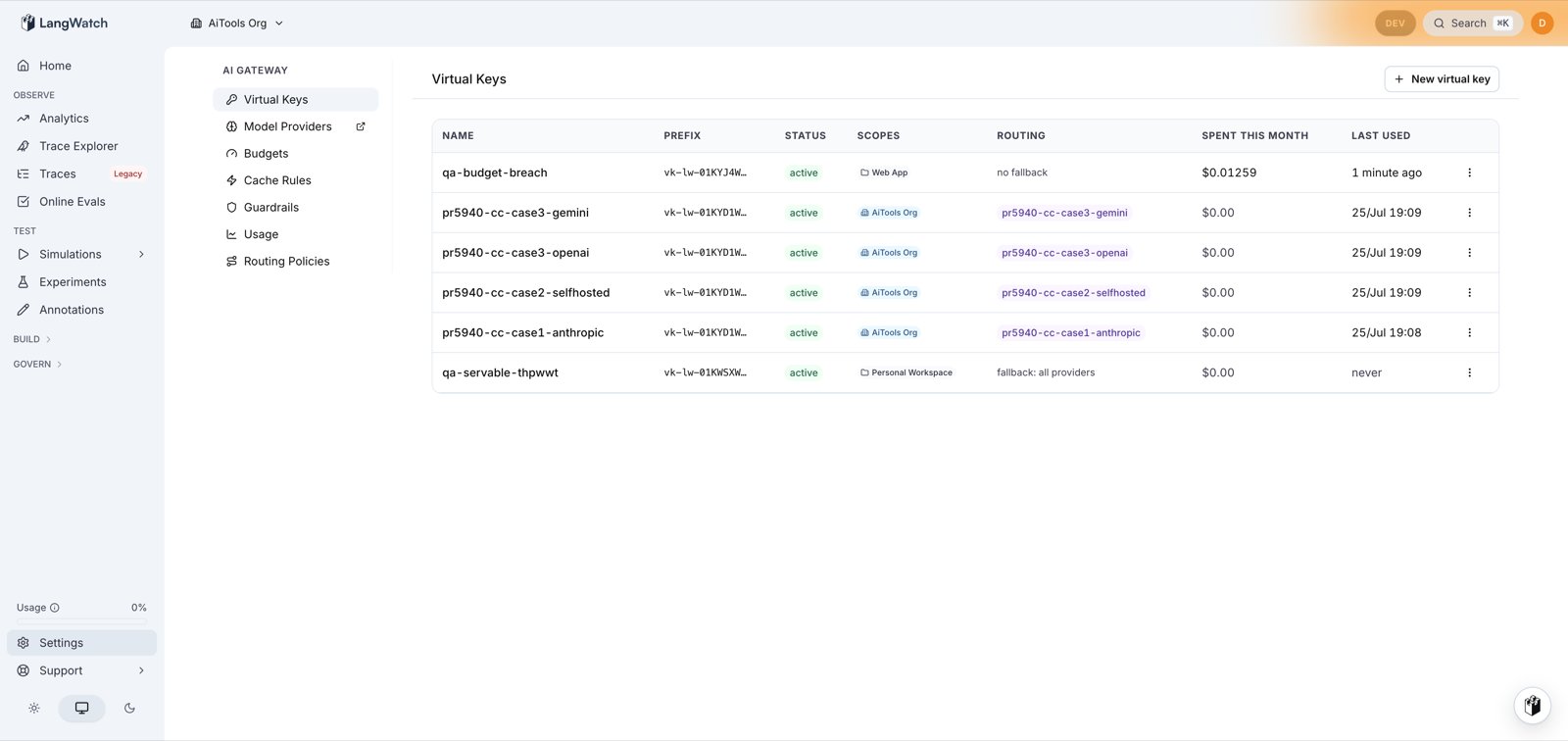
The keys list shows a **Spent this month** column for every key, read from the same cost data the Usage tab reports. Clicking it opens Usage on its **This month** preset, pre-filtered to that key: the same UTC month-to-date window the column is computed over, so the number you click and the page you land on agree.
### Routing
What happens when the provider serving a request fails:
* **Default: no fallback** (new keys): the error surfaces to the caller. No silent retry on a different vendor.
* **Fall back to all eligible providers**: the request retries on the next eligible provider, ordered by `fallbackPriorityGlobal` then `createdAt`. Keys created before routing became an explicit choice keep this behavior.
* **A routing policy**: pins an explicit ordered provider list.
Click **Create**. The full secret is revealed exactly once with a **Copy** button and a confirmation checkbox that must be checked before dismissing. After dismiss, the secret is gone for good.
The keys list shows a **Spent this month** column for every key, read from the same cost data the Usage tab reports. Clicking it opens Usage on its **This month** preset, pre-filtered to that key: the same UTC month-to-date window the column is computed over, so the number you click and the page you land on agree.
 ## VK detail page
Clicking a row in the list opens the detail page (`/gateway/virtual-keys/`). Four sections, top-to-bottom:
1. **Header**: name + action bar: **Audit history** (deep-links into `/settings/audit-log?targetKind=virtual_key&targetId=` with a pre-filled filter chip showing only this VK's events alongside any related platform actions), **Edit**, **Rotate**, **Revoke**. The Audit history deep-link is the fastest way to reconstruct "who changed this VK, when" during an incident.
2. **Identity, Activity**: id, prefix, environment, status, description, and humanised **Last used** + **Created** (hover for exact timestamp). Revision number shown when non-zero, increments on every `gateway.virtual_key.updated` audit row.
3. **Provider fallback chain**: ordered rows, each showing provider icon + readable name + ModelProvider id + position badge (`primary`, `fallback-1`, `fallback-2`, …). The list is computed from the bound routing policy (or the default policy if none is pinned). Clarifies at-a-glance which provider is in the driver's seat and what falls back when it errors.
4. **Configuration summary**: compact read-only view (no drawer needed) of the runtime config that's actually in effect:
* **Tags**: colored subtle badges, the same strings shown on the list row.
* **Cache mode**: badge (`respect`, `force`, `disable`) + TTL on force.
* **Rate limits**: `rpm` + `rpd` outline badges (or em-dash if unset).
* **Model aliases**: expanded as `alias → target` pairs, up to 5 visible with "+N more" overflow.
* **Blocked patterns**: grouped by dimension (`tools`, `mcp`, `urls`, `models`) with red-tinted regex chips; click-through opens the edit drawer at that section.
* **Guardrails**: count + direction breakdown (`N pre / M post / K stream_chunk`), each clickable to the guardrail config.
5. **Usage (last 30 days)**: stat tiles (Total spend, Requests, Avg \$/request), a 30-day filled area sparkline, Spend-by-model row, and the top 10 recent debits table (When relative, Model, Tokens in→out, Amount smart-decimals, Latency ms). Guarded on `virtualKeys:view` + `gatewayUsage:view`.
Everything on this page is read-only except the four header actions, edits happen in the drawer (`Edit`) or dedicated flows (`Rotate`, `Revoke`).
## Rotation
Rotate a VK when you believe the secret may have leaked or as part of routine hygiene.
1. Open the VK in the list.
2. Click **Rotate secret**.
3. LangWatch mints a new secret and displays it exactly once.
4. The old secret remains valid for a 24-hour **grace window** to let in-flight deploys update.
5. After the grace window ends, only the new secret works.
Rotation keeps the same `vk_id`, same ownership, same configuration, only the secret changes. Observability traces remain continuous across rotation.
## Revocation
Revocation immediately invalidates the secret. There is **no grace period** on revoke.
Gateway caches are invalidated within 60 seconds via the `/internal/gateway/changes` long-poll. If you need instant invalidation everywhere (e.g. incident response), restart the gateway pods, the next request that hits them will pull fresh state before serving.
Revoked VKs remain in the database (soft-delete) for audit. Their traces still appear in analytics.
## Scoping
A VK belongs to exactly one **organisation** and carries one or more **scope rows** (`VirtualKeyScope`). Each row pins the VK to an ORGANIZATION, TEAM, or PROJECT. The scope set drives:
* **Eligible provider set**: union of every ModelProvider visible from any of the VK's scopes (upward cascade). A VK scoped to PROJECT `demo` sees `demo`'s ModelProviders, the parent team's, and the org's.
* **Budget cascade**: every applicable budget at any of the VK's scopes is checked. Hard-block at any scope blocks.
* **Trace attribution**: the gateway tags spans with the most-specific scope match (PROJECT > TEAM > ORG).
For the full semantics — including how multi-scope intersection works and which scope provides `langwatch.project_id` on a span — see [vk-scope-inheritance.feature](https://github.com/langwatch/langwatch/blob/main/specs/ai-gateway/governance/vk-scope-inheritance.feature) and [vk-config-bundle.feature](https://github.com/langwatch/langwatch/blob/main/specs/ai-gateway/governance/vk-config-bundle.feature).
Trace attribution on every request:
* `langwatch.virtual_key_id`
* `langwatch.organization_id` (always present)
* `langwatch.project_id`, resolution order: (a) the VK's unique PROJECT-scope row, if it has exactly one; otherwise (b) the org's `internal_governance` project, where TEAM- and ORG-scoped VK spans land so all governance traffic surfaces in one filter view. The create drawer requires org- and team-owned keys to pick their trace project explicitly (spend that lands nowhere could not be capped by any budget); the governance fallback remains for API callers and pre-existing keys.
* `langwatch.team_id` (present when the VK has a TEAM scope, or a unique team containing the resolved project)
* `langwatch.principal_id` (present when `principalUserId` is set on the VK)
## Personal vs shared
Two flavours, distinguished by whether `principalUserId` is set:
* **Personal VK** (`principalUserId` set): the VK is treated as that user's personal credential. Budget cascade includes the user's PRINCIPAL-scope budget first. Visibility is per-user by default; `virtualKeys:viewOtherPersonal` is required to inspect another user's personal VK. The CLI device-flow self-mints one of these at ORG scope on first login.
* **Shared VK** (`principalUserId` null): service-account-style credential. Budget cascade runs only through scope-driven budgets. Visibility follows the standard `virtualKeys:view` perm at the VK's scopes.
Both use the same `vk-lw-…` format and the same multi-scope semantics; the principal column is orthogonal to scope.
## Permissions
Acting on VKs requires the following permissions (2-segment `resource:action`):
| Action | Permission |
| ------------------------------- | ----------------------------------------------------------------------------------------- |
| View list (own + scope-visible) | `virtualKeys:view` |
| View another user's personal VK | `virtualKeys:viewOtherPersonal` |
| Create | `virtualKeys:create` (must hold `:manage` at every named scope when creating multi-scope) |
| Update config | `virtualKeys:update` |
| Rotate | `virtualKeys:rotate` |
| Delete, revoke | `virtualKeys:delete` |
| All of the above | `virtualKeys:manage` |
See [RBAC](/docs/ai-gateway/rbac) for default role mappings.
## How the gateway resolves your VK
The first time the gateway sees a presented VK:
1. Calls `/internal/gateway/resolve-key` on the LangWatch control-plane → receives a signed JWT (15-minute TTL) with identity claims (`vk_id`, `project_id`, `principal_id`, etc.) plus a `revision` number.
2. Calls `/internal/gateway/config/:vk_id` (with `If-None-Match: ` on subsequent fetches) → receives the fat config (providers, fallback, guardrails, budgets).
3. Caches both in-memory (L1 LRU) and optionally in Redis (L2, shared across gateway pods).
4. Subscribes to `/internal/gateway/changes?since=` long-poll, on any mutation to any VK, the gateway invalidates and re-fetches.
Subsequent requests with the same VK are served entirely from cache. JWT verification is local (HS256 shared secret); no control-plane round-trip on the hot path.
This means:
* **First request** on a cold cache: 2-4 ms of control-plane overhead.
* **Warm request** after first: tens of microseconds of overhead.
* **Control-plane offline**: gateway continues serving from warm cache until JWT TTL expires (15 min default); with bootstrap mode on, it can serve indefinitely.
See [Self-Hosting → Config](/docs/ai-gateway/self-hosting/config) for tuning the cache.
## VK detail page
Clicking a row in the list opens the detail page (`/gateway/virtual-keys/`). Four sections, top-to-bottom:
1. **Header**: name + action bar: **Audit history** (deep-links into `/settings/audit-log?targetKind=virtual_key&targetId=` with a pre-filled filter chip showing only this VK's events alongside any related platform actions), **Edit**, **Rotate**, **Revoke**. The Audit history deep-link is the fastest way to reconstruct "who changed this VK, when" during an incident.
2. **Identity, Activity**: id, prefix, environment, status, description, and humanised **Last used** + **Created** (hover for exact timestamp). Revision number shown when non-zero, increments on every `gateway.virtual_key.updated` audit row.
3. **Provider fallback chain**: ordered rows, each showing provider icon + readable name + ModelProvider id + position badge (`primary`, `fallback-1`, `fallback-2`, …). The list is computed from the bound routing policy (or the default policy if none is pinned). Clarifies at-a-glance which provider is in the driver's seat and what falls back when it errors.
4. **Configuration summary**: compact read-only view (no drawer needed) of the runtime config that's actually in effect:
* **Tags**: colored subtle badges, the same strings shown on the list row.
* **Cache mode**: badge (`respect`, `force`, `disable`) + TTL on force.
* **Rate limits**: `rpm` + `rpd` outline badges (or em-dash if unset).
* **Model aliases**: expanded as `alias → target` pairs, up to 5 visible with "+N more" overflow.
* **Blocked patterns**: grouped by dimension (`tools`, `mcp`, `urls`, `models`) with red-tinted regex chips; click-through opens the edit drawer at that section.
* **Guardrails**: count + direction breakdown (`N pre / M post / K stream_chunk`), each clickable to the guardrail config.
5. **Usage (last 30 days)**: stat tiles (Total spend, Requests, Avg \$/request), a 30-day filled area sparkline, Spend-by-model row, and the top 10 recent debits table (When relative, Model, Tokens in→out, Amount smart-decimals, Latency ms). Guarded on `virtualKeys:view` + `gatewayUsage:view`.
Everything on this page is read-only except the four header actions, edits happen in the drawer (`Edit`) or dedicated flows (`Rotate`, `Revoke`).
## Rotation
Rotate a VK when you believe the secret may have leaked or as part of routine hygiene.
1. Open the VK in the list.
2. Click **Rotate secret**.
3. LangWatch mints a new secret and displays it exactly once.
4. The old secret remains valid for a 24-hour **grace window** to let in-flight deploys update.
5. After the grace window ends, only the new secret works.
Rotation keeps the same `vk_id`, same ownership, same configuration, only the secret changes. Observability traces remain continuous across rotation.
## Revocation
Revocation immediately invalidates the secret. There is **no grace period** on revoke.
Gateway caches are invalidated within 60 seconds via the `/internal/gateway/changes` long-poll. If you need instant invalidation everywhere (e.g. incident response), restart the gateway pods, the next request that hits them will pull fresh state before serving.
Revoked VKs remain in the database (soft-delete) for audit. Their traces still appear in analytics.
## Scoping
A VK belongs to exactly one **organisation** and carries one or more **scope rows** (`VirtualKeyScope`). Each row pins the VK to an ORGANIZATION, TEAM, or PROJECT. The scope set drives:
* **Eligible provider set**: union of every ModelProvider visible from any of the VK's scopes (upward cascade). A VK scoped to PROJECT `demo` sees `demo`'s ModelProviders, the parent team's, and the org's.
* **Budget cascade**: every applicable budget at any of the VK's scopes is checked. Hard-block at any scope blocks.
* **Trace attribution**: the gateway tags spans with the most-specific scope match (PROJECT > TEAM > ORG).
For the full semantics — including how multi-scope intersection works and which scope provides `langwatch.project_id` on a span — see [vk-scope-inheritance.feature](https://github.com/langwatch/langwatch/blob/main/specs/ai-gateway/governance/vk-scope-inheritance.feature) and [vk-config-bundle.feature](https://github.com/langwatch/langwatch/blob/main/specs/ai-gateway/governance/vk-config-bundle.feature).
Trace attribution on every request:
* `langwatch.virtual_key_id`
* `langwatch.organization_id` (always present)
* `langwatch.project_id`, resolution order: (a) the VK's unique PROJECT-scope row, if it has exactly one; otherwise (b) the org's `internal_governance` project, where TEAM- and ORG-scoped VK spans land so all governance traffic surfaces in one filter view. The create drawer requires org- and team-owned keys to pick their trace project explicitly (spend that lands nowhere could not be capped by any budget); the governance fallback remains for API callers and pre-existing keys.
* `langwatch.team_id` (present when the VK has a TEAM scope, or a unique team containing the resolved project)
* `langwatch.principal_id` (present when `principalUserId` is set on the VK)
## Personal vs shared
Two flavours, distinguished by whether `principalUserId` is set:
* **Personal VK** (`principalUserId` set): the VK is treated as that user's personal credential. Budget cascade includes the user's PRINCIPAL-scope budget first. Visibility is per-user by default; `virtualKeys:viewOtherPersonal` is required to inspect another user's personal VK. The CLI device-flow self-mints one of these at ORG scope on first login.
* **Shared VK** (`principalUserId` null): service-account-style credential. Budget cascade runs only through scope-driven budgets. Visibility follows the standard `virtualKeys:view` perm at the VK's scopes.
Both use the same `vk-lw-…` format and the same multi-scope semantics; the principal column is orthogonal to scope.
## Permissions
Acting on VKs requires the following permissions (2-segment `resource:action`):
| Action | Permission |
| ------------------------------- | ----------------------------------------------------------------------------------------- |
| View list (own + scope-visible) | `virtualKeys:view` |
| View another user's personal VK | `virtualKeys:viewOtherPersonal` |
| Create | `virtualKeys:create` (must hold `:manage` at every named scope when creating multi-scope) |
| Update config | `virtualKeys:update` |
| Rotate | `virtualKeys:rotate` |
| Delete, revoke | `virtualKeys:delete` |
| All of the above | `virtualKeys:manage` |
See [RBAC](/docs/ai-gateway/rbac) for default role mappings.
## How the gateway resolves your VK
The first time the gateway sees a presented VK:
1. Calls `/internal/gateway/resolve-key` on the LangWatch control-plane → receives a signed JWT (15-minute TTL) with identity claims (`vk_id`, `project_id`, `principal_id`, etc.) plus a `revision` number.
2. Calls `/internal/gateway/config/:vk_id` (with `If-None-Match: ` on subsequent fetches) → receives the fat config (providers, fallback, guardrails, budgets).
3. Caches both in-memory (L1 LRU) and optionally in Redis (L2, shared across gateway pods).
4. Subscribes to `/internal/gateway/changes?since=` long-poll, on any mutation to any VK, the gateway invalidates and re-fetches.
Subsequent requests with the same VK are served entirely from cache. JWT verification is local (HS256 shared secret); no control-plane round-trip on the hot path.
This means:
* **First request** on a cold cache: 2-4 ms of control-plane overhead.
* **Warm request** after first: tens of microseconds of overhead.
* **Control-plane offline**: gateway continues serving from warm cache until JWT TTL expires (15 min default); with bootstrap mode on, it can serve indefinitely.
See [Self-Hosting → Config](/docs/ai-gateway/self-hosting/config) for tuning the cache.