> ## Documentation Index
> Fetch the complete documentation index at: https://langwatch.ai/docs/llms.txt
> Use this file to discover all available pages before exploring further.
# AI Governance Overview
> A personal tool home for developers and a governance home for admins.
LangWatch gives every developer a personal home for Claude Code, Codex, Cursor, Gemini, opencode, and every other AI tool the company approves. Admins get a governance home for spend, sources, routing, anomalies, and audit trails.
## How it feels day to day
### For a developer
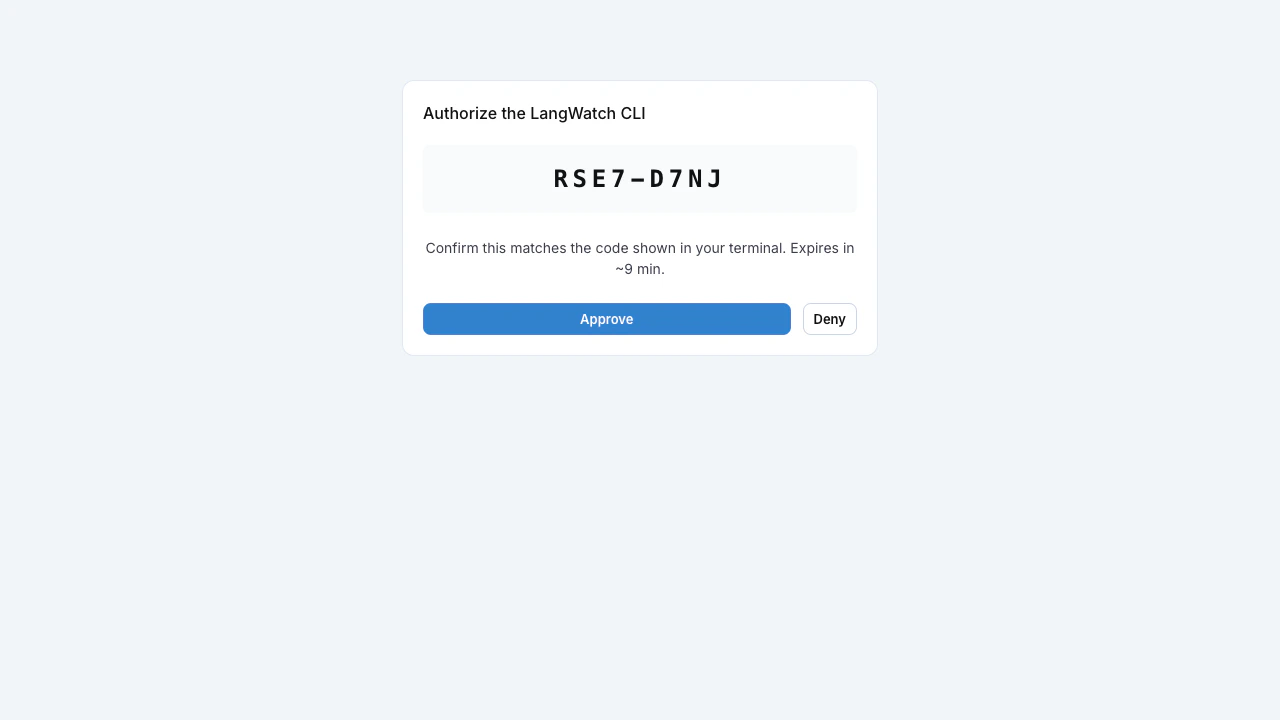
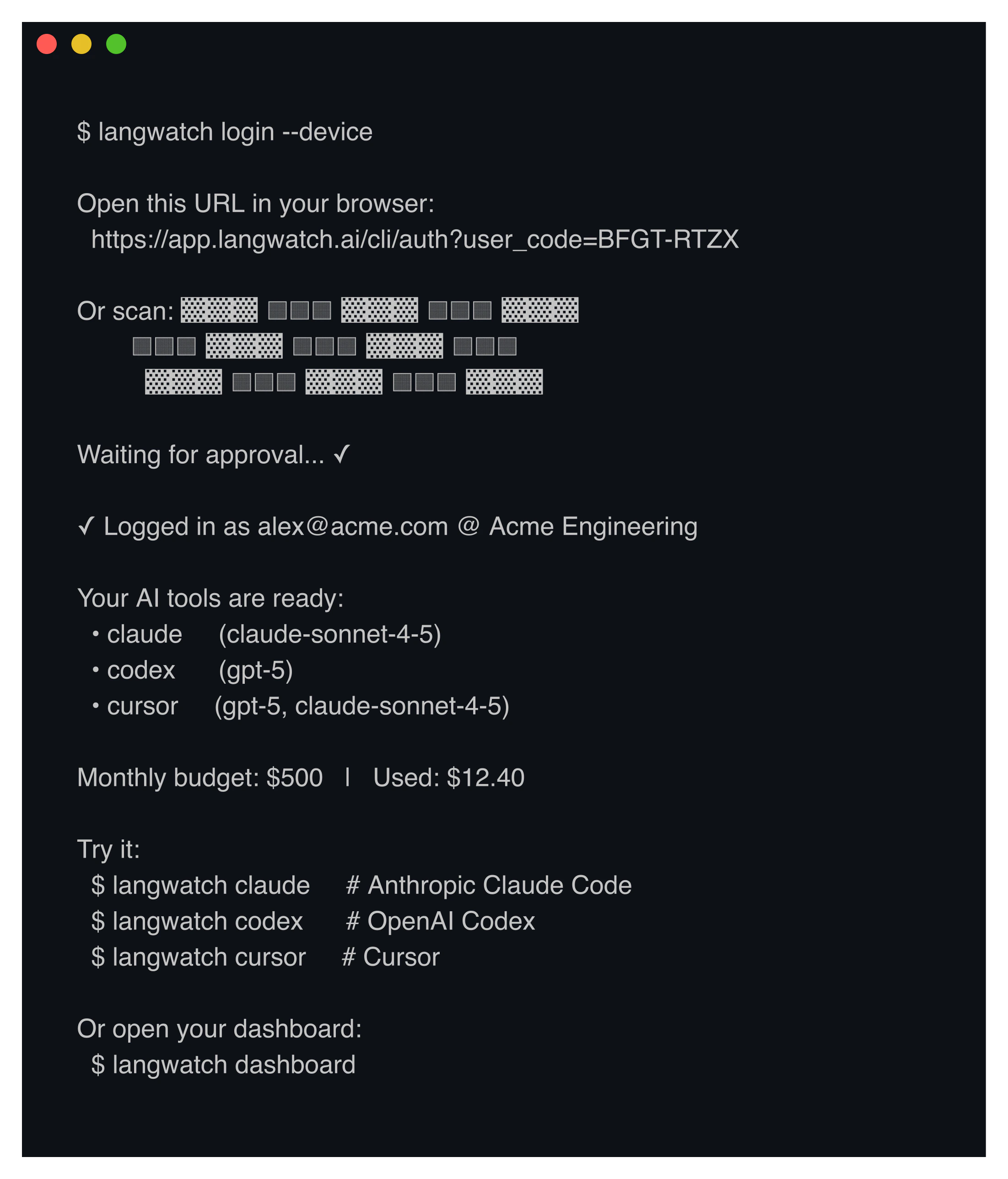
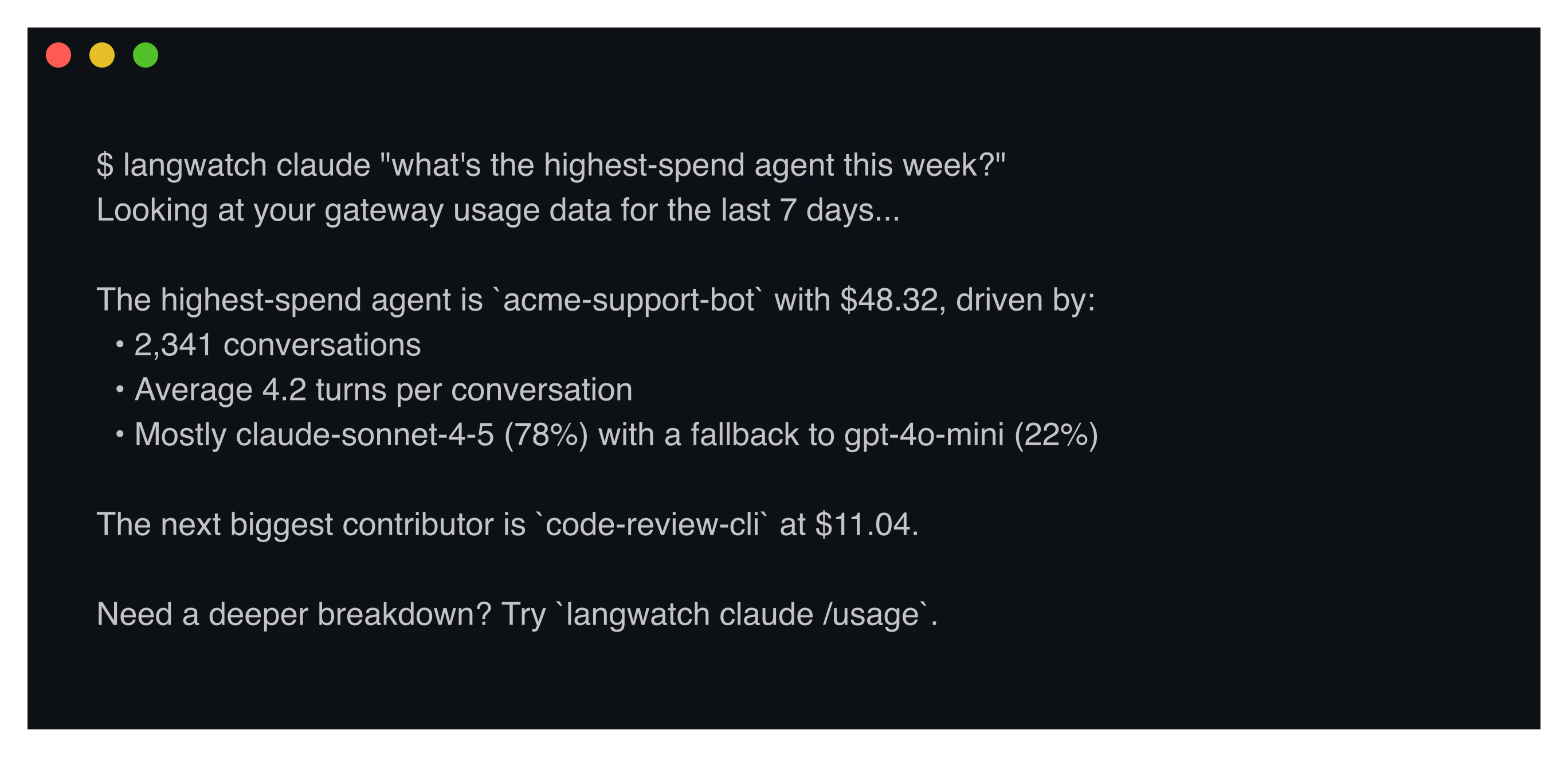
`langwatch login` opens a device-flow approval in the browser, comes back to the CLI ready to wrap any supported tool.
 The Personal AI Tools Portal at `/me` is the dashboard for everything they have access to.
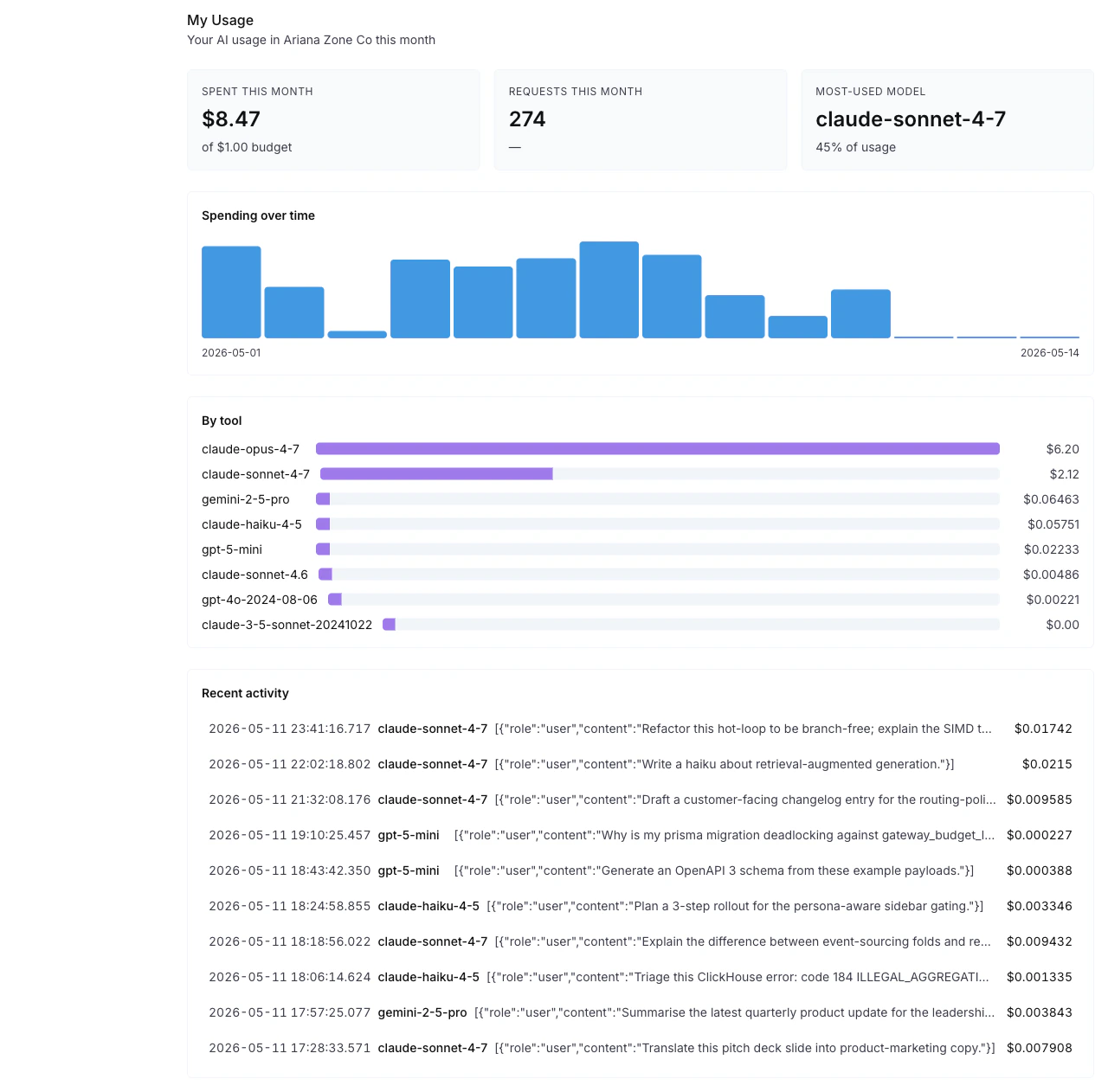
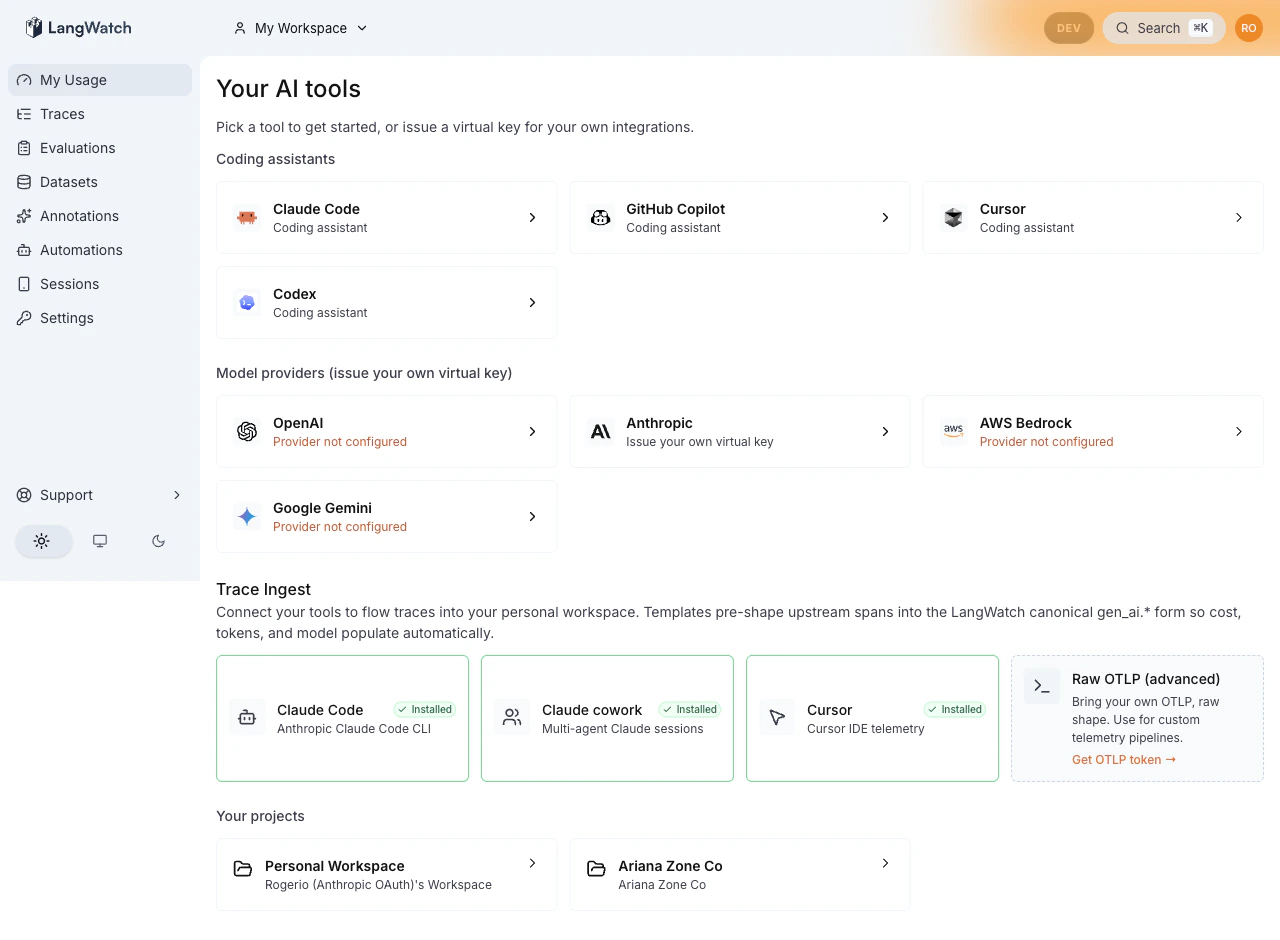 Below the tools, the live usage panel shows this month's spend against the personal budget, request count, the daily-bucket cost chart, and the model breakdown.
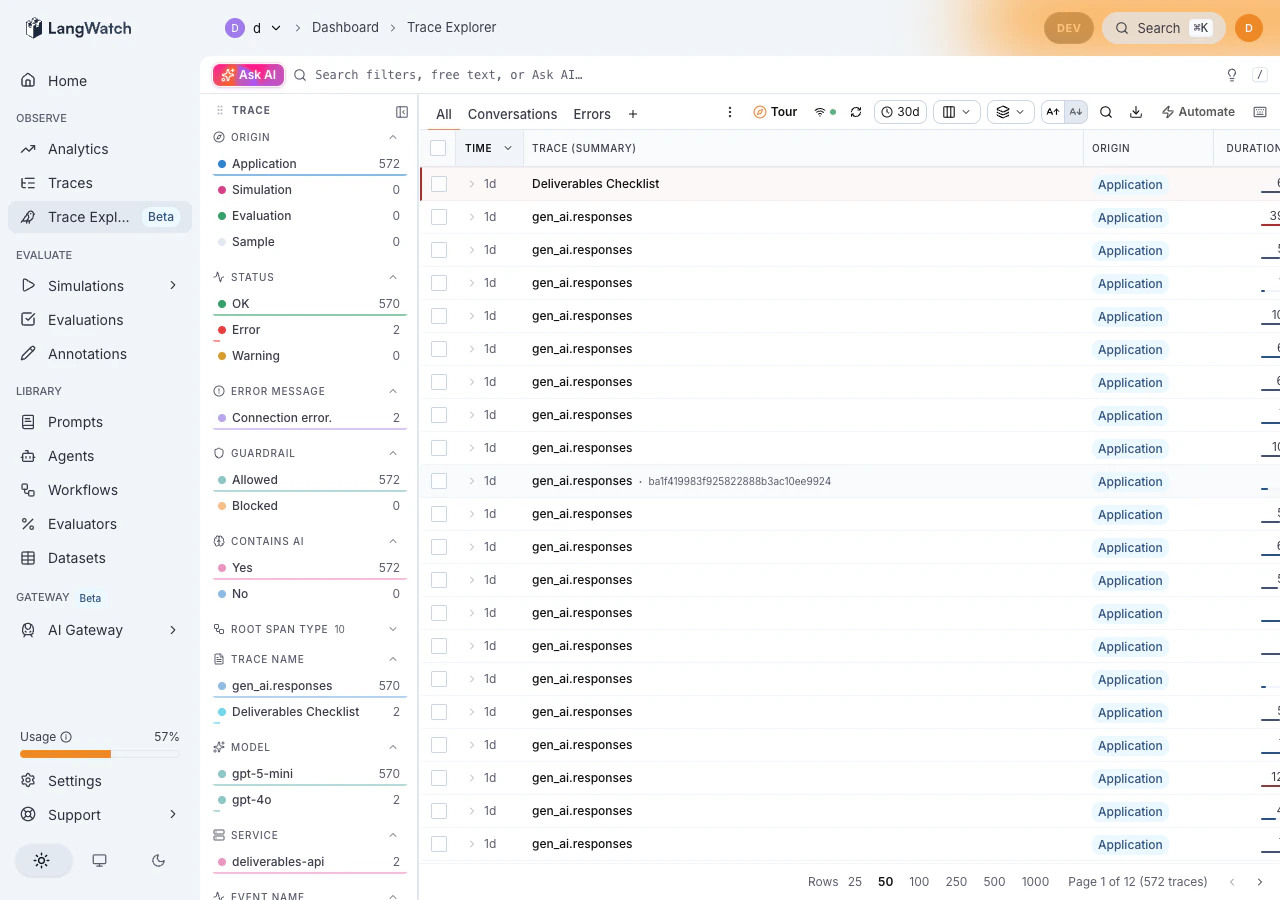
 Every span the wrapper produces lands in the developer's own Trace Explorer, with cost, tokens, duration, and model attributed to them.
 > Subscription-based tools that authenticate client-side (a personal Anthropic 20x plan, an OpenAI Enterprise plan, a Cursor with a custom endpoint) skip the Virtual Key proxy path entirely. The direct-OTLP route is documented in [Ingestion templates](/ai-governance/ingestion-templates).
### For an admin
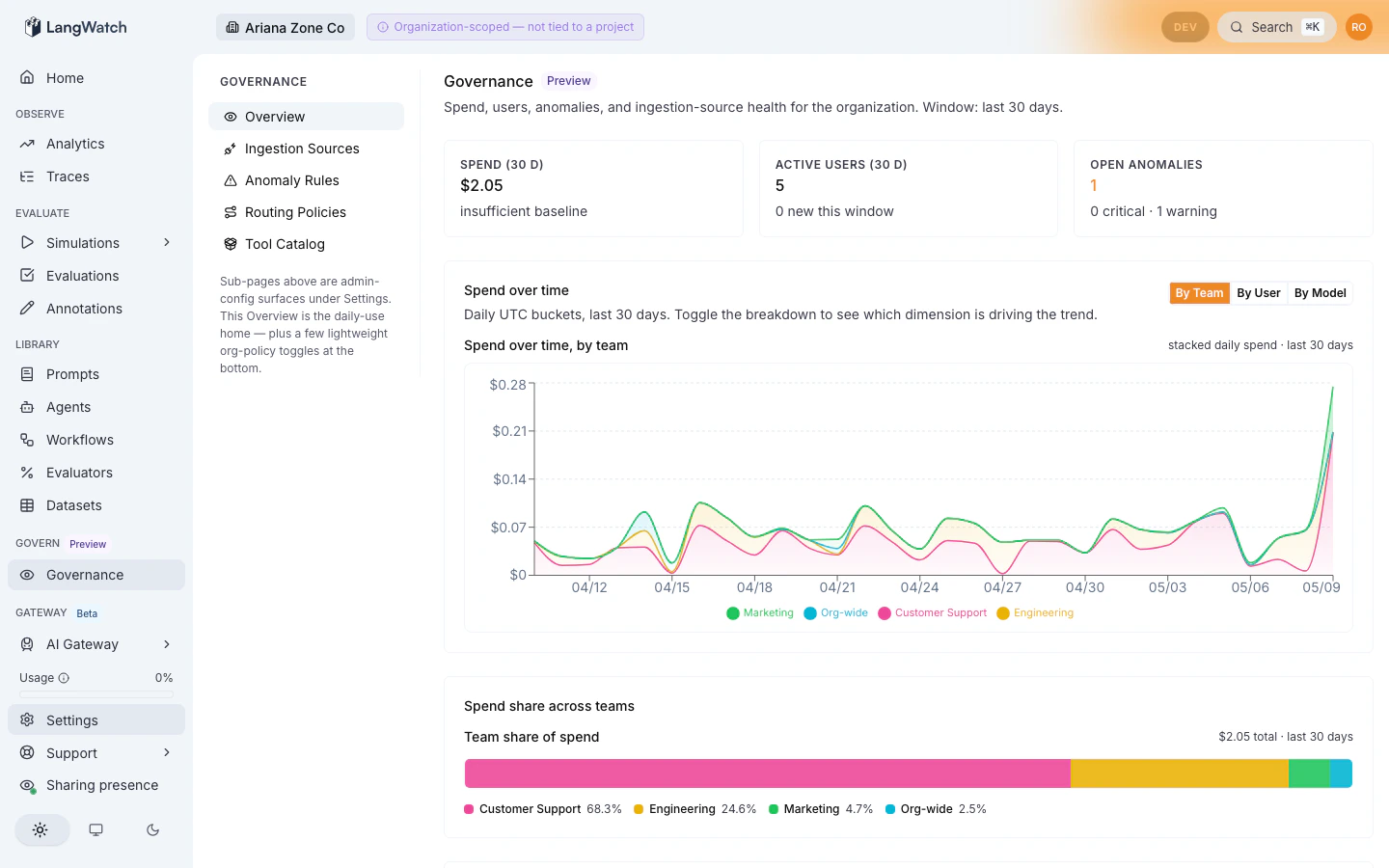
The bird-eye view at `/governance` is the daily home for admin oversight: org-wide spend, top spenders, open anomaly count, ingestion-source health, recent activity. Below it, `/settings/governance/*` is the authoring surface where routing policies, ingestion sources, anomaly rules, the AI Tools Portal catalog, and the audit log all live.
> Subscription-based tools that authenticate client-side (a personal Anthropic 20x plan, an OpenAI Enterprise plan, a Cursor with a custom endpoint) skip the Virtual Key proxy path entirely. The direct-OTLP route is documented in [Ingestion templates](/ai-governance/ingestion-templates).
### For an admin
The bird-eye view at `/governance` is the daily home for admin oversight: org-wide spend, top spenders, open anomaly count, ingestion-source health, recent activity. Below it, `/settings/governance/*` is the authoring surface where routing policies, ingestion sources, anomaly rules, the AI Tools Portal catalog, and the audit log all live.
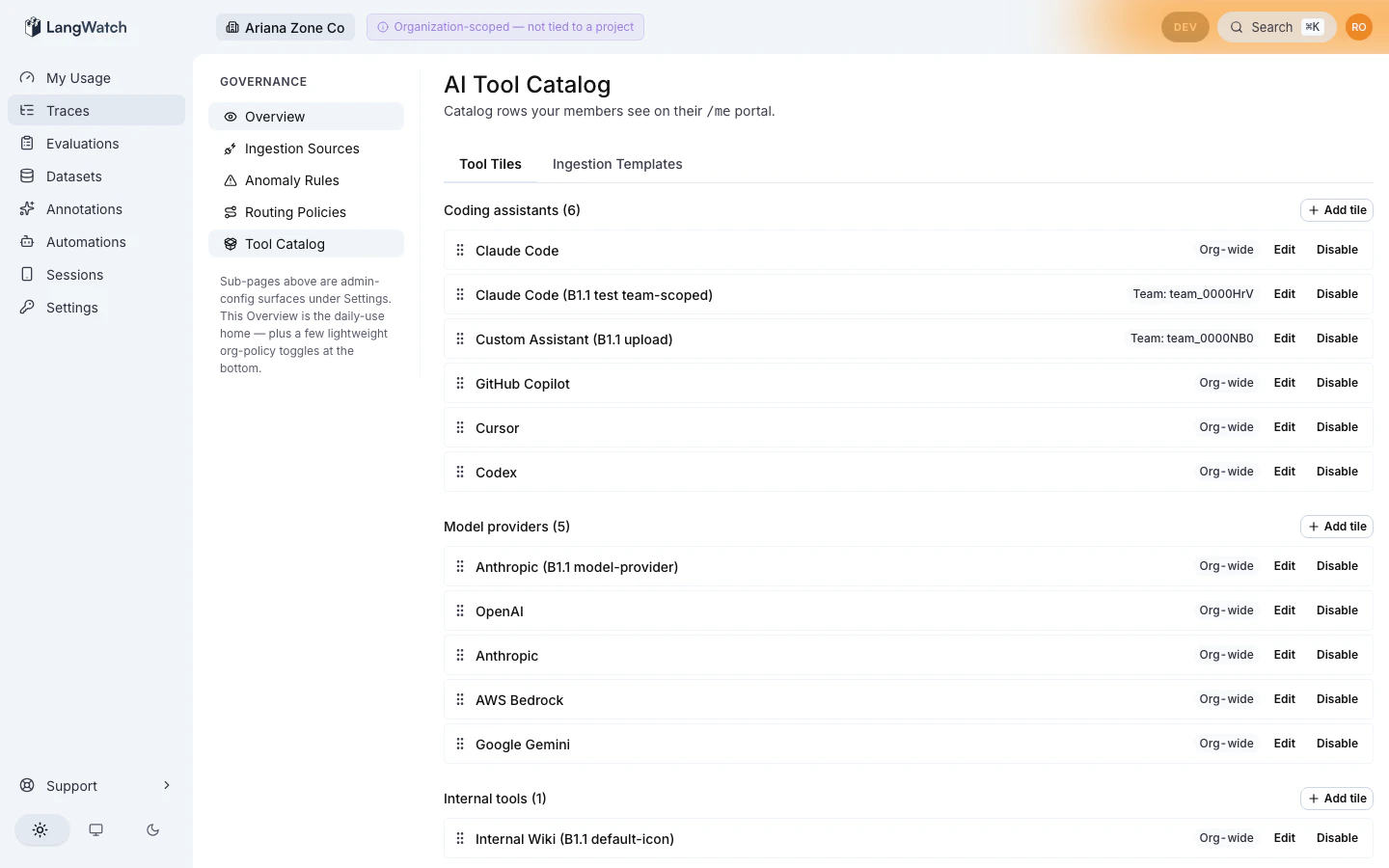
 The Tool Catalog at `/settings/governance/tool-catalog` stocks the developer-facing `/me` portal. Pick a fixed roster of coding assistants and model providers, scope to the org or to specific teams, publish.
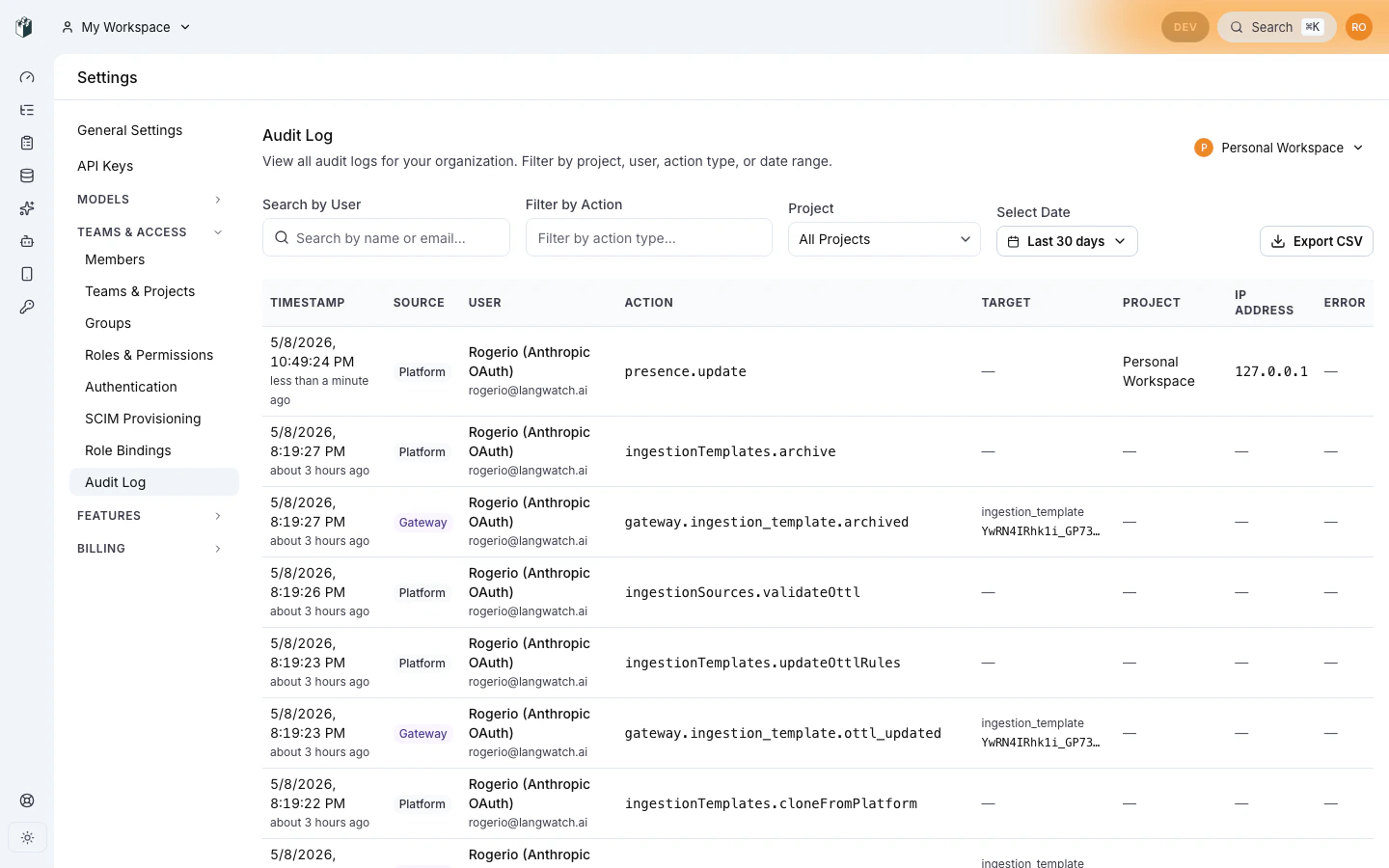
 Every governance mutation lands in the audit log, with filterable URL state and CSV export.
 ## What it covers
* **Coding assistants**: Claude Code, Codex, Cursor, Gemini CLI, opencode. The wrapper CLI signs the user in, mints a Personal Virtual Key, and routes every request through the gateway.
* **Provider Virtual Keys**: per-user keys for Anthropic, OpenAI, Bedrock, Gemini. Drop them into your app config, same gateway, same budget, no provider secret in dotfiles.
* **Direct OTLP ingestion**: see [Ingestion templates](/ai-governance/ingestion-templates).
* **External AI platforms**: Workato, Microsoft Copilot Studio, OpenAI Enterprise Compliance, Anthropic Compliance API, generic S3 audit-log drops. They land in the same trace store as everything else.
* **Anomaly detection**: admin-defined rules for spend spikes, geo mismatch, and off-hours activity, all folded from the same event stream.
* **Compliance and SIEM export**: every event is OCSF v1.1 mapped, replayable to Splunk, Datadog Security, Sentinel, and Elastic Security via cron pull.
## Two personas
LangWatch governance is shaped around two people who never need the same screen:
* **End user**: a developer or analyst who needs a Personal Virtual Key, wants to see their own usage and budget at `/me`, and sometimes switches between Personal, Team, and Project workspaces. They never see the admin surface.
* **Admin**: an org-level operator who configures ingestion sources, publishes routing policies, defines anomaly rules, and signs off on OCSF and SIEM export. They never see the end-user `/me` chrome.
The persona-aware chrome (single-chip header on `/me`, full sidebar on `/settings/governance/*`) keeps both surfaces clean, so neither has to navigate around the other.
## Get started
* **Developer**: [First 5 minutes](/ai-governance/getting-started-developer). Install the CLI, sign in via SSO, run your first request, read your spend back.
* **Admin**: [First 30 minutes](/ai-governance/getting-started-admin). Publish a routing policy, configure an ingestion source, import the AI Tools Portal starter pack, invite a developer, write your first spend-spike anomaly rule.
* **Drive governance from an agent**: every governance feature has a [REST API](/ai-governance/api), [CLI](/ai-governance/cli), and [MCP server](/ai-governance/mcp). Customers can fully set up governance via Claude Code or any MCP-capable agent.
## Reference
* [Personas](/ai-governance/personas): who sees what
* [Workspaces, members, roles](/ai-governance/workspaces): Personal, Team, Project scopes
* [`/governance` dashboard](/ai-governance/governance-dashboard): daily admin home
* [Ingestion templates](/ai-governance/ingestion-templates): admin-curated catalog for direct-OTLP ingestion
* [Ingestion sources](/ai-governance/ingestion-sources/index): Workato, Copilot Studio, Compliance APIs, S3
* [Anomaly rules](/ai-governance/anomaly-rules)
* [Audit log](/ai-governance/audit-log)
* [Compliance architecture](/ai-governance/compliance-architecture): OCSF, retention, SIEM
* [No-spy mode](/ai-governance/no-spy-mode): content-stripping for privacy-locked enterprises
* [Open-core licensing](/ai-governance/open-core-licensing): what's Apache 2.0 vs Enterprise
## What it covers
* **Coding assistants**: Claude Code, Codex, Cursor, Gemini CLI, opencode. The wrapper CLI signs the user in, mints a Personal Virtual Key, and routes every request through the gateway.
* **Provider Virtual Keys**: per-user keys for Anthropic, OpenAI, Bedrock, Gemini. Drop them into your app config, same gateway, same budget, no provider secret in dotfiles.
* **Direct OTLP ingestion**: see [Ingestion templates](/ai-governance/ingestion-templates).
* **External AI platforms**: Workato, Microsoft Copilot Studio, OpenAI Enterprise Compliance, Anthropic Compliance API, generic S3 audit-log drops. They land in the same trace store as everything else.
* **Anomaly detection**: admin-defined rules for spend spikes, geo mismatch, and off-hours activity, all folded from the same event stream.
* **Compliance and SIEM export**: every event is OCSF v1.1 mapped, replayable to Splunk, Datadog Security, Sentinel, and Elastic Security via cron pull.
## Two personas
LangWatch governance is shaped around two people who never need the same screen:
* **End user**: a developer or analyst who needs a Personal Virtual Key, wants to see their own usage and budget at `/me`, and sometimes switches between Personal, Team, and Project workspaces. They never see the admin surface.
* **Admin**: an org-level operator who configures ingestion sources, publishes routing policies, defines anomaly rules, and signs off on OCSF and SIEM export. They never see the end-user `/me` chrome.
The persona-aware chrome (single-chip header on `/me`, full sidebar on `/settings/governance/*`) keeps both surfaces clean, so neither has to navigate around the other.
## Get started
* **Developer**: [First 5 minutes](/ai-governance/getting-started-developer). Install the CLI, sign in via SSO, run your first request, read your spend back.
* **Admin**: [First 30 minutes](/ai-governance/getting-started-admin). Publish a routing policy, configure an ingestion source, import the AI Tools Portal starter pack, invite a developer, write your first spend-spike anomaly rule.
* **Drive governance from an agent**: every governance feature has a [REST API](/ai-governance/api), [CLI](/ai-governance/cli), and [MCP server](/ai-governance/mcp). Customers can fully set up governance via Claude Code or any MCP-capable agent.
## Reference
* [Personas](/ai-governance/personas): who sees what
* [Workspaces, members, roles](/ai-governance/workspaces): Personal, Team, Project scopes
* [`/governance` dashboard](/ai-governance/governance-dashboard): daily admin home
* [Ingestion templates](/ai-governance/ingestion-templates): admin-curated catalog for direct-OTLP ingestion
* [Ingestion sources](/ai-governance/ingestion-sources/index): Workato, Copilot Studio, Compliance APIs, S3
* [Anomaly rules](/ai-governance/anomaly-rules)
* [Audit log](/ai-governance/audit-log)
* [Compliance architecture](/ai-governance/compliance-architecture): OCSF, retention, SIEM
* [No-spy mode](/ai-governance/no-spy-mode): content-stripping for privacy-locked enterprises
* [Open-core licensing](/ai-governance/open-core-licensing): what's Apache 2.0 vs Enterprise