> ## Documentation Index
> Fetch the complete documentation index at: https://langwatch.ai/docs/llms.txt
> Use this file to discover all available pages before exploring further.
# AI Tools Portal admin catalog editor
> How to publish, scope, and edit the AI tools that your developers see on /me. Covers starter-pack import, the three tile-type drawers, scope binding, reordering, and archive.
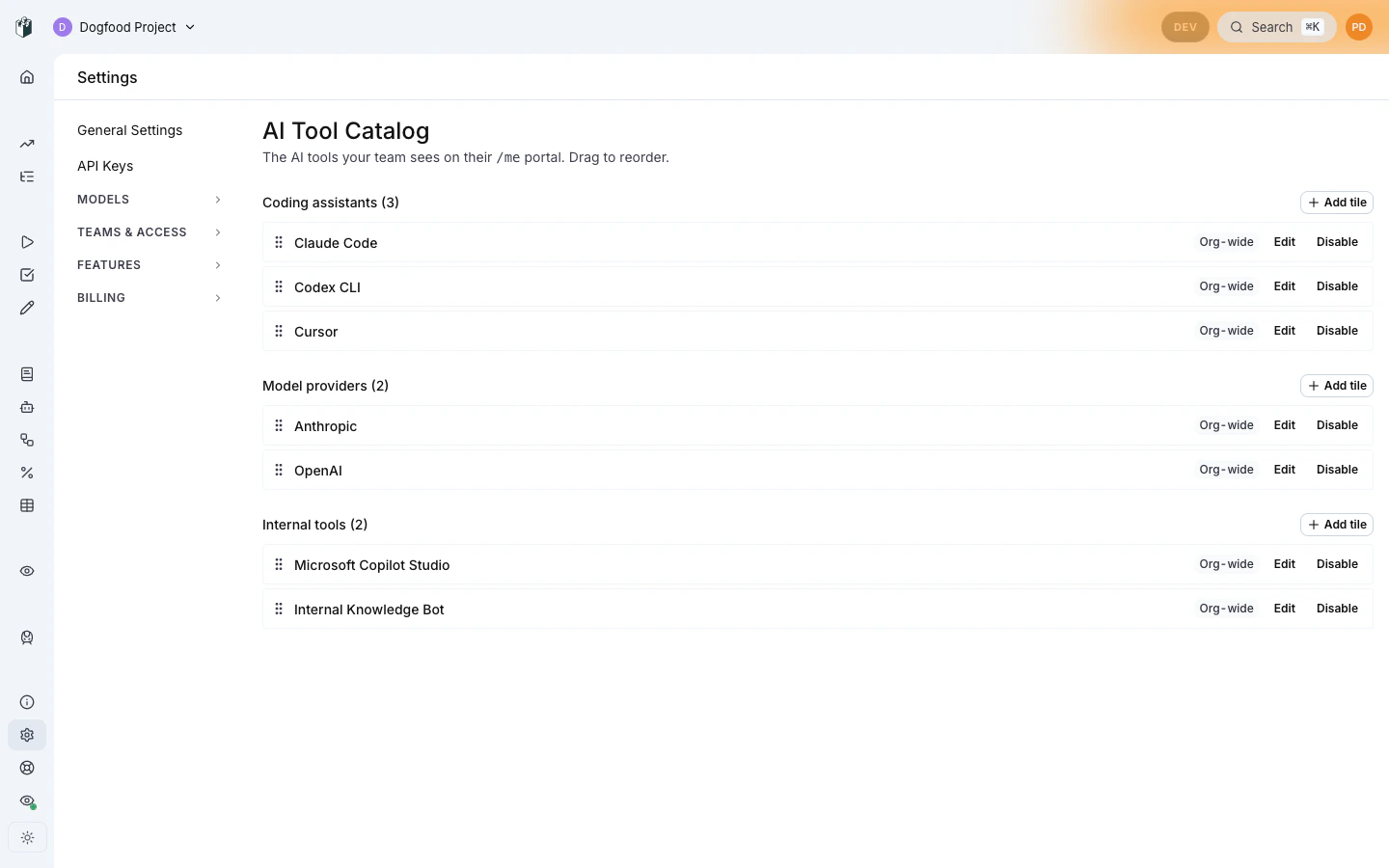
The AI Tools Portal is curated by org admins from
**Settings → AI Governance → Tool catalog**
(`/settings/governance/tool-catalog`). Anything you publish here lands on
every matching user's `/me` portal grid.
 **Pairs with:** [Portal overview](/docs/ai-governance/personal-portal/overview) for the user-side tile grid, and [End-user tile interactions](/docs/ai-governance/personal-portal/end-user) for what each tile expands into.
**Permission required**: `aiTools:manage` (granted to ADMIN by default; delegable via the `CustomRolePermissions` JSON column).
## Starter pack
A fresh organization has an empty catalog. Your first visit shows an
**Import starter pack** CTA, one click publishes a sensible default
set:
* Coding assistants: Claude Code, Copilot, Cursor, Codex
* Model providers: OpenAI, Anthropic, Bedrock, Gemini
* External tools: empty (admins fill these in per-org with internal
links)
The starter pack is org-scoped and editable like any other entry. You
can reorder, scope to specific teams, or archive entries afterward.
There's no penalty for skipping the starter pack and adding tiles
manually if your org's allowed-AI list is narrower.
## Adding a tile
Click **+ Add tile** to open the upsert drawer. The drawer is shaped by
the **type** picker:
**Pairs with:** [Portal overview](/docs/ai-governance/personal-portal/overview) for the user-side tile grid, and [End-user tile interactions](/docs/ai-governance/personal-portal/end-user) for what each tile expands into.
**Permission required**: `aiTools:manage` (granted to ADMIN by default; delegable via the `CustomRolePermissions` JSON column).
## Starter pack
A fresh organization has an empty catalog. Your first visit shows an
**Import starter pack** CTA, one click publishes a sensible default
set:
* Coding assistants: Claude Code, Copilot, Cursor, Codex
* Model providers: OpenAI, Anthropic, Bedrock, Gemini
* External tools: empty (admins fill these in per-org with internal
links)
The starter pack is org-scoped and editable like any other entry. You
can reorder, scope to specific teams, or archive entries afterward.
There's no penalty for skipping the starter pack and adding tiles
manually if your org's allowed-AI list is narrower.
## Adding a tile
Click **+ Add tile** to open the upsert drawer. The drawer is shaped by
the **type** picker:
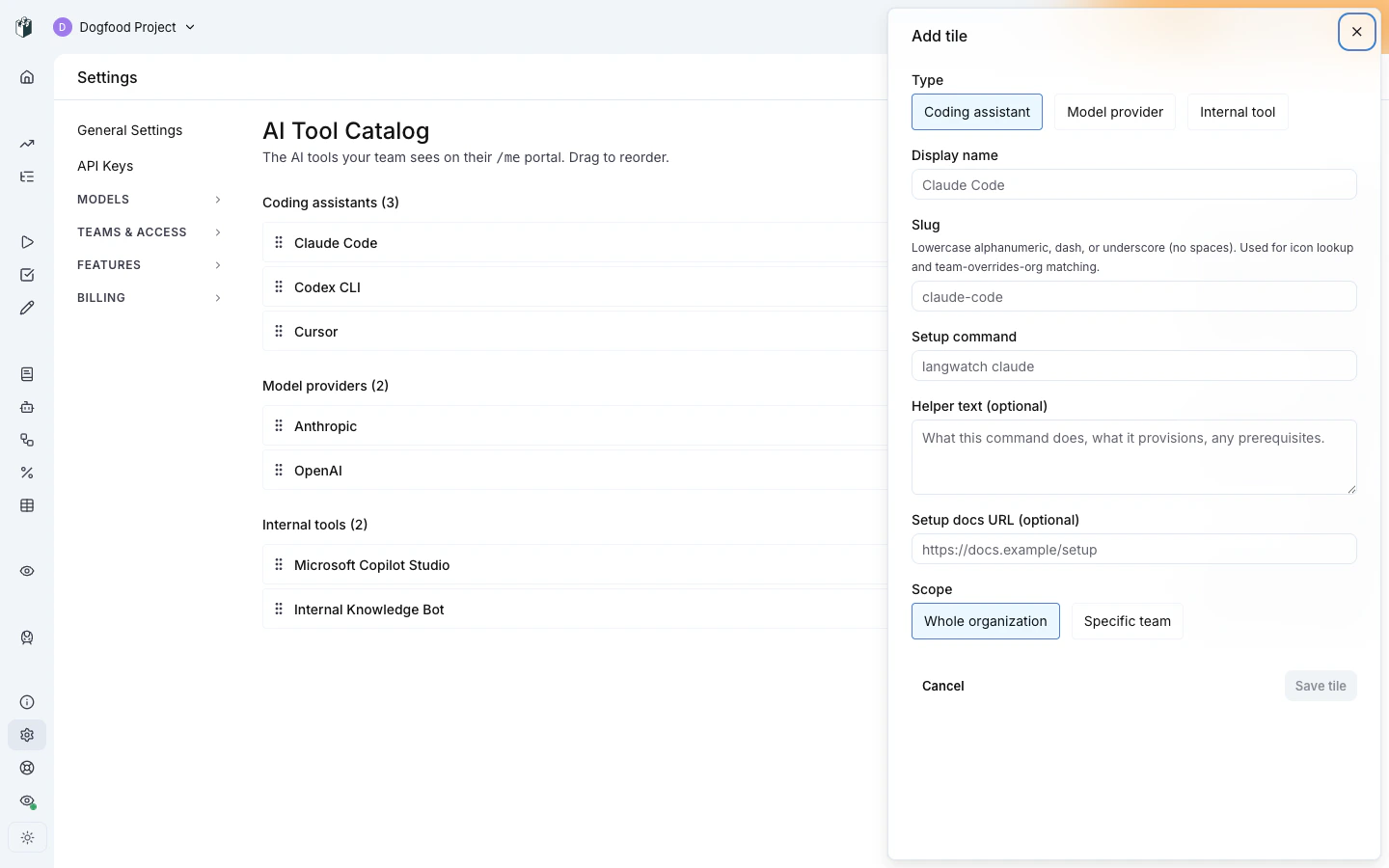 ### Coding assistant
| Field | Description |
| -------------- | -------------------------------------------------------------------------- |
| Display name | What appears on the tile (e.g. "Claude Code") |
| Icon | Tile icon, `slug`-derived by default, overridable |
| Scope | `org-wide` or `team:` |
| Setup command | The `langwatch ` command shown to the user (e.g. `langwatch claude`) |
| Setup docs URL | Optional `/ai-governance/...` link for "More" |
| Helper text | Optional one-liner shown above the command block |
The user-side click-to-expand renders the setup command in a
copy-to-clipboard code block plus the helper text and docs link.
### Model provider
| Field | Description |
| ------------------------ | ----------------------------------------------------- |
| Display name | What appears on the tile (e.g. "OpenAI") |
| Icon, scope | Same as coding assistant |
| `providerKey` | Provider slug (`openai`, `anthropic`, `bedrock`, …) |
| Suggested routing policy | Routing policy to bind new virtual keys to |
| Default label | Pre-fills the user's "Name your key" input |
| Project-suggestion text | Override the "building an app? create a project" hint |
The user-side click-to-expand opens an inline virtual-key creation form.
The form posts to `personalVirtualKeys.issuePersonal` with the suggested
routing policy attached, so the admin's routing policy chain (provider
order, fallback, per-model rules) applies automatically.
### External tool
| Field | Description |
| ---------------------- | ----------------------------------------------------------------- |
| Display name | What appears on the tile (e.g. "Copilot Studio") |
| Icon, scope | Same as coding assistant |
| External link | Where the tile's CTA points (vendor portal, internal wiki) |
| CTA label | Override default "Open guide ▸" if needed |
| Description (markdown) | Admin-authored body, supports headings, lists, links, code blocks |
The user-side click-to-expand renders the markdown via LangWatch's
existing safe-markdown pipeline (HTML sanitization is on; no inline
JavaScript, no inline `
### Coding assistant
| Field | Description |
| -------------- | -------------------------------------------------------------------------- |
| Display name | What appears on the tile (e.g. "Claude Code") |
| Icon | Tile icon, `slug`-derived by default, overridable |
| Scope | `org-wide` or `team:` |
| Setup command | The `langwatch ` command shown to the user (e.g. `langwatch claude`) |
| Setup docs URL | Optional `/ai-governance/...` link for "More" |
| Helper text | Optional one-liner shown above the command block |
The user-side click-to-expand renders the setup command in a
copy-to-clipboard code block plus the helper text and docs link.
### Model provider
| Field | Description |
| ------------------------ | ----------------------------------------------------- |
| Display name | What appears on the tile (e.g. "OpenAI") |
| Icon, scope | Same as coding assistant |
| `providerKey` | Provider slug (`openai`, `anthropic`, `bedrock`, …) |
| Suggested routing policy | Routing policy to bind new virtual keys to |
| Default label | Pre-fills the user's "Name your key" input |
| Project-suggestion text | Override the "building an app? create a project" hint |
The user-side click-to-expand opens an inline virtual-key creation form.
The form posts to `personalVirtualKeys.issuePersonal` with the suggested
routing policy attached, so the admin's routing policy chain (provider
order, fallback, per-model rules) applies automatically.
### External tool
| Field | Description |
| ---------------------- | ----------------------------------------------------------------- |
| Display name | What appears on the tile (e.g. "Copilot Studio") |
| Icon, scope | Same as coding assistant |
| External link | Where the tile's CTA points (vendor portal, internal wiki) |
| CTA label | Override default "Open guide ▸" if needed |
| Description (markdown) | Admin-authored body, supports headings, lists, links, code blocks |
The user-side click-to-expand renders the markdown via LangWatch's
existing safe-markdown pipeline (HTML sanitization is on; no inline
JavaScript, no inline `![]() ` from third-party hosts, external links
get `rel="noopener noreferrer"`).
## Scope binding
Each tile is scoped either **org-wide** (visible to every user in the
org) or **team-scoped** (visible only to that team's members). Team
scoping uses the existing org-team multi-select picker.
` from third-party hosts, external links
get `rel="noopener noreferrer"`).
## Scope binding
Each tile is scoped either **org-wide** (visible to every user in the
org) or **team-scoped** (visible only to that team's members). Team
scoping uses the existing org-team multi-select picker.
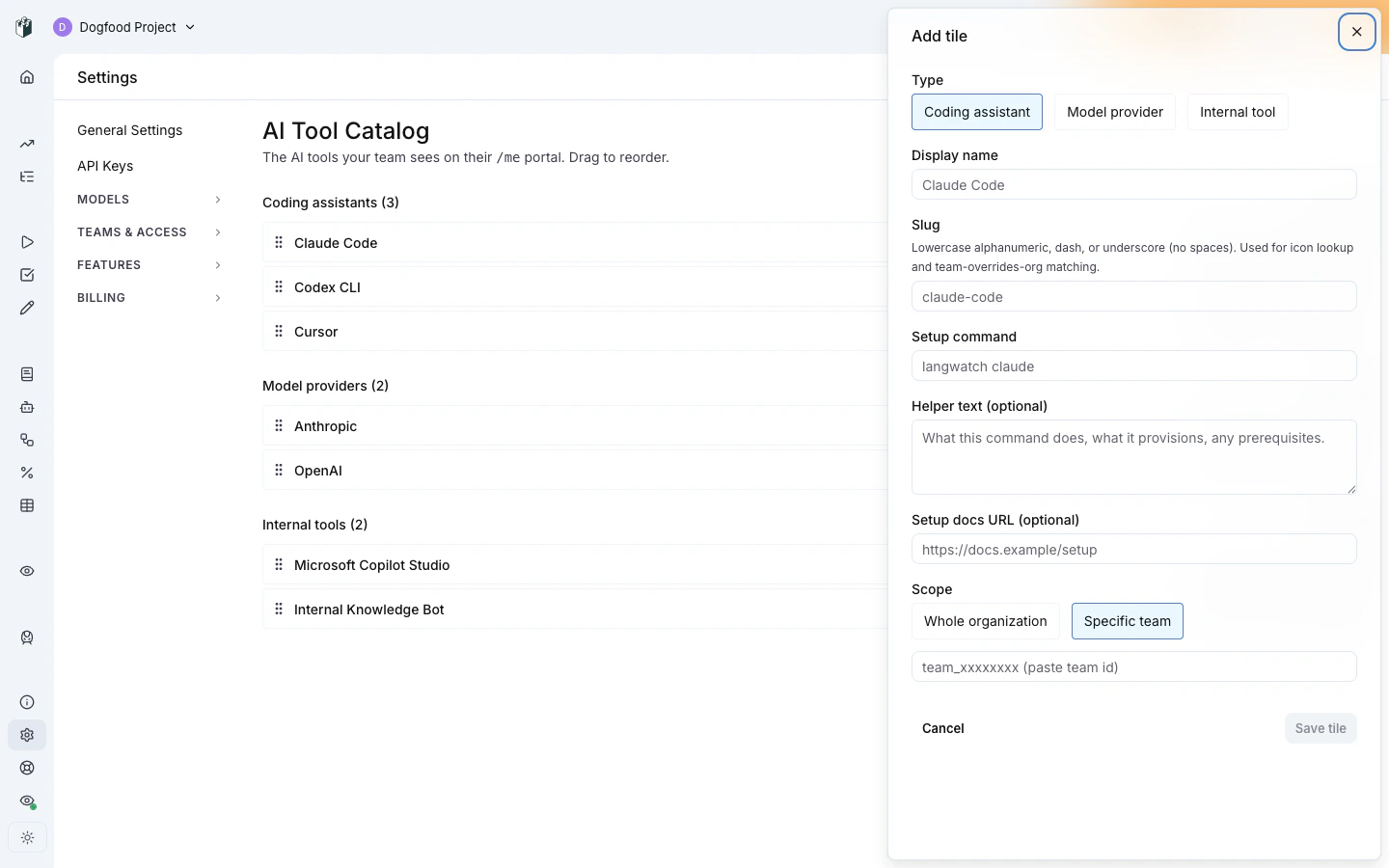 When a team-scoped tile shares its `slug` with an org-scoped tile, the
team entry **overrides** the org entry for users in that team. This is
the recommended pattern for "engineering gets Cursor, everyone else
gets Copilot", publish Copilot at org scope, then publish a Cursor
entry with `slug: copilot` (or the same slug as the team's preferred
override) at team scope.
## Reordering
Tiles in the editor are drag-to-reorder within their type section. The
order is per-section, you can't move a coding-assistant tile under
the model-providers section. Order is admin-curated; the portal
respects it strictly.
## Archive vs disable
Two soft-delete shapes:
* **Disable** (toggle the tile to disabled state), hides the tile from
end users but keeps it in the admin list, ready to re-enable.
* **Archive** (`archivedAt` set to now), hides from both end users and
admin list. Archive is meant for "we no longer offer this tool";
disable is meant for "we're rolling this out gradually" or "we're
taking it down for the day".
Neither is destructive, archive can be reversed by the admin via direct
DB access if needed. The intent is to never lose the audit trail of who
published what.
## Where to next
* [End-user tile interactions](/docs/ai-governance/personal-portal/end-user) —
what your published tiles look like to users.
* [Personal IDE keys](/docs/ai-gateway/governance/personal-keys): the
underlying device-flow + virtual-key provisioning that
coding-assistant tiles trigger.
* [Routing policies](/docs/ai-gateway/governance/routing-policies): the
policy chain bound by model-provider tile virtual keys.
When a team-scoped tile shares its `slug` with an org-scoped tile, the
team entry **overrides** the org entry for users in that team. This is
the recommended pattern for "engineering gets Cursor, everyone else
gets Copilot", publish Copilot at org scope, then publish a Cursor
entry with `slug: copilot` (or the same slug as the team's preferred
override) at team scope.
## Reordering
Tiles in the editor are drag-to-reorder within their type section. The
order is per-section, you can't move a coding-assistant tile under
the model-providers section. Order is admin-curated; the portal
respects it strictly.
## Archive vs disable
Two soft-delete shapes:
* **Disable** (toggle the tile to disabled state), hides the tile from
end users but keeps it in the admin list, ready to re-enable.
* **Archive** (`archivedAt` set to now), hides from both end users and
admin list. Archive is meant for "we no longer offer this tool";
disable is meant for "we're rolling this out gradually" or "we're
taking it down for the day".
Neither is destructive, archive can be reversed by the admin via direct
DB access if needed. The intent is to never lose the audit trail of who
published what.
## Where to next
* [End-user tile interactions](/docs/ai-governance/personal-portal/end-user) —
what your published tiles look like to users.
* [Personal IDE keys](/docs/ai-gateway/governance/personal-keys): the
underlying device-flow + virtual-key provisioning that
coding-assistant tiles trigger.
* [Routing policies](/docs/ai-gateway/governance/routing-policies): the
policy chain bound by model-provider tile virtual keys.