> ## Documentation Index
> Fetch the complete documentation index at: https://langwatch.ai/docs/llms.txt
> Use this file to discover all available pages before exploring further.
# AI Tools Portal tile interactions
> What each tile class expands into when an end user clicks it on /me. Covers coding-assistant setup walkthroughs, inline virtual-key creation, and external-tool guidance pages.
When you sign in via `langwatch login` or open the LangWatch dashboard,
you land on `/me`. The top of the page is your **AI Tools Portal**: a
card grid of every tool your IT admin has published for you. Below the
grid, your usage dashboard (spend vs. budget, requests, recent
activity) is unchanged.
**Pairs with:** [Personal IDE keys](/docs/ai-gateway/governance/personal-keys) (the device-flow login the coding-assistant tiles trigger).
This page walks through what happens when you click each tile class.
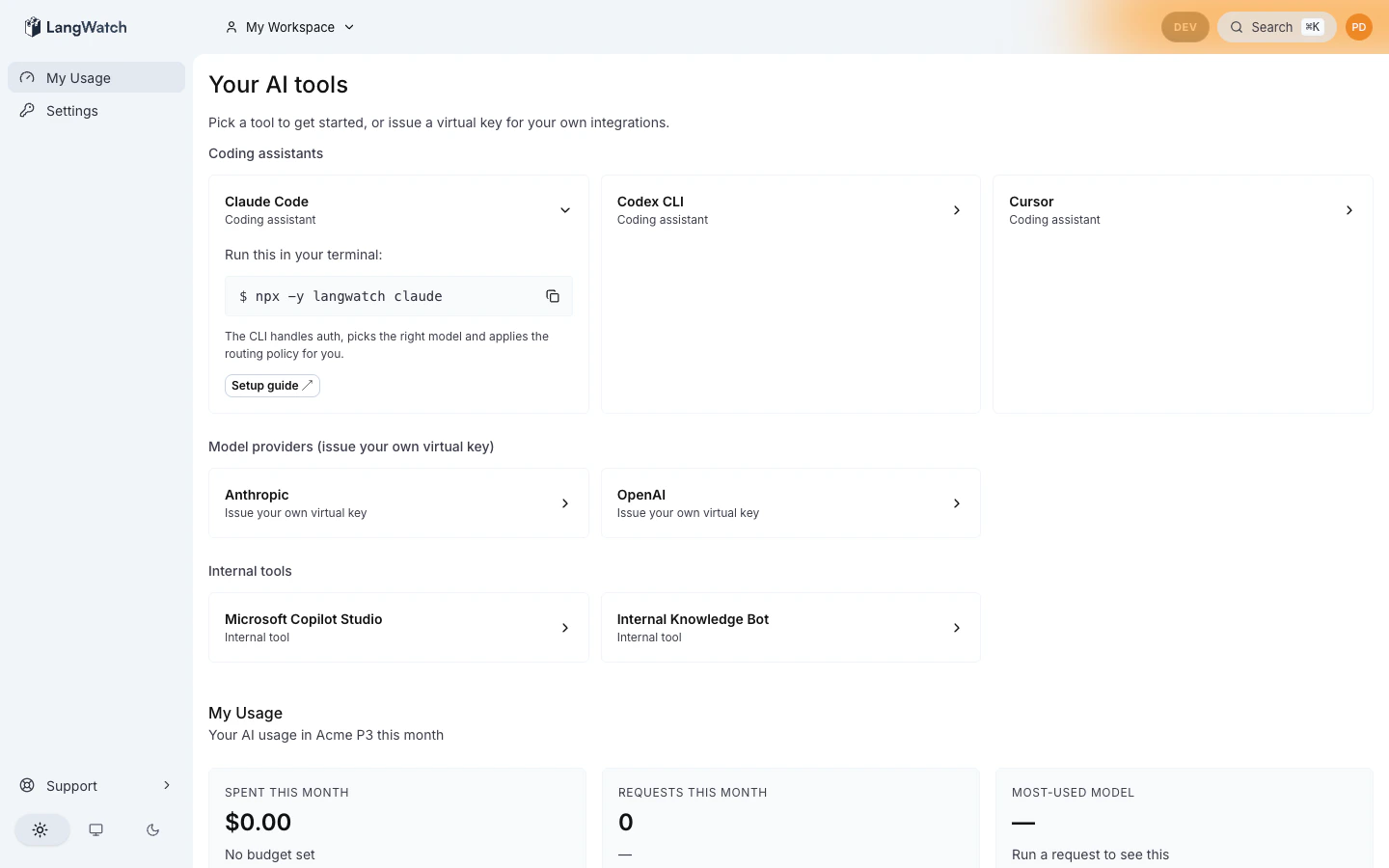
## Coding-assistant tiles
Examples: Claude Code, Copilot, Cursor, Codex, Gemini CLI.
Click expands the tile inline with the setup walkthrough:
 ```
┌─ Claude Code ──────────────────────────── [×] collapse ────────────┐
│ Run this in your terminal: │
│ $ langwatch claude [📋] │
│ │
│ This will: │
│ 1. Open a browser tab to sign you in via your company SSO │
│ 2. Provision a personal virtual key bound to your identity │
│ 3. exec `claude` with the right env vars pre-injected │
│ │
│ Always-on: paste this in your ~/.zshrc │
│ $ eval "$(langwatch init-shell zsh)" [📋] │
└────────────────────────────────────────────────────────────────────┘
```
The first time you run the command:
1. Your terminal prints a device-flow URL with a one-time code.
2. Your browser opens. You sign in via your company SSO.
3. The CLI receives a personal virtual key, persists it at
`~/.langwatch/config.json` (mode 0600), and exec's the underlying
tool (Claude Code in this case).
The personal virtual key is bound to your identity via JWT claims
(`organization_id`, `principal_id`, `personal: true`), so every request
through the gateway is attributed to you. Your monthly budget,
governance policies, and audit trail all apply automatically.
If your admin hasn't published a default routing policy yet, the CLI
returns a friendly `409 no_default_routing_policy` error and points to
the admin. See [CLI debugging](/docs/ai-governance/cli-debug#error-catalog)
for the full error catalog.
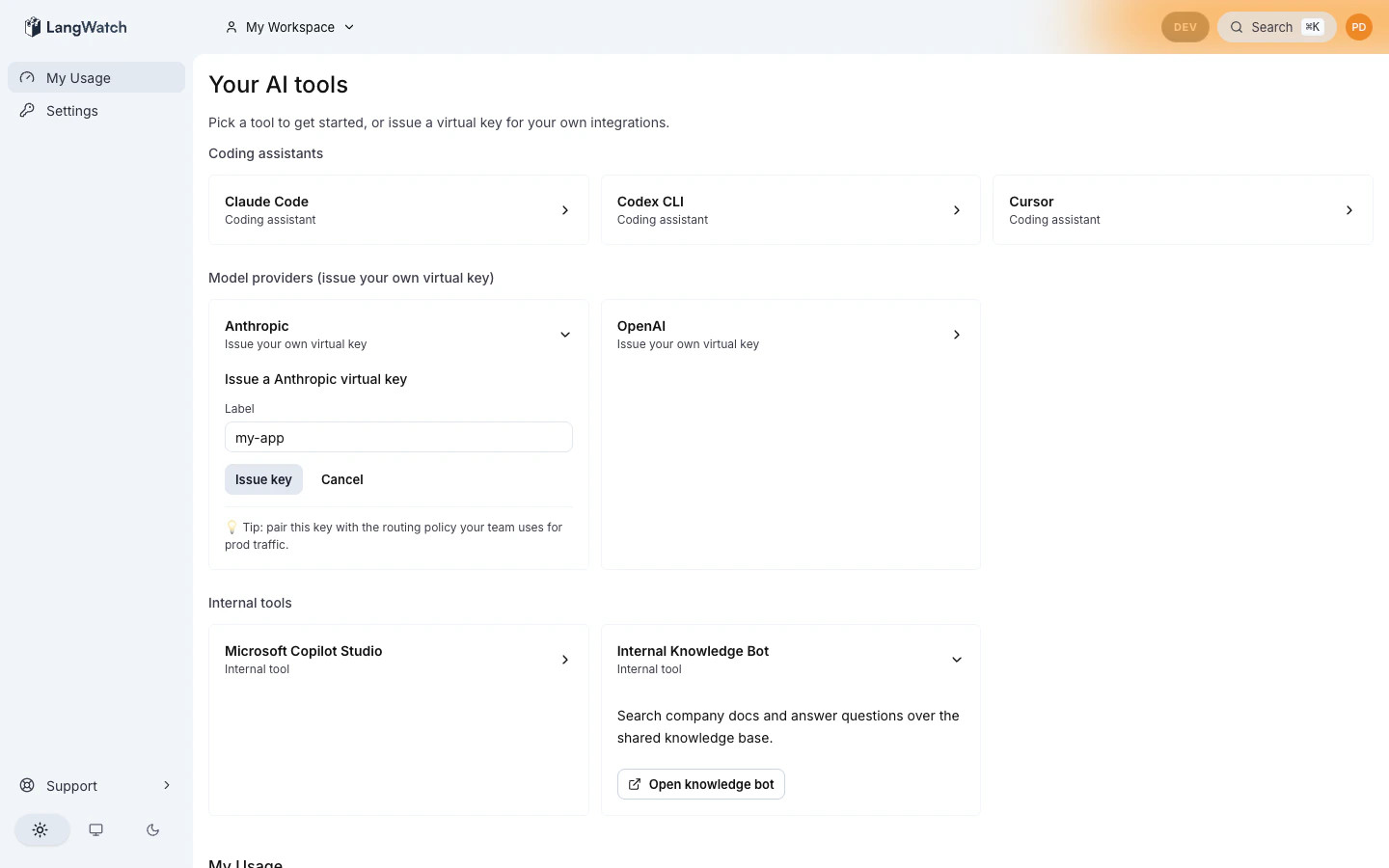
## Model-provider tiles
Examples: OpenAI, Anthropic, Bedrock, Gemini.
Click expands the tile inline with a virtual-key creation form:
```
┌─ Claude Code ──────────────────────────── [×] collapse ────────────┐
│ Run this in your terminal: │
│ $ langwatch claude [📋] │
│ │
│ This will: │
│ 1. Open a browser tab to sign you in via your company SSO │
│ 2. Provision a personal virtual key bound to your identity │
│ 3. exec `claude` with the right env vars pre-injected │
│ │
│ Always-on: paste this in your ~/.zshrc │
│ $ eval "$(langwatch init-shell zsh)" [📋] │
└────────────────────────────────────────────────────────────────────┘
```
The first time you run the command:
1. Your terminal prints a device-flow URL with a one-time code.
2. Your browser opens. You sign in via your company SSO.
3. The CLI receives a personal virtual key, persists it at
`~/.langwatch/config.json` (mode 0600), and exec's the underlying
tool (Claude Code in this case).
The personal virtual key is bound to your identity via JWT claims
(`organization_id`, `principal_id`, `personal: true`), so every request
through the gateway is attributed to you. Your monthly budget,
governance policies, and audit trail all apply automatically.
If your admin hasn't published a default routing policy yet, the CLI
returns a friendly `409 no_default_routing_policy` error and points to
the admin. See [CLI debugging](/docs/ai-governance/cli-debug#error-catalog)
for the full error catalog.
## Model-provider tiles
Examples: OpenAI, Anthropic, Bedrock, Gemini.
Click expands the tile inline with a virtual-key creation form:
 ```
┌─ OpenAI ───────────────────────────────── [×] collapse ────────────┐
│ Create a virtual key for your apps │
│ │
│ Name your key: [my-rag-app ] │
│ [ Generate ] │
│ │
│ 💡 Building an application for the team? Consider creating a │
│ shared project instead. → /settings/projects │
└────────────────────────────────────────────────────────────────────┘
```
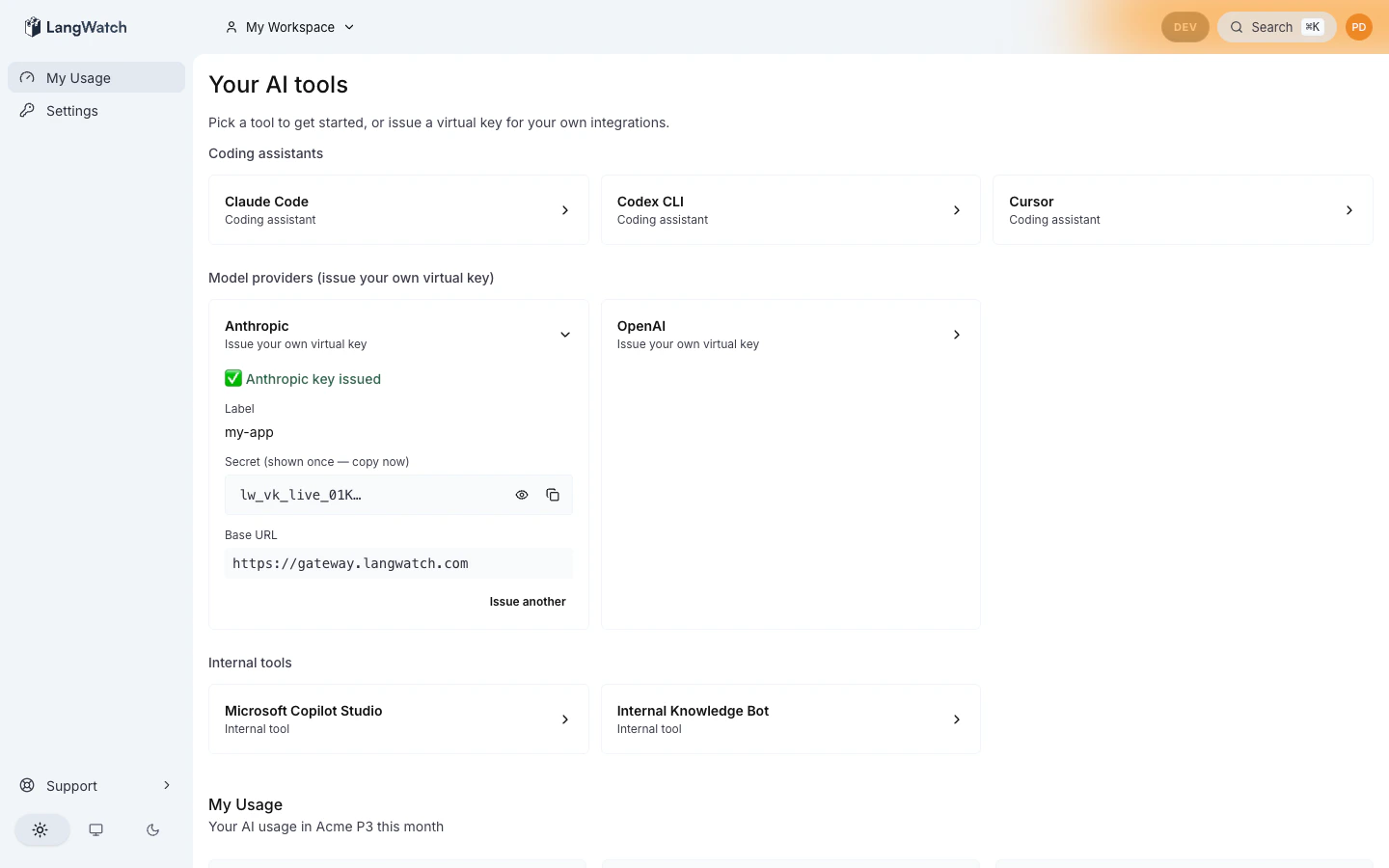
Type a label (anything that helps you identify the key, `my-rag-app`,
`weekend-experiment`), click **Generate**, and the form replaces itself
with the issued state:
```
┌─ OpenAI ───────────────────────────────── [×] collapse ────────────┐
│ Create a virtual key for your apps │
│ │
│ Name your key: [my-rag-app ] │
│ [ Generate ] │
│ │
│ 💡 Building an application for the team? Consider creating a │
│ shared project instead. → /settings/projects │
└────────────────────────────────────────────────────────────────────┘
```
Type a label (anything that helps you identify the key, `my-rag-app`,
`weekend-experiment`), click **Generate**, and the form replaces itself
with the issued state:
 ```
┌─ OpenAI ───────────────────────────────── [×] collapse ────────────┐
│ ✓ Key created │
│ │
│ Secret: vk-lw-ABCD…XYZ9 [👁 reveal] [📋 copy] │
│ │
│ Base URL: https://gateway.langwatch.ai/api/v1 │
│ │
│ Use it as a drop-in replacement for the OpenAI SDK: │
│ $ curl https://gateway.langwatch.ai/api/v1/chat/completions \ │
│ -H "Authorization: Bearer vk-lw-…" -d '{...}' [📋] │
└────────────────────────────────────────────────────────────────────┘
```
Important: the secret is shown **once**. Copy it now. If you lose it,
generate a new key, there's no recovery surface (this is by design;
secrets are hashed at rest with a peppered HMAC and we never see the
plaintext after issuance).
The key inherits your admin's **routing policy** automatically, so the
same key works against whichever provider chain the admin has wired up
for your org (OpenAI primary, Azure fallback, etc.). You don't pick a
provider; the policy does.
### If issuance returns "routing\_policy\_has\_no\_providers" (HTTP 422)
The org-default routing policy exists but has zero providers bound, so
the gateway would have nothing to forward to. The portal (and the CLI
device-flow login) refuse to mint a key in that state, you'll see an
HTTP 422 response with an actionable hint rather than a green key that
returns 504 on every call.
Ask your admin to bind at least one provider in
`/settings/governance/routing-policies`. Once a provider is bound,
retry, issuance will succeed and your key works immediately.
### When to create a project instead
If you're building a team-shared application, a customer-facing chat,
an internal RAG system, anything that's not a one-developer experiment
— create a **project** at `/settings/projects` and mint the virtual key
there instead. Project keys aren't bound to your identity, so the spend
attributes to the project (and rolls up to your team) instead of to
your personal monthly budget.
The hint line on the tile is a one-line nudge in that direction; the
flow itself is the existing project key flow at
`/settings/projects//api-keys`.
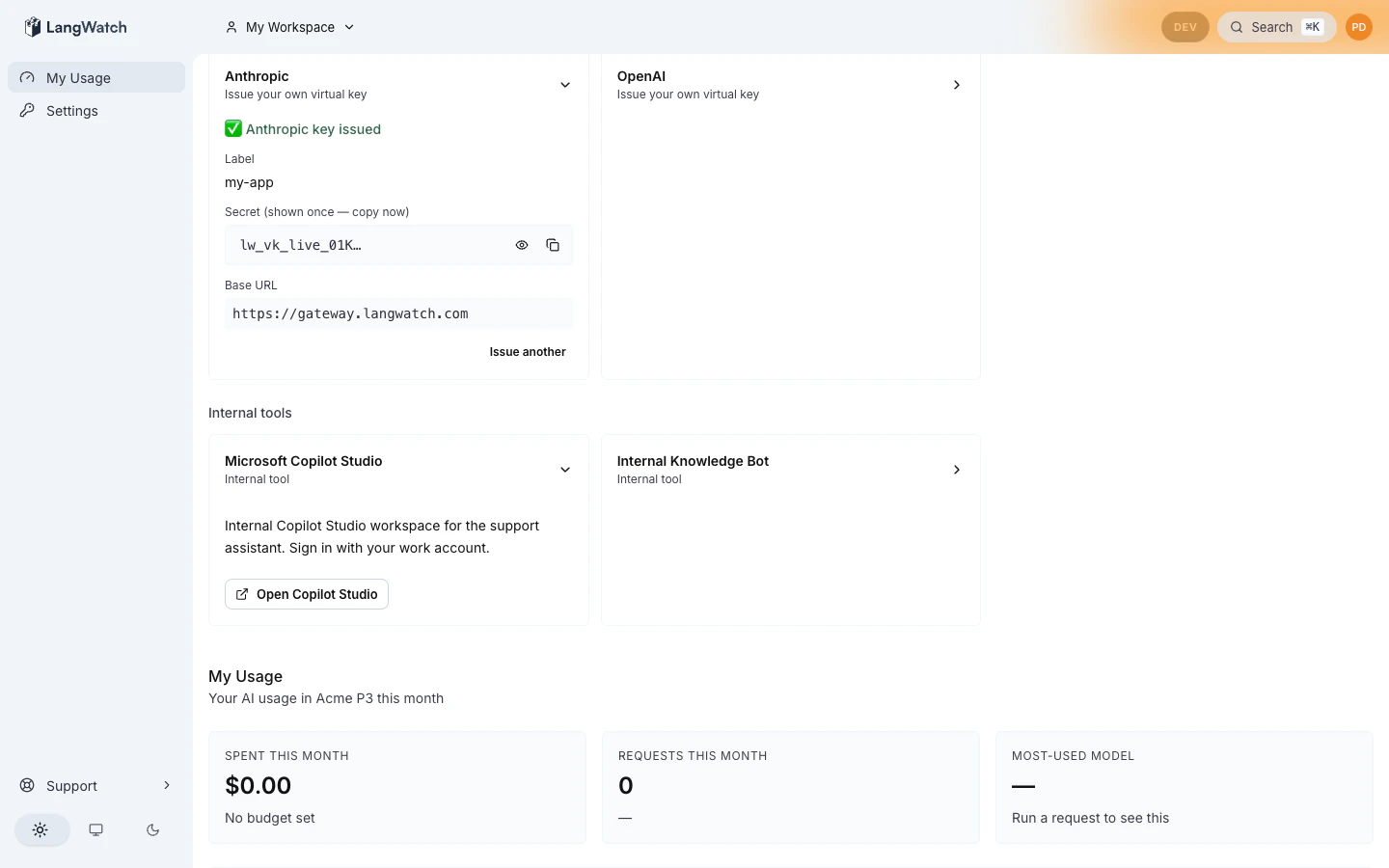
## External-tool tiles
Examples: Copilot Studio, Workato, internal company chat agents.
Click expands the tile inline with admin-authored markdown:
```
┌─ OpenAI ───────────────────────────────── [×] collapse ────────────┐
│ ✓ Key created │
│ │
│ Secret: vk-lw-ABCD…XYZ9 [👁 reveal] [📋 copy] │
│ │
│ Base URL: https://gateway.langwatch.ai/api/v1 │
│ │
│ Use it as a drop-in replacement for the OpenAI SDK: │
│ $ curl https://gateway.langwatch.ai/api/v1/chat/completions \ │
│ -H "Authorization: Bearer vk-lw-…" -d '{...}' [📋] │
└────────────────────────────────────────────────────────────────────┘
```
Important: the secret is shown **once**. Copy it now. If you lose it,
generate a new key, there's no recovery surface (this is by design;
secrets are hashed at rest with a peppered HMAC and we never see the
plaintext after issuance).
The key inherits your admin's **routing policy** automatically, so the
same key works against whichever provider chain the admin has wired up
for your org (OpenAI primary, Azure fallback, etc.). You don't pick a
provider; the policy does.
### If issuance returns "routing\_policy\_has\_no\_providers" (HTTP 422)
The org-default routing policy exists but has zero providers bound, so
the gateway would have nothing to forward to. The portal (and the CLI
device-flow login) refuse to mint a key in that state, you'll see an
HTTP 422 response with an actionable hint rather than a green key that
returns 504 on every call.
Ask your admin to bind at least one provider in
`/settings/governance/routing-policies`. Once a provider is bound,
retry, issuance will succeed and your key works immediately.
### When to create a project instead
If you're building a team-shared application, a customer-facing chat,
an internal RAG system, anything that's not a one-developer experiment
— create a **project** at `/settings/projects` and mint the virtual key
there instead. Project keys aren't bound to your identity, so the spend
attributes to the project (and rolls up to your team) instead of to
your personal monthly budget.
The hint line on the tile is a one-line nudge in that direction; the
flow itself is the existing project key flow at
`/settings/projects//api-keys`.
## External-tool tiles
Examples: Copilot Studio, Workato, internal company chat agents.
Click expands the tile inline with admin-authored markdown:
 ```
┌─ Copilot Studio ───────────────────────── [×] collapse ────────────┐
│ Microsoft Copilot Studio is approved for org-wide use. │
│ See the internal wiki for setup instructions: │
│ │
│ → wiki.acme.corp/ai/copilot-studio │
│ │
│ ## Approved use cases │
│ - Customer support automation │
│ - Internal knowledge agents │
│ Contact: ai-platform@acme.corp │
└────────────────────────────────────────────────────────────────────┘
```
External-tool tiles render markdown, your admin can include headings,
lists, code blocks, and external links. External links open in a new
tab with `rel="noopener noreferrer"` for safety.
These tiles don't generate keys or trigger logins. They're informational
* a link out to wherever your company tracks AI tool guidance (vendor
portal, internal wiki, intranet page).
## Empty state
If your admin hasn't published the catalog yet, you'll see:
> **No AI tools configured yet.**
> Your IT team is still setting things up. Reach out to your org admin
> once tools are ready.
This is normal during a brand-new organization's onboarding. Ask your
admin to import the starter pack at
`/settings/governance/tool-catalog`.
## Where to next
* [Personal IDE keys](/docs/ai-gateway/governance/personal-keys): deep dive
on the device-flow login that coding-assistant tiles trigger.
* [Admin catalog](/docs/ai-governance/personal-portal/admin-catalog): what
your admin sees on the other side.
* [CLI debugging](/docs/ai-governance/cli-debug): error catalog if a tile's
setup command fails.
```
┌─ Copilot Studio ───────────────────────── [×] collapse ────────────┐
│ Microsoft Copilot Studio is approved for org-wide use. │
│ See the internal wiki for setup instructions: │
│ │
│ → wiki.acme.corp/ai/copilot-studio │
│ │
│ ## Approved use cases │
│ - Customer support automation │
│ - Internal knowledge agents │
│ Contact: ai-platform@acme.corp │
└────────────────────────────────────────────────────────────────────┘
```
External-tool tiles render markdown, your admin can include headings,
lists, code blocks, and external links. External links open in a new
tab with `rel="noopener noreferrer"` for safety.
These tiles don't generate keys or trigger logins. They're informational
* a link out to wherever your company tracks AI tool guidance (vendor
portal, internal wiki, intranet page).
## Empty state
If your admin hasn't published the catalog yet, you'll see:
> **No AI tools configured yet.**
> Your IT team is still setting things up. Reach out to your org admin
> once tools are ready.
This is normal during a brand-new organization's onboarding. Ask your
admin to import the starter pack at
`/settings/governance/tool-catalog`.
## Where to next
* [Personal IDE keys](/docs/ai-gateway/governance/personal-keys): deep dive
on the device-flow login that coding-assistant tiles trigger.
* [Admin catalog](/docs/ai-governance/personal-portal/admin-catalog): what
your admin sees on the other side.
* [CLI debugging](/docs/ai-governance/cli-debug): error catalog if a tile's
setup command fails.