> ## Documentation Index
> Fetch the complete documentation index at: https://langwatch.ai/docs/llms.txt
> Use this file to discover all available pages before exploring further.
> ## Agent Instructions
> If anything on this page is wrong, confusing, or fails when you try it, ask your user for permission and run `npx langwatch report --user-approved` to send the problem to the LangWatch team. No login is needed and secrets are redacted locally. `npx langwatch report --help` has the details.
# Coding Agent Quickstart
> Connect Claude Code, Codex, Copilot, Gemini CLI or opencode to LangWatch with one command.
Run your agent through the LangWatch wrapper. This will open LangWatch for you to sign in, then start your agent with all telemetry already set up, tracking your token cost per PR, cache hit ratio, and much more.
```bash theme={null}
npx langwatch claude
```
```bash theme={null}
npx langwatch codex
```
```bash theme={null}
npx langwatch copilot
```
```bash theme={null}
npx langwatch gemini
```
```bash theme={null}
npx langwatch opencode
```
Cursor connects through the LangWatch AI Gateway. See [Cursor on the gateway](/docs/ai-gateway/cli/cursor).
Each agent's page covers the first-run setup in full, for example [Claude Code](/docs/coding-agents/claude-code).
## What you see now
Work with the agent for a minute, then open [/me](https://app.langwatch.ai/me):
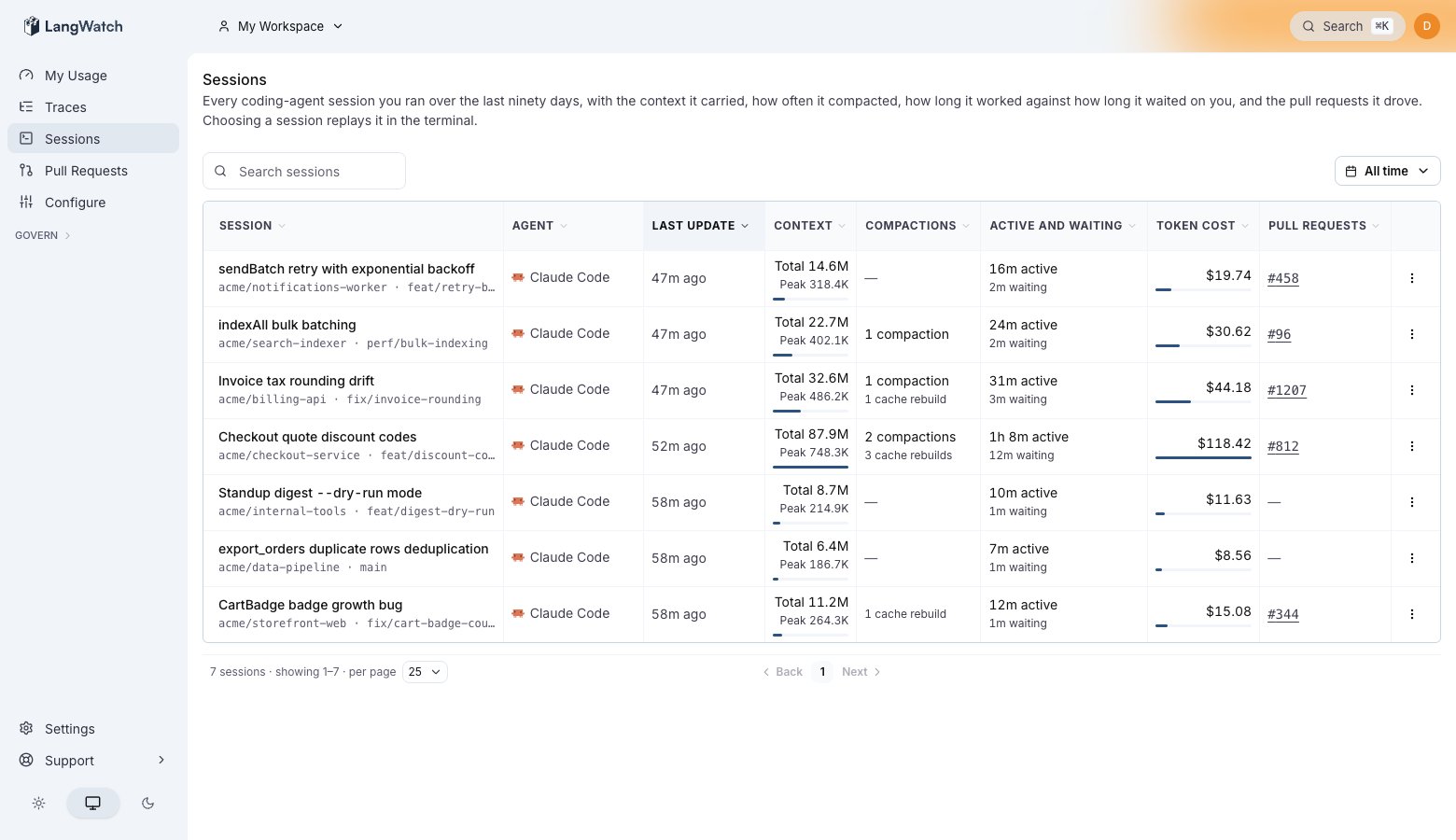 * Your session is on the [sessions list](/docs/coding-agents/sessions), with its cost, the context it carried, and a terminal replay of the conversation.
* Your spend for the month is on the usage cards. See [Usage analytics](/docs/coding-agents/usage-analytics).
* Once the session works on a branch with a pull request, it shows under [Pull requests](/docs/coding-agents/pull-requests).
## Expand from here
* **Run plain commands with reporting on.** `langwatch instrument ` writes the connection and exits, so `claude` without the wrapper reports too. Each agent's page covers it, for example [Claude Code](/docs/coding-agents/claude-code).
* **Send a machine to a team project** with `--project`, or wire servers and CI with no login. See [Team projects](/docs/coding-agents/team-projects) and [Headless machines and CI](/docs/coding-agents/headless-and-ci).
* **Route the model calls through the LangWatch AI Gateway** for budgets, model policies and provider fallback. See the [coding CLI gateway integrations](/docs/ai-gateway/cli/overview).
* **Control what gets stored.** [Privacy](/docs/coding-agents/privacy) states who can read your sessions, and you can drop the conversation content while keeping the cost and token counts.
* Your session is on the [sessions list](/docs/coding-agents/sessions), with its cost, the context it carried, and a terminal replay of the conversation.
* Your spend for the month is on the usage cards. See [Usage analytics](/docs/coding-agents/usage-analytics).
* Once the session works on a branch with a pull request, it shows under [Pull requests](/docs/coding-agents/pull-requests).
## Expand from here
* **Run plain commands with reporting on.** `langwatch instrument ` writes the connection and exits, so `claude` without the wrapper reports too. Each agent's page covers it, for example [Claude Code](/docs/coding-agents/claude-code).
* **Send a machine to a team project** with `--project`, or wire servers and CI with no login. See [Team projects](/docs/coding-agents/team-projects) and [Headless machines and CI](/docs/coding-agents/headless-and-ci).
* **Route the model calls through the LangWatch AI Gateway** for budgets, model policies and provider fallback. See the [coding CLI gateway integrations](/docs/ai-gateway/cli/overview).
* **Control what gets stored.** [Privacy](/docs/coding-agents/privacy) states who can read your sessions, and you can drop the conversation content while keeping the cost and token counts.