> ## Documentation Index
> Fetch the complete documentation index at: https://langwatch.ai/docs/llms.txt
> Use this file to discover all available pages before exploring further.
# DSPy Visualization Quickstart
> Quickly visualize DSPy notebooks and optimization experiments in LangWatch to support debugging and agent evaluation.
[ ](https://colab.research.google.com/github/langwatch/langwatch/blob/main/python-sdk/examples/dspy_visualization.ipynb)
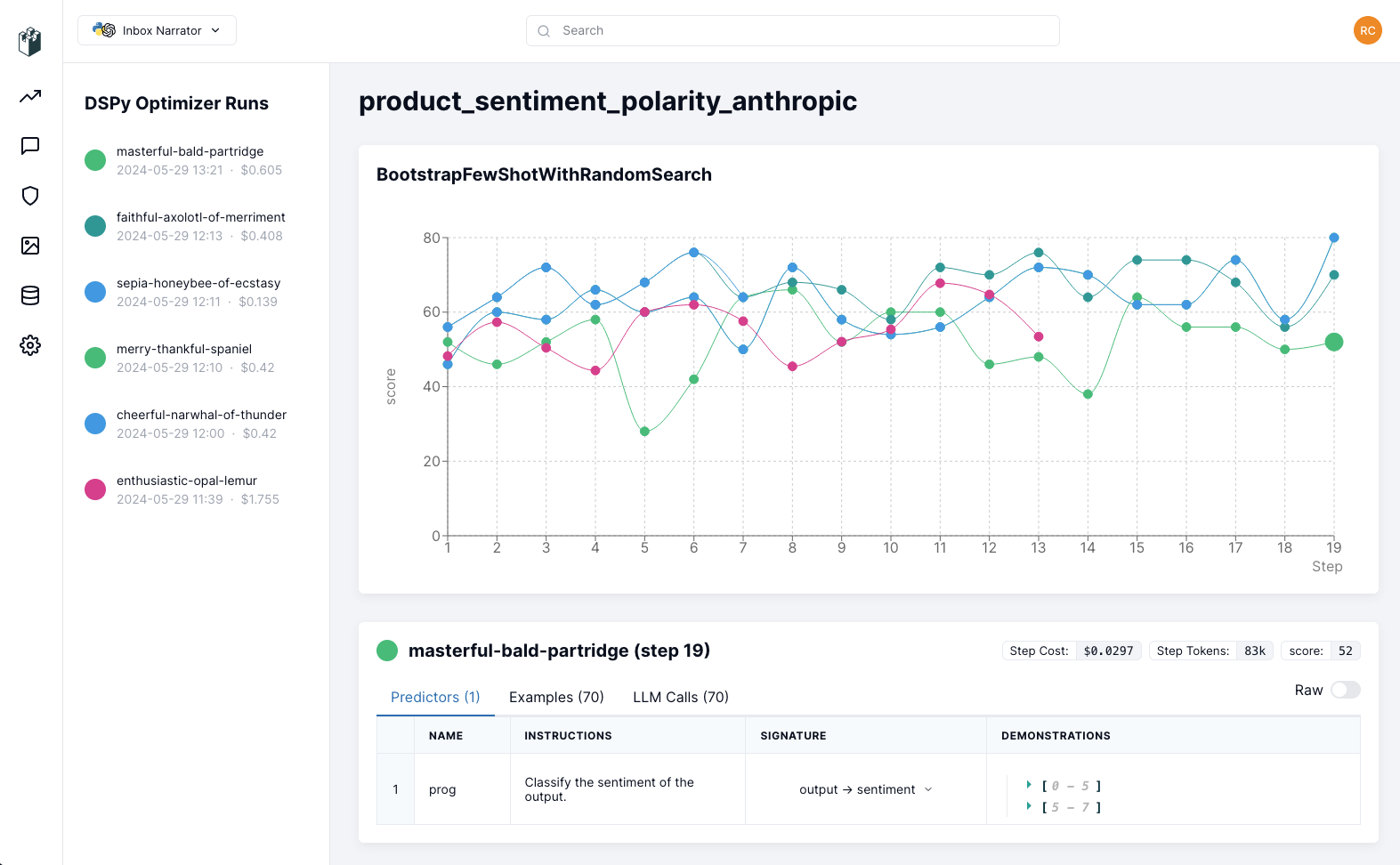
LangWatch DSPy Visualization allows you to start tracking your DSPy experiments in real-time and easily follow the progress, track costs and debug each step.
## 1. Install the Python library
```bash theme={null}
!pip install langwatch
```
```bash theme={null}
pip install langwatch
```
## 2. Login to LangWatch
Import and authenticate the LangWatch SDK:
```python theme={null}
import langwatch
langwatch.login()
```
Be sure to login or create an account on the link that will be displayed, then provide your API key when prompted.
## 3. Start tracking
Before your DSPy program compilation starts, initialize langwatch with your experiment name and the optimizer to be tracked:
```python theme={null}
# Initialize langwatch for this run, to track the optimizer compilation
langwatch.dspy.init(experiment="my-awesome-experiment", optimizer=optimizer)
compiled_rag = optimizer.compile(RAG(), trainset=trainset)
```
## Follow your experiment
Open the link provided when the compilation starts or go to your [LangWatch dashboard](https://app.langwatch.ai) to follow the progress of your experiments:
](https://colab.research.google.com/github/langwatch/langwatch/blob/main/python-sdk/examples/dspy_visualization.ipynb)
LangWatch DSPy Visualization allows you to start tracking your DSPy experiments in real-time and easily follow the progress, track costs and debug each step.
## 1. Install the Python library
```bash theme={null}
!pip install langwatch
```
```bash theme={null}
pip install langwatch
```
## 2. Login to LangWatch
Import and authenticate the LangWatch SDK:
```python theme={null}
import langwatch
langwatch.login()
```
Be sure to login or create an account on the link that will be displayed, then provide your API key when prompted.
## 3. Start tracking
Before your DSPy program compilation starts, initialize langwatch with your experiment name and the optimizer to be tracked:
```python theme={null}
# Initialize langwatch for this run, to track the optimizer compilation
langwatch.dspy.init(experiment="my-awesome-experiment", optimizer=optimizer)
compiled_rag = optimizer.compile(RAG(), trainset=trainset)
```
## Follow your experiment
Open the link provided when the compilation starts or go to your [LangWatch dashboard](https://app.langwatch.ai) to follow the progress of your experiments:
 ## Wrapping up
With your experiments tracked on LangWatch, now it's time to explore how is the training going, take a look at the examples, the llm calls,
the different steps and so on, so you can understand and hypothesize where you could improve your DSPy program, and keep iterating!
When you are ready to deploy your DSPy program, you can monitor the inference traces on LangWatch dashboard as well. Check out the [Python Integration Guide](/docs/integration/python/guide) for more details.
For any questions or issues, feel free to contact our support, join our channel on [Discord](https://discord.com/invite/kT4PhDS2gH) or [open an issue](https://github.com/langwatch/langwatch/issues) on our GitHub.
## Wrapping up
With your experiments tracked on LangWatch, now it's time to explore how is the training going, take a look at the examples, the llm calls,
the different steps and so on, so you can understand and hypothesize where you could improve your DSPy program, and keep iterating!
When you are ready to deploy your DSPy program, you can monitor the inference traces on LangWatch dashboard as well. Check out the [Python Integration Guide](/docs/integration/python/guide) for more details.
For any questions or issues, feel free to contact our support, join our channel on [Discord](https://discord.com/invite/kT4PhDS2gH) or [open an issue](https://github.com/langwatch/langwatch/issues) on our GitHub.