> ## Documentation Index
> Fetch the complete documentation index at: https://langwatch.ai/docs/llms.txt
> Use this file to discover all available pages before exploring further.
# Experiments via SDK
> Run experiments programmatically from notebooks or scripts to batch test your LLM applications.
**Let your agent set this up.** [Copy the evaluations prompt](/docs/skills/code-prompts#set-up-evaluations) into your coding agent to get started automatically.
LangWatch makes it easy to run experiments from code.
Just add a few lines to start tracking your experiments.
## Quickstart
### 1. Install the SDK
```bash theme={null}
pip install langwatch
```
```bash theme={null}
npm install langwatch
# or
pnpm add langwatch
```
### 2. Set your API Key
```python theme={null}
import langwatch
langwatch.login()
```
Be sure to login or create an account on the link that will be displayed, then provide your API key when prompted.
```bash theme={null}
export LANGWATCH_API_KEY=your_api_key
export LANGWATCH_PROJECT_ID=your_project_id # Required for service API keys
```
`LANGWATCH_PROJECT_ID` is required when using a **service API key** (e.g. for CI/CD or multi-project setups). Project API keys obtained via `langwatch.login()` or from the project settings page already have the project context built in.
### 3. Start tracking
```python theme={null}
import langwatch
import pandas as pd
# Load your dataset
df = pd.read_csv("my_dataset.csv")
# Initialize a new experiment
evaluation = langwatch.experiment.init("my-experiment")
# Wrap your loop with evaluation.loop(), and iterate as usual
for idx, row in evaluation.loop(df.iterrows()):
# Run your model or pipeline
response = my_agent(row["question"])
# Log a metric for this sample
evaluation.log("sample_metric", index=idx, score=0.95)
```
```typescript theme={null}
import { LangWatch } from 'langwatch';
// Initialize the SDK
const langwatch = new LangWatch();
// Your dataset
const dataset = [
{ question: "What is 2+2?", expected: "4" },
{ question: "What is the capital of France?", expected: "Paris" },
];
// Initialize evaluation
const evaluation = await langwatch.experiments.init("my-experiment");
// Run evaluation with a callback
await evaluation.run(dataset, async ({ item, index }) => {
// Run your model or pipeline
const response = await myAgent(item.question);
// Log a metric for this sample
evaluation.log("sample_metric", { index, score: 0.95 });
});
```
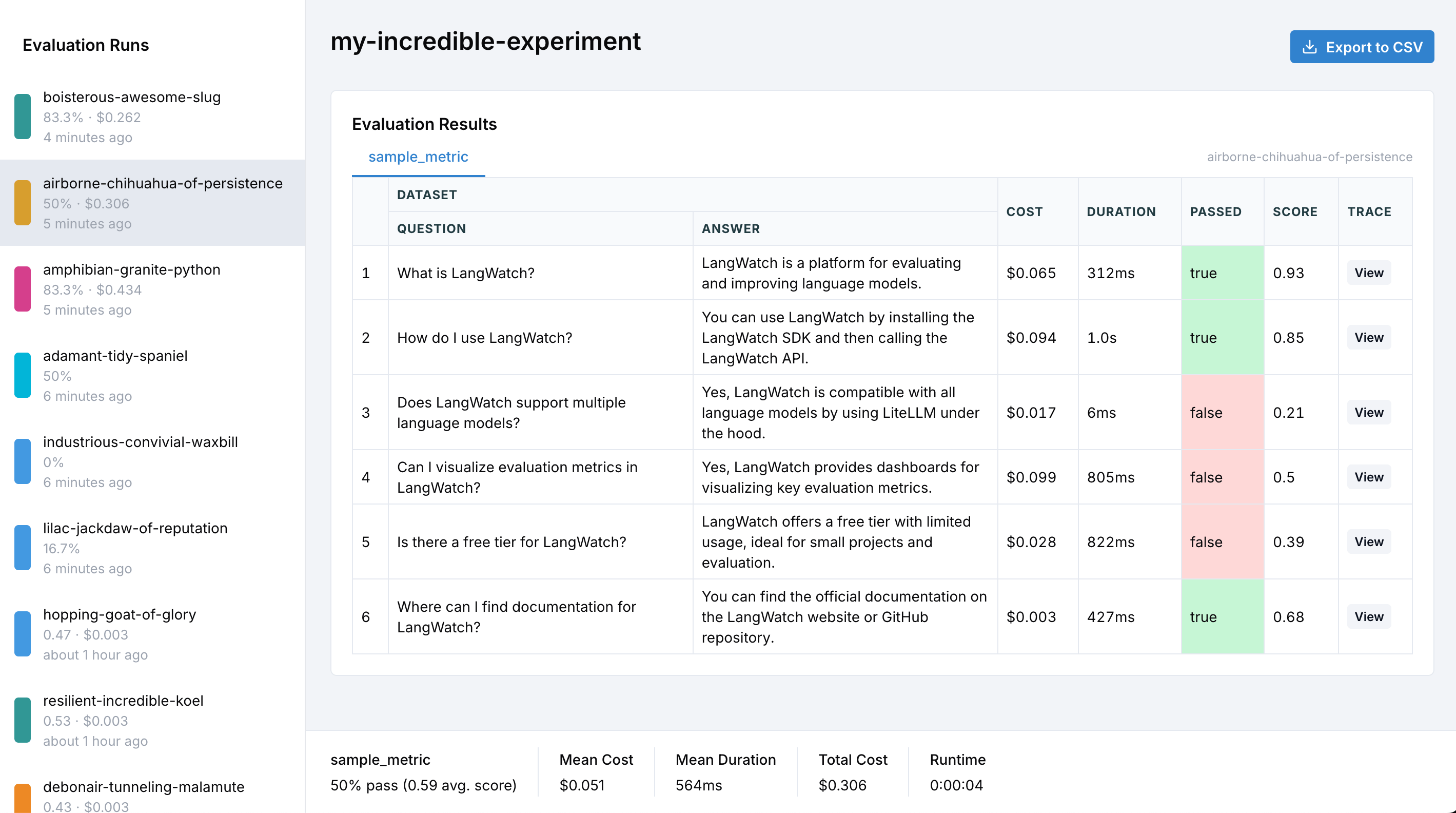
That's it! Your evaluation metrics are now being tracked and visualized in LangWatch.
 ## Core Concepts
### Evaluation Initialization
The evaluation is started by creating an evaluation session with a descriptive name:
```python theme={null}
evaluation = langwatch.experiment.init("rag-pipeline-openai-vs-claude")
```
```typescript theme={null}
const evaluation = await langwatch.experiments.init("rag-pipeline-openai-vs-claude");
```
### Iterating over data
Use `evaluation.loop()` around your iterator so the entries are tracked:
```python theme={null}
for index, row in evaluation.loop(df.iterrows()):
# Your existing evaluation code
```
Use `evaluation.run()` with a callback that receives each item:
```typescript theme={null}
await evaluation.run(dataset, async ({ item, index, span }) => {
// Your existing evaluation code
});
```
The callback receives `item` (the current dataset item), `index` (the current index), and `span` (an OpenTelemetry span for custom tracing).
### Metrics logging
Track any metric you want with `evaluation.log()`:
```python theme={null}
# Numeric scores
evaluation.log("relevance", index=index, score=0.85)
# Boolean pass/fail
evaluation.log("contains_citation", index=index, passed=True)
# Include additional data for debugging
evaluation.log("coherence", index=index, score=0.9,
data={"output": result["text"], "tokens": result["token_count"]})
```
```typescript theme={null}
// Numeric scores
evaluation.log("relevance", { index, score: 0.85 });
// Boolean pass/fail
evaluation.log("contains_citation", { index, passed: true });
// Include additional data for debugging
evaluation.log("coherence", {
index,
score: 0.9,
data: { output: result.text, tokens: result.tokenCount }
});
```
## Comparing Multiple Targets
When comparing different models, prompts, or configurations, use targets to organize your results.
Both SDKs provide a `target()`, `withTarget()` context that automatically captures latency and enables context inference.
Use `evaluation.target()` for automatic latency capture and context inference:
```python theme={null}
evaluation = langwatch.experiment.init("model-comparison")
for index, row in evaluation.loop(df.iterrows()):
def compare_models(index, row):
# Evaluate GPT-5 with automatic latency tracking
with evaluation.target("gpt5-baseline", {"model": "openai/gpt-5"}):
response = call_openai("gpt-5", row["question"])
evaluation.log_response(response) # Store the model output
# Target is auto-inferred inside target()!
evaluation.log("accuracy", index=index,
score=calculate_accuracy(response, row["expected"]))
# Evaluate Claude with automatic latency tracking
with evaluation.target("claude-experiment", {"model": "anthropic/claude-4-opus"}):
response = call_anthropic("claude-4-opus", row["question"])
evaluation.log_response(response)
evaluation.log("accuracy", index=index,
score=calculate_accuracy(response, row["expected"]))
evaluation.submit(compare_models, index, row)
```
`evaluation.target()` automatically captures latency, creates isolated traces per target, and enables context inference so `log()` calls don't need explicit `target` parameters. Use `log_response()` to store the model's output.
Alternatively, use the `target` parameter directly with `evaluation.log()`:
```python theme={null}
evaluation.log(
"accuracy",
index=index,
score=0.95,
target="gpt5-baseline",
metadata={"model": "openai/gpt-5", "temperature": 0.7}
)
```
Use `withTarget()` for automatic latency capture and context inference:
```typescript theme={null}
const evaluation = await langwatch.experiments.init("model-comparison");
await evaluation.run(dataset, async ({ item, index }) => {
// Run targets in parallel with automatic tracing
const [gpt5Result, claudeResult] = await Promise.all([
evaluation.withTarget("gpt5-baseline", { model: "openai/gpt-5" }, async () => {
const response = await callOpenAI("gpt-5", item.question);
// Target and index are auto-inferred inside withTarget()!
evaluation.log("accuracy", { score: calculateAccuracy(response, item.expected) });
return response;
}),
evaluation.withTarget("claude-experiment", { model: "anthropic/claude-4-opus" }, async () => {
const response = await callAnthropic("claude-4-opus", item.question);
evaluation.log("accuracy", { score: calculateAccuracy(response, item.expected) });
return response;
}),
]);
// Latency is automatically captured from each withTarget() span
console.log(`GPT-5: ${gpt5Result.duration}ms, Claude: ${claudeResult.duration}ms`);
});
```
`withTarget()` automatically captures latency, creates isolated traces per target, and enables context inference so `log()` calls don't need explicit `target` or `index` parameters.
### Target Registration
The first time you use a target name, it's automatically registered with the provided metadata:
```python theme={null}
# Using target() - metadata is set when entering the context
with evaluation.target("gpt5", {"model": "gpt-5", "temp": 0.7}):
evaluation.log_response("AI response here") # Store the output
evaluation.log("latency", index=0, score=150) # target auto-inferred
evaluation.log("accuracy", index=0, score=0.95) # target auto-inferred
# Or using explicit target parameter (without target() context)
evaluation.log("latency", index=0, target="gpt5", metadata={"model": "gpt-5", "temp": 0.7})
# Subsequent calls can omit metadata - it's already registered
evaluation.log("accuracy", index=0, target="gpt5", score=0.95)
evaluation.log("latency", index=1, target="gpt5", score=150)
```
```typescript theme={null}
// Using withTarget() - metadata is set once when registering the target
await evaluation.withTarget("gpt5", { model: "gpt-5", temp: 0.7 }, async () => {
evaluation.log("latency", { score: 150 }); // target auto-inferred
evaluation.log("accuracy", { score: 0.95 }); // target auto-inferred
});
// Or using explicit target parameter
evaluation.log("latency", { index: 0, target: "gpt5", metadata: { model: "gpt-5", temp: 0.7 } });
evaluation.log("accuracy", { index: 0, target: "gpt5", score: 0.95 }); // metadata already registered
```
If you provide different metadata for the same target name, an error will be raised.
Use a different target name if you want different configurations.
### Metadata for Comparison
Target metadata is used for comparison charts in the LangWatch UI. You can group results by any metadata field:
```python theme={null}
# Compare different temperatures
for temp in [0.0, 0.5, 0.7, 1.0]:
for index, row in evaluation.loop(df.iterrows()):
response = call_llm(row["question"], temperature=temp)
evaluation.log(
"quality",
index=index,
score=evaluate_quality(response),
target=f"temp-{temp}",
metadata={"model": "gpt-5", "temperature": temp}
)
```
```typescript theme={null}
// Compare different temperatures
for (const temp of [0.0, 0.5, 0.7, 1.0]) {
await evaluation.run(dataset, async ({ item, index }) => {
const response = await callLLM(item.question, { temperature: temp });
evaluation.log("quality", {
index,
score: evaluateQuality(response),
target: `temp-${temp}`,
metadata: { model: "gpt-5", temperature: temp }
});
});
}
```
In the LangWatch UI, you can then visualize how quality varies across temperature values.
## Parallel Execution
LLM calls can be slow. Both SDKs support parallel execution to speed up your evaluations.
Use the built-in parallelization by putting the content of the loop in a function and submitting it:
```python {4,8} theme={null}
evaluation = langwatch.experiment.init("parallel-eval-example")
for index, row in evaluation.loop(df.iterrows(), threads=4):
def task(index, row):
result = agent(row["question"]) # Runs in parallel
evaluation.log("response_quality", index=index, score=0.92)
evaluation.submit(task, index, row)
```
By default, `threads=4`. Adjust based on your API rate limits and system resources.
### Async-native mode
The default `loop()`, `submit()` path above already parallelises, each submitted task runs in a worker thread, so sync and async tasks both speed up with no extra work on your side. That's the right choice for most users.
Reach for `aloop()`, `asubmit()` only when your code is fully async-first and your task relies on async state whose identity is tied to one event loop. The threading path spins up a fresh event loop per worker, so those objects raise `"Future attached to a different loop"` on first use. `aloop`, `asubmit` keep every submitted task on the caller's event loop, so that state stays valid across concurrent items.
```python theme={null}
evaluation = langwatch.experiment.init("async-eval-example")
async def task(index, row):
result = await my_async_agent(row["question"])
evaluation.log("response_quality", index=index, score=0.92)
index = 0
async for row in evaluation.aloop(dataset, concurrency=4):
evaluation.asubmit(task, index, row)
index += 1
```
Sync callables passed to `asubmit` are automatically offloaded to a worker thread so they don't block the event loop for concurrent async siblings.
Pass the `concurrency` option to control how many items run in parallel:
```typescript theme={null}
await evaluation.run(dataset, async ({ item, index }) => {
const result = await agent(item.question); // Runs in parallel
evaluation.log("response_quality", { index, score: 0.92 });
}, { concurrency: 4 });
```
By default, `concurrency=4`. Adjust based on your API rate limits and system resources.
## Built-in Evaluators
LangWatch provides a comprehensive suite of evaluation metrics out of the box.
Use `evaluation.run()` to leverage pre-built evaluators:
```python theme={null}
for index, row in evaluation.loop(df.iterrows()):
def task(index, row):
response, contexts = execute_rag_pipeline(row["question"])
# Use built-in RAGAS faithfulness evaluator
evaluation.evaluate(
"ragas/faithfulness",
index=index,
data={
"input": row["question"],
"output": response,
"contexts": contexts,
},
settings={
"model": "openai/gpt-5",
"max_tokens": 2048,
}
)
# Log custom metrics alongside
evaluation.log("confidence", index=index, score=response.confidence)
evaluation.submit(task, index, row)
```
Use `evaluation.evaluate()` to leverage pre-built evaluators:
```typescript theme={null}
await evaluation.run(dataset, async ({ item, index }) => {
const { response, contexts } = await executeRagPipeline(item.question);
// Use built-in RAGAS faithfulness evaluator
await evaluation.evaluate("ragas/faithfulness", {
index,
data: {
input: item.question,
output: response,
contexts,
},
settings: {
model: "openai/gpt-5",
max_tokens: 2048,
}
});
// Log custom metrics alongside
evaluation.log("confidence", { index, score: response.confidence });
});
```
Browse our complete list of [available evaluators](/docs/evaluations/evaluators/list) including metrics for RAG quality, hallucination detection, safety, and more.
### Pairwise Compare
`langevals/pairwise_compare` compares two candidate outputs for the same input and asks a judge model to pick the better one. This is useful when you want to compare two prompts, models, or agent configurations directly instead of scoring each one independently.
The example below was verified against the live SDK path using `evaluation.evaluate("langevals/pairwise_compare", ...)`.
```python theme={null}
import langwatch
ROWS = [
{
"input": "Write a function that checks if a given integer is a prime number.",
"golden": "def is_prime(n): ...",
"candidate_a_id": "variant-a",
"candidate_a_output": "def is_prime(n: int) -> bool: ...",
"candidate_b_id": "variant-b",
"candidate_b_output": "def is_prime(n: int) -> bool: ...",
}
]
evaluation = langwatch.experiment.init("pairwise-sdk-verification")
for index, row in evaluation.loop(list(enumerate(ROWS))):
evaluation.evaluate(
"langevals/pairwise_compare",
index=index,
data={
"input": row["input"],
"golden": row["golden"],
"candidate_a_id": row["candidate_a_id"],
"candidate_a_output": row["candidate_a_output"],
"candidate_b_id": row["candidate_b_id"],
"candidate_b_output": row["candidate_b_output"],
},
settings={
"model": "openai/gpt-5-mini",
"has_golden_answer": True,
"swap_and_confirm": True,
"allow_tie": True,
"include_metrics": ["cost", "duration"],
},
)
evaluation.print_summary()
```
```typescript theme={null}
import { LangWatch } from 'langwatch';
const langwatch = new LangWatch();
const rows = [
{
input: "Write a function that checks if a given integer is a prime number.",
golden: "function isPrime(n) { ... }",
candidateAId: "variant-a",
candidateAOutput: "function isPrime(n) { ... }",
candidateBId: "variant-b",
candidateBOutput: "function isPrime(n) { ... }",
},
];
const evaluation = await langwatch.experiments.init("pairwise-sdk-verification");
await evaluation.run(rows, async ({ item, index }) => {
await evaluation.evaluate("langevals/pairwise_compare", {
index,
data: {
input: item.input,
golden: item.golden,
candidate_a_id: item.candidateAId,
candidate_a_output: item.candidateAOutput,
candidate_b_id: item.candidateBId,
candidate_b_output: item.candidateBOutput,
},
settings: {
model: "openai/gpt-5-mini",
has_golden_answer: true,
swap_and_confirm: true,
allow_tie: true,
include_metrics: ["cost", "duration"],
},
});
});
evaluation.printSummary();
```
`swap_and_confirm` performs two judge calls with A/B order reversed on the second pass. If the two calls disagree, the evaluator returns a tie. Set `has_golden_answer` to `false` when you want a pure head-to-head comparison without a reference answer.
The SDK result also records the pairwise judge's own evaluator cost and duration. In exported results, those appear under the evaluator columns for `langevals/pairwise_compare`; they are separate from `include_metrics`, which injects each candidate target's cost or duration into the judge prompt.
If you already have your own local pairwise judge, publish its result with `evaluation.log(...)` by sending a `score`, `label`, and `details`. Those custom results are tracked like any other SDK metric. The dedicated pairwise column visualization currently comes from the built-in Pairwise Compare evaluator configuration.
## Complete Example
```python theme={null}
import langwatch
# Load dataset from LangWatch
df = langwatch.dataset.get_dataset("your-dataset-id").to_pandas()
# Initialize evaluation
evaluation = langwatch.experiment.init("rag-pipeline-evaluation-v2")
# Run evaluation with parallelization
for index, row in evaluation.loop(df.iterrows(), threads=8):
def task(index, row):
# Compare two RAG configurations
with evaluation.target("rag-v1", {"model": "gpt-5", "retriever": "dense"}):
response, contexts = execute_rag_pipeline(row["question"], version="v1")
evaluation.log_response(response.text) # Store the output
# Use LangWatch evaluators - target auto-inferred
evaluation.evaluate(
"ragas/faithfulness",
index=index,
data={"input": row["question"], "output": response, "contexts": contexts},
settings={"model": "openai/gpt-5", "max_tokens": 2048}
)
# Log custom metrics - latency auto-captured by target()
evaluation.log("response_quality", index=index, score=response.quality)
with evaluation.target("rag-v2", {"model": "gpt-5", "retriever": "hybrid"}):
response, contexts = execute_rag_pipeline(row["question"], version="v2")
evaluation.log_response(response.text)
evaluation.evaluate(
"ragas/faithfulness",
index=index,
data={"input": row["question"], "output": response, "contexts": contexts},
settings={"model": "openai/gpt-5", "max_tokens": 2048}
)
evaluation.log("response_quality", index=index, score=response.quality)
evaluation.submit(task, index, row)
```
```typescript theme={null}
import { LangWatch } from 'langwatch';
const langwatch = new LangWatch();
// Your dataset (or load from LangWatch)
const dataset = await loadDataset();
// Initialize evaluation
const evaluation = await langwatch.experiments.init("rag-pipeline-evaluation-v2");
// Run evaluation with parallelization
await evaluation.run(dataset, async ({ item, index }) => {
// Compare multiple RAG configurations in parallel
await Promise.all([
evaluation.withTarget("rag-v1", { model: "gpt-5", retriever: "dense" }, async () => {
const { response, contexts } = await executeRagPipeline(item.question, "v1");
// Use LangWatch evaluators - target auto-inferred
await evaluation.evaluate("ragas/faithfulness", {
data: { input: item.question, output: response, contexts },
settings: { model: "openai/gpt-5", max_tokens: 2048 }
});
// Log custom metrics - latency auto-captured by withTarget()
evaluation.log("response_quality", { score: response.quality });
}),
evaluation.withTarget("rag-v2", { model: "gpt-5", retriever: "hybrid" }, async () => {
const { response, contexts } = await executeRagPipeline(item.question, "v2");
await evaluation.evaluate("ragas/faithfulness", {
data: { input: item.question, output: response, contexts },
settings: { model: "openai/gpt-5", max_tokens: 2048 }
});
evaluation.log("response_quality", { score: response.quality });
}),
]);
}, { concurrency: 8 });
```
## Tracing Your Pipeline
To get complete visibility into your LLM pipeline, add tracing to your functions:
```python theme={null}
@langwatch.trace()
def agent(question):
# Your RAG pipeline, chain, or agent logic
context = retrieve_documents(question)
completion = llm.generate(question, context)
return {"text": completion.text, "context": context}
for index, row in evaluation.loop(df.iterrows()):
result = agent(row["question"])
evaluation.log("accuracy", index=index, score=0.9)
```
Learn more in our [Python Integration Guide](/docs/integration/python/guide).
```typescript theme={null}
import { getLangWatchTracer } from 'langwatch';
const tracer = getLangWatchTracer('my-app');
const agent = async (question: string) => {
return tracer.withActiveSpan('agent', async (span) => {
// Your RAG pipeline, chain, or agent logic
const context = await retrieveDocuments(question);
const completion = await llm.generate(question, context);
return { text: completion.text, context };
});
};
await evaluation.run(dataset, async ({ item, index }) => {
const result = await agent(item.question);
evaluation.log("accuracy", { index, score: 0.9 });
});
```
Learn more in our [TypeScript Integration Guide](/docs/integration/typescript/guide).
With tracing enabled, you can click through from any evaluation result to see the complete execution trace, including all LLM calls, prompts, and intermediate steps.
## Exporting Results to CSV
After running your evaluations, you can export results to CSV for further analysis in spreadsheet tools like Excel or Google Sheets.
### How to Export
Click the **Export to CSV** button in the top-right corner of the evaluation results page to download a complete CSV file with all your data.
### CSV Structure
The exported CSV contains comprehensive data organized by dataset rows and targets. Here's the complete column structure:
#### Row Index
| Column | Description |
| ------- | ------------------------------------------------------ |
| `index` | Row number (0-based) for cross-referencing with the UI |
#### Dataset Columns
All columns from your input dataset are included with their original names.
#### Target Columns (per target)
For each target in your evaluation, the following columns are exported:
| Column Pattern | Description | Example |
| ------------------------- | -------------------------------------------- | --------------------------------------- |
| `{target}_model` | Model used for this target | `gpt-4_model` → `openai/gpt-4` |
| `{target}_prompt_id` | Prompt configuration ID (for prompt targets) | `gpt-4_prompt_id` → `prompt-abc123` |
| `{target}_prompt_version` | Prompt version number | `gpt-4_prompt_version` → `2` |
| `{target}_{metadata_key}` | Custom metadata values | `gpt-4_temperature` → `0.7` |
| `{target}_output` | Model output (or individual output fields) | `gpt-4_output` → `"The answer is 42"` |
| `{target}_cost` | Execution cost in USD | `gpt-4_cost` → `0.0012` |
| `{target}_duration_ms` | Execution time in milliseconds | `gpt-4_duration_ms` → `1250` |
| `{target}_error` | Error message if execution failed | `gpt-4_error` → `"Rate limit exceeded"` |
| `{target}_trace_id` | Trace ID for viewing execution details | `gpt-4_trace_id` → `trace_abc123` |
#### Evaluator Columns (per target, per evaluator)
For each evaluator applied to a target:
| Column Pattern | Description | Example |
| ---------------------------------- | --------------------------------- | ------------------------------------------------------- |
| `{target}_{evaluator}_score` | Numeric score (0-1) | `gpt-4_faithfulness_score` → `0.95` |
| `{target}_{evaluator}_passed` | Boolean pass/fail | `gpt-4_faithfulness_passed` → `true` |
| `{target}_{evaluator}_label` | Classification label | `gpt-4_sentiment_label` → `positive` |
| `{target}_{evaluator}_details` | Additional details or explanation | `gpt-4_faithfulness_details` → `"All claims supported"` |
| `{target}_{evaluator}_cost` | Cost of running the evaluator | `gpt-4_faithfulness_cost` → `0.0005` |
| `{target}_{evaluator}_duration_ms` | Evaluator execution time | `gpt-4_faithfulness_duration_ms` → `850` |
For `langevals/pairwise_compare`, the evaluator cost and duration columns describe the pairwise judge run itself. When `swap_and_confirm` is enabled, that judge run may include two model calls.
### Example CSV Output
For an evaluation comparing GPT-4 and Claude with a faithfulness evaluator:
```csv theme={null}
index,question,expected,gpt-4_model,gpt-4_output,gpt-4_cost,gpt-4_duration_ms,gpt-4_faithfulness_score,gpt-4_faithfulness_passed,claude_model,claude_output,claude_cost,claude_duration_ms,claude_faithfulness_score,claude_faithfulness_passed
0,What is 2+2?,4,openai/gpt-4,The answer is 4,0.0012,1250,0.95,true,anthropic/claude-3,2+2 equals 4,0.0008,980,0.92,true
1,Capital of France?,Paris,openai/gpt-4,Paris is the capital of France,0.0015,1100,0.98,true,anthropic/claude-3,The capital of France is Paris,0.0010,890,0.97,true
```
### Using the Data
The CSV export enables powerful analysis workflows:
Use spreadsheet filters to compare specific models or configurations:
* Filter by `{target}_model` to analyze specific model performance
* Sort by `{target}_{evaluator}_score` to find best/worst performing samples
* Filter by `{target}_error` to identify failed executions
Calculate aggregate metrics across your evaluation:
* Sum `{target}_cost` columns for total evaluation cost per model
* Average `{target}_duration_ms` to compare response times
* Identify outliers with high latency or cost
Analyze performance across different configurations:
* Pivot tables by temperature, max\_tokens, or custom metadata
* Compare prompt versions side-by-side
* Track improvements across iterations
Investigate problematic samples:
* Filter rows where `{target}_error` is not empty
* Cross-reference `index` with the UI for detailed inspection
* Click through to traces using `{target}_trace_id`
All column headers are normalized to lowercase with spaces replaced by underscores for consistency and compatibility with data analysis tools.
## Running in CI/CD
You can run SDK experiments in your CI/CD pipeline. The `print_summary()` method outputs a structured summary and exits with code 1 if any evaluations fail:
```python theme={null}
import langwatch
experiment = langwatch.experiment.init("ci-quality-check")
for idx, row in experiment.loop(dataset.iterrows()):
response = my_llm(row["input"])
experiment.evaluate("ragas/faithfulness", index=idx, data={...})
# This will exit with code 1 if any evaluations failed
experiment.print_summary()
```
See [CI/CD Integration](/docs/evaluations/experiments/ci-cd) for complete examples with GitHub Actions, GitLab CI, and more.
## What's Next?
Run experiments in your CI/CD pipeline
Explore all available evaluation metrics
Learn about dataset management
Check out example notebooks
## Core Concepts
### Evaluation Initialization
The evaluation is started by creating an evaluation session with a descriptive name:
```python theme={null}
evaluation = langwatch.experiment.init("rag-pipeline-openai-vs-claude")
```
```typescript theme={null}
const evaluation = await langwatch.experiments.init("rag-pipeline-openai-vs-claude");
```
### Iterating over data
Use `evaluation.loop()` around your iterator so the entries are tracked:
```python theme={null}
for index, row in evaluation.loop(df.iterrows()):
# Your existing evaluation code
```
Use `evaluation.run()` with a callback that receives each item:
```typescript theme={null}
await evaluation.run(dataset, async ({ item, index, span }) => {
// Your existing evaluation code
});
```
The callback receives `item` (the current dataset item), `index` (the current index), and `span` (an OpenTelemetry span for custom tracing).
### Metrics logging
Track any metric you want with `evaluation.log()`:
```python theme={null}
# Numeric scores
evaluation.log("relevance", index=index, score=0.85)
# Boolean pass/fail
evaluation.log("contains_citation", index=index, passed=True)
# Include additional data for debugging
evaluation.log("coherence", index=index, score=0.9,
data={"output": result["text"], "tokens": result["token_count"]})
```
```typescript theme={null}
// Numeric scores
evaluation.log("relevance", { index, score: 0.85 });
// Boolean pass/fail
evaluation.log("contains_citation", { index, passed: true });
// Include additional data for debugging
evaluation.log("coherence", {
index,
score: 0.9,
data: { output: result.text, tokens: result.tokenCount }
});
```
## Comparing Multiple Targets
When comparing different models, prompts, or configurations, use targets to organize your results.
Both SDKs provide a `target()`, `withTarget()` context that automatically captures latency and enables context inference.
Use `evaluation.target()` for automatic latency capture and context inference:
```python theme={null}
evaluation = langwatch.experiment.init("model-comparison")
for index, row in evaluation.loop(df.iterrows()):
def compare_models(index, row):
# Evaluate GPT-5 with automatic latency tracking
with evaluation.target("gpt5-baseline", {"model": "openai/gpt-5"}):
response = call_openai("gpt-5", row["question"])
evaluation.log_response(response) # Store the model output
# Target is auto-inferred inside target()!
evaluation.log("accuracy", index=index,
score=calculate_accuracy(response, row["expected"]))
# Evaluate Claude with automatic latency tracking
with evaluation.target("claude-experiment", {"model": "anthropic/claude-4-opus"}):
response = call_anthropic("claude-4-opus", row["question"])
evaluation.log_response(response)
evaluation.log("accuracy", index=index,
score=calculate_accuracy(response, row["expected"]))
evaluation.submit(compare_models, index, row)
```
`evaluation.target()` automatically captures latency, creates isolated traces per target, and enables context inference so `log()` calls don't need explicit `target` parameters. Use `log_response()` to store the model's output.
Alternatively, use the `target` parameter directly with `evaluation.log()`:
```python theme={null}
evaluation.log(
"accuracy",
index=index,
score=0.95,
target="gpt5-baseline",
metadata={"model": "openai/gpt-5", "temperature": 0.7}
)
```
Use `withTarget()` for automatic latency capture and context inference:
```typescript theme={null}
const evaluation = await langwatch.experiments.init("model-comparison");
await evaluation.run(dataset, async ({ item, index }) => {
// Run targets in parallel with automatic tracing
const [gpt5Result, claudeResult] = await Promise.all([
evaluation.withTarget("gpt5-baseline", { model: "openai/gpt-5" }, async () => {
const response = await callOpenAI("gpt-5", item.question);
// Target and index are auto-inferred inside withTarget()!
evaluation.log("accuracy", { score: calculateAccuracy(response, item.expected) });
return response;
}),
evaluation.withTarget("claude-experiment", { model: "anthropic/claude-4-opus" }, async () => {
const response = await callAnthropic("claude-4-opus", item.question);
evaluation.log("accuracy", { score: calculateAccuracy(response, item.expected) });
return response;
}),
]);
// Latency is automatically captured from each withTarget() span
console.log(`GPT-5: ${gpt5Result.duration}ms, Claude: ${claudeResult.duration}ms`);
});
```
`withTarget()` automatically captures latency, creates isolated traces per target, and enables context inference so `log()` calls don't need explicit `target` or `index` parameters.
### Target Registration
The first time you use a target name, it's automatically registered with the provided metadata:
```python theme={null}
# Using target() - metadata is set when entering the context
with evaluation.target("gpt5", {"model": "gpt-5", "temp": 0.7}):
evaluation.log_response("AI response here") # Store the output
evaluation.log("latency", index=0, score=150) # target auto-inferred
evaluation.log("accuracy", index=0, score=0.95) # target auto-inferred
# Or using explicit target parameter (without target() context)
evaluation.log("latency", index=0, target="gpt5", metadata={"model": "gpt-5", "temp": 0.7})
# Subsequent calls can omit metadata - it's already registered
evaluation.log("accuracy", index=0, target="gpt5", score=0.95)
evaluation.log("latency", index=1, target="gpt5", score=150)
```
```typescript theme={null}
// Using withTarget() - metadata is set once when registering the target
await evaluation.withTarget("gpt5", { model: "gpt-5", temp: 0.7 }, async () => {
evaluation.log("latency", { score: 150 }); // target auto-inferred
evaluation.log("accuracy", { score: 0.95 }); // target auto-inferred
});
// Or using explicit target parameter
evaluation.log("latency", { index: 0, target: "gpt5", metadata: { model: "gpt-5", temp: 0.7 } });
evaluation.log("accuracy", { index: 0, target: "gpt5", score: 0.95 }); // metadata already registered
```
If you provide different metadata for the same target name, an error will be raised.
Use a different target name if you want different configurations.
### Metadata for Comparison
Target metadata is used for comparison charts in the LangWatch UI. You can group results by any metadata field:
```python theme={null}
# Compare different temperatures
for temp in [0.0, 0.5, 0.7, 1.0]:
for index, row in evaluation.loop(df.iterrows()):
response = call_llm(row["question"], temperature=temp)
evaluation.log(
"quality",
index=index,
score=evaluate_quality(response),
target=f"temp-{temp}",
metadata={"model": "gpt-5", "temperature": temp}
)
```
```typescript theme={null}
// Compare different temperatures
for (const temp of [0.0, 0.5, 0.7, 1.0]) {
await evaluation.run(dataset, async ({ item, index }) => {
const response = await callLLM(item.question, { temperature: temp });
evaluation.log("quality", {
index,
score: evaluateQuality(response),
target: `temp-${temp}`,
metadata: { model: "gpt-5", temperature: temp }
});
});
}
```
In the LangWatch UI, you can then visualize how quality varies across temperature values.
## Parallel Execution
LLM calls can be slow. Both SDKs support parallel execution to speed up your evaluations.
Use the built-in parallelization by putting the content of the loop in a function and submitting it:
```python {4,8} theme={null}
evaluation = langwatch.experiment.init("parallel-eval-example")
for index, row in evaluation.loop(df.iterrows(), threads=4):
def task(index, row):
result = agent(row["question"]) # Runs in parallel
evaluation.log("response_quality", index=index, score=0.92)
evaluation.submit(task, index, row)
```
By default, `threads=4`. Adjust based on your API rate limits and system resources.
### Async-native mode
The default `loop()`, `submit()` path above already parallelises, each submitted task runs in a worker thread, so sync and async tasks both speed up with no extra work on your side. That's the right choice for most users.
Reach for `aloop()`, `asubmit()` only when your code is fully async-first and your task relies on async state whose identity is tied to one event loop. The threading path spins up a fresh event loop per worker, so those objects raise `"Future attached to a different loop"` on first use. `aloop`, `asubmit` keep every submitted task on the caller's event loop, so that state stays valid across concurrent items.
```python theme={null}
evaluation = langwatch.experiment.init("async-eval-example")
async def task(index, row):
result = await my_async_agent(row["question"])
evaluation.log("response_quality", index=index, score=0.92)
index = 0
async for row in evaluation.aloop(dataset, concurrency=4):
evaluation.asubmit(task, index, row)
index += 1
```
Sync callables passed to `asubmit` are automatically offloaded to a worker thread so they don't block the event loop for concurrent async siblings.
Pass the `concurrency` option to control how many items run in parallel:
```typescript theme={null}
await evaluation.run(dataset, async ({ item, index }) => {
const result = await agent(item.question); // Runs in parallel
evaluation.log("response_quality", { index, score: 0.92 });
}, { concurrency: 4 });
```
By default, `concurrency=4`. Adjust based on your API rate limits and system resources.
## Built-in Evaluators
LangWatch provides a comprehensive suite of evaluation metrics out of the box.
Use `evaluation.run()` to leverage pre-built evaluators:
```python theme={null}
for index, row in evaluation.loop(df.iterrows()):
def task(index, row):
response, contexts = execute_rag_pipeline(row["question"])
# Use built-in RAGAS faithfulness evaluator
evaluation.evaluate(
"ragas/faithfulness",
index=index,
data={
"input": row["question"],
"output": response,
"contexts": contexts,
},
settings={
"model": "openai/gpt-5",
"max_tokens": 2048,
}
)
# Log custom metrics alongside
evaluation.log("confidence", index=index, score=response.confidence)
evaluation.submit(task, index, row)
```
Use `evaluation.evaluate()` to leverage pre-built evaluators:
```typescript theme={null}
await evaluation.run(dataset, async ({ item, index }) => {
const { response, contexts } = await executeRagPipeline(item.question);
// Use built-in RAGAS faithfulness evaluator
await evaluation.evaluate("ragas/faithfulness", {
index,
data: {
input: item.question,
output: response,
contexts,
},
settings: {
model: "openai/gpt-5",
max_tokens: 2048,
}
});
// Log custom metrics alongside
evaluation.log("confidence", { index, score: response.confidence });
});
```
Browse our complete list of [available evaluators](/docs/evaluations/evaluators/list) including metrics for RAG quality, hallucination detection, safety, and more.
### Pairwise Compare
`langevals/pairwise_compare` compares two candidate outputs for the same input and asks a judge model to pick the better one. This is useful when you want to compare two prompts, models, or agent configurations directly instead of scoring each one independently.
The example below was verified against the live SDK path using `evaluation.evaluate("langevals/pairwise_compare", ...)`.
```python theme={null}
import langwatch
ROWS = [
{
"input": "Write a function that checks if a given integer is a prime number.",
"golden": "def is_prime(n): ...",
"candidate_a_id": "variant-a",
"candidate_a_output": "def is_prime(n: int) -> bool: ...",
"candidate_b_id": "variant-b",
"candidate_b_output": "def is_prime(n: int) -> bool: ...",
}
]
evaluation = langwatch.experiment.init("pairwise-sdk-verification")
for index, row in evaluation.loop(list(enumerate(ROWS))):
evaluation.evaluate(
"langevals/pairwise_compare",
index=index,
data={
"input": row["input"],
"golden": row["golden"],
"candidate_a_id": row["candidate_a_id"],
"candidate_a_output": row["candidate_a_output"],
"candidate_b_id": row["candidate_b_id"],
"candidate_b_output": row["candidate_b_output"],
},
settings={
"model": "openai/gpt-5-mini",
"has_golden_answer": True,
"swap_and_confirm": True,
"allow_tie": True,
"include_metrics": ["cost", "duration"],
},
)
evaluation.print_summary()
```
```typescript theme={null}
import { LangWatch } from 'langwatch';
const langwatch = new LangWatch();
const rows = [
{
input: "Write a function that checks if a given integer is a prime number.",
golden: "function isPrime(n) { ... }",
candidateAId: "variant-a",
candidateAOutput: "function isPrime(n) { ... }",
candidateBId: "variant-b",
candidateBOutput: "function isPrime(n) { ... }",
},
];
const evaluation = await langwatch.experiments.init("pairwise-sdk-verification");
await evaluation.run(rows, async ({ item, index }) => {
await evaluation.evaluate("langevals/pairwise_compare", {
index,
data: {
input: item.input,
golden: item.golden,
candidate_a_id: item.candidateAId,
candidate_a_output: item.candidateAOutput,
candidate_b_id: item.candidateBId,
candidate_b_output: item.candidateBOutput,
},
settings: {
model: "openai/gpt-5-mini",
has_golden_answer: true,
swap_and_confirm: true,
allow_tie: true,
include_metrics: ["cost", "duration"],
},
});
});
evaluation.printSummary();
```
`swap_and_confirm` performs two judge calls with A/B order reversed on the second pass. If the two calls disagree, the evaluator returns a tie. Set `has_golden_answer` to `false` when you want a pure head-to-head comparison without a reference answer.
The SDK result also records the pairwise judge's own evaluator cost and duration. In exported results, those appear under the evaluator columns for `langevals/pairwise_compare`; they are separate from `include_metrics`, which injects each candidate target's cost or duration into the judge prompt.
If you already have your own local pairwise judge, publish its result with `evaluation.log(...)` by sending a `score`, `label`, and `details`. Those custom results are tracked like any other SDK metric. The dedicated pairwise column visualization currently comes from the built-in Pairwise Compare evaluator configuration.
## Complete Example
```python theme={null}
import langwatch
# Load dataset from LangWatch
df = langwatch.dataset.get_dataset("your-dataset-id").to_pandas()
# Initialize evaluation
evaluation = langwatch.experiment.init("rag-pipeline-evaluation-v2")
# Run evaluation with parallelization
for index, row in evaluation.loop(df.iterrows(), threads=8):
def task(index, row):
# Compare two RAG configurations
with evaluation.target("rag-v1", {"model": "gpt-5", "retriever": "dense"}):
response, contexts = execute_rag_pipeline(row["question"], version="v1")
evaluation.log_response(response.text) # Store the output
# Use LangWatch evaluators - target auto-inferred
evaluation.evaluate(
"ragas/faithfulness",
index=index,
data={"input": row["question"], "output": response, "contexts": contexts},
settings={"model": "openai/gpt-5", "max_tokens": 2048}
)
# Log custom metrics - latency auto-captured by target()
evaluation.log("response_quality", index=index, score=response.quality)
with evaluation.target("rag-v2", {"model": "gpt-5", "retriever": "hybrid"}):
response, contexts = execute_rag_pipeline(row["question"], version="v2")
evaluation.log_response(response.text)
evaluation.evaluate(
"ragas/faithfulness",
index=index,
data={"input": row["question"], "output": response, "contexts": contexts},
settings={"model": "openai/gpt-5", "max_tokens": 2048}
)
evaluation.log("response_quality", index=index, score=response.quality)
evaluation.submit(task, index, row)
```
```typescript theme={null}
import { LangWatch } from 'langwatch';
const langwatch = new LangWatch();
// Your dataset (or load from LangWatch)
const dataset = await loadDataset();
// Initialize evaluation
const evaluation = await langwatch.experiments.init("rag-pipeline-evaluation-v2");
// Run evaluation with parallelization
await evaluation.run(dataset, async ({ item, index }) => {
// Compare multiple RAG configurations in parallel
await Promise.all([
evaluation.withTarget("rag-v1", { model: "gpt-5", retriever: "dense" }, async () => {
const { response, contexts } = await executeRagPipeline(item.question, "v1");
// Use LangWatch evaluators - target auto-inferred
await evaluation.evaluate("ragas/faithfulness", {
data: { input: item.question, output: response, contexts },
settings: { model: "openai/gpt-5", max_tokens: 2048 }
});
// Log custom metrics - latency auto-captured by withTarget()
evaluation.log("response_quality", { score: response.quality });
}),
evaluation.withTarget("rag-v2", { model: "gpt-5", retriever: "hybrid" }, async () => {
const { response, contexts } = await executeRagPipeline(item.question, "v2");
await evaluation.evaluate("ragas/faithfulness", {
data: { input: item.question, output: response, contexts },
settings: { model: "openai/gpt-5", max_tokens: 2048 }
});
evaluation.log("response_quality", { score: response.quality });
}),
]);
}, { concurrency: 8 });
```
## Tracing Your Pipeline
To get complete visibility into your LLM pipeline, add tracing to your functions:
```python theme={null}
@langwatch.trace()
def agent(question):
# Your RAG pipeline, chain, or agent logic
context = retrieve_documents(question)
completion = llm.generate(question, context)
return {"text": completion.text, "context": context}
for index, row in evaluation.loop(df.iterrows()):
result = agent(row["question"])
evaluation.log("accuracy", index=index, score=0.9)
```
Learn more in our [Python Integration Guide](/docs/integration/python/guide).
```typescript theme={null}
import { getLangWatchTracer } from 'langwatch';
const tracer = getLangWatchTracer('my-app');
const agent = async (question: string) => {
return tracer.withActiveSpan('agent', async (span) => {
// Your RAG pipeline, chain, or agent logic
const context = await retrieveDocuments(question);
const completion = await llm.generate(question, context);
return { text: completion.text, context };
});
};
await evaluation.run(dataset, async ({ item, index }) => {
const result = await agent(item.question);
evaluation.log("accuracy", { index, score: 0.9 });
});
```
Learn more in our [TypeScript Integration Guide](/docs/integration/typescript/guide).
With tracing enabled, you can click through from any evaluation result to see the complete execution trace, including all LLM calls, prompts, and intermediate steps.
## Exporting Results to CSV
After running your evaluations, you can export results to CSV for further analysis in spreadsheet tools like Excel or Google Sheets.
### How to Export
Click the **Export to CSV** button in the top-right corner of the evaluation results page to download a complete CSV file with all your data.
### CSV Structure
The exported CSV contains comprehensive data organized by dataset rows and targets. Here's the complete column structure:
#### Row Index
| Column | Description |
| ------- | ------------------------------------------------------ |
| `index` | Row number (0-based) for cross-referencing with the UI |
#### Dataset Columns
All columns from your input dataset are included with their original names.
#### Target Columns (per target)
For each target in your evaluation, the following columns are exported:
| Column Pattern | Description | Example |
| ------------------------- | -------------------------------------------- | --------------------------------------- |
| `{target}_model` | Model used for this target | `gpt-4_model` → `openai/gpt-4` |
| `{target}_prompt_id` | Prompt configuration ID (for prompt targets) | `gpt-4_prompt_id` → `prompt-abc123` |
| `{target}_prompt_version` | Prompt version number | `gpt-4_prompt_version` → `2` |
| `{target}_{metadata_key}` | Custom metadata values | `gpt-4_temperature` → `0.7` |
| `{target}_output` | Model output (or individual output fields) | `gpt-4_output` → `"The answer is 42"` |
| `{target}_cost` | Execution cost in USD | `gpt-4_cost` → `0.0012` |
| `{target}_duration_ms` | Execution time in milliseconds | `gpt-4_duration_ms` → `1250` |
| `{target}_error` | Error message if execution failed | `gpt-4_error` → `"Rate limit exceeded"` |
| `{target}_trace_id` | Trace ID for viewing execution details | `gpt-4_trace_id` → `trace_abc123` |
#### Evaluator Columns (per target, per evaluator)
For each evaluator applied to a target:
| Column Pattern | Description | Example |
| ---------------------------------- | --------------------------------- | ------------------------------------------------------- |
| `{target}_{evaluator}_score` | Numeric score (0-1) | `gpt-4_faithfulness_score` → `0.95` |
| `{target}_{evaluator}_passed` | Boolean pass/fail | `gpt-4_faithfulness_passed` → `true` |
| `{target}_{evaluator}_label` | Classification label | `gpt-4_sentiment_label` → `positive` |
| `{target}_{evaluator}_details` | Additional details or explanation | `gpt-4_faithfulness_details` → `"All claims supported"` |
| `{target}_{evaluator}_cost` | Cost of running the evaluator | `gpt-4_faithfulness_cost` → `0.0005` |
| `{target}_{evaluator}_duration_ms` | Evaluator execution time | `gpt-4_faithfulness_duration_ms` → `850` |
For `langevals/pairwise_compare`, the evaluator cost and duration columns describe the pairwise judge run itself. When `swap_and_confirm` is enabled, that judge run may include two model calls.
### Example CSV Output
For an evaluation comparing GPT-4 and Claude with a faithfulness evaluator:
```csv theme={null}
index,question,expected,gpt-4_model,gpt-4_output,gpt-4_cost,gpt-4_duration_ms,gpt-4_faithfulness_score,gpt-4_faithfulness_passed,claude_model,claude_output,claude_cost,claude_duration_ms,claude_faithfulness_score,claude_faithfulness_passed
0,What is 2+2?,4,openai/gpt-4,The answer is 4,0.0012,1250,0.95,true,anthropic/claude-3,2+2 equals 4,0.0008,980,0.92,true
1,Capital of France?,Paris,openai/gpt-4,Paris is the capital of France,0.0015,1100,0.98,true,anthropic/claude-3,The capital of France is Paris,0.0010,890,0.97,true
```
### Using the Data
The CSV export enables powerful analysis workflows:
Use spreadsheet filters to compare specific models or configurations:
* Filter by `{target}_model` to analyze specific model performance
* Sort by `{target}_{evaluator}_score` to find best/worst performing samples
* Filter by `{target}_error` to identify failed executions
Calculate aggregate metrics across your evaluation:
* Sum `{target}_cost` columns for total evaluation cost per model
* Average `{target}_duration_ms` to compare response times
* Identify outliers with high latency or cost
Analyze performance across different configurations:
* Pivot tables by temperature, max\_tokens, or custom metadata
* Compare prompt versions side-by-side
* Track improvements across iterations
Investigate problematic samples:
* Filter rows where `{target}_error` is not empty
* Cross-reference `index` with the UI for detailed inspection
* Click through to traces using `{target}_trace_id`
All column headers are normalized to lowercase with spaces replaced by underscores for consistency and compatibility with data analysis tools.
## Running in CI/CD
You can run SDK experiments in your CI/CD pipeline. The `print_summary()` method outputs a structured summary and exits with code 1 if any evaluations fail:
```python theme={null}
import langwatch
experiment = langwatch.experiment.init("ci-quality-check")
for idx, row in experiment.loop(dataset.iterrows()):
response = my_llm(row["input"])
experiment.evaluate("ragas/faithfulness", index=idx, data={...})
# This will exit with code 1 if any evaluations failed
experiment.print_summary()
```
See [CI/CD Integration](/docs/evaluations/experiments/ci-cd) for complete examples with GitHub Actions, GitLab CI, and more.
## What's Next?
Run experiments in your CI/CD pipeline
Explore all available evaluation metrics
Learn about dataset management
Check out example notebooks