> ## Documentation Index
> Fetch the complete documentation index at: https://langwatch.ai/docs/llms.txt
> Use this file to discover all available pages before exploring further.
# How to compare two or more prompts, models, or agents head-to-head
> Use the Comparison evaluator to judge two or more candidate outputs against each other, with built-in position-bias mitigation.
When you are choosing between two prompts, two models, or several agent configurations, absolute evaluator scores can be hard to calibrate. A score of `0.78` does not always tell you whether one variant is actually better than the others for your users.
**Comparison** is built for that decision. It shows an LLM judge every candidate output for the same dataset row and asks which one is best, or whether it's a tie. The result is a per-row verdict naming the winning candidate, plus an aggregate win/tie summary across the run. Comparing two candidates isn't a different feature from comparing five — one card, one config form, one result column handle any number of variants from two upward.
 ## Why use Comparison?
Comparison is useful because the judge only has to answer a relative question: "which of these candidate outputs is best for this input?" That is often easier and more stable than asking for an absolute score for each candidate in isolation.
Use it when you want to:
* **Choose a winner among finalists.** Compare a baseline prompt against a proposed rewrite, a current model against a cheaper one, or several agent configurations against each other in one pass.
* **Evaluate subjective quality.** Tone, helpfulness, concision, formatting, and reasoning quality often have no single golden answer, but one output can still be clearly better than the rest.
* **Review row-level tradeoffs.** Results show which variant won each row, and where the judge sees no meaningful difference.
* **Reduce position bias.** Candidate order is shuffled deterministically per row before being shown to the judge, so the same row re-evaluated gives a comparable verdict without depending on which candidate happened to appear first.
* **Factor in operational metrics.** Include candidate cost or duration in the judge context when you want the better answer to also account for latency or spend.
## When to use it
Comparison is the right fit when the decision is between two or more alternatives:
* You are reviewing a prompt change before promoting it.
* You are testing whether a smaller or cheaper model preserves answer quality.
* You are comparing several retrieval, tool-use, or agent policies on the same dataset.
* You have a golden answer, but want to judge which candidate follows it best.
* You do not have a golden answer, but can describe what "better" means in judge instructions.
* You want a human-reviewable explanation for each win, loss, or tie.
It is not the best first tool when:
* You only have one target to score. Use [Expected Answer Evaluation](/docs/evaluations/experiments/ui/answer-correctness) or [LLM-as-a-Judge](/docs/evaluations/experiments/ui/llm-as-a-judge).
* You need a calibrated numeric metric such as exact match, retrieval recall, toxicity, or latency.
## Setting it up
1. Open the [Experiments Workbench](https://app.langwatch.ai/@project/experiments).
2. Add the two or more prompts, agents, models, or other targets you want to compare.
3. Add **Comparison** from Add to Evaluation. If you already have a saved Comparison evaluator, pick it from the list, or select **New Comparison** to start blank.
4. Select the targets you want as variants — they lay out in an even grid as you add more (3–4 per row).
5. If a variant's target produces a structured output (for example `{answer, confidence}`), pick which field the judge should see for that variant. Each variant chooses its field independently.
6. If your dataset has a reference answer, keep **Has Golden Answer** on (the default) and select the golden field. If there is no reference answer, turn it off and use judge instructions to define the preference criteria instead.
7. Save. Saving is disabled until at least two variants are selected.
8. Run the experiment. Comparison runs once all variants have produced outputs for a row; a row is skipped (not scored) if any variant hasn't produced output yet.
You can compare variants even when they have the same display name. LangWatch numbers same-name variants, for example `bot (1)` and `bot (2)`, so the scoreboard and row verdicts stay readable without guessing whether the difference is model, temperature, prompt text, or another configuration detail.
## How the verdict works
Comparison shuffles candidate order deterministically (seeded per row) and asks the judge to pick the best candidate in a single call:
1. Candidates are presented to the judge in a shuffled order that's stable for that row — re-evaluating the same row produces the same order and a comparable verdict.
2. The judge picks the single best candidate, or a tie if none is clearly better and ties are allowed.
3. The verdict is mapped back to the winning candidate's real identifier before it's shown to you — never the shuffled slot position.
This uses exactly one judge call per row, regardless of how many variants are being compared — half the token cost of the old two-call swap-and-confirm approach, with the same protection against position bias.
The verdict names the winning candidate's own identifier (for a prompt variant, its prompt handle) rather than a generic slot label. The details include the judge's reasoning so you can inspect why a row went the way it did.
## Golden answer vs direct preference
**Has Golden Answer** is on by default. When enabled, the evaluator judges every candidate relative to the reference answer you select. When disabled, the evaluator compares the candidates directly on their own merits, with no reference answer involved — and the judge prompt drops golden-answer framing entirely rather than asking about a reference that doesn't exist.
Use a golden answer when correctness is the primary question. Use direct preference when the task is open-ended and you care about qualities such as tone, completeness, helpfulness, structure, or policy adherence.
## Reading the results
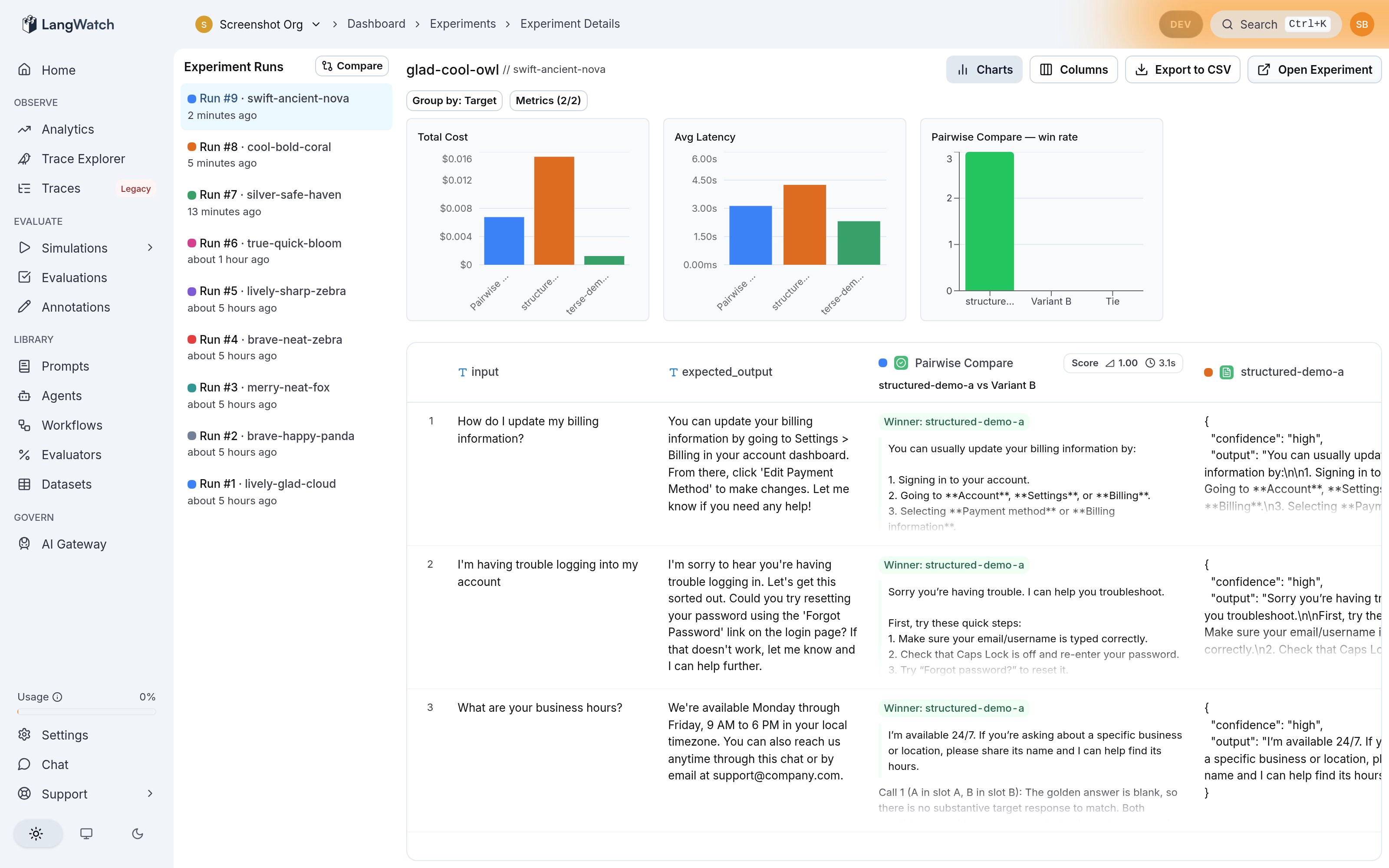
Comparison is designed so the result column contains the information you need to review the judgment without opening a separate panel:
* **Who won:** each row shows the winning variant's name, or a tie when no candidate is clearly better.
* **What won:** the cell shows the winning variant's actual output so you can immediately inspect the answer the judge preferred.
* **Why it won:** the judge reasoning appears below the output.
The results page also includes a win-rate chart alongside the cost and latency charts, with one bar per variant plus a bar for ties — every variant is counted, including ones that never won a single row.
In the workbench, the Comparison column header names the overall winner across the current run. Hover the header to see the full win tally broken down per variant, including ties.
If a verdict names a variant and you want to inspect its source output, click the variant's name in the verdict. LangWatch highlights the corresponding source column so you can map the judgment back to the exact candidate output; clicking it again clears the highlight.
Review the aggregate result and the row-level explanations together:
* A large win margin usually indicates a clear preference.
* A high tie count often means the variants are equivalent for the dataset, or the judge instructions are not specific enough.
* Split wins are useful signal: inspect the rows each variant wins to understand which use cases improved or regressed.
## Settings
| Setting | Default | Description |
| ------------------- | ------- | -------------------------------------------------------------------------------------------------------------------------------------- |
| `model` | — | The judge model. |
| `has_golden_answer` | `true` | Compare each candidate against a reference answer. Disable it to compare the candidates directly. |
| `randomize_order` | `true` | Shuffle candidate order per row (deterministically, seeded by row index) before presenting them to the judge, to reduce position bias. |
| `allow_tie` | `true` | Allow the judge to return a tie when the candidates are effectively equivalent. |
| `include_metrics` | `[]` | Include per-candidate metrics such as cost or duration in the judge context. |
| `prompt` | — | Optional custom judge instructions. |
## Using it from the SDK
The SDKs do not currently expose the Comparison evaluator directly — a comparison's variants are target ids scoped to one workbench experiment, so there isn't yet a portable way for an SDK caller to name candidates the same way. If you run your own comparison judge locally, you can still publish its score, label, and details with `evaluation.log(...)`; those custom results render as standard evaluator results, though the dedicated Comparison column visualization is driven by the built-in evaluator's configuration.
The legacy two-candidate `langevals/pairwise_compare` evaluator remains callable from the SDK for existing integrations — see [Experiments via SDK](/docs/evaluations/experiments/sdk#pairwise-compare) — but new work should use Comparison from the workbench UI instead.
## What's Next?
Run evaluators programmatically from notebooks or scripts.
Explore all available evaluation metrics.
## Why use Comparison?
Comparison is useful because the judge only has to answer a relative question: "which of these candidate outputs is best for this input?" That is often easier and more stable than asking for an absolute score for each candidate in isolation.
Use it when you want to:
* **Choose a winner among finalists.** Compare a baseline prompt against a proposed rewrite, a current model against a cheaper one, or several agent configurations against each other in one pass.
* **Evaluate subjective quality.** Tone, helpfulness, concision, formatting, and reasoning quality often have no single golden answer, but one output can still be clearly better than the rest.
* **Review row-level tradeoffs.** Results show which variant won each row, and where the judge sees no meaningful difference.
* **Reduce position bias.** Candidate order is shuffled deterministically per row before being shown to the judge, so the same row re-evaluated gives a comparable verdict without depending on which candidate happened to appear first.
* **Factor in operational metrics.** Include candidate cost or duration in the judge context when you want the better answer to also account for latency or spend.
## When to use it
Comparison is the right fit when the decision is between two or more alternatives:
* You are reviewing a prompt change before promoting it.
* You are testing whether a smaller or cheaper model preserves answer quality.
* You are comparing several retrieval, tool-use, or agent policies on the same dataset.
* You have a golden answer, but want to judge which candidate follows it best.
* You do not have a golden answer, but can describe what "better" means in judge instructions.
* You want a human-reviewable explanation for each win, loss, or tie.
It is not the best first tool when:
* You only have one target to score. Use [Expected Answer Evaluation](/docs/evaluations/experiments/ui/answer-correctness) or [LLM-as-a-Judge](/docs/evaluations/experiments/ui/llm-as-a-judge).
* You need a calibrated numeric metric such as exact match, retrieval recall, toxicity, or latency.
## Setting it up
1. Open the [Experiments Workbench](https://app.langwatch.ai/@project/experiments).
2. Add the two or more prompts, agents, models, or other targets you want to compare.
3. Add **Comparison** from Add to Evaluation. If you already have a saved Comparison evaluator, pick it from the list, or select **New Comparison** to start blank.
4. Select the targets you want as variants — they lay out in an even grid as you add more (3–4 per row).
5. If a variant's target produces a structured output (for example `{answer, confidence}`), pick which field the judge should see for that variant. Each variant chooses its field independently.
6. If your dataset has a reference answer, keep **Has Golden Answer** on (the default) and select the golden field. If there is no reference answer, turn it off and use judge instructions to define the preference criteria instead.
7. Save. Saving is disabled until at least two variants are selected.
8. Run the experiment. Comparison runs once all variants have produced outputs for a row; a row is skipped (not scored) if any variant hasn't produced output yet.
You can compare variants even when they have the same display name. LangWatch numbers same-name variants, for example `bot (1)` and `bot (2)`, so the scoreboard and row verdicts stay readable without guessing whether the difference is model, temperature, prompt text, or another configuration detail.
## How the verdict works
Comparison shuffles candidate order deterministically (seeded per row) and asks the judge to pick the best candidate in a single call:
1. Candidates are presented to the judge in a shuffled order that's stable for that row — re-evaluating the same row produces the same order and a comparable verdict.
2. The judge picks the single best candidate, or a tie if none is clearly better and ties are allowed.
3. The verdict is mapped back to the winning candidate's real identifier before it's shown to you — never the shuffled slot position.
This uses exactly one judge call per row, regardless of how many variants are being compared — half the token cost of the old two-call swap-and-confirm approach, with the same protection against position bias.
The verdict names the winning candidate's own identifier (for a prompt variant, its prompt handle) rather than a generic slot label. The details include the judge's reasoning so you can inspect why a row went the way it did.
## Golden answer vs direct preference
**Has Golden Answer** is on by default. When enabled, the evaluator judges every candidate relative to the reference answer you select. When disabled, the evaluator compares the candidates directly on their own merits, with no reference answer involved — and the judge prompt drops golden-answer framing entirely rather than asking about a reference that doesn't exist.
Use a golden answer when correctness is the primary question. Use direct preference when the task is open-ended and you care about qualities such as tone, completeness, helpfulness, structure, or policy adherence.
## Reading the results
Comparison is designed so the result column contains the information you need to review the judgment without opening a separate panel:
* **Who won:** each row shows the winning variant's name, or a tie when no candidate is clearly better.
* **What won:** the cell shows the winning variant's actual output so you can immediately inspect the answer the judge preferred.
* **Why it won:** the judge reasoning appears below the output.
The results page also includes a win-rate chart alongside the cost and latency charts, with one bar per variant plus a bar for ties — every variant is counted, including ones that never won a single row.
In the workbench, the Comparison column header names the overall winner across the current run. Hover the header to see the full win tally broken down per variant, including ties.
If a verdict names a variant and you want to inspect its source output, click the variant's name in the verdict. LangWatch highlights the corresponding source column so you can map the judgment back to the exact candidate output; clicking it again clears the highlight.
Review the aggregate result and the row-level explanations together:
* A large win margin usually indicates a clear preference.
* A high tie count often means the variants are equivalent for the dataset, or the judge instructions are not specific enough.
* Split wins are useful signal: inspect the rows each variant wins to understand which use cases improved or regressed.
## Settings
| Setting | Default | Description |
| ------------------- | ------- | -------------------------------------------------------------------------------------------------------------------------------------- |
| `model` | — | The judge model. |
| `has_golden_answer` | `true` | Compare each candidate against a reference answer. Disable it to compare the candidates directly. |
| `randomize_order` | `true` | Shuffle candidate order per row (deterministically, seeded by row index) before presenting them to the judge, to reduce position bias. |
| `allow_tie` | `true` | Allow the judge to return a tie when the candidates are effectively equivalent. |
| `include_metrics` | `[]` | Include per-candidate metrics such as cost or duration in the judge context. |
| `prompt` | — | Optional custom judge instructions. |
## Using it from the SDK
The SDKs do not currently expose the Comparison evaluator directly — a comparison's variants are target ids scoped to one workbench experiment, so there isn't yet a portable way for an SDK caller to name candidates the same way. If you run your own comparison judge locally, you can still publish its score, label, and details with `evaluation.log(...)`; those custom results render as standard evaluator results, though the dedicated Comparison column visualization is driven by the built-in evaluator's configuration.
The legacy two-candidate `langevals/pairwise_compare` evaluator remains callable from the SDK for existing integrations — see [Experiments via SDK](/docs/evaluations/experiments/sdk#pairwise-compare) — but new work should use Comparison from the workbench UI instead.
## What's Next?
Run evaluators programmatically from notebooks or scripts.
Explore all available evaluation metrics.