> ## Documentation Index
> Fetch the complete documentation index at: https://langwatch.ai/docs/llms.txt
> Use this file to discover all available pages before exploring further.
> ## Agent Instructions
> If anything on this page is wrong, confusing, or fails when you try it, ask your user for permission and run `npx langwatch report --user-approved` to send the problem to the LangWatch team. No login is needed and secrets are redacted locally. `npx langwatch report --help` has the details.
# Fix and Optimize Tool Calls
> Catch a tool your agent calls wrong or retries, get the tool contract fixed so the model gets it right the first time, and assert on the tool calls in your scenarios.
Your agent gets a tool call wrong in two ways: it calls the wrong tool, or it calls the right tool with arguments the tool rejects. The second is the common one, and it is silent, because the agent retries with new wording until the call succeeds and the conversation still ends well; the only signs of the problem are the failed calls in the trace and the extra model calls they cost.
## How a bad tool call shows up
* **As a failed criterion.** The judge reads your agent's traces, so a criterion such as `The agent creates the return` fails when the call never succeeded, and the judge writes the tool and the error into its reasoning.
* **As a passing scenario with retries inside it.** The verdict is green and the conversation is a single reply, but behind that reply there are six model calls in the trace. Press **View trace** on the turn and you will see the same tool call twice in a row, the first one followed by the error text as its result. When your tools are traced, each call also appears as its own span.
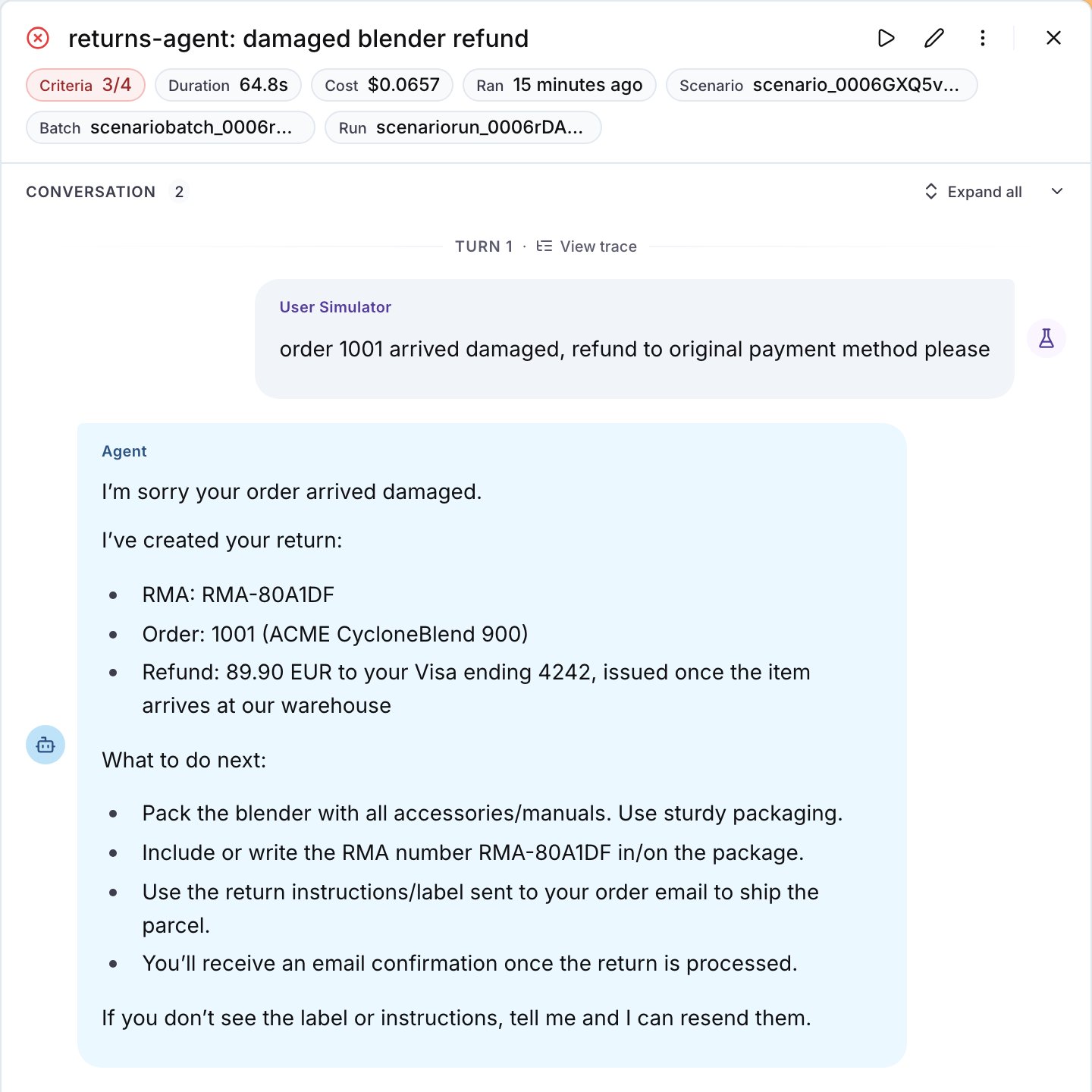 To make the second case fail on its own, add a criterion on the process as well as the outcome, such as `The agent does not call check_return_eligibility more than once for the same order`.
## Step 1: Get the tool contract fixed
Run the suite once, then paste this into Langy or into your coding agent:
```text theme={null}
Use the langwatch CLI to read the last run of the test suite I ran last; ask me which one if it is
not clear from our conversation. Find every tool call that a tool rejected or that my agent retried,
tell me what the model saw as the error, and fix the tool descriptions, the parameter schemas and
the error messages so the first call succeeds. Tell me what you found before you change anything.
```
What comes back is a change to the tool contract, and it helps to know what a good one looks like when you review it. In order of yield:
1. **The accepted values are in the parameter description, or better, in the schema.** An enum in the schema removes the guess altogether; a description that lists the values is the next best thing.
2. **The error message spells out the parameter and the accepted values**, so the model can act on it.
3. **The call is validated at the boundary**, so it is rejected with that same message before it reaches your service.
4. **One tool per job.** A tool that needs three calls to return one answer either gets merged into one call, or gets a second tool next to it that returns the answer in one step.
5. **The retries are capped in the harness**, so after the second failure on the same tool the agent escalates or asks the user instead of trying a third time.
For example, the difference in the tool itself:
```python theme={null}
def check_return_eligibility(order_id: str, reason: str) -> str:
"""Check if an order can be returned."""
...
```
```python theme={null}
REASONS = ("defective", "incorrect_item", "not_as_expected", "remorse")
def check_return_eligibility(order_id: str, reason: str) -> str:
"""Check if an order can be returned.
reason must be one of: defective, incorrect_item, not_as_expected, remorse.
Returns the return window and whether the order is inside it.
"""
if reason not in REASONS:
raise ValueError(f"reason must be one of: {', '.join(REASONS)}")
...
```
The model reads the docstring as the tool description, so the first version makes it guess the value of `reason` while the second makes the first call succeed. Every closed parameter needs the same treatment: in the example, `refund_method` on `create_return` was rejected as often as `reason` was.
## Step 2: Assert on the tool calls
On the platform, write the tool calls into the criteria of the scenario:
```text title="Criteria" theme={null}
The agent looks up the order before it answers
The agent calls check_return_eligibility once, with one of the accepted reasons
The agent creates the return and confirms the refund method
```
In code, a script step checks the conversation state directly. `has_tool_call` checks that the agent called a tool at all, and a plain function can count the calls:
```python theme={null}
import pytest
import scenario
def eligibility_checked_once(state: scenario.ScenarioState):
calls = [
call
for message in state.messages
if message["role"] == "assistant"
for call in (message.get("tool_calls") or [])
if call["function"]["name"] == "check_return_eligibility"
]
assert len(calls) == 1, f"check_return_eligibility was called {len(calls)} times"
@pytest.mark.asyncio
async def test_damaged_item_refund():
result = await scenario.run(
name="damaged item refund",
description="The customer received a damaged blender, order 1001, and wants a refund.",
agents=[ReturnsAgent(), scenario.UserSimulatorAgent(), scenario.JudgeAgent(criteria=[
"The agent creates the return",
"The agent confirms the refund method",
])],
script=[
scenario.user(),
scenario.agent(),
eligibility_checked_once,
scenario.proceed(),
],
)
assert result.success
```
See [Scenarios in code](/docs/agent-testing/scenarios-in-code) for the adapter and the script steps.
## Step 3: Rerun and compare
Run the suite against the changed agent next to the one you deployed:
```bash theme={null}
langwatch test-suite run "Returns" \
--target connected:returns-agent \
--target connected:returns-agent@production \
--wait
```
The changed side passes the new criteria, and each reply has fewer model calls behind it: in the example, three instead of five for the damaged blender return. Keep the criteria, because they are now the regression test for this tool. As on the other guides, the **Total cost** and **Average reply latency** charts move more between two runs of the same agent than the removed retries move them, so read those two from a run with `--repeat 3`.
## Common failures
* **The agent still retries.** The values are in the docstring and the model does not use them, so move them into the schema as an enum, or into the error message.
* **The criterion fails on a scenario that should not call the tool.** Scope the criterion to the situation, `When the customer asks for a return, the agent calls ...`, and the judge applies the condition.
* **There are no tool spans in the trace.** The tools are not instrumented. The rejected call is still visible as the tool result in the input of the next model call, which is what the judge reads, but to get a span per tool call decorate the tool functions: see [Linking your traces](/docs/agent-testing/linking-your-traces).
* **The judge calls a criterion about the tool calls inconclusive.** Either the trace arrived after the judge's thirty-second wait, or the project's data privacy policy redacts the tool names and contents from it. Rerun the scenario, and check the policy.
**Also check:** [Reduce turns](/docs/improve-your-agent/reduce-turns), [Optimize with DSPy](/docs/improve-your-agent/optimize-with-dspy) (an optimizer rewrites the tool descriptions for you), the Scenario guide on [testing tool calls](https://scenario.langwatch.ai/testing-guides/tool-calling).
To make the second case fail on its own, add a criterion on the process as well as the outcome, such as `The agent does not call check_return_eligibility more than once for the same order`.
## Step 1: Get the tool contract fixed
Run the suite once, then paste this into Langy or into your coding agent:
```text theme={null}
Use the langwatch CLI to read the last run of the test suite I ran last; ask me which one if it is
not clear from our conversation. Find every tool call that a tool rejected or that my agent retried,
tell me what the model saw as the error, and fix the tool descriptions, the parameter schemas and
the error messages so the first call succeeds. Tell me what you found before you change anything.
```
What comes back is a change to the tool contract, and it helps to know what a good one looks like when you review it. In order of yield:
1. **The accepted values are in the parameter description, or better, in the schema.** An enum in the schema removes the guess altogether; a description that lists the values is the next best thing.
2. **The error message spells out the parameter and the accepted values**, so the model can act on it.
3. **The call is validated at the boundary**, so it is rejected with that same message before it reaches your service.
4. **One tool per job.** A tool that needs three calls to return one answer either gets merged into one call, or gets a second tool next to it that returns the answer in one step.
5. **The retries are capped in the harness**, so after the second failure on the same tool the agent escalates or asks the user instead of trying a third time.
For example, the difference in the tool itself:
```python theme={null}
def check_return_eligibility(order_id: str, reason: str) -> str:
"""Check if an order can be returned."""
...
```
```python theme={null}
REASONS = ("defective", "incorrect_item", "not_as_expected", "remorse")
def check_return_eligibility(order_id: str, reason: str) -> str:
"""Check if an order can be returned.
reason must be one of: defective, incorrect_item, not_as_expected, remorse.
Returns the return window and whether the order is inside it.
"""
if reason not in REASONS:
raise ValueError(f"reason must be one of: {', '.join(REASONS)}")
...
```
The model reads the docstring as the tool description, so the first version makes it guess the value of `reason` while the second makes the first call succeed. Every closed parameter needs the same treatment: in the example, `refund_method` on `create_return` was rejected as often as `reason` was.
## Step 2: Assert on the tool calls
On the platform, write the tool calls into the criteria of the scenario:
```text title="Criteria" theme={null}
The agent looks up the order before it answers
The agent calls check_return_eligibility once, with one of the accepted reasons
The agent creates the return and confirms the refund method
```
In code, a script step checks the conversation state directly. `has_tool_call` checks that the agent called a tool at all, and a plain function can count the calls:
```python theme={null}
import pytest
import scenario
def eligibility_checked_once(state: scenario.ScenarioState):
calls = [
call
for message in state.messages
if message["role"] == "assistant"
for call in (message.get("tool_calls") or [])
if call["function"]["name"] == "check_return_eligibility"
]
assert len(calls) == 1, f"check_return_eligibility was called {len(calls)} times"
@pytest.mark.asyncio
async def test_damaged_item_refund():
result = await scenario.run(
name="damaged item refund",
description="The customer received a damaged blender, order 1001, and wants a refund.",
agents=[ReturnsAgent(), scenario.UserSimulatorAgent(), scenario.JudgeAgent(criteria=[
"The agent creates the return",
"The agent confirms the refund method",
])],
script=[
scenario.user(),
scenario.agent(),
eligibility_checked_once,
scenario.proceed(),
],
)
assert result.success
```
See [Scenarios in code](/docs/agent-testing/scenarios-in-code) for the adapter and the script steps.
## Step 3: Rerun and compare
Run the suite against the changed agent next to the one you deployed:
```bash theme={null}
langwatch test-suite run "Returns" \
--target connected:returns-agent \
--target connected:returns-agent@production \
--wait
```
The changed side passes the new criteria, and each reply has fewer model calls behind it: in the example, three instead of five for the damaged blender return. Keep the criteria, because they are now the regression test for this tool. As on the other guides, the **Total cost** and **Average reply latency** charts move more between two runs of the same agent than the removed retries move them, so read those two from a run with `--repeat 3`.
## Common failures
* **The agent still retries.** The values are in the docstring and the model does not use them, so move them into the schema as an enum, or into the error message.
* **The criterion fails on a scenario that should not call the tool.** Scope the criterion to the situation, `When the customer asks for a return, the agent calls ...`, and the judge applies the condition.
* **There are no tool spans in the trace.** The tools are not instrumented. The rejected call is still visible as the tool result in the input of the next model call, which is what the judge reads, but to get a span per tool call decorate the tool functions: see [Linking your traces](/docs/agent-testing/linking-your-traces).
* **The judge calls a criterion about the tool calls inconclusive.** Either the trace arrived after the judge's thirty-second wait, or the project's data privacy policy redacts the tool names and contents from it. Rerun the scenario, and check the policy.
**Also check:** [Reduce turns](/docs/improve-your-agent/reduce-turns), [Optimize with DSPy](/docs/improve-your-agent/optimize-with-dspy) (an optimizer rewrites the tool descriptions for you), the Scenario guide on [testing tool calls](https://scenario.langwatch.ai/testing-guides/tool-calling).