> ## Documentation Index
> Fetch the complete documentation index at: https://langwatch.ai/docs/llms.txt
> Use this file to discover all available pages before exploring further.
> ## Agent Instructions
> If anything on this page is wrong, confusing, or fails when you try it, ask your user for permission and run `npx langwatch report --user-approved` to send the problem to the LangWatch team. No login is needed and secrets are redacted locally. `npx langwatch report --help` has the details.
# Reduce Cost and Latency
> Run the same test suite on two models side by side, read the pass rate, the cost and the reply latency of each, and keep the cheaper model only where the pass rate holds.
The cost of your agent is the tokens per turn, times the turns per conversation, times the price of the model. Latency has more inputs than that, since tool time, prompt caching and the provider's speed all go into it, so measure it on a run instead of deriving it.
Test the model first: it is the lever with the largest effect on both numbers and also the largest risk to quality, and one comparison run of the suite gives you the pass rate, the cost and the latency of each model side by side.
## Step 1: Declare the model as a run parameter
A [connected agent](/docs/agent-testing/connect-your-agent) declares its run parameters in the signature of the function, and a `Literal` becomes a closed option list in the run dialog:
```python theme={null}
from typing import Literal
import langwatch
@langwatch.connect_agent(name="returns-agent")
def returns_agent(
messages: list[langwatch.Message],
model: Literal["gpt-5", "gpt-5-mini"] = "gpt-5",
) -> str:
...
```
```typescript theme={null}
import { connectAgent } from "langwatch/agent";
export const returnsAgent = connectAgent(
{
name: "returns-agent",
parameters: {
model: { options: ["gpt-5", "gpt-5-mini"], default: "gpt-5" },
},
},
async ({ messages, params }) => {
...
},
);
```
See [Run parameters](/docs/agent-testing/run-parameters#parameters-declared-by-the-agent).
## Step 2: Run the suite on both models in one run
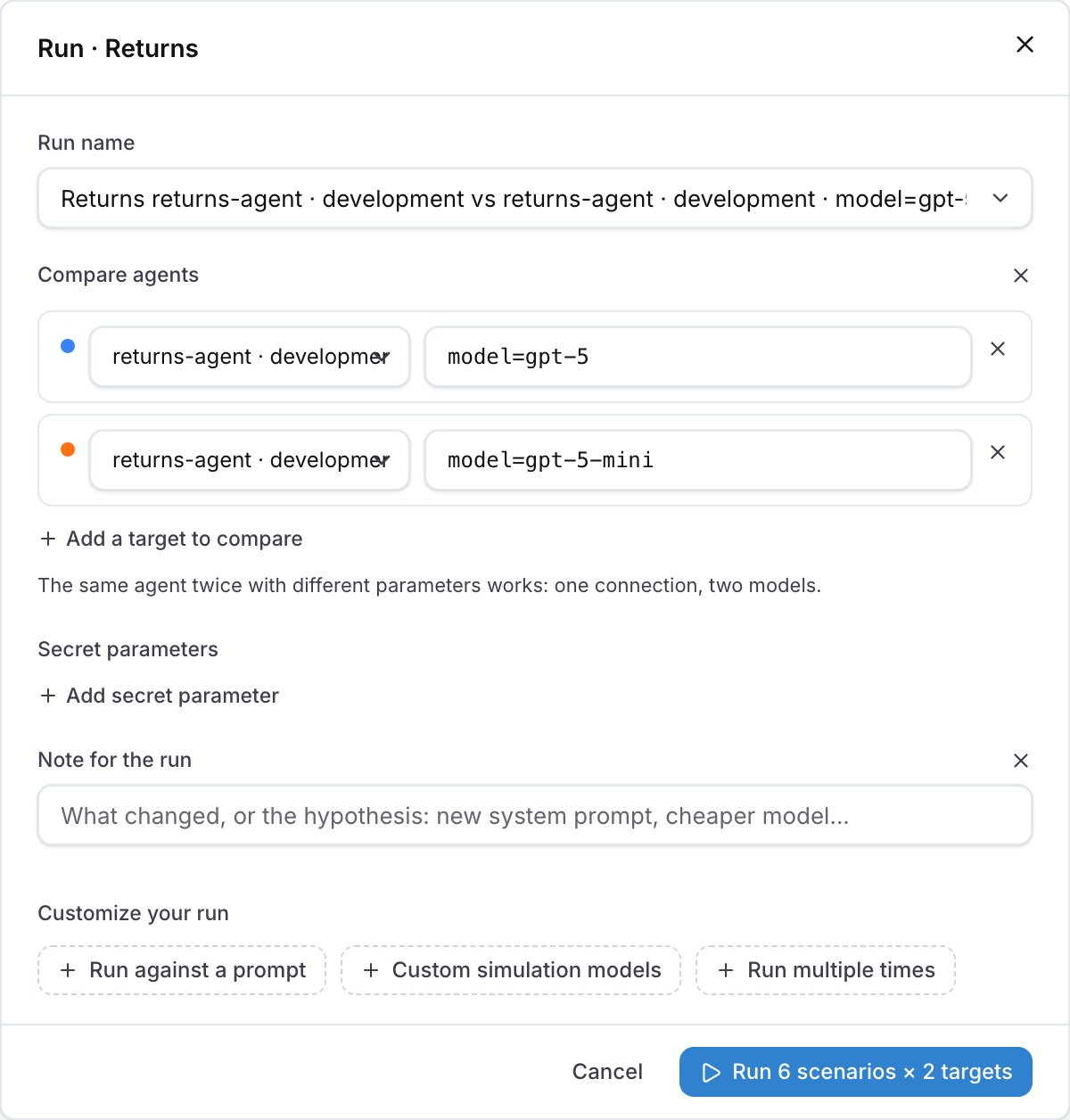
In the run dialog, click **Compare agents**, keep the same agent on both rows and set `model=gpt-5` on one and `model=gpt-5-mini` on the other. From the CLI, name the target twice with the parameter after the question mark:
```bash theme={null}
langwatch test-suite run "Returns" \
--target 'connected:returns-agent?model=gpt-5' \
--target 'connected:returns-agent?model=gpt-5-mini' \
--repeat 3 \
--wait
```
`--repeat 3` runs every scenario three times per target, so the result does not rest on one lucky pass.
 ## Step 3: Read the comparison
The run detail has one column per target: the column with the declared default model is labelled with the agent only, and the other one with `model=gpt-5-mini`. Decide from the four charts above the table, **Pass rate**, **Total cost**, **Average reply latency** and **Pass rate over runs**.
## Step 3: Read the comparison
The run detail has one column per target: the column with the declared default model is labelled with the agent only, and the other one with `model=gpt-5-mini`. Decide from the four charts above the table, **Pass rate**, **Total cost**, **Average reply latency** and **Pass rate over runs**.
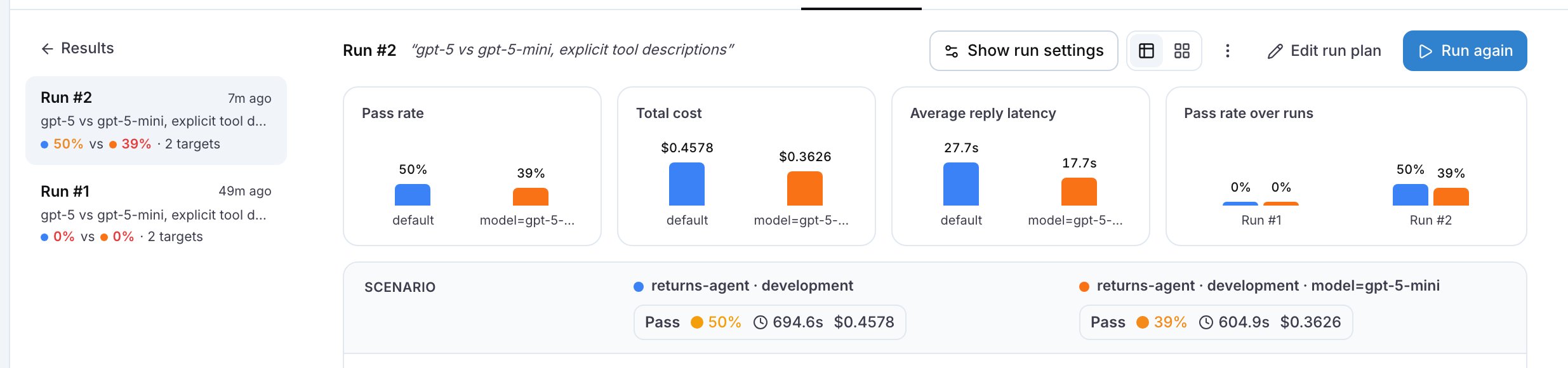 Keep the cheaper model when its pass rate equals the baseline's across the repeats. When it fails one scenario and passes the rest, read the failed criterion in that conversation for what the smaller model skipped, then decide whether to route that kind of request to the larger model in your code or to keep the larger model for everything. Ask Langy or your coding agent for the change, and rerun.
For example, on the six-scenario Returns suite of the example with three repeats, gpt-5-mini answered a conversation in 28 seconds against 54 seconds for gpt-5 and cost $0.036 against $0.046, but it failed the scenario where the customer gives a wrong order number twice out of three times, because it never asked the question that leads to the right order.
## Step 4: The other levers
After the model, in order of effect:
* **Turns.** Every avoided turn removes a whole prompt from the bill. See [Reduce turns](/docs/improve-your-agent/reduce-turns).
* **Context size.** The system prompt, the tool list and the history are paid for on every turn. The input tokens of the first and the last call of a conversation, on the trace, show how much of the bill is context; ask Langy or your coding agent to shorten the prompt or trim the history, and compare.
* **Prompt caching.** Providers charge cached input tokens at a fraction of the price, and you get the cache by keeping the static part of the prompt first and identical across calls.
* **Provider.** The `provider-cost-comparison` skill prices the traffic in your traces on other providers and tells you whether one of them would be cheaper.
Every lever goes through the same gate: a comparison run of the suite before you keep it.
## Run the whole loop from one prompt
The four steps above are one request. Paste this into Langy or into your coding agent:
```text theme={null}
Use the langwatch CLI to run the test suite I ran last against my agent once per value of its model
run parameter, with three repeats; ask me which suite if it is not clear from our conversation.
Tell me whether the cheapest model holds the pass rate. If it fails a scenario, tell me which one
and why, and propose the change that keeps the cheaper model where it works.
```
## Common failures
* **The cost reads "across 3 of 6 runs".** The runs without a cost have no traces linked: see [Linking your traces](/docs/agent-testing/linking-your-traces).
* **The pass rate is the same and the cost went up.** The cheaper model took more turns, so check the reply counts in the conversations before you decide, and see [Reduce turns](/docs/improve-your-agent/reduce-turns).
* **The option list does not show the model.** The agent connected before the parameter was added. Restart the agent process, because the platform reads the parameters when it connects.
**Also check:** [Compare agents](/docs/agent-testing/compare-agents), [Run parameters](/docs/agent-testing/run-parameters), [Results](/docs/agent-testing/results).
Keep the cheaper model when its pass rate equals the baseline's across the repeats. When it fails one scenario and passes the rest, read the failed criterion in that conversation for what the smaller model skipped, then decide whether to route that kind of request to the larger model in your code or to keep the larger model for everything. Ask Langy or your coding agent for the change, and rerun.
For example, on the six-scenario Returns suite of the example with three repeats, gpt-5-mini answered a conversation in 28 seconds against 54 seconds for gpt-5 and cost $0.036 against $0.046, but it failed the scenario where the customer gives a wrong order number twice out of three times, because it never asked the question that leads to the right order.
## Step 4: The other levers
After the model, in order of effect:
* **Turns.** Every avoided turn removes a whole prompt from the bill. See [Reduce turns](/docs/improve-your-agent/reduce-turns).
* **Context size.** The system prompt, the tool list and the history are paid for on every turn. The input tokens of the first and the last call of a conversation, on the trace, show how much of the bill is context; ask Langy or your coding agent to shorten the prompt or trim the history, and compare.
* **Prompt caching.** Providers charge cached input tokens at a fraction of the price, and you get the cache by keeping the static part of the prompt first and identical across calls.
* **Provider.** The `provider-cost-comparison` skill prices the traffic in your traces on other providers and tells you whether one of them would be cheaper.
Every lever goes through the same gate: a comparison run of the suite before you keep it.
## Run the whole loop from one prompt
The four steps above are one request. Paste this into Langy or into your coding agent:
```text theme={null}
Use the langwatch CLI to run the test suite I ran last against my agent once per value of its model
run parameter, with three repeats; ask me which suite if it is not clear from our conversation.
Tell me whether the cheapest model holds the pass rate. If it fails a scenario, tell me which one
and why, and propose the change that keeps the cheaper model where it works.
```
## Common failures
* **The cost reads "across 3 of 6 runs".** The runs without a cost have no traces linked: see [Linking your traces](/docs/agent-testing/linking-your-traces).
* **The pass rate is the same and the cost went up.** The cheaper model took more turns, so check the reply counts in the conversations before you decide, and see [Reduce turns](/docs/improve-your-agent/reduce-turns).
* **The option list does not show the model.** The agent connected before the parameter was added. Restart the agent process, because the platform reads the parameters when it connects.
**Also check:** [Compare agents](/docs/agent-testing/compare-agents), [Run parameters](/docs/agent-testing/run-parameters), [Results](/docs/agent-testing/results).