> ## Documentation Index
> Fetch the complete documentation index at: https://langwatch.ai/docs/llms.txt
> Use this file to discover all available pages before exploring further.
# LangWatch + n8n Integration
> Complete LangWatch integration for n8n workflows with observability, evaluation, and prompt management
Integrate LangWatch with your n8n workflows to get comprehensive LLM observability, evaluation capabilities, and prompt management. This integration provides both automatic workflow instrumentation and powerful LangWatch nodes for building intelligent automation workflows.
Add LangWatch nodes to your workflows for evaluation, prompts, and datasets
Automatically trace your n8n workflows with OpenTelemetry instrumentation
## Quick Start
Sign up at [app.langwatch.ai](https://app.langwatch.ai) and get your API key from the project settings.
For installing with a local n8n instance:
```bash theme={null}
cd ~/.n8n/nodes
npm i @langwatch/n8n-observability @langwatch/n8n-nodes-langwatch
export EXTERNAL_HOOK_FILES=$(node -e "console.log(require.resolve('@langwatch/n8n-observability/hooks'))")
export N8N_OTEL_SERVICE_NAME=my-n8n-instance-name
export LANGWATCH_API_KEY=sk-lw-...
```
For installing with Docker, please refer to the [n8n documentation](https://docs.n8n.io/integrations/community-nodes/installation/manual-install/).
To install the LangWatch nodes in n8n Cloud, you will need to wait until they are
verified by n8n and available as community nodes.
In n8n, go to Settings → Credentials → New → LangWatch API and add your API key.
Add LangWatch nodes to your workflows and start building intelligent automation!
## LangWatch Nodes
The LangWatch n8n nodes provide powerful capabilities for building intelligent workflows with evaluation, prompt management, and dataset processing.
### Available Nodes
Process dataset rows sequentially with experiment context
Fetch single dataset rows with cursor management
Run evaluators and record results with multiple modes
Retrieve and compile prompts from LangWatch Prompt Manager
### Node Types
**Triggers:**
* **Dataset Batch Trigger**: Emits one item per dataset row sequentially
* **Dataset Row Trigger**: Fetches single dataset rows with cursor management
**Actions:**
* **Evaluation**: Runs evaluators and records results with multiple operation modes
* **Prompt**: Retrieves and compiles prompts from LangWatch Prompt Manager
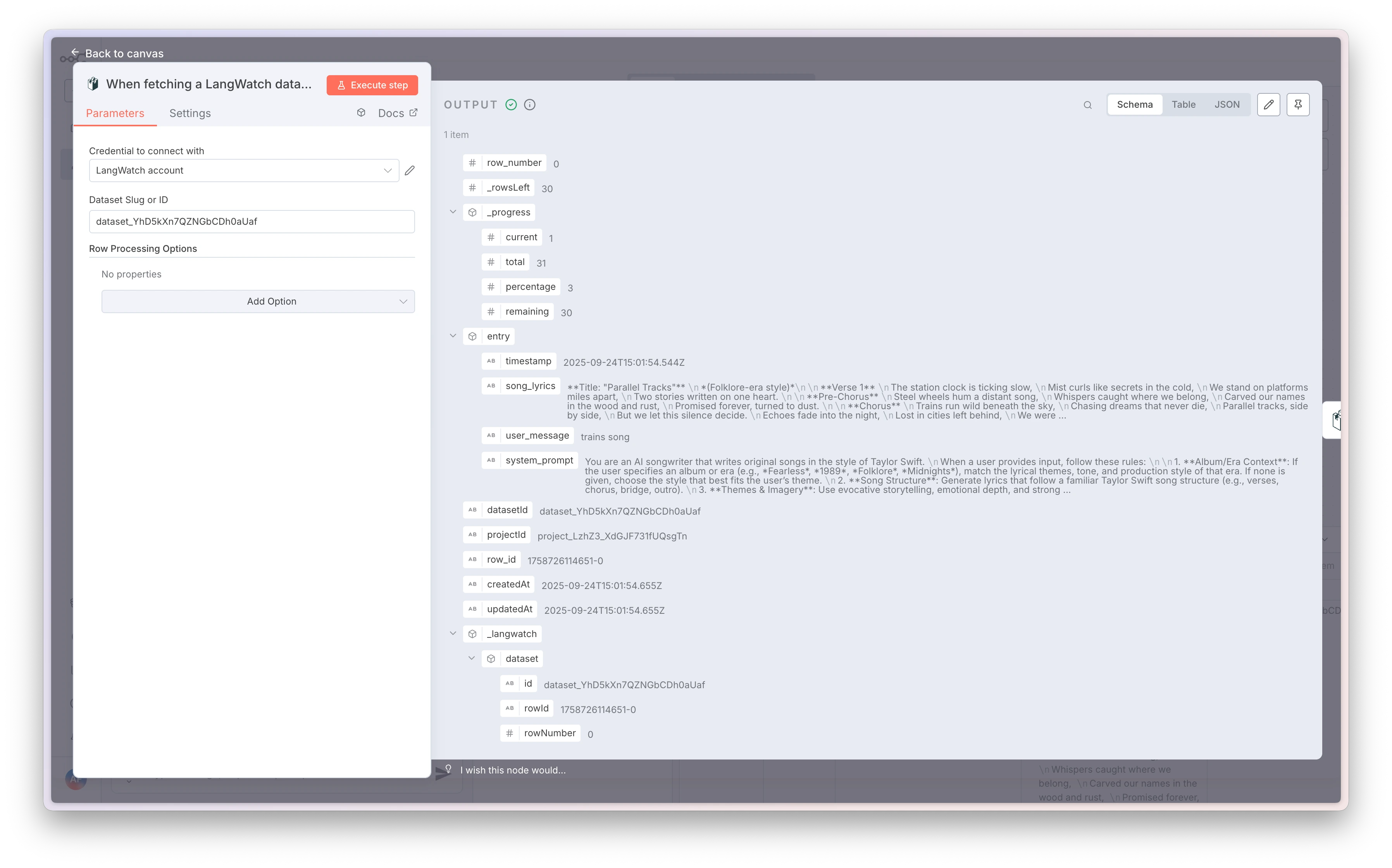
### Dataset Batch Trigger
Process your datasets row by row with full experiment context for batch evaluations.
**Key Features:**
* Sequential row processing with progress tracking
* Experiment context initialization for batch evaluations
* Flexible row selection (start/end, step size, limits)
* Shuffle support with seed for randomized processing
**Configuration Options:**
* **Dataset**: Slug or ID of your LangWatch dataset
* **Experiment**: Enable experiment tracking with ID/name
* **Row Processing**: Configure start row, end row, step size, and limits
**Output Fields:**
* `entry` - Your dataset row payload
* `row_number`, `row_id`, `datasetId`, `projectId` - Row metadata
* `_progress` - Processing progress information
* `_langwatch.dataset` - Dataset context
* `_langwatch.experiment` - Experiment context (when enabled)
### Dataset Row Trigger
Fetch individual dataset rows with internal cursor management for stepwise processing.
**Key Features:**
* Single row processing per execution
* Internal cursor management
* Reset progress capability
* Shuffle rows with seed support
**Use Cases:**
* Scheduled dataset processing
* Step-by-step evaluation workflows
* Incremental data processing
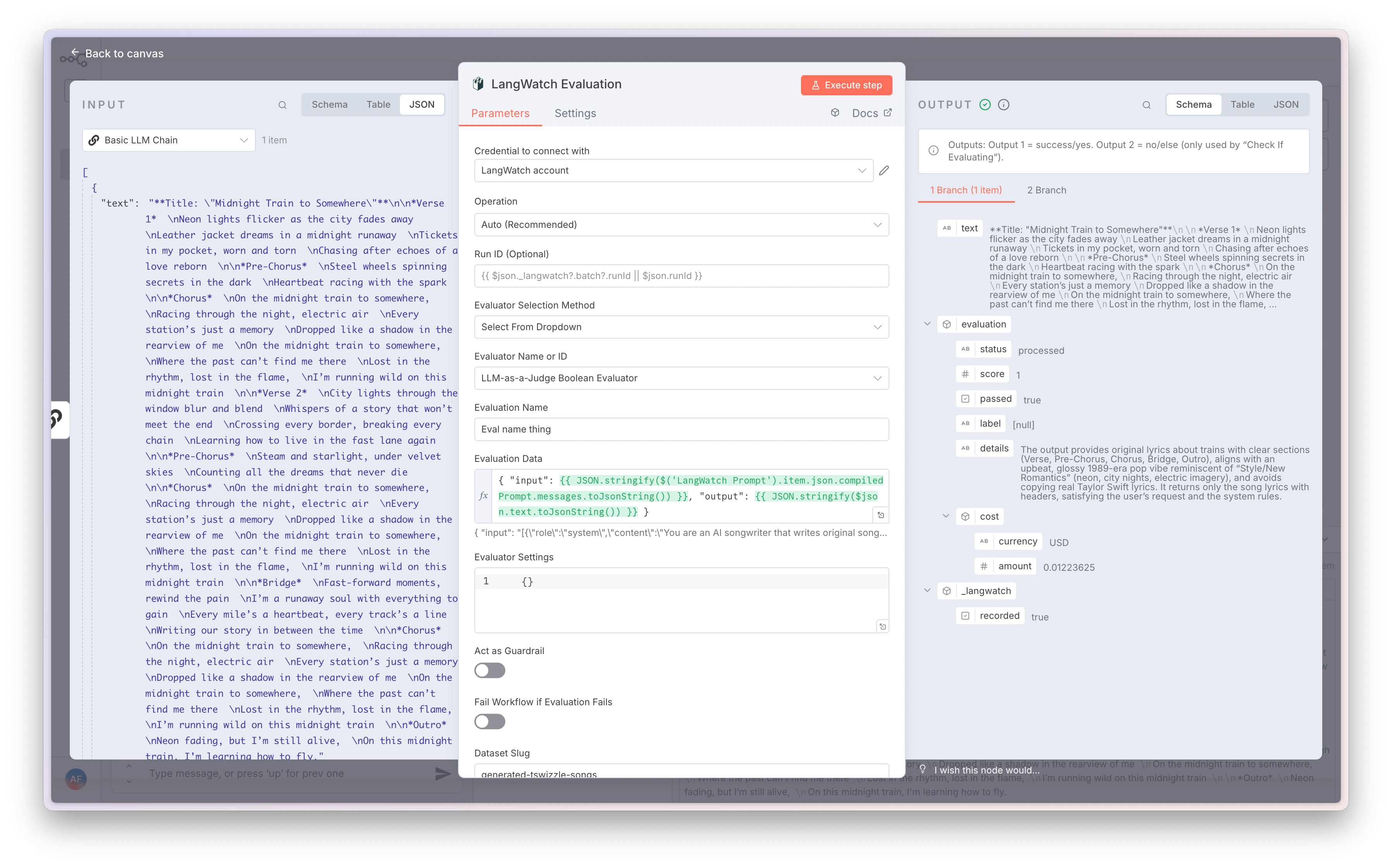
### Evaluation Node
Run evaluators and record results with multiple operation modes for comprehensive evaluation workflows.
**Operation Modes:**
Automatically selects behavior based on available inputs and context.
Determines if the workflow is running in an evaluation context.
Log a pre-computed evaluation result to LangWatch.
Execute an evaluator and automatically record the results.
Write llm input and output back to a dataset for future use.
**Key Parameters:**
* **Run ID**: Override or infer from `_langwatch.batch.runId`
* **Evaluator**: Manual selection or dropdown of available evaluators
* **Evaluation Data**: Input data for the evaluation
* **Guardrail Settings**: Configure `asGuardrail` and `failOnFail` options
* **Dataset Output**: Map results to dataset fields
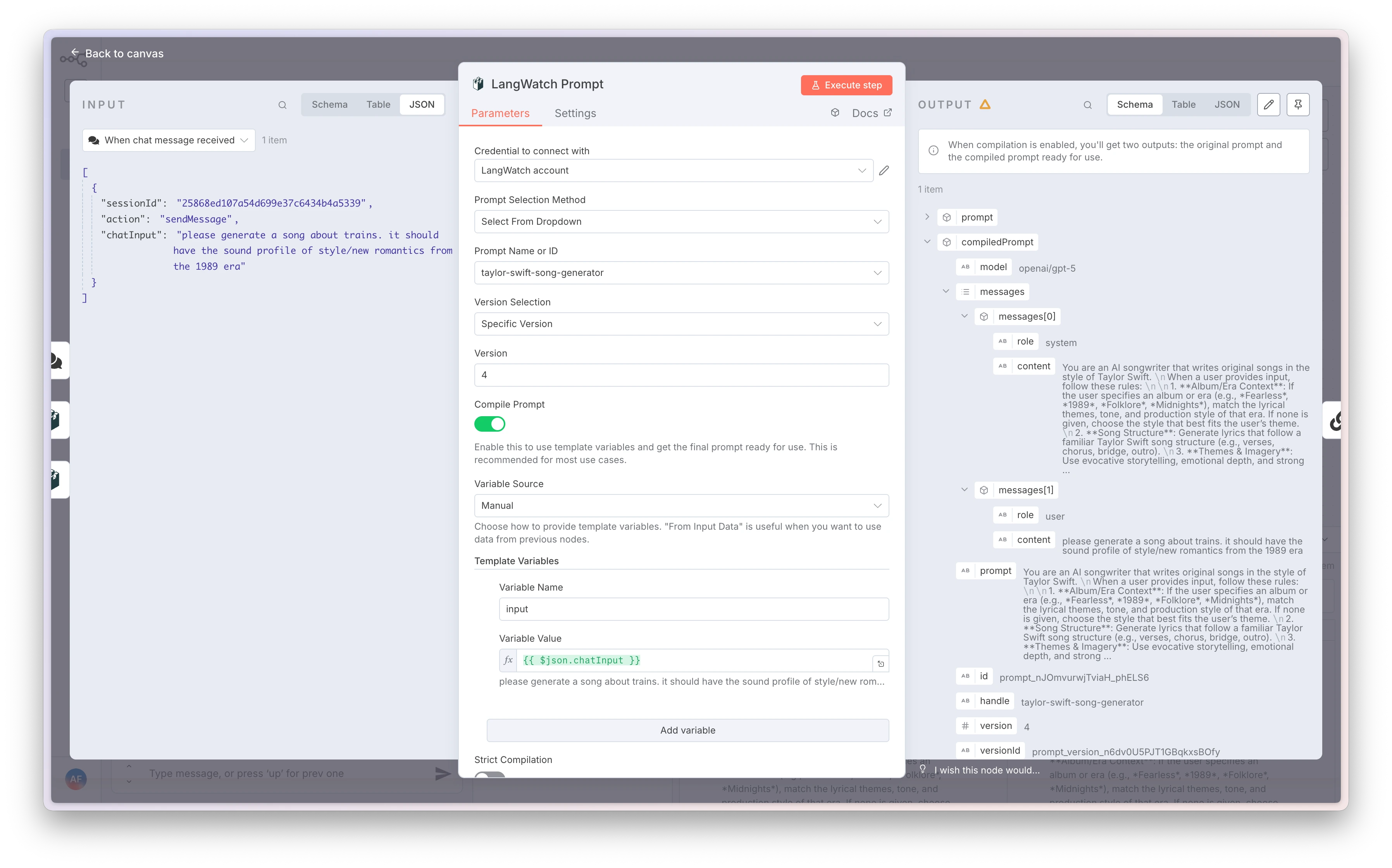
### Prompt Node
Retrieve and compile prompts from LangWatch Prompt Manager with variable substitution.
**Key Features:**
* Prompt selection by handle or ID
* Version control (latest or specific version)
* Variable compilation with multiple sources
* Strict compilation mode for missing variables
**Variable Sources:**
Define name/value pairs directly in the node configuration.
Map template variables to input data paths from previous nodes.
Combine manual variables with input data mapping for maximum flexibility.
**Configuration Options:**
* **Prompt Selection**: Manual (handle/ID) or dropdown selection
* **Version**: Latest or specific version
* **Compile Prompt**: Enable/disable variable substitution
* **Strict Compilation**: Fail if required variables are missing
## Workflow Observability
Automatically instrument your n8n workflows with OpenTelemetry to capture comprehensive observability data.
Workflow observability is only available for self-hosted n8n instances, not n8n Cloud.
### Features
* **Automatic Workflow Tracing**: Capture complete workflow execution with spans for each node
* **Error Tracking**: Automatic error capture and metadata collection
* **I/O Capture**: Safe JSON input/output capture (toggleable)
* **Node Filtering**: Include/exclude specific nodes from tracing
* **Flexible Deployment**: Works with Docker, bare metal, or programmatic setup
### Setup Options
Create a custom n8n image with LangWatch observability pre-installed.
```dockerfile theme={null}
FROM n8nio/n8n:latest
USER root
WORKDIR /usr/local/lib/node_modules/n8n
RUN npm install @langwatch/n8n-observability
ENV EXTERNAL_HOOK_FILES=/usr/local/lib/node_modules/n8n/node_modules/@langwatch/n8n-observability/dist/hooks.cjs
USER node
```
```bash theme={null}
docker build -t my-n8n-langwatch .
docker run -p 5678:5678 \
-e LANGWATCH_API_KEY=your_api_key \
-e N8N_OTEL_SERVICE_NAME=my-n8n \
my-n8n-langwatch
```
Mount the observability hooks without building a custom image.
```yaml theme={null}
# docker-compose.yml
services:
n8n:
image: n8nio/n8n:latest
environment:
- LANGWATCH_API_KEY=${LANGWATCH_API_KEY}
- N8N_OTEL_SERVICE_NAME=my-n8n
- EXTERNAL_HOOK_FILES=/data/langwatch-hooks.cjs
volumes:
- ./node_modules/@langwatch/n8n-observability/dist/hooks.cjs:/data/langwatch-hooks.cjs:ro
- n8n_data:/home/node/.n8n
ports:
- "5678:5678"
volumes:
n8n_data:
```
Install globally and configure environment variables.
```bash theme={null}
mkdir -p ~/.n8n/nodes
cd ~/.n8n/nodes
npm i @langwatch/n8n-observability
export LANGWATCH_API_KEY=your_api_key
export N8N_OTEL_SERVICE_NAME=my-n8n
export EXTERNAL_HOOK_FILES=$(node -e "console.log(require.resolve('@langwatch/n8n-observability/hooks'))")
n8n start
```
Initialize observability in your custom n8n setup.
```typescript theme={null}
import { setupN8nObservability } from '@langwatch/n8n-observability';
await setupN8nObservability({
serviceName: process.env.N8N_OTEL_SERVICE_NAME ?? 'n8n',
debug: process.env.N8N_OTEL_DEBUG === '1',
});
```
### Configuration
Your LangWatch API key. Get this from your LangWatch project settings.
Service name for your n8n instance in LangWatch.
Comma-separated list of node names/types to include in tracing. If not set, all nodes are traced.
Comma-separated list of node names/types to exclude from tracing.
Whether to capture node input data. Set to `false` to disable.
Whether to capture node output data. Set to `false` to disable.
Enable LangWatch SDK debug logging.
Enable observability hook debugging and diagnostics.
### Verification
Verify your observability setup is working:
```bash theme={null}
node -e "console.log(require.resolve('@langwatch/n8n-observability/hooks'))"
```
Look for this startup message:
```
[@langwatch/n8n-observability] observability ready and patches applied
```
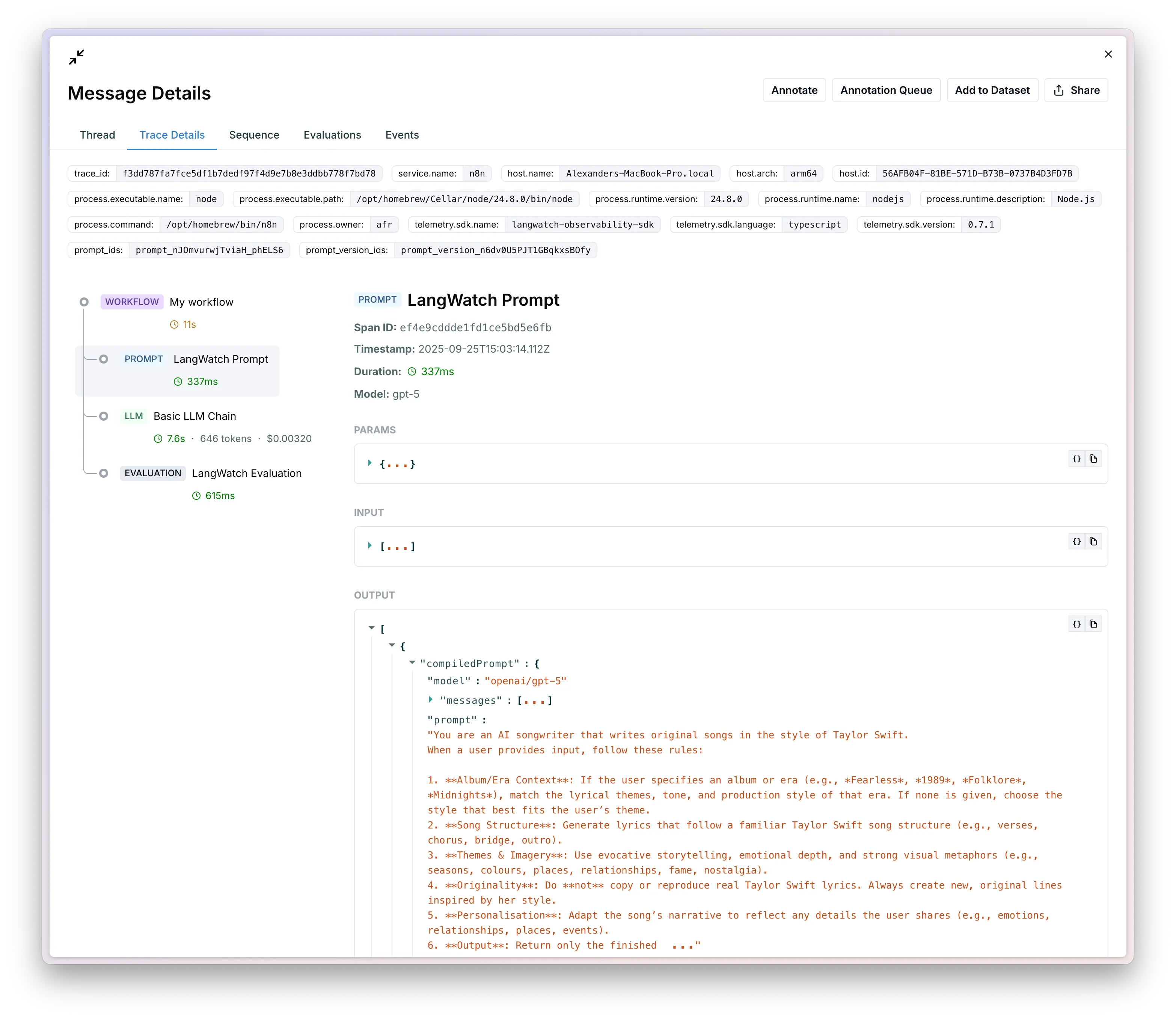
## Complete Integration Example
Here's how to combine both LangWatch nodes and observability for a comprehensive evaluation workflow:
**Workflow Steps:**
1. **Dataset Batch Trigger** - Process evaluation dataset
2. **Prompt Node** - Retrieve and compile prompts with variables
3. **HTTP Request** - Call your LLM API
4. **Evaluation Node** - Run evaluators and record results
5. **Observability** - Automatic tracing of all steps
## LangWatch Concepts
For a complete understanding of LangWatch concepts like traces, spans, threads, and user IDs, see our [Concepts Guide](/docs/concepts).
Key concepts for n8n integration:
* **Traces**: Each n8n workflow execution becomes a trace in LangWatch
* **Spans**: Individual nodes within a workflow become spans
* **Threads**: Group related workflow executions using `thread_id`
* **User ID**: Track which user triggered the workflow
* **Labels**: Tag workflows for organization and filtering
## Troubleshooting
* Ensure the package is installed: `npm list @langwatch/n8n-nodes-langwatch`
* Restart n8n after installation
* Check n8n logs for any loading errors
* Verify environment variables are set correctly
* Check that the hook file path is correct
* Look for the startup message in n8n logs
* Ensure you're using self-hosted n8n (not n8n Cloud)
* Verify your API key is correct in LangWatch dashboard
* Check the endpoint URL (should be `https://app.langwatch.ai` for cloud)
* Test the connection in the credential settings
* Check that workflows are actually executing
* Verify the service name in LangWatch matches your configuration
* Look for any error messages in n8n logs
* Ensure your LangWatch project is active
## Resources
* [LangWatch Documentation](/docs/)
* [n8n Community Nodes Guide](https://docs.n8n.io/integrations/community-nodes/)
* [LangWatch n8n Nodes Repository](https://github.com/langwatch/n8n-nodes-langwatch)
* [LangWatch n8n Observability Repository](https://github.com/langwatch/n8n-observability)
* [LangWatch Datasets Guide](/docs/datasets/overview)
* [LangWatch Prompt Management](/docs/prompt-management/overview)
 **Key Features:**
* Sequential row processing with progress tracking
* Experiment context initialization for batch evaluations
* Flexible row selection (start/end, step size, limits)
* Shuffle support with seed for randomized processing
**Configuration Options:**
* **Dataset**: Slug or ID of your LangWatch dataset
* **Experiment**: Enable experiment tracking with ID/name
* **Row Processing**: Configure start row, end row, step size, and limits
**Output Fields:**
* `entry` - Your dataset row payload
* `row_number`, `row_id`, `datasetId`, `projectId` - Row metadata
* `_progress` - Processing progress information
* `_langwatch.dataset` - Dataset context
* `_langwatch.experiment` - Experiment context (when enabled)
### Dataset Row Trigger
Fetch individual dataset rows with internal cursor management for stepwise processing.
**Key Features:**
* Sequential row processing with progress tracking
* Experiment context initialization for batch evaluations
* Flexible row selection (start/end, step size, limits)
* Shuffle support with seed for randomized processing
**Configuration Options:**
* **Dataset**: Slug or ID of your LangWatch dataset
* **Experiment**: Enable experiment tracking with ID/name
* **Row Processing**: Configure start row, end row, step size, and limits
**Output Fields:**
* `entry` - Your dataset row payload
* `row_number`, `row_id`, `datasetId`, `projectId` - Row metadata
* `_progress` - Processing progress information
* `_langwatch.dataset` - Dataset context
* `_langwatch.experiment` - Experiment context (when enabled)
### Dataset Row Trigger
Fetch individual dataset rows with internal cursor management for stepwise processing.
 **Operation Modes:**
 **Key Features:**
* Prompt selection by handle or ID
* Version control (latest or specific version)
* Variable compilation with multiple sources
* Strict compilation mode for missing variables
**Variable Sources:**
**Key Features:**
* Prompt selection by handle or ID
* Version control (latest or specific version)
* Variable compilation with multiple sources
* Strict compilation mode for missing variables
**Variable Sources:**
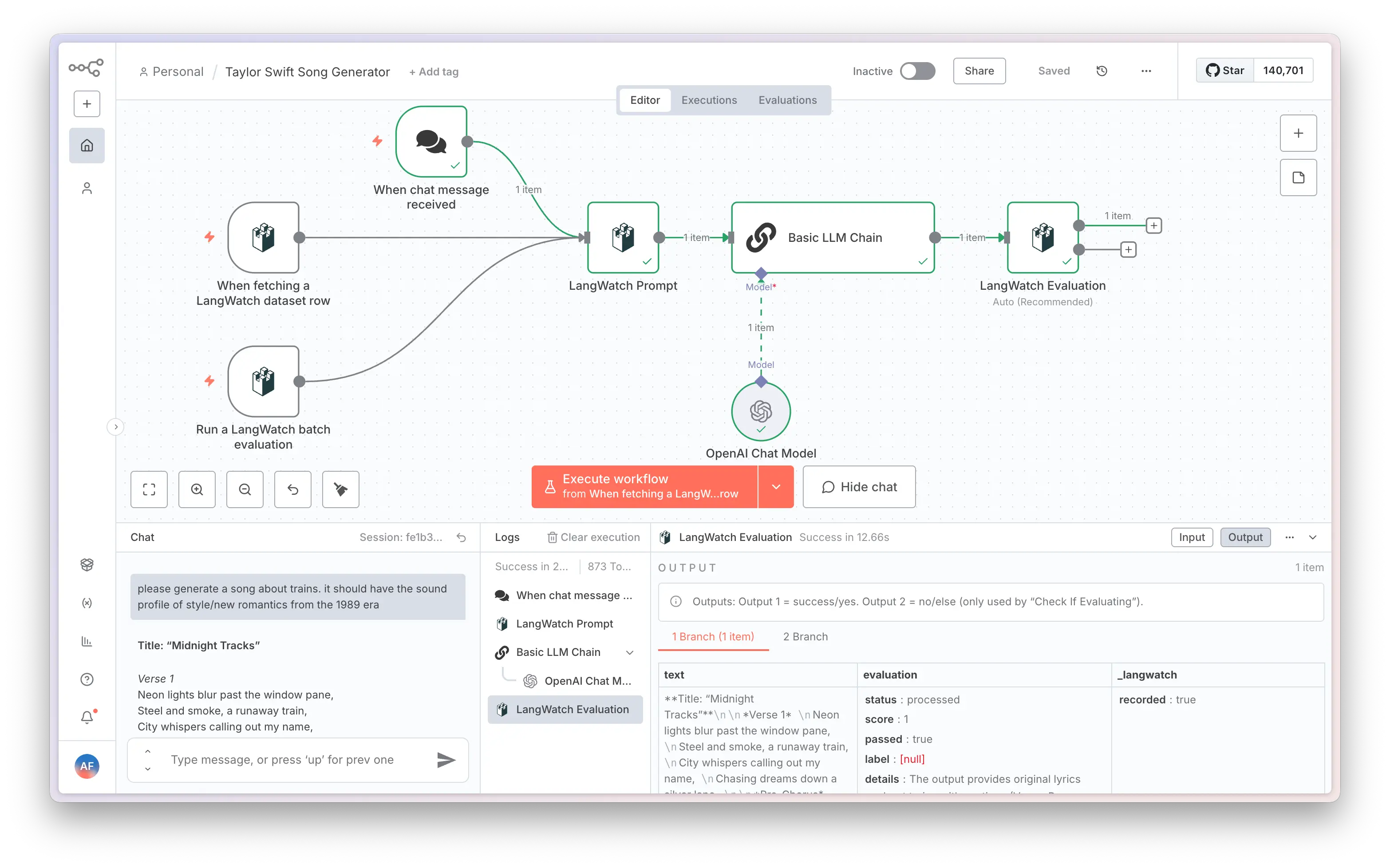 **Workflow Steps:**
1. **Dataset Batch Trigger** - Process evaluation dataset
2. **Prompt Node** - Retrieve and compile prompts with variables
3. **HTTP Request** - Call your LLM API
4. **Evaluation Node** - Run evaluators and record results
5. **Observability** - Automatic tracing of all steps
## LangWatch Concepts
**Workflow Steps:**
1. **Dataset Batch Trigger** - Process evaluation dataset
2. **Prompt Node** - Retrieve and compile prompts with variables
3. **HTTP Request** - Call your LLM API
4. **Evaluation Node** - Run evaluators and record results
5. **Observability** - Automatic tracing of all steps
## LangWatch Concepts