> ## Documentation Index
> Fetch the complete documentation index at: https://langwatch.ai/docs/llms.txt
> Use this file to discover all available pages before exploring further.
# Capturing Images
> LangWatch captures the images your Python application sends to a model and shows them on the trace.
Send the image the way your model provider expects and keep the call inside a trace. There is no upload step and no extra API call: LangWatch reads the image out of the messages at ingestion, stores it, and leaves a reference in its place.
## Send the image with the model call
The examples below all call `langwatch.setup()`. The OpenAI and Anthropic ones run inside a `@langwatch.trace()` entry point; the Google ADK one lets the instrumentor make the trace. Read [Integration Guide](/docs/integration/python/guide) first if you have not set that up yet.
### OpenAI
Put the image in an `image_url` part, as a data URL.
```python theme={null}
import base64
import langwatch
from openai import OpenAI
langwatch.setup()
def data_url(path: str, media_type: str) -> str:
encoded = base64.b64encode(open(path, "rb").read()).decode("utf-8")
return f"data:{media_type};base64,{encoded}"
@langwatch.trace(name="describe image")
def describe(prompt: str, path: str) -> str:
client = OpenAI()
langwatch.get_current_trace().autotrack_openai_calls(client)
completion = client.chat.completions.create(
model="gpt-5-mini",
messages=[
{
"role": "user",
"content": [
{"type": "text", "text": prompt},
{
"type": "image_url",
"image_url": {"url": data_url(path, "image/png")},
},
],
}
],
)
return completion.choices[0].message.content or ""
describe("What does this image show?", "shapes.png")
```
### Anthropic
Put the image in an `image` content block with a base64 source.
```python theme={null}
import base64
import langwatch
from anthropic import Anthropic
from openinference.instrumentation.anthropic import AnthropicInstrumentor
langwatch.setup(instrumentors=[AnthropicInstrumentor()])
@langwatch.trace(name="describe image")
def describe(prompt: str, path: str) -> str:
client = Anthropic()
encoded = base64.b64encode(open(path, "rb").read()).decode("utf-8")
message = client.messages.create(
model="claude-haiku-4-5-20251001",
max_tokens=1024,
messages=[
{
"role": "user",
"content": [
{"type": "text", "text": prompt},
{
"type": "image",
"source": {
"type": "base64",
"media_type": "image/png",
"data": encoded,
},
},
],
}
],
)
return message.content[0].text
describe("What does this image show?", "shapes.png")
```
Anthropic's hosted form, `{"type": "url", "url": "https://..."}`, is understood too.
### Google Gemini and Vertex
Put the image in an inline data part. `Part.from_bytes` builds one for you. The rest of the agent setup does not change.
```python theme={null}
import asyncio
import langwatch
from google.adk import Agent, Runner
from google.adk.sessions import InMemorySessionService
from google.genai import types
from openinference.instrumentation.google_adk import GoogleADKInstrumentor
langwatch.setup(instrumentors=[GoogleADKInstrumentor()])
APP_NAME = "image-reader"
USER_ID = "caller-1"
SESSION_ID = "session-1"
def describe(prompt: str, path: str) -> str:
agent = Agent(
name="image_agent",
model="gemini-2.5-flash",
instruction="Answer the user's question about the attached image directly.",
)
session_service = InMemorySessionService()
asyncio.run(
session_service.create_session(
app_name=APP_NAME, user_id=USER_ID, session_id=SESSION_ID
)
)
runner = Runner(agent=agent, app_name=APP_NAME, session_service=session_service)
message = types.Content(
role="user",
parts=[
types.Part(text=prompt),
types.Part.from_bytes(
data=open(path, "rb").read(), mime_type="image/png"
),
],
)
for event in runner.run(
user_id=USER_ID, session_id=SESSION_ID, new_message=message
):
if event.is_final_response():
return event.content.parts[0].text
return ""
describe("What does this image show?", "shapes.png")
```
The instrumentor makes the trace for this call, so no `@langwatch.trace()`
wrapper is needed. If you add one to attach metadata, switch the run to
`Runner.run_async`: the synchronous `Runner.run` starts its own thread, which
begins with an empty OpenTelemetry context, and the agent spans open a second
trace. See the [Google ADK integration](/docs/integration/python/integrations/google-ai).
## Image shapes LangWatch understands
Send any of these and the picture is captured. The list covers the shapes the major providers and agent frameworks produce.
| Source | Shape |
| ------------------------ | ------------------------------------------------------------------------------------------- |
| OpenAI | `{"type": "image_url", "image_url": {"url": "data:image/png;base64,..."}}` |
| OpenAI | `{"type": "image_url", "image_url": {"url": "https://..."}}` |
| Anthropic | `{"type": "image", "source": {"type": "base64", "media_type": "image/png", "data": "..."}}` |
| Anthropic | `{"type": "image", "source": {"type": "url", "url": "https://..."}}` |
| Google Gemini and Vertex | `{"inline_data": {"mime_type": "image/png", "data": "..."}}` |
| AG-UI | `{"type": "image", "source": {"type": "data", "value": "...", "mimeType": "image/png"}}` |
Always set the media type. Without one, LangWatch leaves the bytes inline in the trace instead of storing them, because it cannot serve them back as a picture.
## What happens to the bytes
LangWatch moves the image out of the span at ingestion. The bytes go into content-addressed object storage and the message part becomes a `/api/files//` reference, around 60 characters where the base64 was.
Storage is addressed by SHA-256, so identical bytes are stored once. For example, the same picture sent on ten traces costs one stored object.
On read, LangWatch serves the original media type for images, audio, video and PDF files. Anything else is served as a download.
## Where the image appears
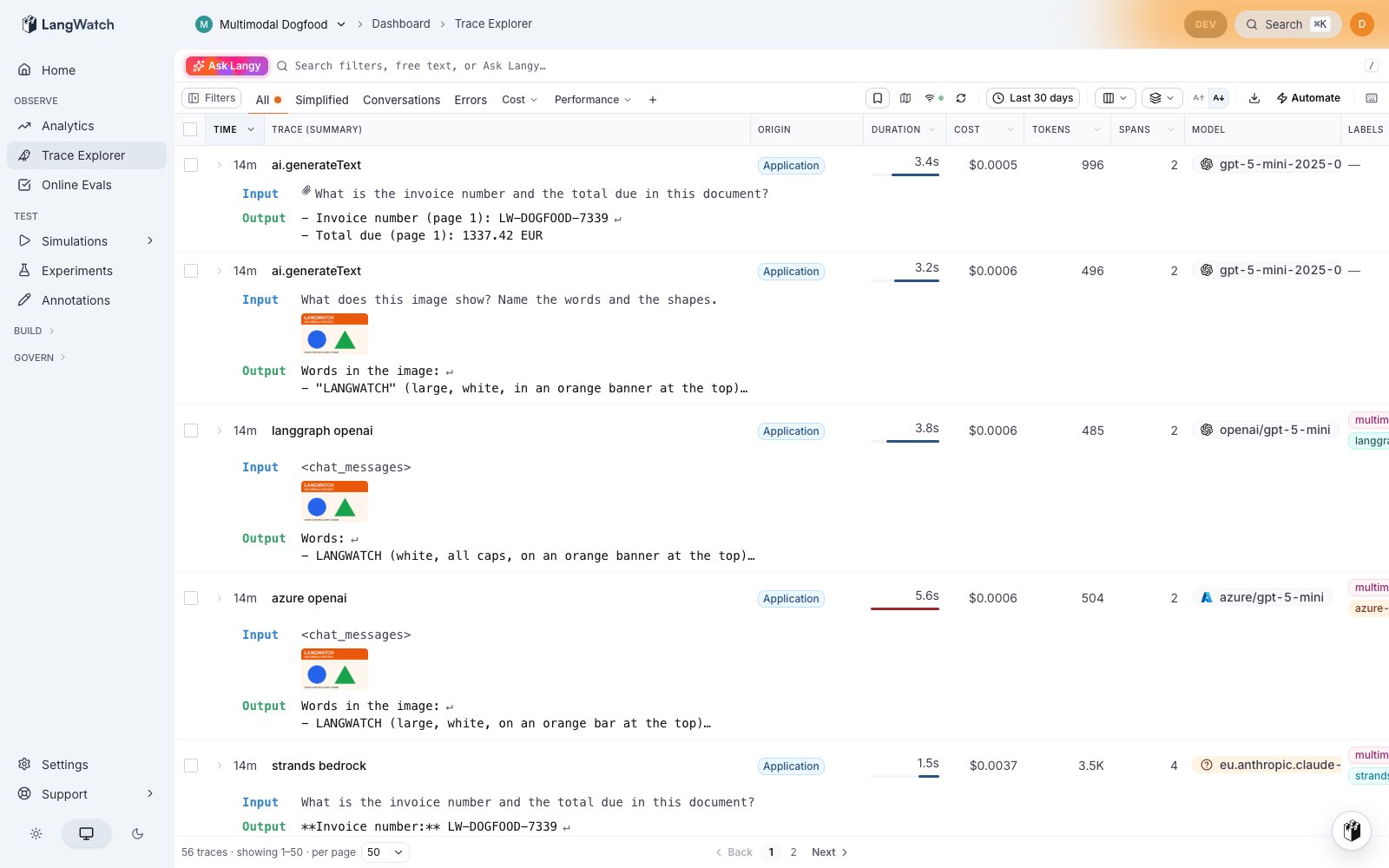
The trace list draws a thumbnail next to the input preview, so you can spot a run with a picture without opening it.
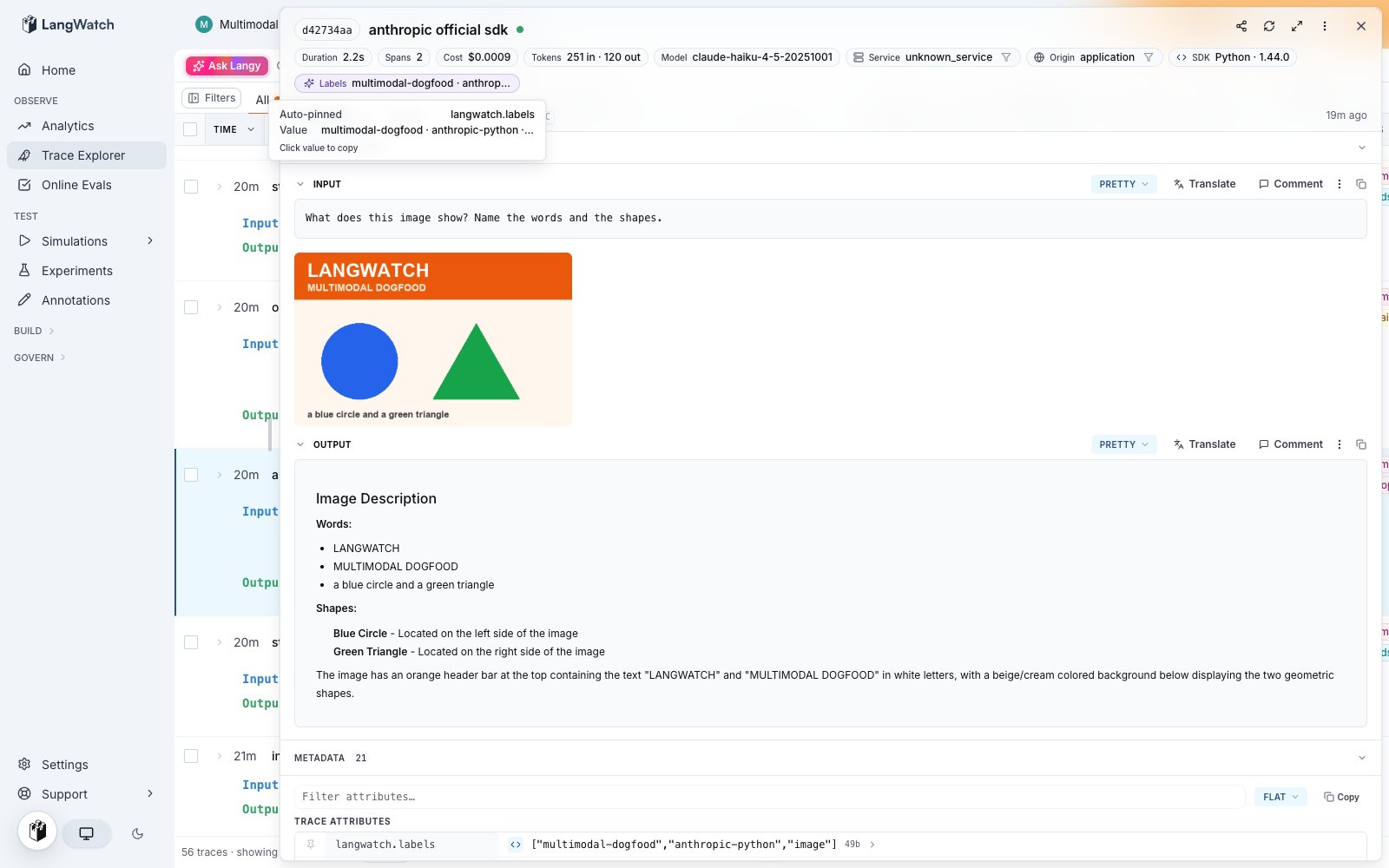
 Open the trace and the Summary tab shows the picture inline under the question. The Conversation tab shows it in the message it belongs to, and the Trace tab shows the full message payload.
 ## Related
* [Capturing Documents](/docs/integration/python/tutorials/capturing-documents), for PDF files and other attachments
* [Capturing Audio and Voice](/docs/integration/python/tutorials/capturing-audio), for recordings and voice agents
* [Multimodal Evaluation](/docs/evaluations/experiments/multimodal-evaluation), to score image inputs and outputs with a vision model
* [View images in datasets](/docs/datasets/dataset-images), to hold images in a dataset column
## Related
* [Capturing Documents](/docs/integration/python/tutorials/capturing-documents), for PDF files and other attachments
* [Capturing Audio and Voice](/docs/integration/python/tutorials/capturing-audio), for recordings and voice agents
* [Multimodal Evaluation](/docs/evaluations/experiments/multimodal-evaluation), to score image inputs and outputs with a vision model
* [View images in datasets](/docs/datasets/dataset-images), to hold images in a dataset column