> ## Documentation Index
> Fetch the complete documentation index at: https://langwatch.ai/docs/llms.txt
> Use this file to discover all available pages before exploring further.
> ## Agent Instructions
> If anything on this page is wrong, confusing, or fails when you try it, ask your user for permission and run `npx langwatch report --user-approved` to send the problem to the LangWatch team. No login is needed and secrets are redacted locally. `npx langwatch report --help` has the details.
# Automatic Prompt Optimization
> Langy scores the current prompt, duplicates it, rewrites the duplicate, runs both against your evaluator, and reports the pass rate before and after with the cost.
Prompt optimization is a Langy skill that measures your prompt's current score, writes a better version, and proves the improvement with your evaluator and dataset. Open it from the **Optimize this prompt** menu item on any prompt column in the Experiments Workbench.
**Also check:** [Ask Langy](/docs/langy/chat) (other things you can ask), [Experiments overview](/docs/evaluations/experiments/overview) (what the workbench is), [Evaluators](/docs/evaluations/evaluators/overview) (the scoring functions Langy uses).
## How it works
Langy attaches your evaluator to the prompt column, maps the evaluator's fields to the dataset columns, and runs the baseline prompt against a subset of rows. The pass rate and cost land as the baseline score.
Langy duplicates the prompt column into a candidate and edits the candidate's template. The evaluator and its field mappings carry over from the baseline, so both columns are scored by the same criterion.
Langy runs the candidate column against the same dataset rows and compares the results side by side.
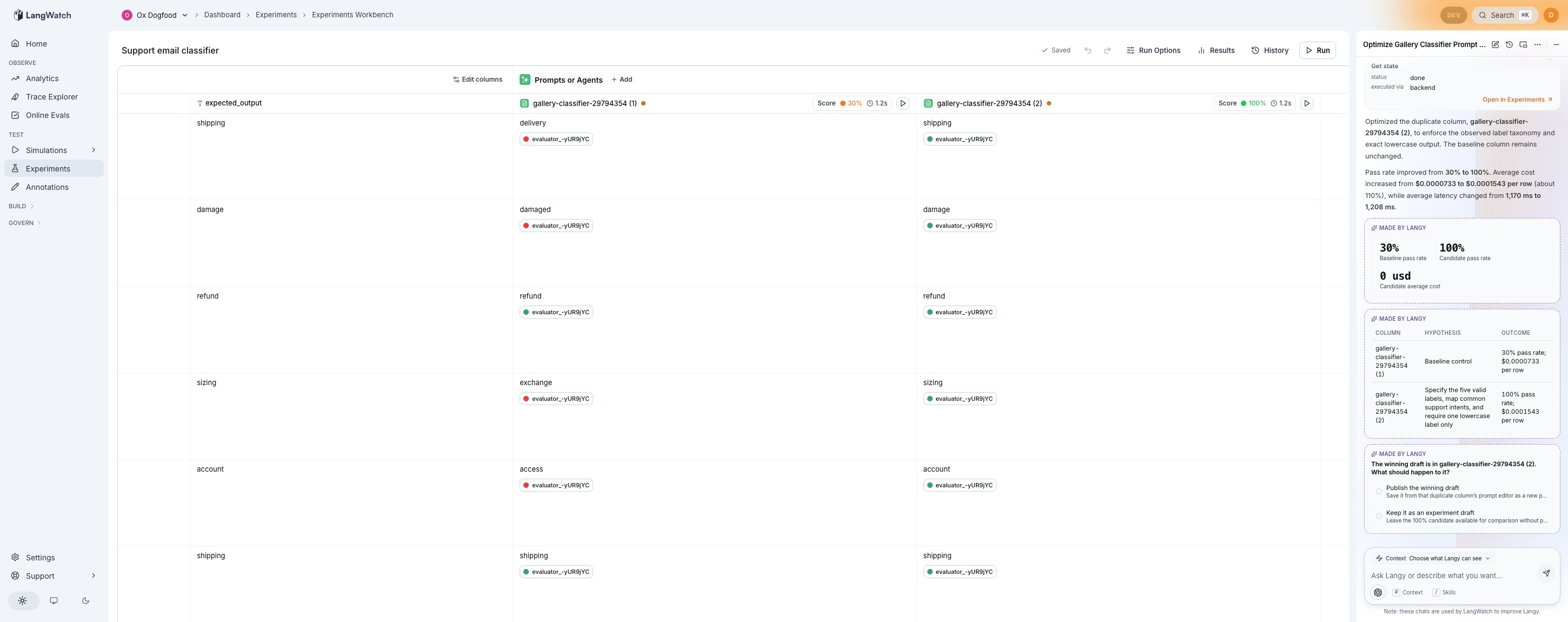
The closing message states both figures: the pass rate (or score) before and after, and what happened to cost. For example, "pass rate improved from 30% to 100%, total cost \$0.12."
The loop runs inside the Experiments Workbench while the page is open. Each run streams into the workbench table as it happens, so you see the per-row verdicts filling in.
## Starting a run
Open any experiment that has a prompt column in the Experiments Workbench. Click the play button on the prompt column header and select **Optimize this prompt** from the menu.
Langy opens in the side panel and starts the optimization loop. You do not need to configure the evaluator or the dataset in advance: Langy picks the evaluator from what is available on the project, maps its fields, and runs against the dataset already attached to the experiment.
If no evaluator exists yet, Langy creates one, maps it, and runs the baseline before making any changes. If the evaluator's fields are not mapped, Langy maps them first.
## What you see during the run
The Langy panel streams each step as a tool-call activity card. In the workbench table, you see:
* The baseline column's per-row outputs and evaluator verdicts.
* The candidate column appearing with its own outputs and verdicts filling in.
* Score chips on both column headers showing the aggregate pass rate.
## After the run
Langy asks what to do with the winning candidate:
* **Publish the winning draft.** Save the candidate's prompt as a new published version, replacing the current one.
* **Keep it as an experiment draft.** Leave the candidate column in the workbench for further iteration without publishing.
The version history in the workbench records every save, so you can always compare or roll back.
## What Langy will not do
* **It will not create a standalone comparison column.** Only the Comparison judge (the pairwise evaluator) may own a comparison column. Langy attaches evaluators as chips on each prompt column, and the workbench enforces this rule at the schema, the transform, and the save boundary.
* **It will not skip the baseline.** The loop always scores the current prompt first. A score from an unmapped evaluator, or from one that compares empty strings, is not trusted. Langy maps and reruns until real verdicts exist.
## Running from chat
You can also start the optimization from the [Langy chat panel](/docs/langy/chat) by asking in plain language:
* "Optimize the support classifier prompt."
* "Can you improve this prompt's pass rate?"
* "Try a better version of this prompt and compare."
Langy finds the experiment, finds the prompt column, and runs the same loop.
 ## Starting a run
Open any experiment that has a prompt column in the Experiments Workbench. Click the play button on the prompt column header and select **Optimize this prompt** from the menu.
Langy opens in the side panel and starts the optimization loop. You do not need to configure the evaluator or the dataset in advance: Langy picks the evaluator from what is available on the project, maps its fields, and runs against the dataset already attached to the experiment.
If no evaluator exists yet, Langy creates one, maps it, and runs the baseline before making any changes. If the evaluator's fields are not mapped, Langy maps them first.
## What you see during the run
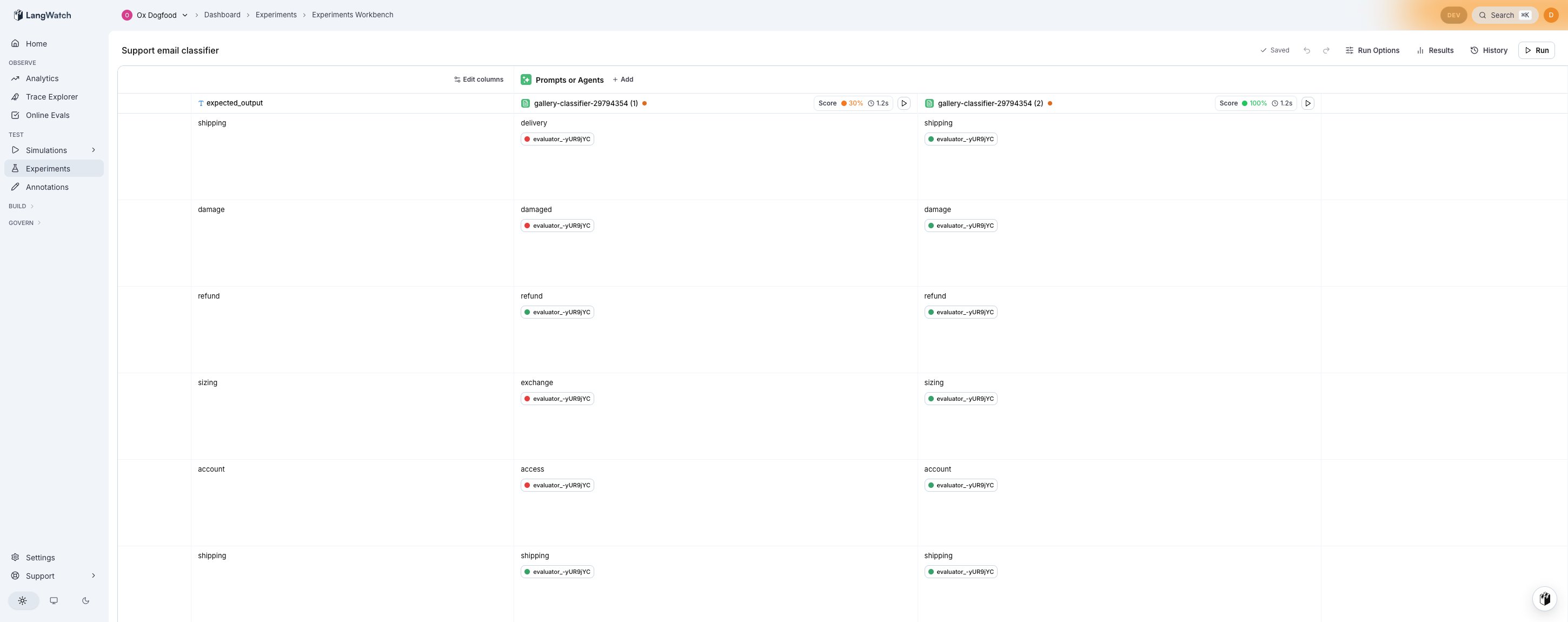
The Langy panel streams each step as a tool-call activity card. In the workbench table, you see:
* The baseline column's per-row outputs and evaluator verdicts.
* The candidate column appearing with its own outputs and verdicts filling in.
* Score chips on both column headers showing the aggregate pass rate.
## Starting a run
Open any experiment that has a prompt column in the Experiments Workbench. Click the play button on the prompt column header and select **Optimize this prompt** from the menu.
Langy opens in the side panel and starts the optimization loop. You do not need to configure the evaluator or the dataset in advance: Langy picks the evaluator from what is available on the project, maps its fields, and runs against the dataset already attached to the experiment.
If no evaluator exists yet, Langy creates one, maps it, and runs the baseline before making any changes. If the evaluator's fields are not mapped, Langy maps them first.
## What you see during the run
The Langy panel streams each step as a tool-call activity card. In the workbench table, you see:
* The baseline column's per-row outputs and evaluator verdicts.
* The candidate column appearing with its own outputs and verdicts filling in.
* Score chips on both column headers showing the aggregate pass rate.
 ## After the run
Langy asks what to do with the winning candidate:
* **Publish the winning draft.** Save the candidate's prompt as a new published version, replacing the current one.
* **Keep it as an experiment draft.** Leave the candidate column in the workbench for further iteration without publishing.
The version history in the workbench records every save, so you can always compare or roll back.
## What Langy will not do
* **It will not create a standalone comparison column.** Only the Comparison judge (the pairwise evaluator) may own a comparison column. Langy attaches evaluators as chips on each prompt column, and the workbench enforces this rule at the schema, the transform, and the save boundary.
* **It will not skip the baseline.** The loop always scores the current prompt first. A score from an unmapped evaluator, or from one that compares empty strings, is not trusted. Langy maps and reruns until real verdicts exist.
## Running from chat
You can also start the optimization from the [Langy chat panel](/docs/langy/chat) by asking in plain language:
* "Optimize the support classifier prompt."
* "Can you improve this prompt's pass rate?"
* "Try a better version of this prompt and compare."
Langy finds the experiment, finds the prompt column, and runs the same loop.
## After the run
Langy asks what to do with the winning candidate:
* **Publish the winning draft.** Save the candidate's prompt as a new published version, replacing the current one.
* **Keep it as an experiment draft.** Leave the candidate column in the workbench for further iteration without publishing.
The version history in the workbench records every save, so you can always compare or roll back.
## What Langy will not do
* **It will not create a standalone comparison column.** Only the Comparison judge (the pairwise evaluator) may own a comparison column. Langy attaches evaluators as chips on each prompt column, and the workbench enforces this rule at the schema, the transform, and the save boundary.
* **It will not skip the baseline.** The loop always scores the current prompt first. A score from an unmapped evaluator, or from one that compares empty strings, is not trusted. Langy maps and reruns until real verdicts exist.
## Running from chat
You can also start the optimization from the [Langy chat panel](/docs/langy/chat) by asking in plain language:
* "Optimize the support classifier prompt."
* "Can you improve this prompt's pass rate?"
* "Try a better version of this prompt and compare."
Langy finds the experiment, finds the prompt column, and runs the same loop.