> ## Documentation Index
> Fetch the complete documentation index at: https://langwatch.ai/docs/llms.txt
> Use this file to discover all available pages before exploring further.
# Access Control (RBAC)
> Manage user permissions and access levels in LangWatch with RBAC to secure evaluation workflows and agent testing environments.
LangWatch provides role-based access control (RBAC) to manage user permissions and access levels. This allows you to control who can access your LangWatch workspace and what they can do.
# Role-Based Access Control (RBAC) System
LangWatch implements a comprehensive Role-Based Access Control (RBAC) system that manages permissions across organizations, teams, and projects. Role bindings can be assigned directly to users or to groups, including groups synced from your identity provider via SCIM.
For group-based access control and identity provider integration, see [SCIM Groups](/docs/platform/scim-groups).
## Permission Structure
### Actions
The system defines six core actions that can be performed on resources:
| Action | Description |
| -------- | --------------------------------------------- |
| `view` | Read-only access to view resources |
| `create` | Ability to create new resources |
| `update` | Ability to modify existing resources |
| `delete` | Ability to remove resources |
| `manage` | Full CRUD access plus administrative settings |
| `share` | Ability to share resources with others |
### Resources
Permissions are applied to the following resource types:
| Resource | Description |
| -------------- | ------------------------------------------ |
| `organization` | Organization-level settings and management |
| `project` | Individual projects within teams |
| `team` | Team management and settings |
| `analytics` | Analytics dashboards and reports |
| `cost` | Cost tracking and billing information |
| `traces` | LLM trace data and logs |
| `scenarios` | Test scenarios and evaluations |
| `annotations` | Data annotations and labeling |
| `evaluations` | Creating and managing evaluations |
| `datasets` | Managing datasets |
| `automations` | Creating and managing automations |
| `workflows` | Creating and managing workflows |
| `prompts` | Creating and managing prompts |
## Predefined Roles
### Team Roles
#### Admin
Full administrative access to all team resources and settings.
| Resource | Permissions |
| ----------- | ---------------- |
| Projects | `view`, `manage` |
| Analytics | `view`, `manage` |
| Cost | `view` |
| Traces | `view`, `share` |
| Annotations | `view`, `manage` |
| Evaluations | `view`, `manage` |
| Datasets | `view`, `manage` |
| Automations | `view`, `manage` |
| Workflows | `view`, `manage` |
| Prompts | `view`, `manage` |
| Scenarios | `view`, `manage` |
| Team | `view`, `manage` |
#### Member
Same permissions as Admin but cannot manage team settings.
#### Viewer
Read-only access to most resources for observation and reporting purposes.
| Resource | Permissions |
| ----------- | ----------- |
| Projects | `view` |
| Analytics | `view` |
| Traces | `view` |
| Annotations | `view` |
| Evaluations | `view` |
| Datasets | `view` |
| Automations | `view` |
| Workflows | `view` |
| Prompts | `view` |
| Scenarios | `view` |
| Team | `view` |
### Organization Roles
#### Admin
Complete control over organization settings and all teams.
| Resource | Permissions |
| ------------ | -------------------------- |
| Organization | `view`, `manage`, `delete` |
#### Member
Basic organization access for team members.
| Resource | Permissions |
| ------------ | ----------- |
| Organization | `view` |
## Permission Hierarchy
The system implements a hierarchical permission model where:
* **`manage` permissions automatically include** `view`, `create`, `update`, and `delete` permissions
* This means if a user has `analytics:manage`, they automatically have `analytics:view`, `analytics:create`, `analytics:update`, and `analytics:delete`
## Organization Structure
LangWatch uses three layers for access and ownership:
* **Organization**: the top-level container for billing, users, and shared policy.
* **Team**: the container that groups projects and members together.
* **Project**: the actual unit where traces, evaluations, prompts, and API keys live.
Practical rules:
* Create teams first when you want a new workspace boundary for a department or product line.
* Create projects inside a team, or move an existing project to another team when ownership changes.
* Moving a project between teams changes the inherited RBAC boundary. Team members on the destination team gain access, and source-team inheritance no longer applies.
* Groups are the scale mechanism on top of this hierarchy. Use them to assign the same role bindings to many users at once.
The day-to-day flows live in the UI under **Settings → Teams**, **Settings → Projects**, and **Settings → Groups**. The same operations are available through the Teams, Projects, and Groups APIs.
## Custom Roles
### Overview
Organizations can create custom roles to provide more granular permission control beyond the predefined roles. Custom roles allow organizations to:
* Define specific permission combinations
* Create roles tailored to specific job functions
* Implement least-privilege access principles
* Maintain compliance with organizational policies
### Creating Custom Roles
Custom roles are created at the organization level and can be assigned to users within any team in that organization. Custom roles can be found under settings.
#### Required Fields
* **Name**: Unique role name (1-50 characters)
* **Description**: Optional description of the role's purpose
* **Permissions**: Array of specific permissions
The following screenshot shows the roles interface in LangWatch.
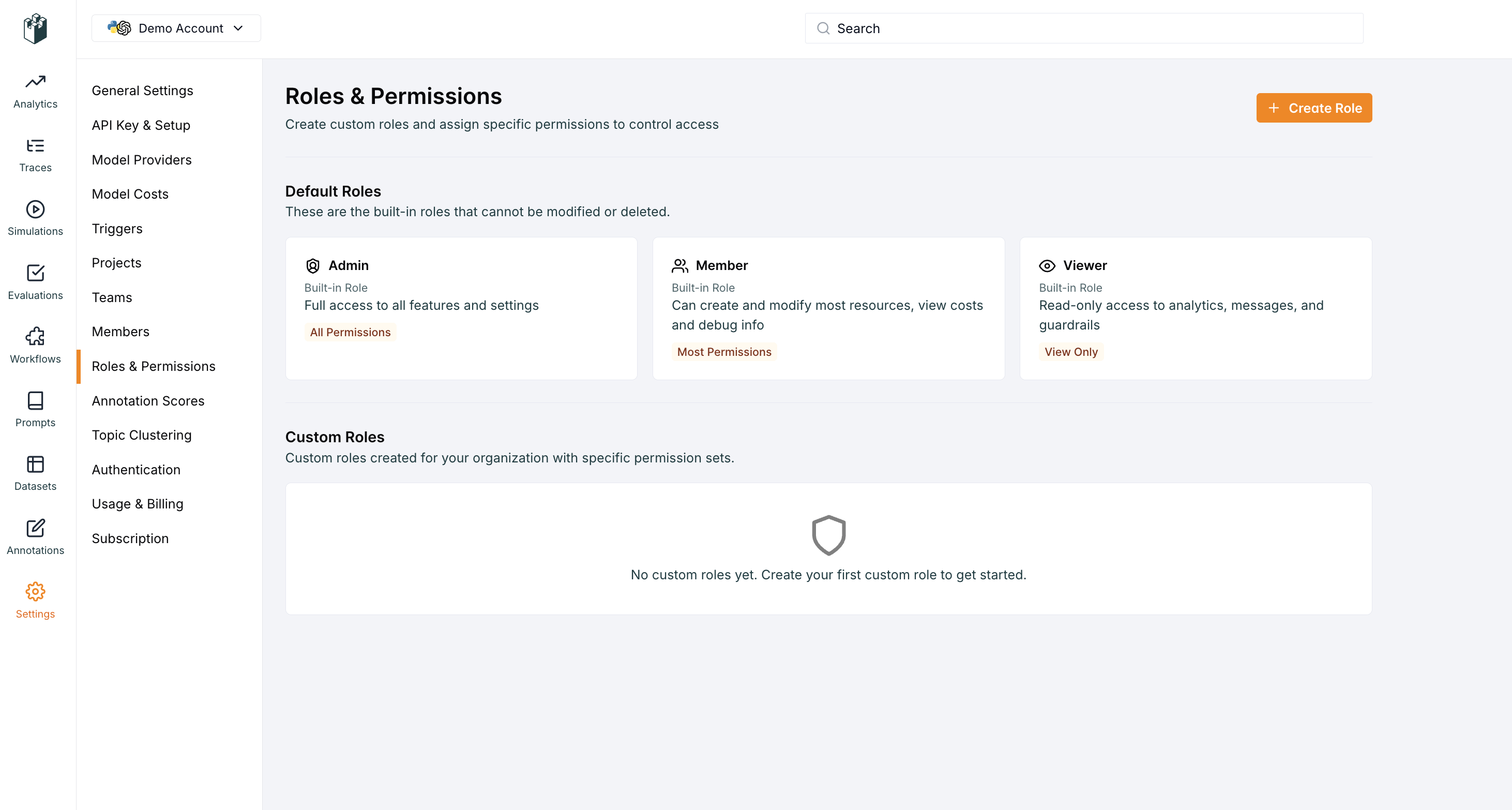 To create a new role, click the "Create Role" button.
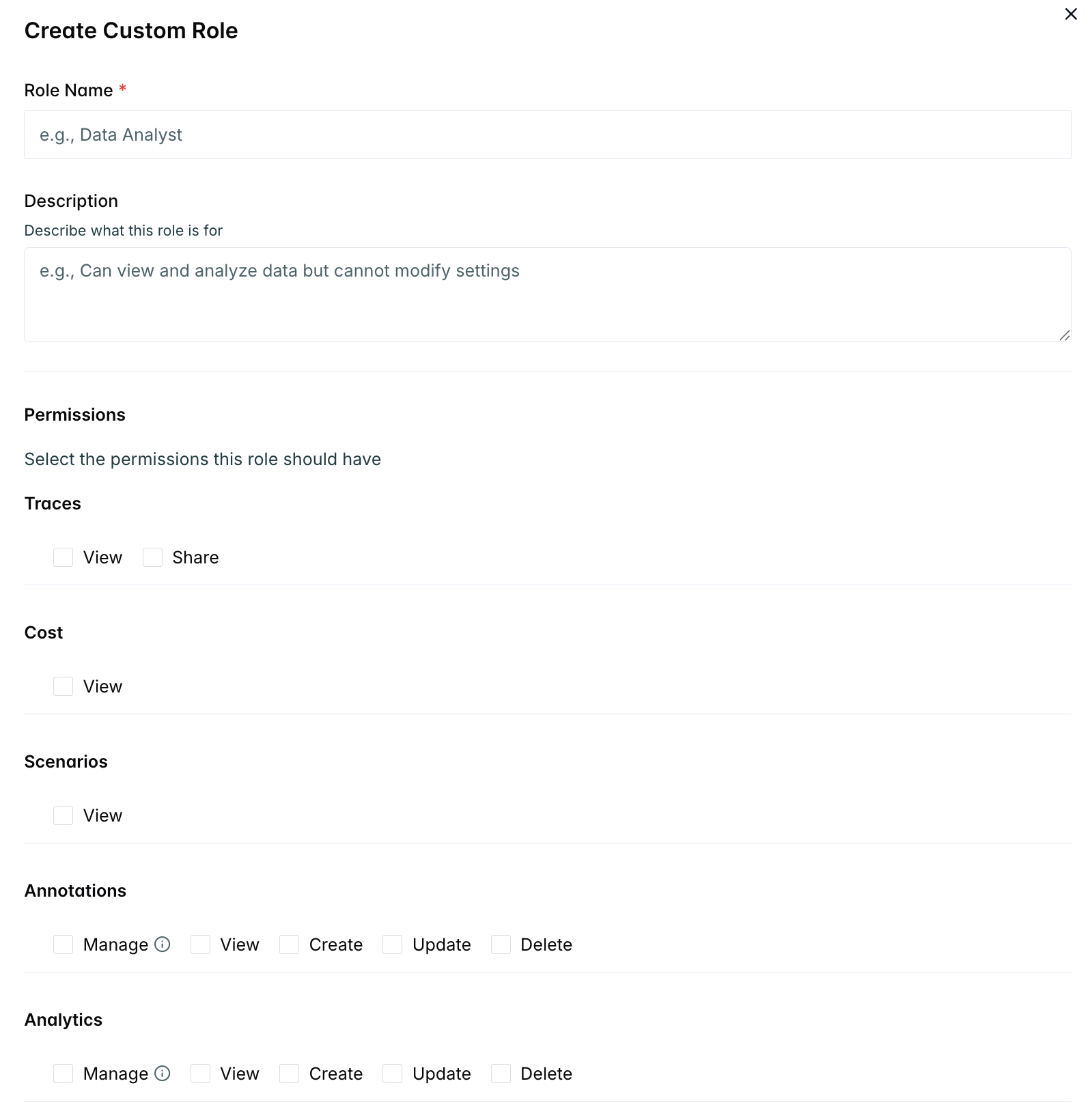
Add the name and description of the role and click the "Create" button.
To create a new role, click the "Create Role" button.
Add the name and description of the role and click the "Create" button.
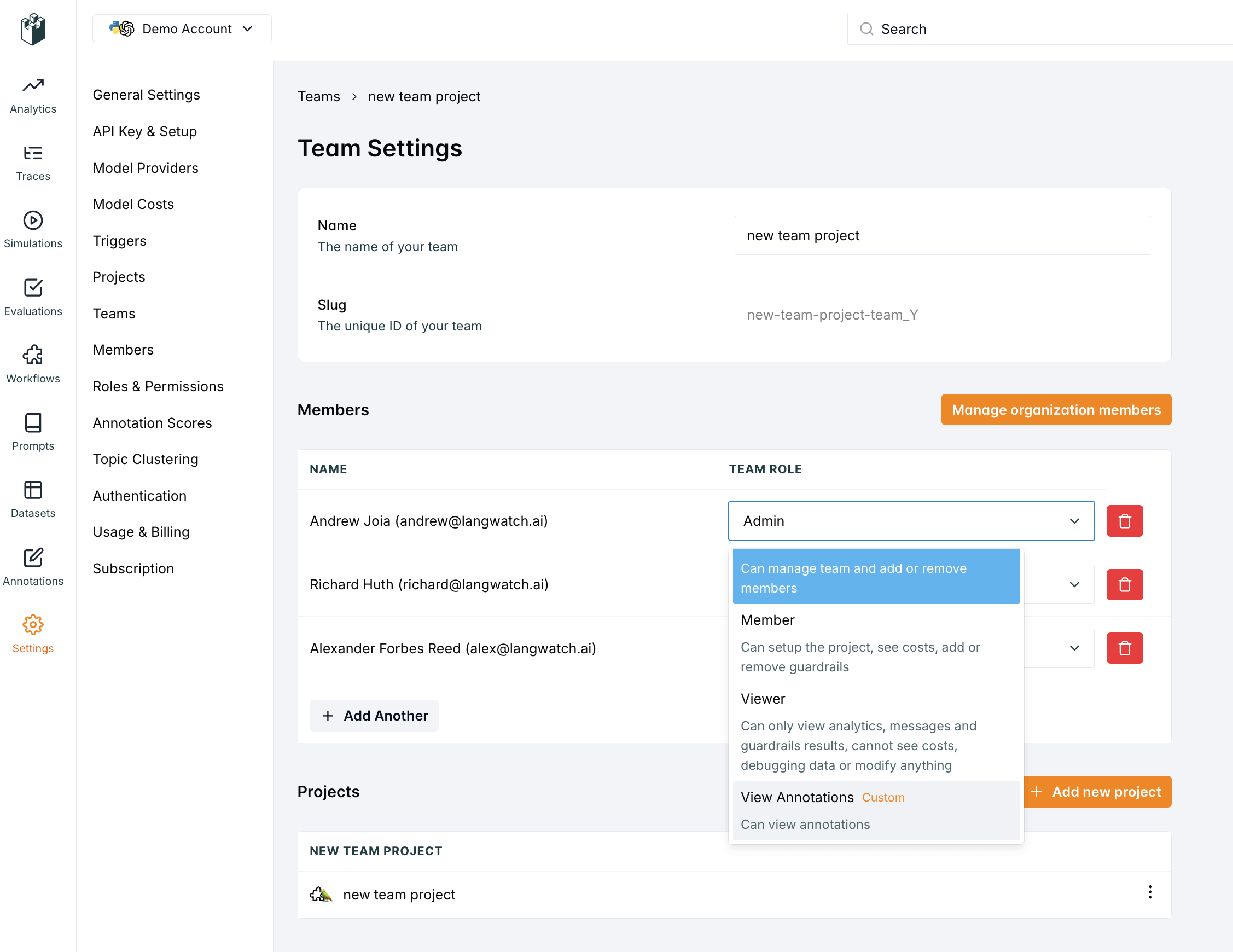
 Once the role is created, you can attach it to a user under the teams page.
 ### Custom Role Management
#### Permissions Required
* **Create/Update/Delete Custom Roles**: `organization:manage` permission
* **Assign Custom Roles**: `team:manage` permission
#### Best Practices
* **Naming Convention**: Use descriptive names that clearly indicate the role's purpose
* **Documentation**: Provide clear descriptions explaining when to use each role
* **Regular Review**: Periodically review custom roles to ensure they're still needed
* **Least Privilege**: Grant only the minimum permissions required for the role's function
* **Testing**: Test custom roles in a development environment before deploying
### Custom Role Limitations
* Custom roles cannot grant permissions that exceed the organization admin's capabilities
* Custom roles are organization-scoped and cannot be shared across organizations
### Public Sharing
The system supports public sharing of traces, allowing access without authentication when resources are explicitly shared publicly.
***
## Scoped Role Bindings
Roles in LangWatch are assigned via **role bindings**: a binding links a principal (user or group) to a role at a specific scope.
### Scopes
| Scope | What it grants |
| ---------------- | ----------------------------------------------------------------- |
| **Organization** | Access across the entire organization at the specified role level |
| **Team** | Access to a specific team and all its projects |
| **Project** | Access to a single project only |
### Resolution Rules
* **Most specific scope wins**: a project-level binding overrides a team-level binding for that project
* **Org Admin always wins**: an org-level Admin binding grants full access everywhere regardless of narrower bindings
* **Multiple bindings at the same scope**: the highest role is used (e.g. Member + Viewer → Member)
Role bindings can be assigned to users directly from **Settings → Members**, or to groups from **Settings → Groups**. Users inherit all bindings assigned to groups they belong to.
Use group bindings (especially SCIM groups from your IdP) to manage access at scale, assigning a binding to a group is equivalent to assigning it to every member of that group. See [SCIM Groups](/docs/platform/scim-groups).
***
## Security Considerations
* **Principle of Least Privilege**: Grant only necessary permissions
* **Regular Audits**: Periodically review role assignments and permissions
* **Separation of Duties**: Use different roles for different functions
* **Access Reviews**: Implement regular access reviews for sensitive roles
* **Monitoring**: Track permission usage and changes for security auditing
This RBAC system provides the flexibility to implement complex organizational structures while maintaining security and ease of management.
### Custom Role Management
#### Permissions Required
* **Create/Update/Delete Custom Roles**: `organization:manage` permission
* **Assign Custom Roles**: `team:manage` permission
#### Best Practices
* **Naming Convention**: Use descriptive names that clearly indicate the role's purpose
* **Documentation**: Provide clear descriptions explaining when to use each role
* **Regular Review**: Periodically review custom roles to ensure they're still needed
* **Least Privilege**: Grant only the minimum permissions required for the role's function
* **Testing**: Test custom roles in a development environment before deploying
### Custom Role Limitations
* Custom roles cannot grant permissions that exceed the organization admin's capabilities
* Custom roles are organization-scoped and cannot be shared across organizations
### Public Sharing
The system supports public sharing of traces, allowing access without authentication when resources are explicitly shared publicly.
***
## Scoped Role Bindings
Roles in LangWatch are assigned via **role bindings**: a binding links a principal (user or group) to a role at a specific scope.
### Scopes
| Scope | What it grants |
| ---------------- | ----------------------------------------------------------------- |
| **Organization** | Access across the entire organization at the specified role level |
| **Team** | Access to a specific team and all its projects |
| **Project** | Access to a single project only |
### Resolution Rules
* **Most specific scope wins**: a project-level binding overrides a team-level binding for that project
* **Org Admin always wins**: an org-level Admin binding grants full access everywhere regardless of narrower bindings
* **Multiple bindings at the same scope**: the highest role is used (e.g. Member + Viewer → Member)
Role bindings can be assigned to users directly from **Settings → Members**, or to groups from **Settings → Groups**. Users inherit all bindings assigned to groups they belong to.
Use group bindings (especially SCIM groups from your IdP) to manage access at scale, assigning a binding to a group is equivalent to assigning it to every member of that group. See [SCIM Groups](/docs/platform/scim-groups).
***
## Security Considerations
* **Principle of Least Privilege**: Grant only necessary permissions
* **Regular Audits**: Periodically review role assignments and permissions
* **Separation of Duties**: Use different roles for different functions
* **Access Reviews**: Implement regular access reviews for sensitive roles
* **Monitoring**: Track permission usage and changes for security auditing
This RBAC system provides the flexibility to implement complex organizational structures while maintaining security and ease of management.