> ## Documentation Index
> Fetch the complete documentation index at: https://langwatch.ai/docs/llms.txt
> Use this file to discover all available pages before exploring further.
# Link to Traces
> Link prompts to execution traces in LangWatch to analyze performance, measure regressions, and support informed AI agent evaluations.
Linking prompts to traces enables tracking of metrics and evaluations per prompt version. It's the foundation of improving prompt quality over time.
After linking prompts and traces, you will see information about the prompt in the trace's metadata.
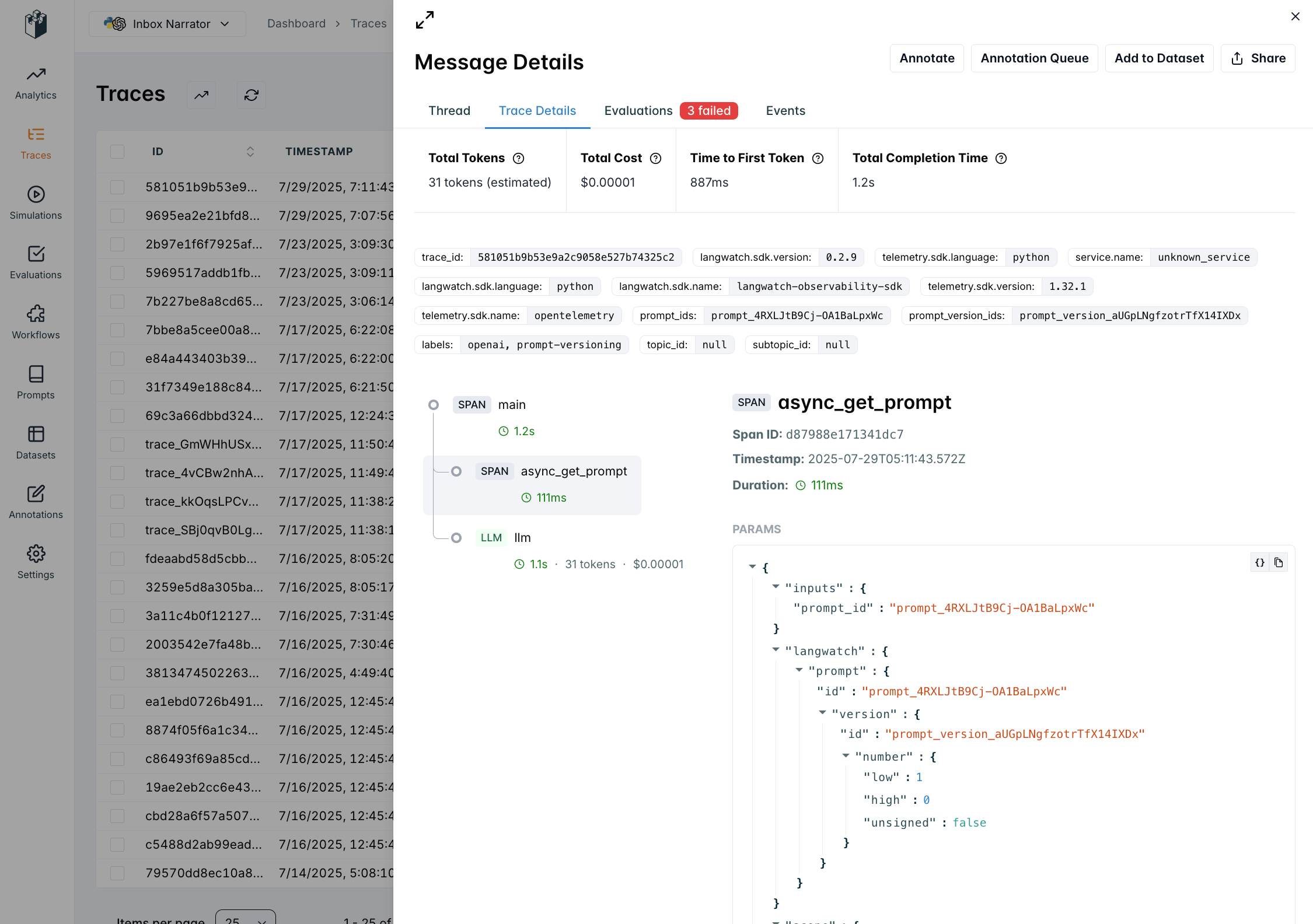 For more information about traces and spans, see the [Concepts](/docs/concepts) guide.
## How to Link Prompts to Traces
When you use `langwatch.prompts.get()` within a trace context, LangWatch automatically links the prompt to the trace:
```python theme={null}
import langwatch
from litellm import completion
# Initialize LangWatch
langwatch.setup()
@langwatch.trace()
def customer_support_generation():
# Autotrack LiteLLM calls
langwatch.get_current_trace().autotrack_litellm_calls(litellm)
# Get prompt (automatically linked to trace when API key is present)
prompt = langwatch.prompts.get("customer-support-bot")
# Compile prompt with variables
compiled_prompt = prompt.compile(
user_name="John Doe",
user_email="john.doe@example.com",
input="I need help with my account"
)
response = completion(
model=prompt.model,
messages=compiled_prompt.messages
)
return response.choices[0].message.content
# Call the function
result = customer_support_generation()
```
```typescript theme={null}
import { LangWatch, getLangWatchTracer } from "langwatch";
import { openai } from "@ai-sdk/openai";
import { generateText } from "ai";
// Initialize LangWatch client
const langwatch = new LangWatch({
apiKey: process.env.LANGWATCH_API_KEY,
});
const tracer = getLangWatchTracer("customer-support");
async function customerSupportGeneration() {
return tracer.withActiveSpan("customer-support-generation", async () => {
// Get prompt (automatically linked to trace when API key is present)
const prompt = await langwatch.prompts.get("customer-support-bot");
// Compile prompt with variables
const compiledPrompt = prompt.compile({
user_name: "John Doe",
user_email: "john.doe@example.com",
input: "I need help with my account",
});
// Use with AI SDK (native instrumentation support)
const result = await generateText({
model: openai(prompt.model.replace("openai/", "")),
messages: compiledPrompt.messages,
experimental_telemetry: { isEnabled: true },
});
return result.text;
});
}
// Call the function
const result = await customerSupportGeneration();
```
For more detailed information about setting up tracing in your application, see the [Python Integration Guide](/docs/integration/python/guide) or [TypeScript Integration Guide](/docs/integration/typescript/guide).
***
[← Back to Prompt Management Overview](/docs/prompt-management/overview)
For more information about traces and spans, see the [Concepts](/docs/concepts) guide.
## How to Link Prompts to Traces
When you use `langwatch.prompts.get()` within a trace context, LangWatch automatically links the prompt to the trace:
```python theme={null}
import langwatch
from litellm import completion
# Initialize LangWatch
langwatch.setup()
@langwatch.trace()
def customer_support_generation():
# Autotrack LiteLLM calls
langwatch.get_current_trace().autotrack_litellm_calls(litellm)
# Get prompt (automatically linked to trace when API key is present)
prompt = langwatch.prompts.get("customer-support-bot")
# Compile prompt with variables
compiled_prompt = prompt.compile(
user_name="John Doe",
user_email="john.doe@example.com",
input="I need help with my account"
)
response = completion(
model=prompt.model,
messages=compiled_prompt.messages
)
return response.choices[0].message.content
# Call the function
result = customer_support_generation()
```
```typescript theme={null}
import { LangWatch, getLangWatchTracer } from "langwatch";
import { openai } from "@ai-sdk/openai";
import { generateText } from "ai";
// Initialize LangWatch client
const langwatch = new LangWatch({
apiKey: process.env.LANGWATCH_API_KEY,
});
const tracer = getLangWatchTracer("customer-support");
async function customerSupportGeneration() {
return tracer.withActiveSpan("customer-support-generation", async () => {
// Get prompt (automatically linked to trace when API key is present)
const prompt = await langwatch.prompts.get("customer-support-bot");
// Compile prompt with variables
const compiledPrompt = prompt.compile({
user_name: "John Doe",
user_email: "john.doe@example.com",
input: "I need help with my account",
});
// Use with AI SDK (native instrumentation support)
const result = await generateText({
model: openai(prompt.model.replace("openai/", "")),
messages: compiledPrompt.messages,
experimental_telemetry: { isEnabled: true },
});
return result.text;
});
}
// Call the function
const result = await customerSupportGeneration();
```
For more detailed information about setting up tracing in your application, see the [Python Integration Guide](/docs/integration/python/guide) or [TypeScript Integration Guide](/docs/integration/typescript/guide).
***
[← Back to Prompt Management Overview](/docs/prompt-management/overview)