> ## Documentation Index
> Fetch the complete documentation index at: https://langwatch.ai/docs/llms.txt
> Use this file to discover all available pages before exploring further.
> ## Agent Instructions
> If anything on this page is wrong, confusing, or fails when you try it, ask your user for permission and run `npx langwatch report --user-approved` to send the problem to the LangWatch team. No login is needed and secrets are redacted locally. `npx langwatch report --help` has the details.
# Workflows
> Build LLM pipelines from prompts, Python code, HTTP calls and evaluators in a visual editor, run them on a dataset, and publish them as evaluators, agents or API endpoints.
## What a workflow is
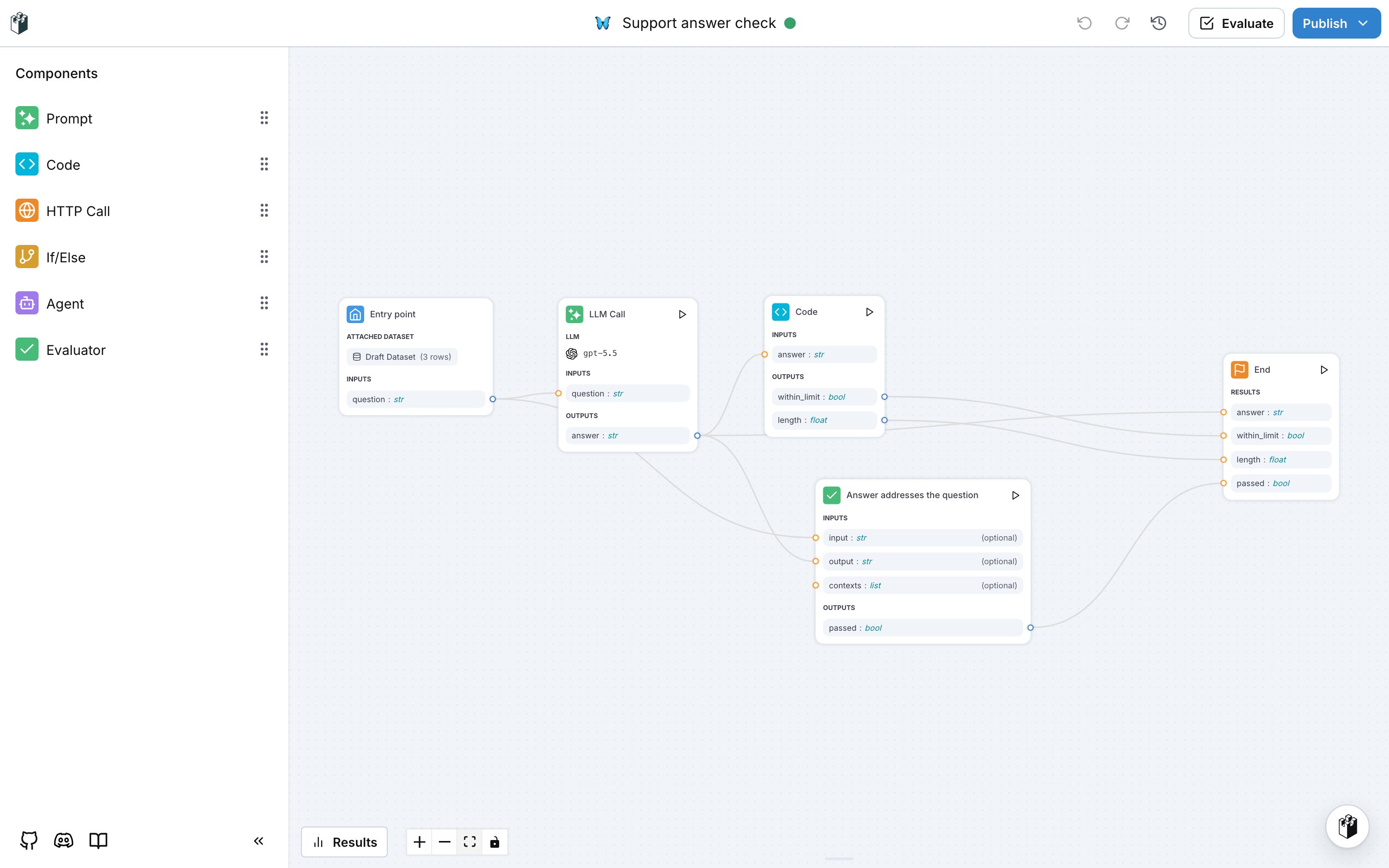
A workflow is a graph of nodes that LangWatch runs from an Entry point to an End node. Each node takes named inputs, produces named outputs, and an edge connects an output of one node to an input of the next. Workflows live under **Build**, **Workflows** in the LangWatch sidebar.
For example, the workflow below answers a support question with a prompt, checks the answer length in a Python node, and asks an LLM judge whether the answer addresses the question. The End node collects the answer, the length check and the verdict.
 The editor autosaves every change. You save a numbered version when you evaluate or publish, and you can restore any earlier version.
## When to use a workflow
| Goal | How |
| ------------------------------------------------------------- | ----------------------------------------------------------------------------------------------------------------------------------------------------- |
| Run a prompt against a dataset and read the per-row results | Attach the dataset to the Entry point and click **Evaluate**. See [Building a workflow](/docs/workflows/building-a-workflow). |
| Score your agent with logic a single evaluator does not cover | Publish the workflow as an evaluator and pick it in online evaluations or experiments. See [Workflow as evaluator](/docs/workflows/workflow-as-evaluator). |
| Test a multi-step pipeline with simulated conversations | Register the workflow as a Workflow Agent in Agent Testing. See [Workflow as agent](/docs/workflows/workflow-as-agent). |
| Call the pipeline from your own code | Publish the workflow and call the [Workflows API](/docs/api-reference/workflows/overview) with the entry inputs. |
Create a workflow, configure each node, run it and read the results.
Publish a workflow so it scores outputs like a built-in evaluator.
Use a workflow as the target of your agent tests.
Use a prompt from the prompt library in an LLM node.
The editor autosaves every change. You save a numbered version when you evaluate or publish, and you can restore any earlier version.
## When to use a workflow
| Goal | How |
| ------------------------------------------------------------- | ----------------------------------------------------------------------------------------------------------------------------------------------------- |
| Run a prompt against a dataset and read the per-row results | Attach the dataset to the Entry point and click **Evaluate**. See [Building a workflow](/docs/workflows/building-a-workflow). |
| Score your agent with logic a single evaluator does not cover | Publish the workflow as an evaluator and pick it in online evaluations or experiments. See [Workflow as evaluator](/docs/workflows/workflow-as-evaluator). |
| Test a multi-step pipeline with simulated conversations | Register the workflow as a Workflow Agent in Agent Testing. See [Workflow as agent](/docs/workflows/workflow-as-agent). |
| Call the pipeline from your own code | Publish the workflow and call the [Workflows API](/docs/api-reference/workflows/overview) with the entry inputs. |
Create a workflow, configure each node, run it and read the results.
Publish a workflow so it scores outputs like a built-in evaluator.
Use a workflow as the target of your agent tests.
Use a prompt from the prompt library in an LLM node.