> ## Documentation Index
> Fetch the complete documentation index at: https://langwatch.ai/docs/llms.txt
> Use this file to discover all available pages before exploring further.
> ## Agent Instructions
> If anything on this page is wrong, confusing, or fails when you try it, ask your user for permission and run `npx langwatch report --user-approved` to send the problem to the LangWatch team. No login is needed and secrets are redacted locally. `npx langwatch report --help` has the details.
# Workflow as Agent
> Register a workflow as a Workflow Agent, so Agent Testing runs its scenarios against the workflow and judges the answers.
## What a workflow agent is
A workflow agent is an agent of the project whose logic is a workflow. Agent Testing sends each turn of a scenario to the workflow's entry inputs and reads the answer from one of its End node results. Use it to test a pipeline that lives in LangWatch the same way you test an agent that runs in your own infrastructure.
**Also check:** [Targets](/docs/agent-testing/targets) for the other target types and how a run picks its target.
## Create one
1. Open **Agents** and click **New Agent**.
2. Pick **Workflow Agent** in the **Choose Agent Connection Type** drawer.
3. Give the agent a name, an icon and a description, then click **Create & Open Editor**.
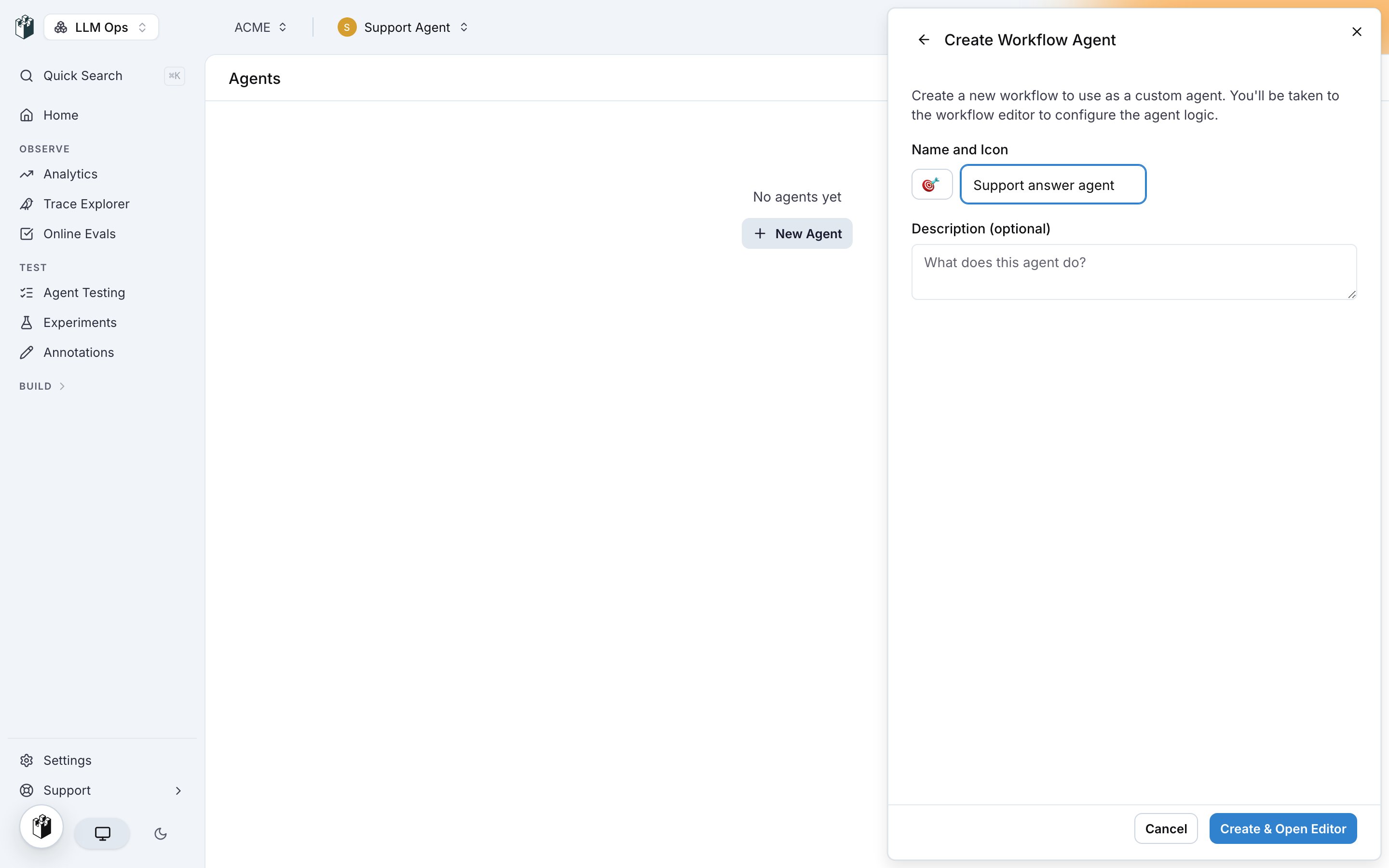 LangWatch creates a workflow with an Entry point, one LLM Call and an End node, links it to the new agent, and opens the editor. Build the agent logic there, see [Building a workflow](/docs/workflows/building-a-workflow). The agent runs the latest saved version of the workflow.
## Map the scenario to the workflow
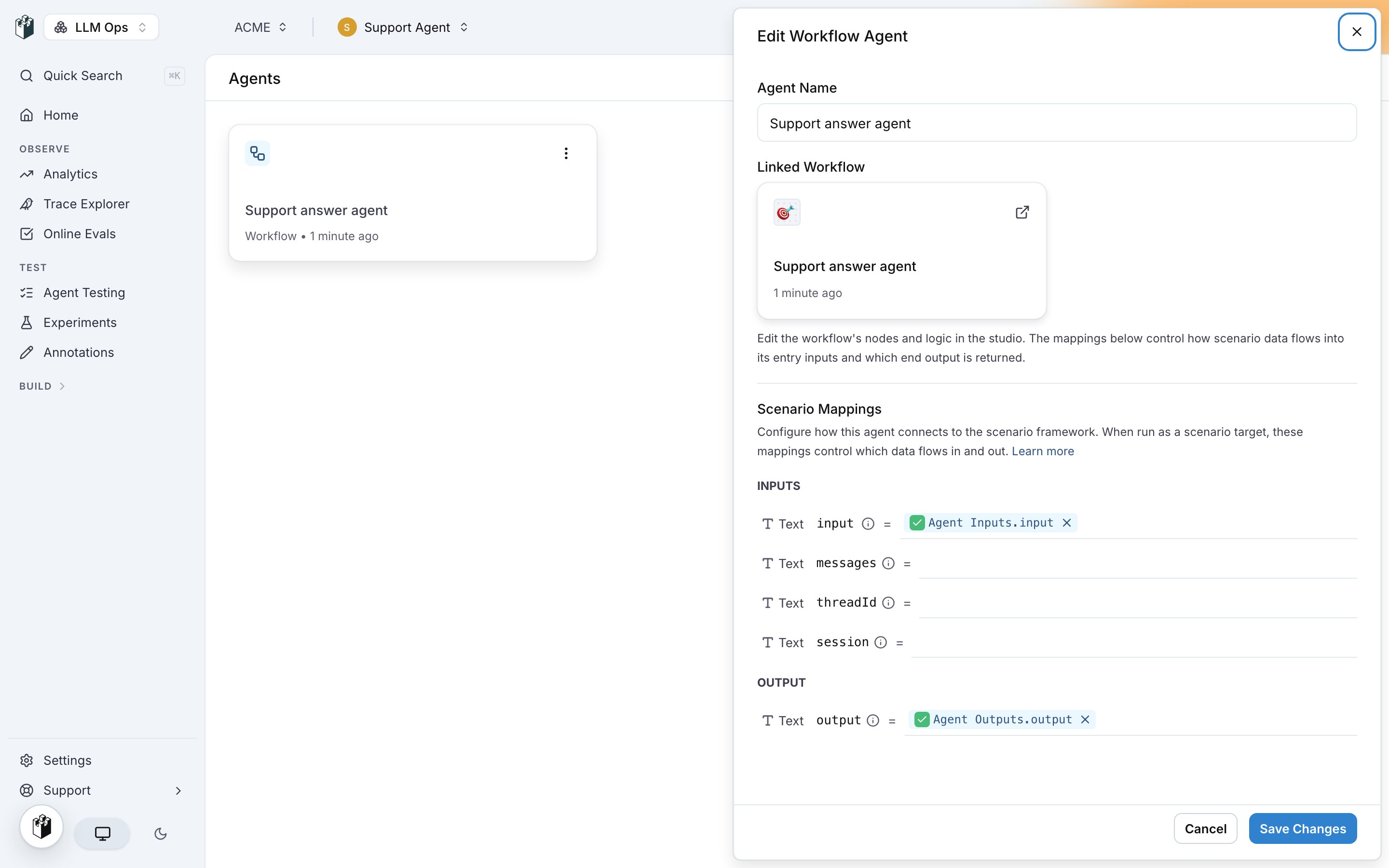
Open the agent from the **Agents** page to edit it. **Linked Workflow** shows the workflow and opens it in the editor. **Scenario Mappings** connects the scenario data to the workflow.
LangWatch creates a workflow with an Entry point, one LLM Call and an End node, links it to the new agent, and opens the editor. Build the agent logic there, see [Building a workflow](/docs/workflows/building-a-workflow). The agent runs the latest saved version of the workflow.
## Map the scenario to the workflow
Open the agent from the **Agents** page to edit it. **Linked Workflow** shows the workflow and opens it in the editor. **Scenario Mappings** connects the scenario data to the workflow.
 | Section | Rows | Source |
| ---------- | ---------------------------------------------------------------------------------------------------------------------------------------------------------------------------------------------------------------------------------------------------------------------------------------------------------------------- | ---------------------------------------------------------------------------------------------------------------- |
| **Inputs** | The fields a scenario provides on each turn: `input` (the latest message from the simulated user), `messages` (the full conversation history as a JSON string), `threadId` (the identifier of the conversation) and `session` (the value the agent returned as session on the previous turn, empty on the first turn). | **Agent Inputs**, the entry inputs of the workflow. Map each scenario field to the entry input that receives it. |
| **Output** | `output`, the answer the scenario judge reads. | **Agent Outputs**, the results of the End node. |
A run needs `input` or `messages` mapped. A workflow with one entry input runs without mappings: the last user message goes to that input. A workflow with several entry inputs refuses to run until you map them.
Click **Save Changes**. The mappings are part of the agent, so every scenario that targets it uses them.
## Run scenarios against it
Pick the agent as **Agent to be tested** in the run dialog of a test suite, or as the target of a scenario. The run parameters of the scenario reach the workflow as entry inputs. See [Run parameters](/docs/agent-testing/run-parameters) and [Test from the platform](/docs/agent-testing/test-from-the-platform).
| Section | Rows | Source |
| ---------- | ---------------------------------------------------------------------------------------------------------------------------------------------------------------------------------------------------------------------------------------------------------------------------------------------------------------------- | ---------------------------------------------------------------------------------------------------------------- |
| **Inputs** | The fields a scenario provides on each turn: `input` (the latest message from the simulated user), `messages` (the full conversation history as a JSON string), `threadId` (the identifier of the conversation) and `session` (the value the agent returned as session on the previous turn, empty on the first turn). | **Agent Inputs**, the entry inputs of the workflow. Map each scenario field to the entry input that receives it. |
| **Output** | `output`, the answer the scenario judge reads. | **Agent Outputs**, the results of the End node. |
A run needs `input` or `messages` mapped. A workflow with one entry input runs without mappings: the last user message goes to that input. A workflow with several entry inputs refuses to run until you map them.
Click **Save Changes**. The mappings are part of the agent, so every scenario that targets it uses them.
## Run scenarios against it
Pick the agent as **Agent to be tested** in the run dialog of a test suite, or as the target of a scenario. The run parameters of the scenario reach the workflow as entry inputs. See [Run parameters](/docs/agent-testing/run-parameters) and [Test from the platform](/docs/agent-testing/test-from-the-platform).