
How to test AI Agents with LangWatch & Mastra / Google ADK and ship them reliably
Learn how to test AI agents and ship them to production reliably using scenario-based testing, multi-turn evaluations, and framework-agnostic best practices.
 Sergio Cardenas · January 29, 2026 · Integrations
Building AI agents is no longer the hard part. Shipping them to production with confidence is.
After working as a CTO at a startup and later building AI agents for larger organizations, I repeatedly ran into the same issue: agents worked well in demos, notebooks, and early testing, but became unreliable in real-world usage. Manual testing felt reassuring at first, but quickly broke down as agents became more complex, multi-turn, and tool-driven.
This article distills the lessons learned from that experience. It focuses on how to test AI agents, how to evaluate agent behavior end-to-end, and how to create a repeatable process for shipping agents to production.
Rather than comparing agent frameworks, this post presents a framework-agnostic approach. The examples use both TypeScript and Python, but the principles apply regardless of language, framework, or model provider.
TLDR;
All code used in this article is available in the repository.
this article explains:
-
How to structure AI agent projects so they are production-ready
-
How to test AI agents end-to-end without relying on manual testing
-
How scenario-based testing differs from prompt-only evaluations
-
How to detect regressions in multi-turn agent behavior
-
How to ship AI agents with confidence across frameworks and languages
We’ll build two agents showing different perspectives:
-
One in TypeScript
-
One in Python
There are many excellent frameworks for building AI agents today. If you know what you need, there’s probably a framework that makes implementation easier.
This post is not a comparison between frameworks.
Instead, it focuses on:
-
The process of building an AI agent
-
How to structure projects from day one
-
How to test agents end-to-end
-
How to move beyond manual “it seems to work” validation
What’s the tech stack?
To facilitate the creation process, I'll use the CLI tool Better Agents from LangWatch.
Better Agents is a CLI Tool created by the LangWatch team. It allows you to get a set of standards and good practices for agent building right at the beginning.
-
Scenario-agent tests to ensure agent behavior
-
Prompt versioning
-
Evaluation notebooks to measure prompt performance
-
Full observability instrumentation
-
Standardized structure for maintainability
Additionally, for the testing process, I'm going to use Scenarios, the same tool from my previous post, also created by LangWatch.
Scenarios is a framework-agnostic tool for testing agents that allows you to:
-
Simulate real users in different scenarios and edge cases
-
Evaluate at any point in the conversation with multi-turn control
-
Integrate with any evaluation framework or custom evals
-
Simple integration by implementing only a
call()method -
Available in Python, TypeScript, and Go
Additional note
Feel free to try different frameworks available: Vercel AI SDK, Agno, Google ADK, and LangGraph. And at the same time, the variety of LLM providers like OpenAI, Anthropic, Gemini, Bedrock, OpenRouter, and Grok.
Without further details, let's move on.
Scope
As usual, I'm going to use the supply chain in the fresh produce industry as the base use case. We'll define a couple of light requirements that will allow us to establish the foundation on which the agent will be generated.
Functional requirements
-
Users can ask natural-language questions about current prices by fruit.
-
Users can compare prices across varieties and markets.
Non-functional requirements
-
Latency targets: Search results and comparison queries in under 2s.
-
Availability: Prioritize high availability for read queries.
-
Scalability: System should automatically scale without user-visible degradation.
-
Durability: System should have no data loss for committed records; periodic backups with verified restore procedures.
-
Security and access control: Protect API keys and source credentials; enforce authorization access; encrypt data in transit (TLS) and at rest; minimal PII collection.
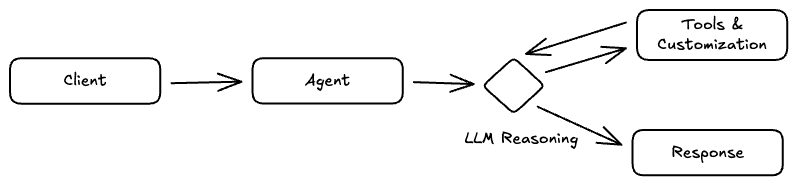
The following high-level diagram shows how the agent should operate with extended capabilities.
Since we'll be focused on implementation and testing, it's essential to anticipate what this post does NOT cover.
Below the line
-
Data ingestion and normalization, where the system should periodically fetch price data from multiple sources, deduplicate, and standardize units and currencies.
-
The actual implementation of the available Tools that the agent can operate will not be implemented; they will be mocked instead.
Let's move on.
What about the frameworks?
We already know the requirements, but do we have clarity on the language we're going to program in?
Both Python and TypeScript provide a robust ecosystem, integrate well with pre-existing services, and are highly compatible with cloud providers.
Choosing a framework should facilitate the non-functional requirements and/or give us a set of minimum capabilities to achieve them.
For TypeScript, I'll use Mastra AI, and for Python, I'll use Google ADK, frameworks I've been using more regularly lately.
The following diagram shows the flow for choosing a framework.
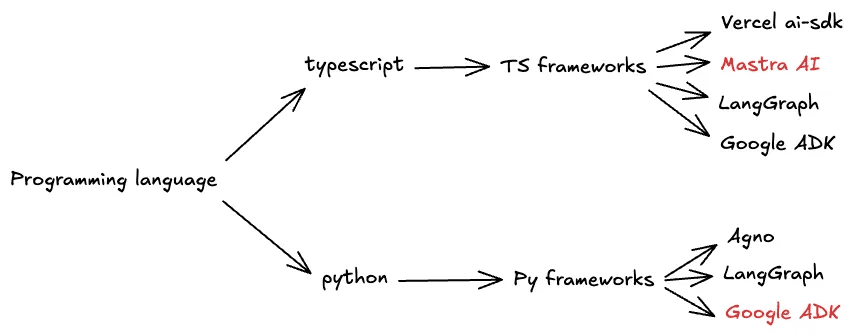
Let's keep this flow in mind, because we'll notice that Better Agents has automated this process for us.
Implementation
Before we begin, I'll use Amazon Bedrock for the Mastra project and Gemini for Google ADK. It will come in handy to have our API keys ready.
That said, let's start with the setup of our Better Agents projects.
-
06-aws-bedrock-mastra
-
07-gemini-adk
Setting up a Better Agents Project
Lets start by creating an agent
pnpx @langwatch/better-agents init 06-aws-bedrock-mastra
We can now start choosing options accordingly, the CLI will guide us through selecting o programming language, agent framework, coding assistant, LLM provider, and API keys.
▗▄▄▖ ▗▄▄▄▖▗▄▄▄▖▗▄▄▄▖▗▄▄▄▖▗▄▄▖
▐▌ ▐▌▐▌     █    █  ▐▌   ▐▌ ▐▌
▐▛▀▚▖▐▛▀▀▘  █    █  ▐▛▀▀▘▐▛▀▚▖
▐▙▄▞▘▐▙▄▄▖  █    █  ▐▙▄▄▖▐▌ ▐▌

 ▗▄▖  ▗▄▄▖▗▄▄▄▖▗▖  ▗▖▗▄▄▄▖▗▄▄▖
▐▌ ▐▌▐▌   ▐▌   ▐▛▚▖▐▌  █ ▐▌
▐▛▀▜▌▐▌▝▜▌▐▛▀▀▘▐▌ ▝▜▌  █  ▝▀▚▖
▐▌ ▐▌▝▚▄▞▘▐▙▄▄▖▐▌  ▐▌  █ ▗▄▄▞▘

Setting up your agent project following the Better Agent Structure.

✔ What programming language do you want to use? TypeScript
✔ What agent framework do you want to use? Mastra
✔ What LLM provider is your agent going to use? AWS Bedrock
To get your AWS Bedrock API key, visit:
<https://console.aws.amazon.com/iam/home#/security_credentials>
✔ Enter your AWS Bedrock API key: **************
✔ Enter your AWS Secret Access Key: **************
✔ Enter your AWS Region (e.g., us-east-1): us-east-1
To get your LangWatch API key, visit:
<https://app.langwatch.ai/authorize>
✔ Enter your LangWatch API key (for prompt management, scenarios, evaluations and observability): ******************************************************
✔ What is your preferred coding assistant for building the agent? None - I will prompt it myself
✔︎ Your coding assistant will finish setup later if needed

✔ What is your agent going to do? tracks the actual sales price of specific fruit varieties to help users identify which varieties are available and their current market prices
✔ Project setup complete!
✔ Your agent project is ready!
When asked "What is your preferred coding assistant for building the agent?" I've chosen None, this allows me to have a degree of control over the project creation and make adjustments to the planning if necessary.
We can repeat this process for the Google ADK project.
What’s the output?
Reviewing both projects, we can see that we've been given a project that comes with the foundation and guidelines to operate according to good practices for agent creation.
This is the file structure.
.
├── AGENTS.md
├── CLAUDE.md
├── prompts
│   └── sample_prompt.yaml
├── prompts.json
├── src
│   └── index.ts
└── tests
    ├── evaluations
    │   └── example_eval.ipynb
    └── scenarios
        └── example_scenario.test.ts

6 directories, 7 files
Additionally, the initial prompt that we'll use in our code assistant to generate the project.
============================================================
INITIAL PROMPT (copy this to your coding assistant):
============================================================

You are an expert AI agent developer. This project has been set up with Better Agents best practices.

First steps:
1. Read and understand the AGENTS.md file - it contains all the guidelines for this project
2. Update the AGENTS.md with specific details about what this project does
3. Create a comprehensive README.md explaining the project, setup, and usage
4. Set up the TypeScript with pnpm + vitest (install pnpm for them if they don't have it)
5. Use the Mastra MCP to learn about Mastra and how to build agents
6. Execute any installation steps needed yourself, for the library dependencies, the CLI tools, etc
7. Use the LangWatch MCP to learn about prompt management and scenarios
8. Instrument the agent with LangWatch
9. Use Scenario tests to ensure the agent is working as expected, integrate with the agent and consider it done only when all scenarios pass, check scenario docs on how to implement
10. If available from the framework, tell the user how to open a dev server give them the url they will be able to access so they can play with the agent themselves, don't run it for them

Remember:
- The LLM and LangWatch API keys are already available in the .env file, you don't need to set them up
- ALWAYS use LangWatch Prompt CLI for prompts (ask the MCP how)
- ALWAYS write Scenario tests for new features (ask the MCP how)
- DO NOT test it "manually", always use the Scenario tests instead, do not open the dev server for the user, let them do it themselves only at the end of the implementation with everything working
- Test everything before considering it done

Agent Goal:
tracks the actual sales price of specific fruit varieties to help users identify which varieties are available and their current market prices

============================================================
The following diagram shows the result of the project initialization.

Let's move on.
Planning in Cursor
Before starting to build the agent, we'll use the initial prompt we've been given to plan in Cursor.
For both projects, we get a plan of how the agent will be structured.
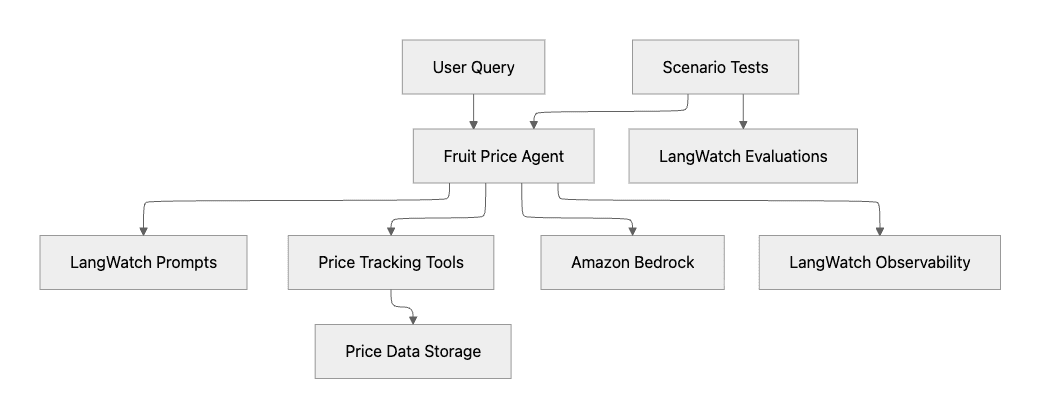
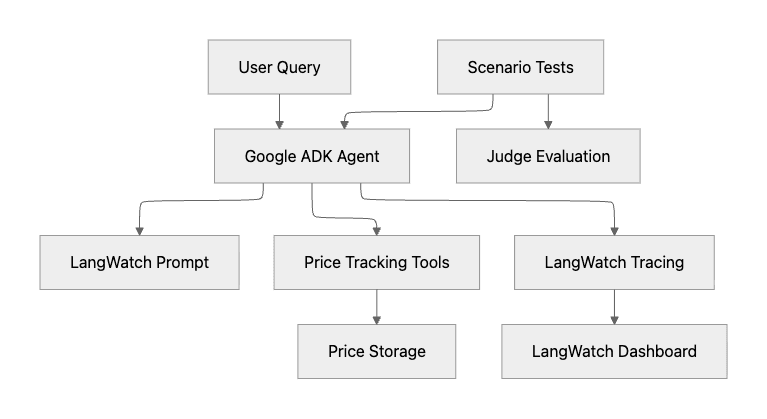
Additionally, we can see a diagram of how Cursor views the agent's structure.
The following diagram shows the agent structure for the TypeScript project with Mastra and Amazon Bedrock.
And the respective version in Python with Google ADK and Google Gemini.
Observations
In both cases, the use of Prompt management, Tools, Observability, and Scenarios testing is planned. That's great.
In the Google ADK project, it's assumed we'll use Gemini as the LLM Provider, and it's not part of the diagram.
Let's add some spicy sauce
To add a bit of variety to both projects, I'm going to make the following modifications in both the mcp.json and AGENTS.md.
In the TypeScript project, I'll specify the use of the beta version of Mastra AI and the Amazon Nova Pro model from Amazon Bedrock.
**Framework:** Mastra (using always @beta version)
**Language:** TypeScript
**Model Provider:** Amazon Bedrock using Amazon Nova Pro (us.amazon.nova-pro-v1:0) by @ai-sdk/amazon-bedrock
In the Python project, I'll specify the use of the Gemini 2.5 Flash model from Google.
**Framework:** Google ADK
**Language:** Python
**Model Provider:** Gemini 2.5 Flash
With these changes, Cursor will give us an updated implementation plan. In summary, we can update our previous diagram with the provided information.
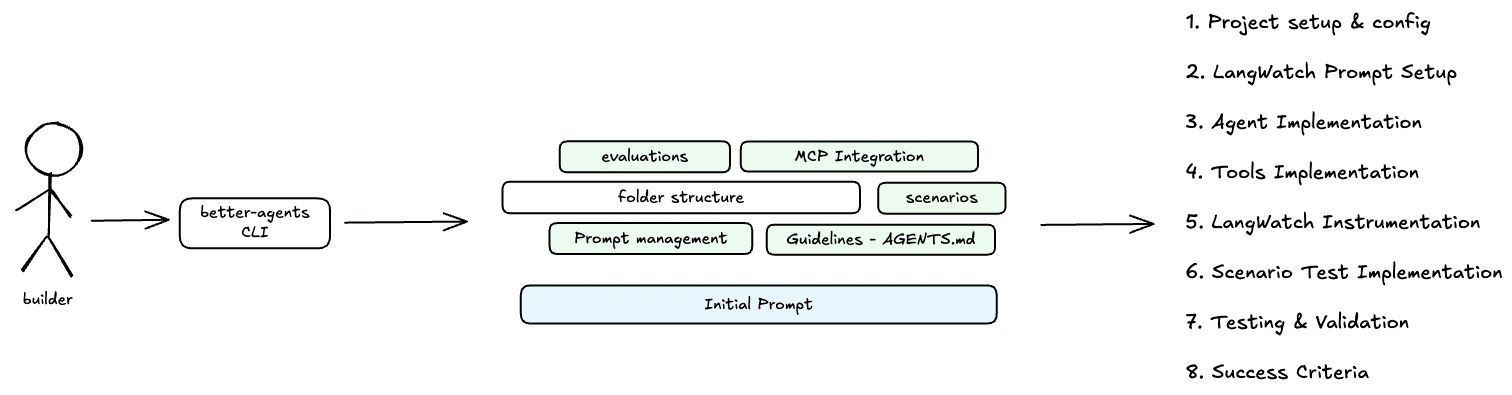
Lets go building!
Building
As soon as we start building, we can interact to refine any details that come up.
The process is quite straightforward, however, we may need to intervene to make corrections. In those cases, my recommendations are:
-
Have read the documentation to understand how each component is implemented.
-
Stress out the usage of MCPs (included)
How does the agent look like?
Here are some interesting things.
import { Agent } from "@mastra/core/agent";
import { bedrock } from "@ai-sdk/amazon-bedrock";
import { LangWatch } from "langwatch";
import { priceLookupTool } from "../tools/price-lookup-tool";
import { varietySearchTool } from "../tools/variety-search-tool";
import { priceUpdateTool } from "../tools/price-update-tool";

// Initialize LangWatch client
const langwatch = new LangWatch({
  apiKey: process.env.LANGWATCH_API_KEY,
});

// Function to load instructions from LangWatch prompt
async function loadInstructions(): Promise<string> {
  const prompt = await langwatch.prompts.get("fruit-price-agent");
  return prompt.prompt!;
}

export const fruitPriceAgent = new Agent({
  id: "fruit-price-agent",
  name: "Fruit Price Agent",
  instructions: async () => {
    return await loadInstructions();
  },
  model: bedrock("us.amazon.nova-pro-v1:0"),
  tools: {
    priceLookupTool,
    varietySearchTool,
    priceUpdateTool,
  },
});
We can see that it has implemented prompt management. That was nice. As well as the Agent is already in place.
Alrighty, we can verify the same in Python.
def get_agent_instruction() -> str:
    """Get the agent instruction from LangWatch prompts. Returns empty string if not found."""
    try:
        prompt = langwatch.prompts.get("fruit_price_agent")
        if prompt and prompt.messages:
            for message in prompt.messages:
                if message.get("role") == "system":
                    return message.get("content", "")
        if prompt and hasattr(prompt, "prompt"):
            return prompt.prompt
    except Exception:
        pass
    return ""

def create_agent() -> Agent:
    """Create and configure the Google ADK agent."""
    instruction = get_agent_instruction()

    agent = Agent(
        name="fruit_price_agent",
        model="gemini-2.5-flash",
        description="Fruit price tracking agent that helps users find and update fruit variety prices",
        instruction=instruction,
        tools=[
            get_fruit_price,
            list_available_varieties,
            update_fruit_price,
            search_varieties,
        ],
    )

    return agent
Quick test in the Mastra Studio if it is working. Probably you can tweak a bit here and there but I am not expecting a major change.
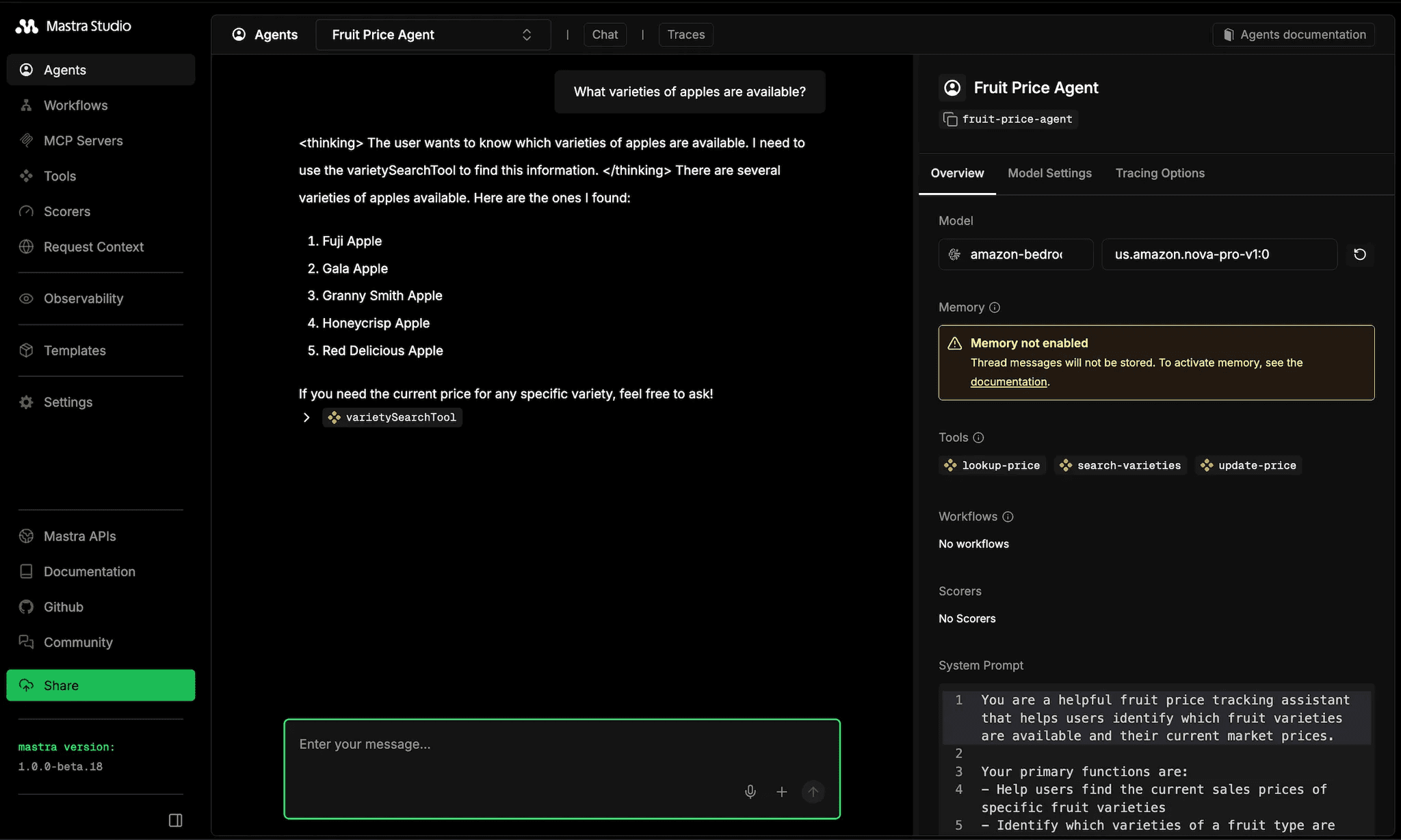
There is the thing, it is quite normal to test the agent manually. Human testing and Human evaluation. We are the one who decides, and that is not scalable.
That’s where Scenarios comes in.
Testing
In my previous post I show a bit of how I found out that I can even test my recently created Agent End to End.
Definition: Scenario-Based Testing for AI AgentsScenario-based testing simulates real user interactions with an AI agent and evaluates behavior, decisions, and outcomes across multiple conversation turns, rather than testing isolated prompts.
Scenario-Based Testing for AI Agents
Here’s a interesting scenario testing, I can easily define a LLM as a judge to verify the scenario that I am interested in.
In the same way, I can check if my tools were called. Here is how the scenario looks like.
  it("searches for available varieties of a fruit type", async () => {
    const result = await scenario.run({
      name: "fruit variety search by type",
      description: "User asks about available apple varieties",
      agents: [
        agentAdapter,
        scenario.userSimulatorAgent(),
        scenario.judgeAgent({
          criteria: [
            "The agent should list available apple varieties",
            "The agent should use the varietySearchTool to find varieties",
            "The response should include multiple apple varieties",
          ],
        }),
      ],
      script: [
        scenario.user("What varieties of apples are available?"),
        scenario.agent(),
        (state) => {
          expect(state.hasToolCall("varietySearchTool")).toBe(true);
        },
        scenario.succeed(),
      ],
    });
    expect(result.success).toBe(true);
  }, 60_000);
And its results.
 ✓ tests/scenarios/fruit-price-agent.test.ts (5 tests) 25023ms
   ✓ Fruit Price Agent Scenarios (5)
     ✓ should look up price for a specific fruit variety  4845ms
     ✓ should search for available varieties of a fruit type  4060ms
     ✓ should handle multi-turn conversation with context  7119ms
     ✓ should handle unknown fruit variety gracefully  4243ms
     ✓ should provide prices for multiple varieties when asked  4755ms

 Test Files  1 passed (1)
      Tests  5 passed (5)
   Start at  01:05:07
   Duration  25.88s (transform 45ms, setup 0ms, import 768ms, tests 25.02s, environment 0ms)
What about extended functionality?
Since the post is already long, I thought about giving a hint on the next step of implementation.
We can easily extend what we just created and deploy it in our environment of choice. In this case, I'll do it in AWS.
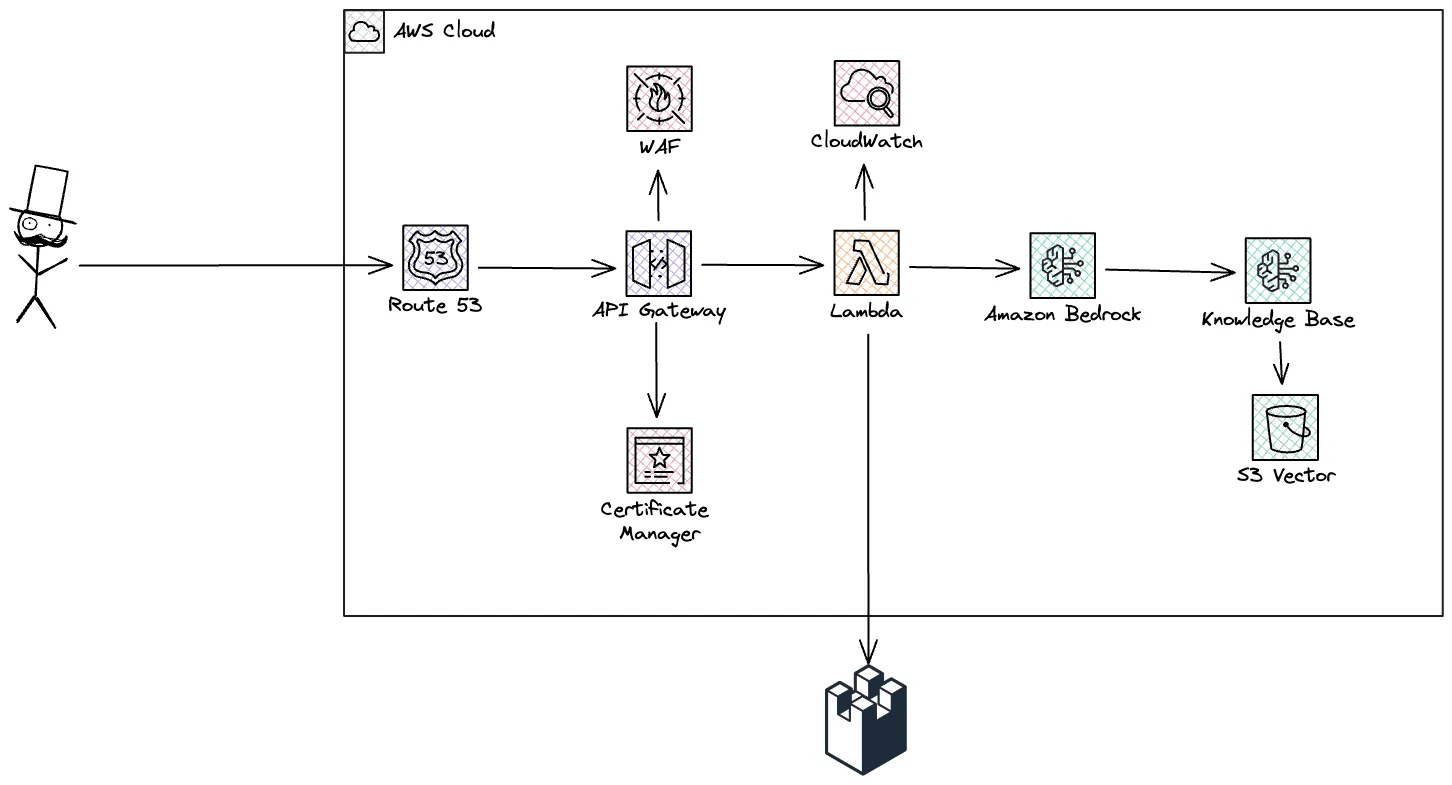
LangWatch support
The CLI tool handles the repetitive setup, letting you focus on the actual agent logic rather than boilerplate configuration.
The real value comes from Scenarios. Testing agents manually doesn't scale, and having a framework-agnostic tool that simulates real user interactions makes a significant difference. You can define criteria, verify tool calls, and run multi-turn conversations programmatically.
Conclusion: A repeatable way to Ship AI Agents with confidence
The hardest part of building AI agents is not choosing a framework or model. It is knowing whether the agent will behave correctly once it reaches production.
Manual testing does not scale. Prompt-level evaluations are insufficient. AI agents must be tested end-to-end, across multiple turns, with explicit validation of behavior and tool usage.
Scenario-based testing provides a practical solution. By simulating real users, verifying intermediate decisions, and evaluating outcomes programmatically, teams can detect regressions early and ship agents with confidence.
Once requirements are clear and testing is in place, framework choice becomes a secondary concern. The combination of structured project setup and automated agent testing creates a predictable path from prototype to production.
AI Summary
-
AI agents require different testing strategies than traditional software
-
Manual testing and prompt-only evaluations do not scale
-
Scenario-based testing validates multi-turn behavior and tool usage
-
Framework choice matters less than testing and observability
-
Production-ready agents require automated, repeatable evaluations
Put this into production with LangWatch.
Trace your agents, run evaluations, and turn failures into repeatable tests.
Frequently asked questions
- How do I test AI agents end-to-end?
- Use scenario-based testing with multi-turn evaluations instead of manual checks, structuring projects to be production-ready and validating agent behavior across realistic conversations, tool usage, and edge cases with LangWatch.
- How does scenario-based testing differ from prompt-only evaluations?
- Scenario-based testing evaluates full multi-turn agent behavior, including tool calls and conversation flow, while prompt-only evaluations check single responses in isolation, missing regressions that emerge over a dialogue.
- Does this approach work across frameworks like Mastra and Google ADK?
- Yes. The approach is framework-agnostic, using TypeScript and Python examples with Mastra and Google ADK, so the principles apply regardless of language, framework, or model provider.