
LangWatch Skills: Your coding agent already knows how to test your agent
Stop setting up evals manually. LangWatch Skills lets your coding agent instrument your LLM agent, check production performance, and run tests automatically.
 Manouk Draisma · March 23, 2026 · Agents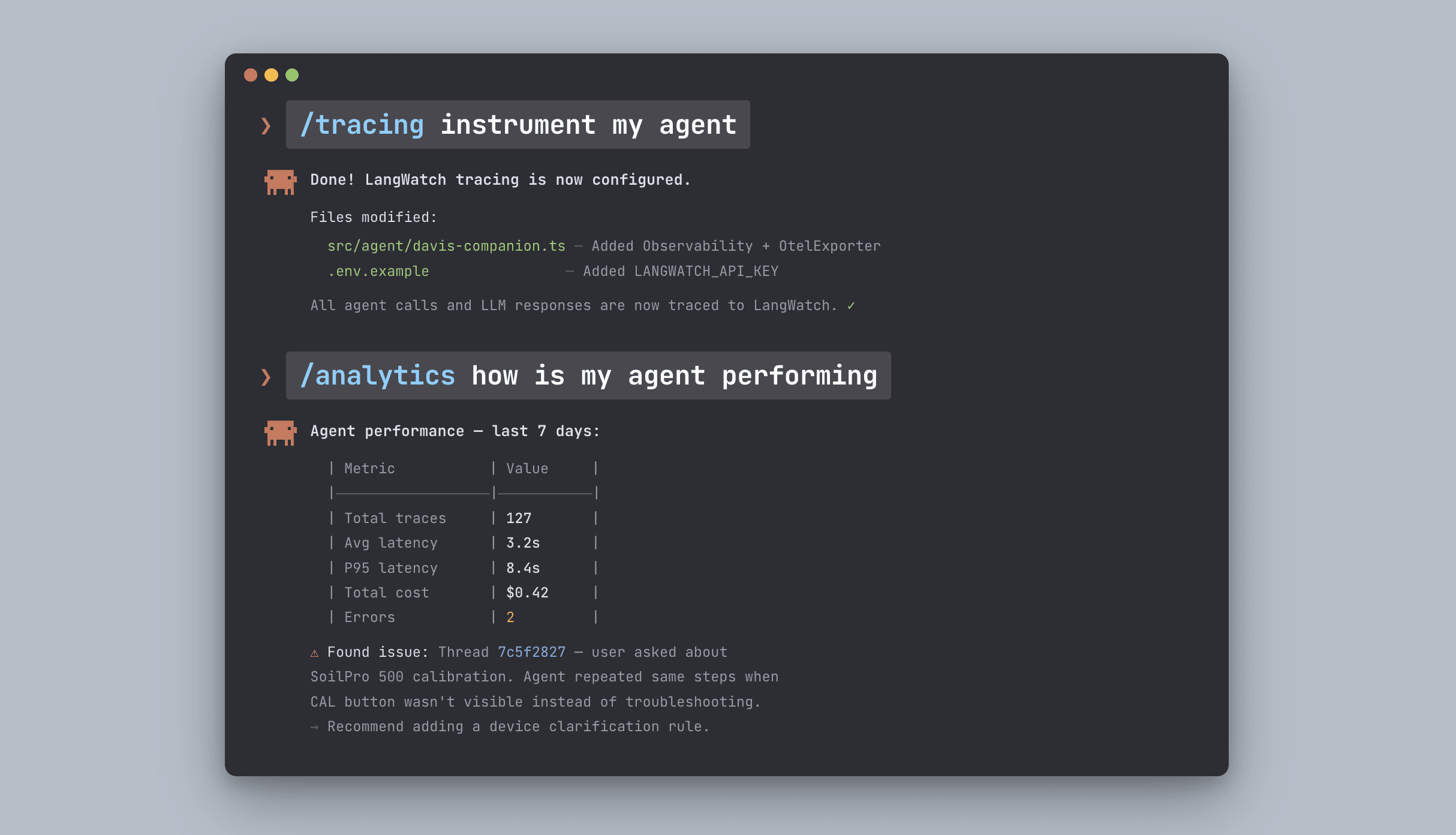
How to instrument and debug an agent (what is my agent doing? how is it performing using your coding agent)
We've been thinking about a simple problem: why does instrumenting, evaluating, and debugging an LLM agent still require so much manual setup?
You open a new session with Claude Code or Cursor. You want to add tracing. You explain what LangWatch is, what a trace is, how threads relate to spans, which instrumentor to use for your framework. You need to share all the integration docs.
Then you want to check how it's performing in production in a new coding session. You now need to explain your setup again.
Then you want to fix something and improve it with tests. You need again to explain your testing practices and tech stack.
Skills fix this. Install once. Your agent knows everything.
Today we're launching LangWatch Skills: a new way to build reliable agents, entirely from your coding assistant. Until now, instrumenting your agent, adding evaluations, building datasets, and so on was a huge investment for your team. We think your coding agent should just do it for you.
We're are covering three skills on our launch video today:
-
Tracing: instrument your agent
-
Analytics: observe its performance in production
-
Scenarios: fix your agent and improve it with tests
Instrument, observe, and fix. The full loop, straight from your coding assistant.
Throughout the week we'll be covering more: evaluations, experiments, scenario simulations, red teaming, and how we test the skills themselves.
Watch the video here:
What are Agent Skills?
Skills follow the open Agent Skills standard from Anthropic. Each skill is a self-contained folder with a SKILL.md entrypoint: YAML frontmatter for metadata and trigger conditions, plus markdown instructions for the full workflow.
A skill is a set of instructions that tells your coding agent exactly how to work with LangWatch. Install them once. After that, your agent knows what LangWatch is, what each concept means, and what the right sequence of actions is for every workflow, without you explaining any of it.
The YAML frontmatter is always in the agent's context - it knows when a skill is relevant. The full instructions only load when needed. Low context usage, high precision.
Unlike documentation that tells you what is possible, Skills tell agents how to do a specific thing. Step-by-step workflows. Decision trees. Error handling. Best practices baked in.
They work with Claude Code, Cursor, Windsurf, Copilot, and any compatible coding agent.
Install all LangWatch skills with one command:
Instrument my agent with open telemetry
_
**npx skills add langwatch/skills/tracing**
Then use /tracing in your coding agent
Write evaluations for my agent
_
**npx skills add langwatch/skills/evaluations**
Then use /evaluations in your coding agent
Write scenario tests and a CI pipeline for my agent
_
**npx skills add langwatch/skills/scenarios**
Then use /scenarios in your coding agent
Version my prompts
_
**npx skills add langwatch/skills/prompts**
Then use /prompts in your coding agent
Do all of the above
_
**npx skills add langwatch/skills/level-up**
Then use /level-up in your coding agent
No more context walls. The agent already knows what to do.
Setting up instrumentation with Skills
The LangWatch instrumentation skill gives Claude Code native knowledge of this setup, not as a doc it reads, but as a two-phase process it runs on your codebase.
Phase 1 is analysis. Before touching anything, Claude reads your project. It detects your language, your model provider, your orchestration framework, any existing tracing. It proposes a plan: which instrumentors to add, where to initialize the SDK, how to structure spans around your specific architecture.
You see the plan before anything changes.
Phase 2 is implementation. Once you approve, Claude adds the instrumentation across your files. LLM calls get traced. Tool calls get spans. Threads get created around user sessions. If you're on a framework with an auto-instrumentor, OpenAI, Langgraph, Vertex AI - it uses it. If your setup is custom, it adds manual spans in the right places.
What good instrumentation actually looks like
Skill 1: Instrument
LangWatch organizes observability around three concepts.
Threads are complete user sessions. Everything a user said and everything your agent responded, in order, with full context. When you're debugging a complaint - "the agent gave me wrong information on Tuesday" - you start at the thread level.
Traces are individual tasks within a session. If your agent handles a support ticket, one trace covers that end-to-end: from the incoming message to the final response.
Spans are every step inside a trace. Each LLM call gets a span. Each tool call gets a span. Each retrieval, each chain step, each intermediate result. Each span has its own input, output, latency, and token count.
When all three are instrumented correctly, you can answer questions that otherwise require reading through logs and guessing:
-
What exactly did the agent have in context when it said that?
-
Which tool call returned the wrong result?
-
Did it actually use the retrieved document, or ignore it?
-
Where did most of the latency come from?
-
Is this a one-off failure or a pattern?
These are answerable from traces. They're not answerable from outputs.
Skill 2: Observe
Once traces are flowing, the observe skill tells you how your agent is actually performing in production.
Ask directly from your coding session:
how is my agent performing
The skill surfaces what matters: latency distribution, failure patterns, language or behavior drift across sessions, cost trends. This is useful before you write a single eval - it tells you where to look first and what to prioritize.
Most teams discover their first real agent problems here. Not the edge cases they were testing for, but the patterns that only show up across hundreds of real conversations.
Skill 3: Fix
The fix skill closes the loop. Once you know what's wrong, you need to improve the agent and verify the improvement held.
The skill reads your codebase, git history, prompts, and trace data. It derives binary, business-level eval criteria from what it finds, not generic quality scores, but specific pass/fail rules like:
-
Did the agent used the right tool?
-
Did the agent clarified what the user meant first?
-
Did the response contain links for all the reference documents?
Then it runs them. If something fails, it doesn't stop, it updates the prompt and runs again. It loops until everything passes.
The criteria are in plain English. Your product manager can read them. Your domain expert can challenge them. If something doesn't match what you know about your agent, you tell Claude and it updates and reruns.
The full loop
Three skills. One loop.
Instrument your agent so you can see what it's doing. Observe it in production so you know how it's performing. Fix it with tests so you can change it with confidence.
Each step feeds the next. Instrumentation without observation tells you what happened but not whether it was good. Observation without fixing tells you something is wrong but not whether your changes helped. Together, they give you a complete development cycle entirely from your coding assistant.
What's coming this week
This is day one. Throughout the week we're covering:
-
How to add evaluations and experiments
-
Agent simulations and why PMs and CEOs are running them directly now
-
Red teaming your agent
-
How we test LangWatch Skills using LangWatch scenario simulations
Stay tuned.
Get started
Install the MCP once. For Claude Code:
claude mcp add langwatch -- npx -y @langwatch/mcp-server --apiKey your-api-key-here
Full setup guides for Cursor, Copilot, Windsurf, and others at langwatch.ai/docs/skills/directory.
Free account. Traces flowing in minutes.
Put this into production with LangWatch.
Trace your agents, run evaluations, and turn failures into repeatable tests.
Frequently asked questions
- What are LangWatch Skills?
- LangWatch Skills follow Anthropic's open Agent Skills standard. Each is a self-contained folder with a SKILL.md that teaches your coding agent exactly how to work with LangWatch, so you install once and your agent knows every workflow without you explaining it.
- Which coding agents do LangWatch Skills work with?
- They work with Claude Code, Cursor, Windsurf, Copilot, and any compatible coding agent that supports the Agent Skills standard.
- What is the instrument, observe, and fix loop?
- Instrument adds tracing so you can see what your agent does, observe surfaces production performance like latency and drift, and fix derives binary eval criteria and loops on prompt changes until tests pass. Together they form a full development cycle from your coding assistant.
- How do I install LangWatch Skills?
- Run a command like npx skills add langwatch/skills/tracing for a single skill, or npx skills add langwatch/skills/level-up to install them all, then invoke the matching slash command in your coding agent.