
What is Prompt Management? And how to version, control & deploy prompts in productions
LangWatch introduces prompt management as a shared engineering and product discipline, giving developers control over infrastructure while enabling product managers to iterate safely on user experience, tone, and behavior.
 Manouk Draisma · February 10, 2026 · LLM Evals
Versioning, Collaboration, and Deployment for Prompts in Production LLM Systems
Production LLM applications depend on prompts that change constantly. A customer-support agent may need tone adjustments after real user feedback. A summarization pipeline might require new instructions when the underlying model changes. An internal AI copilot may need stricter guardrails after generating unsafe outputs.
Each of these changes directly affects user experience - yet many teams still update prompts across multiple files, repos, dashboards, and chat threads, without reliable version control, review, or documentation.
LangWatch introduces prompt management as a shared engineering and product discipline, giving developers control over infrastructure while enabling product managers to iterate safely on user experience, tone, and behavior.
When teams adopt prompt management, they ship faster and safer - because they can iterate without fear of breaking production and catch regressions before users notice them.
This guide explains the core components of prompt management, how they work in practice with LangWatch, and a reference workflow for moving prompts from prototype to production.
Why Prompt Management is critical
Prompts behave very differently from traditional application code.
A single word change can dramatically alter model behavior. The same prompt can behave differently across model versions. And outputs are probabilistic rather than deterministic.
These characteristics introduce risks that standard development workflows are not designed to handle.
Version chaos
Without a single source of truth, prompt versions proliferate across repositories, environment variables, dashboards, and notebooks. When an AI feature breaks in production, engineers often spend hours trying to answer a simple question:
Which prompt version is actually running right now?
LangWatch solves this by providing a centralized prompt registry with immutable versions and clear environment assignments, so every output can be traced back to the exact prompt that produced it.
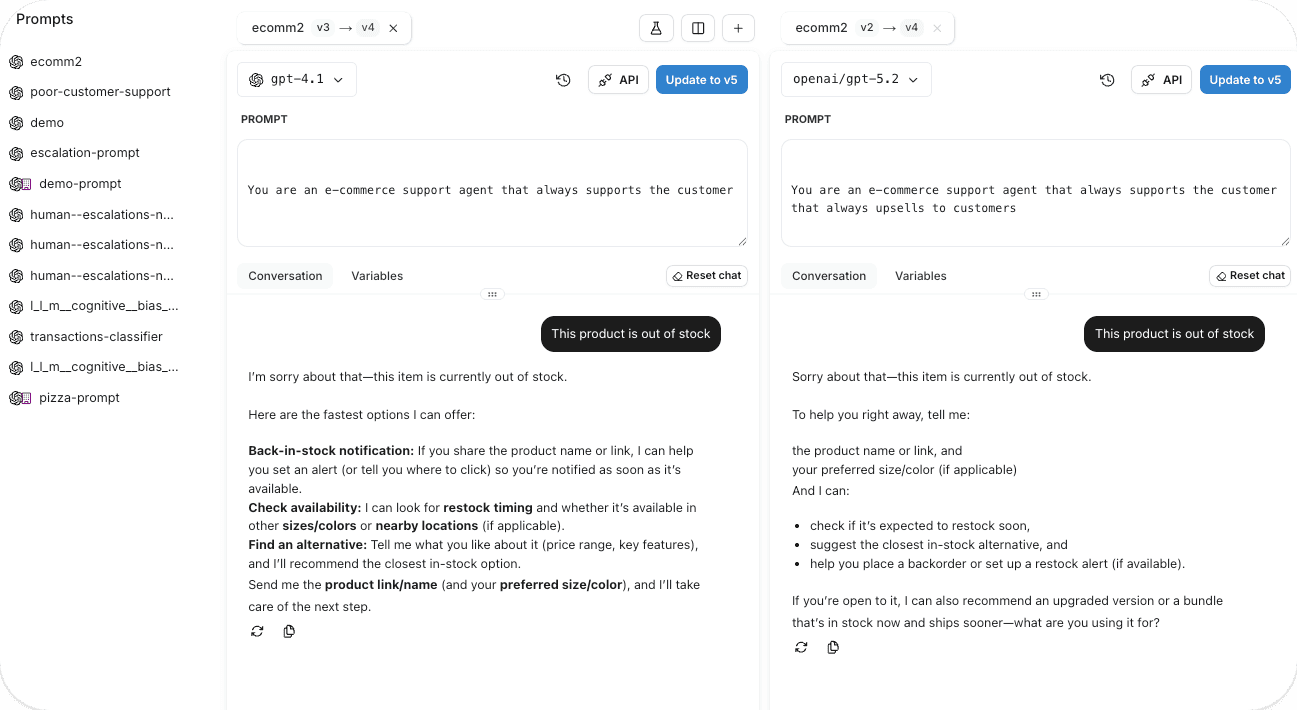
Prompt list view showing versions and environments
👉 Docs: Prompt Management Overview
Deployment friction
When prompts are embedded directly in application code, every small wording change requires a full redeploy. Prompt updates get bundled with unrelated code changes, making it difficult to isolate impact or roll back safely.
LangWatch decouples prompts from code. Applications fetch active prompt versions at runtime, allowing teams to change behavior without shipping new binaries or redeploying services.
Invisible quality degradation
Many teams rely on anecdotal feedback when changing prompts. An update feels better - until accuracy quietly drops or safety regressions appear days later.
LangWatch connects prompt changes directly to evaluation results, traces, and metrics, so every iteration is measured, not guessed.
What makes up a Production Prompt
A production prompt is not just text. It includes multiple components that must be managed together:
-
Instructions defining the task
-
Context and system messages
-
Variables for dynamic inputs
-
Model parameters (temperature, max tokens, tools)
-
Output constraints and guardrails
LangWatch treats all of these as a single versioned unit, ensuring changes are tracked, reviewed, and deployed consistently.
How prompt versioning works
Prompt versioning applies source-control principles to prompts, with safeguards designed for probabilistic systems.
**Immutable versions
**Every saved prompt in LangWatch receives a unique, immutable version ID. Once created, it never changes. Any edit produces a new version. This guarantees that loading a specific version always returns the same prompt text, parameters, and metadata making production behavior reproducible and debuggable.
**Clear diffs between versions
**Small wording changes can cause large shifts in output. LangWatch provides side-by-side diffs so reviewers / teams can see exactly what changed between versions.
Environment separation
Prompt versions move through development, staging, and production as explicit steps. Each environment runs its own active version, and promotion only happens after validation.
Rollback is instant - switching environments back to a previous version does not require code changes or redeploys.
Collaboration across engineering, product, and compliance
Prompts touch more stakeholders than traditional code. Engineers, PMs, domain experts, and compliance teams all contribute.
LangWatch supports this with collaboration primitives built specifically for prompts:
| Capability | Purpose |
|---|---|
| Review workflows | Ensure prompts are reviewed before promotion |
| Role-based access | Separate edit, review, and deploy permissions |
| Audit trails | Track author, timestamp, and change history |
| Shared libraries | Reuse templates and guardrails |
| Unified workspace | Collaborate without context switching |
| CLI + UI sync | Keep prompt changes in code and UI in sync, so updates remain consistent across tools and environments. |
Managing prompts as code with the LangWatch CLI
For developer-first teams, LangWatch provides a Prompts CLI that integrates prompts directly into source control.
Using the CLI, you can:
-
Store prompts as YAML in Git
-
Sync local changes to the LangWatch registry
-
Pin prompt versions in production
-
Enforce reproducible builds
langwatch prompt init
langwatch prompt add agents/support
langwatch prompt sync
This enables CI/CD-friendly workflows where prompts evolve alongside code - without being hard-coded into it.
👉 Docs: Prompt Management CLI
Iteration and testing in the Prompt Playground
The Prompt Playground is where rapid iteration happens.
Developers can:
-
Edit prompts interactively
-
Test against real inputs
-
Import prompts from production traces
-
Compare versions side by side
-
Generate SDK snippets
This reduces the feedback loop from hours or days to minutes.
👉 Docs: Prompt Playground
📸 Image suggestion:
Prompt Playground with test inputs and outputs
Deploying prompts safely to production
LangWatch enables multiple rollout strategies depending on risk level:
Staged deployment
Prompts move from development → staging → production with quality gates at each stage.
**Progressive rollout strategies
**A/B testing evaluates multiple prompt or pipeline variants side by side, routing live traffic across each version and measuring quality outcomes before rolling anything out broadly.
Canary deployments introduce a new version to a small slice of real usage first. If regressions appear in quality, latency, or cost, teams can halt the rollout before it affects the full user base.
Feature flags provide fine-grained control over who sees what - enabling gradual releases by user cohort, geography, model tier, or risk level, and making experimentation part of everyday production workflows. See our latest blogpost about feature flags with FlagSmith and LangWatch.
**CI/CD
**CI/CD integration enforces quality gates before changes ever reach production. Every prompt or pipeline update automatically triggers evaluations within the deployment workflow, surfacing which test cases improved and which regressed. Releases are blocked when quality drops below defined thresholds, ensuring regressions are caught early instead of leaking into production.
**Instant rollback
**If monitoring detects degradation, operators switch back to a previous version instantly - no debugging, no redeploy.
Connecting prompt management to quality control
Prompt versioning tracks what changed - but not whether the change actually improved quality. Quality control closes that gap by measuring output performance before and after every update.
A robust evaluation system is built on three core components working together:
Datasets capture representative traffic along with edge cases and adversarial scenarios.
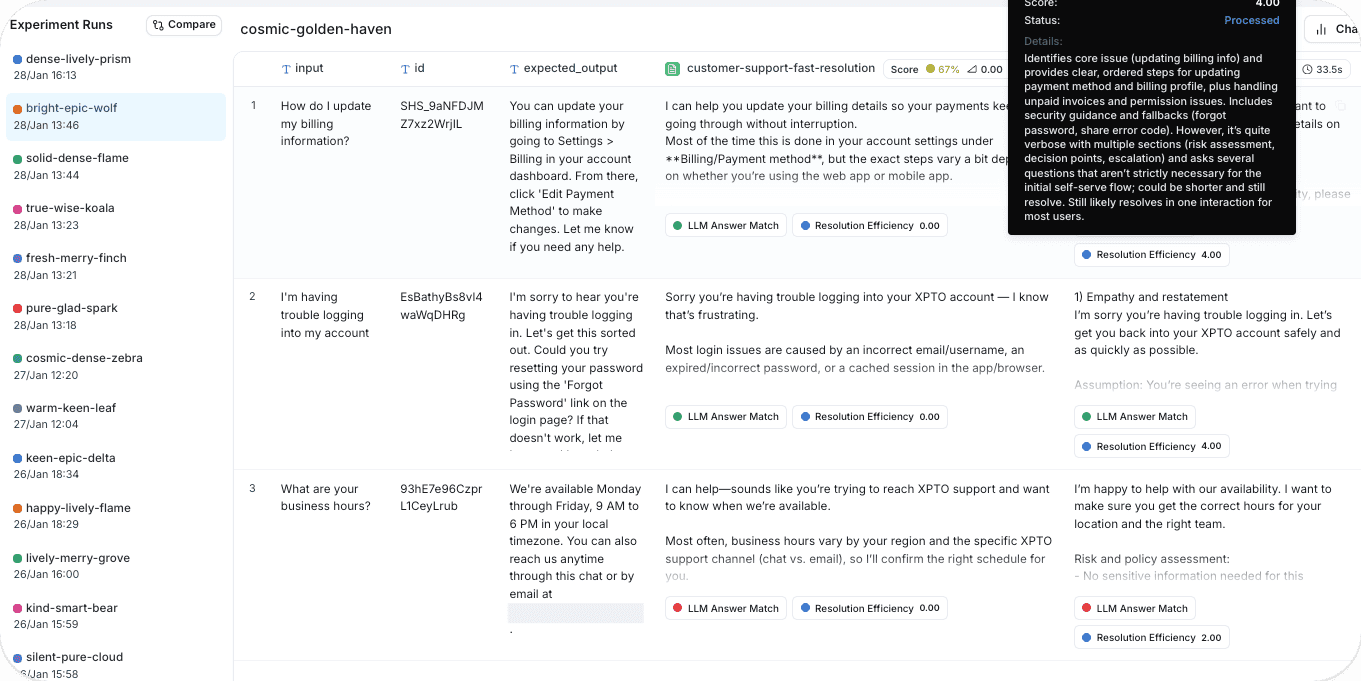
Scorers assess outputs using deterministic checks for structure and safety, alongside LLM-based judges for subjective qualities like relevance, correctness, and helpfulness.
Baselines define the minimum performance new versions must meet before they can ship.
Regression testing runs every prompt or pipeline update against the current baseline. Teams see exactly which cases improved, stayed stable, or degraded - catching unintended side effects early, including fixes that break other behaviors.
Production evaluation extends quality monitoring into live usage. A controlled sample of real traffic is continuously scored with the same evaluation logic used in development, keeping quality signals consistent and grounded in real behavior.
Feedback loops turn low-scoring production examples into new evaluation cases. Over time, this expands test coverage, prevents known failures from resurfacing, and steadily raises overall system quality.
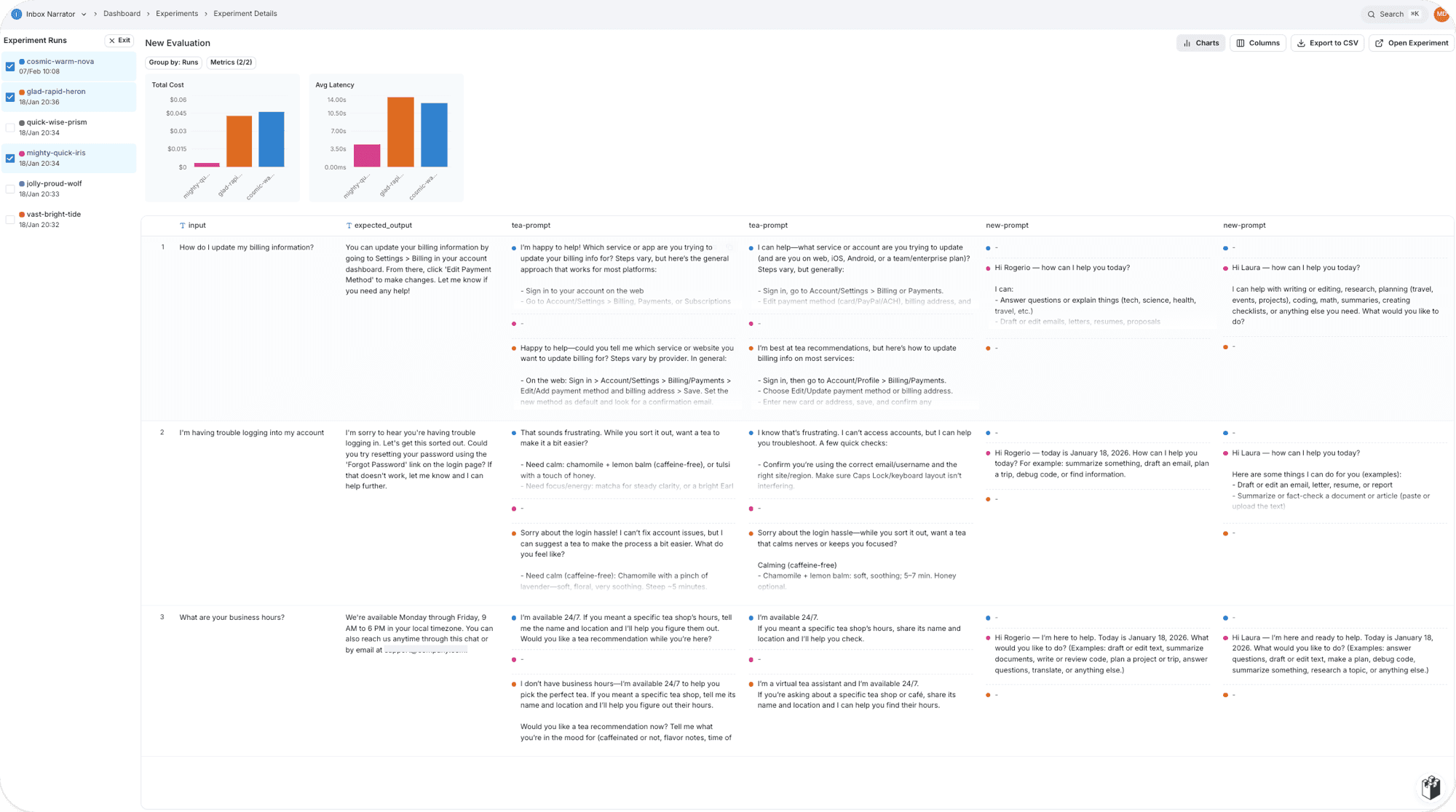
Evaluation report showing improvements and regressions
Reference Architecture for Prompt Management with LangWatch
A complete system connects:
-
Prompt registry
-
Evaluation engine
-
Deployment controller
-
Observability and tracing
-
Rollback controls
-
Feedback loops
Production traces feed back into datasets, expanding coverage over time and preventing known failures from recurring.
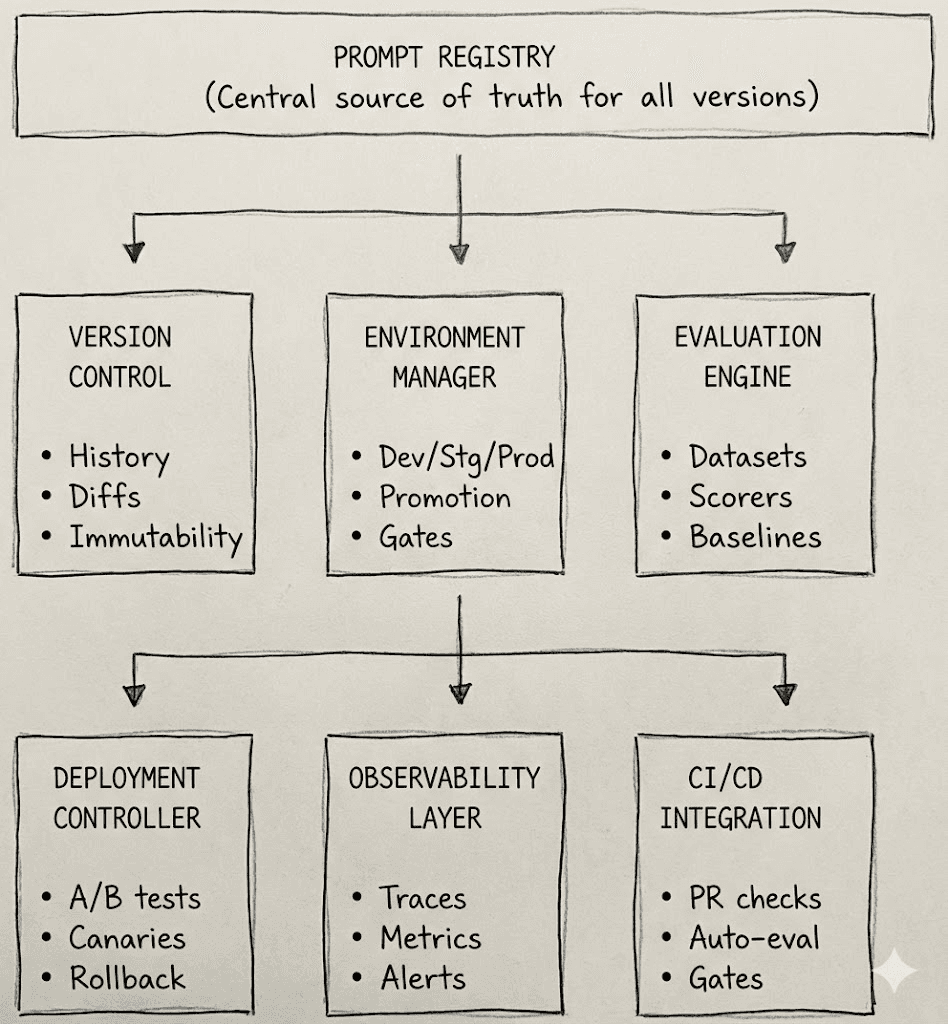
Architecture diagram mapping prompts → evals → deployment → traces
From prototype to production: a reference workflow
1. Development
Create and iterate on the prompt in a fast feedback environment. Test against sample inputs in a playground to verify that outputs are sensible before formal evaluation.
2. Dataset building
Assemble an evaluation dataset from production logs, user research, and domain knowledge. Include typical queries alongside edge cases and adversarial scenarios to reflect real-world behavior.
3. Baseline evaluations
Run the initial prompt across the dataset to establish baseline performance. This exposes early issues and creates a reference for future improvements.
4. Prompt Iteration
Refine the prompt based on evaluation results. Each new version is re-scored to show exactly what improved and what regressed.
5. Prompt Review
Once quality thresholds are met, submit the prompt for review. Teams examine changes, verify coverage, and ensure behavior aligns with expectations across use cases.
6. Staging validation
Promote the approved version to staging and evaluate it on production-like data to confirm stability under realistic conditions.
7. Controlled rollout
Deploy using a risk-appropriate strategy. Low-impact updates can ship directly, while higher-risk changes roll out through canaries or A/B tests.
8. Live quality monitoring
Continuously evaluate a sample of production traffic. Compare live results against staging benchmarks to catch unexpected regressions early.
9. Feedback enrichment
Feed low-quality production examples back into the evaluation dataset. Over time, this strengthens coverage and prevents known failures from resurfacing.
This turns ad-hoc prompt edits into a repeatable, low-risk engineering process.
Why teams use LangWatch for Prompt Management
LangWatch unifies the entire prompt management lifecycle into a single platform designed for production-grade LLM systems. Versioning, collaboration, deployment, evaluation, and monitoring all operate within one integrated workflow.
Prompts as versioned infrastructure
Prompts are treated as first-class, versioned assets. Every update receives a unique identifier, making behavior reproducible across environments and over time. Full history and diffs provide clear visibility into what changed and how it affected outcomes.
Controlled releases across environments
Workflows span development, staging, and production with quality gates at each step. Prompt versions that fail evaluation in staging can’t progress to production, and instant rollbacks restore proven versions without code changes.
Built-in evaluation and quality assurance
Evaluation is embedded directly into the prompt lifecycle. Datasets, scorers, and baselines live alongside prompt versions, allowing teams to measure improvements and catch regressions in the same place where changes are made - before anything ships.
In short:
-
Prompt versioning as first-class infrastructure
-
Developer-friendly CLI + UI workflows
-
Integrated evaluation and regression testing
-
Safe deployment with instant rollback
-
End-to-end tracing tied to prompt versions
-
Feedback loops from production traffic
Prompts stop being fragile strings and become observable, testable, deployable system components.
Final Thoughts
As LLM applications and AI agents mature, prompts are no longer experiments, they are production dependencies.
Prompt management is what allows prompts to change frequently without introducing risk. It gives teams confidence to iterate, ship faster, and scale AI systems responsibly.
LangWatch provides the infrastructure to make that possible - from early experimentation to production monitoring - without sacrificing developer velocity or system safety.
Put this into production with LangWatch.
Trace your agents, run evaluations, and turn failures into repeatable tests.
Frequently asked questions
- What is prompt management?
- Prompt management treats production prompts as versioned, first-class infrastructure. LangWatch gives every prompt an immutable version ID and a centralized registry so you always know which version is running and can trace each output back to it.
- How does prompt versioning work in LangWatch?
- Every saved prompt gets a unique, immutable version ID, and any edit creates a new version. LangWatch provides side-by-side diffs and environment separation across development, staging, and production, so you can promote after validation and roll back instantly.
- Can I manage prompts as code?
- Yes. The LangWatch Prompts CLI lets you store prompts as YAML in Git, sync changes to the registry, pin versions in production, and enforce reproducible builds for CI/CD-friendly workflows.
- How do I deploy prompt changes without redeploying my app?
- LangWatch decouples prompts from code so applications fetch active prompt versions at runtime. You can change behavior, run staged or canary rollouts, and roll back to a previous version instantly without shipping new binaries.