
Governance Projects for Coding Agent Traces
As an organization admin you can now create one project that reads the traces of every personal project, so you see what your developers' coding agents do without opening each project.
What You Can Do Now
Governance projects
When you create a project, tick Governance and choose what it reads: every personal project, which is where coding agents send their traces and includes people who join later, the personal projects in one department, or projects you pick. The new project stores no data of its own, so its Trace Explorer lists the traces of those projects, read only.
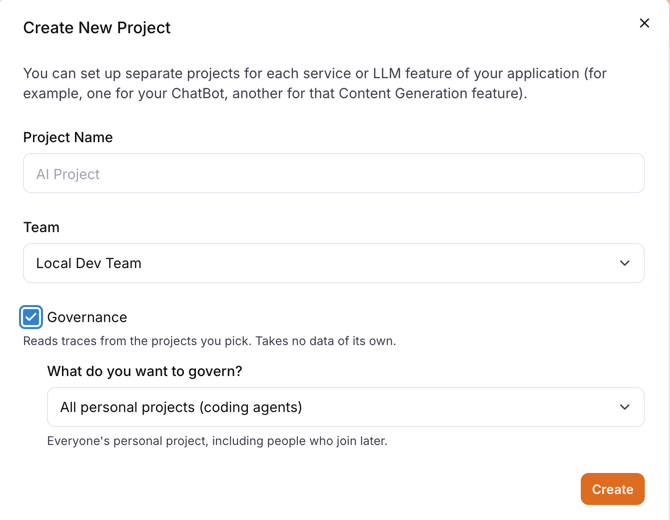
- Only organization admins can create or open a governance project, and every visit is recorded in the audit log.
- Each trace shows which project it came from, and LangWatch applies the strictest data privacy policy among those projects, so a project that hides its inputs and outputs keeps them hidden here too.
- Analytics and online evaluations do not work in a governance project yet.
Developer seats for people who sign up from the terminal
If someone runs langwatch login without an account and signs up with your company address, their request to join now asks for a Developer seat instead of a Full one. You see the seat next to each request in the waiting list, and when you approve it, or when your organization lets colleagues in automatically, they join as a Developer with their own personal project.
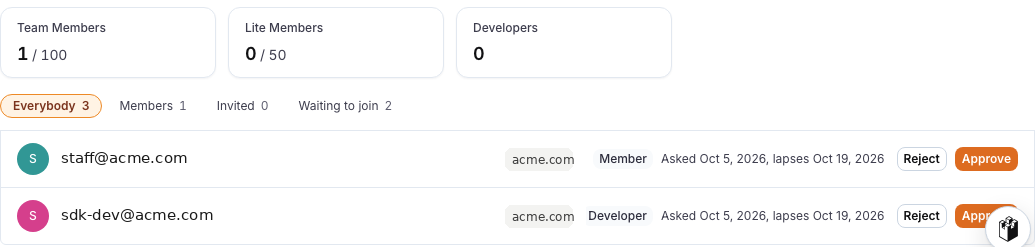
If you already invited that person, the welcome screen now offers your invitation first, so they get the seat you invited them to instead of asking to join from scratch. People who sign up on the web keep the seat your organization gives new members.
Instant Evals on self-hosted installs
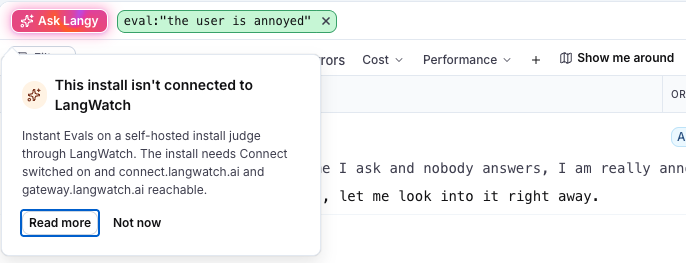
If your license includes Instant Evals and your install judges through LangWatch, Instant Evals are now on without any extra setting. Your admins can still switch them off in Settings, Connect.
When Instant Evals cannot run, the popover now tells you why and what to do: your license does not include them, an admin switched them off, the install cannot reach LangWatch, or the install uses its own judge and you need to ask whoever runs it.
Automations, alerts and filters
- Automations that check an evaluation result, such as a failed verdict, a score or
has:eval, never fired before this fix. They fire now. evaluator:X AND evaluatorVerdict:failnow finds the traces where X failed. It used to match any trace where X ran and any other evaluation failed.- Alerts on a grouped graph now check the number the graph shows without grouping. They used to add the groups together, so an average alert compared a sum of averages against your threshold.
- Graphs and alerts filtered by
metadata.keyormetadata.valuenow count metadata sent through the SDKs.
Experiments and analytics
- When you replicate an experiment and edit the copy, your changes now save to the copy and leave the original alone. The copy is named
<name> (copy), and copies you made before this fix save to themselves the next time you open them. - The analytics dashboard loads on projects with a lot of traffic, where panels used to fail with "This search was too large". If a panel still fails, it shows a short error with a Retry button instead of a card spilling over the panels next to it.
Sending traces over OpenTelemetry
- You can send OTLP bodies compressed with zstd, and LangWatch now reads a gzip or zstd body even when your exporter sends no
Content-Encodingheader or the wrong one. Before, those spans were refused and lost. - OTLP/JSON spans whose links or events leave out empty lists and zero counts are no longer dropped, so exporters that follow the spec to the letter work.
Notes
- No new LangWatch release this week; these changes are on LangWatch Cloud now and reach self-hosted installs with the next release.
- Self-hosting: an install whose license includes Instant Evals turns them on after you upgrade, and the trace text then goes to
gateway.langwatch.aifor judging. To keep them off, setINSTANT_EVAL_CLASSIFIER=nullorLANGWATCH_CONNECT_DISABLED=true(Helm:app.connect.disabled: true). If you setRELEASE_INSTANT_EVALS=1to judge through Connect, remove it so the popovers can tell you why a judgement was refused. - REST API:
POST /api/suitesandPUT /api/scenarios/{id}now refuse fields they do not have instead of dropping them silently, and trace search returns at most 1000 traces per page. - Scenario: Python 1.6.0 and JavaScript 1.7.0 add per-criterion verdicts from the judge and dialing an external number with
TwilioAgentAdapter. With an ElevenLabs agent, the simulated user no longer waits up to 45 seconds after each turn. In JavaScript,UserSimulatorAgentWithVoiceis no longer exported; useVoiceUserSimulator, which has the same shape.