
Improved Automations Flow
You now create automations and alerts in the same three steps, and you connect Slack once instead of once per automation.
What You Can Do Now
Automations
You no longer pick a type before you create an automation. Automations and alerts are in one list, and you create either of them in the same three steps: you choose what to watch, which is traces that match a filter or a graph, then you choose where the result goes, and then you review it before you save.
- You now connect Slack once, in Settings, and give the connection a name. Every automation can then use it, so when your bot token changes you update it in one place instead of in every automation.
- You can send webhooks from every project now, and you choose the Content-Type header yourself.
- When you open an automation you can see its evaluation history, whether its webhook deliveries worked, and a preview of the traces it matched.
- New automations group their notifications into a five-minute digest, so that a broad filter does not message you once per trace. You can still switch to immediate, every 15 minutes or hourly.
- You can also pause, resume and test an automation, and read its fire history, from the REST API, the CLI, the MCP server and the Python and Go SDKs.
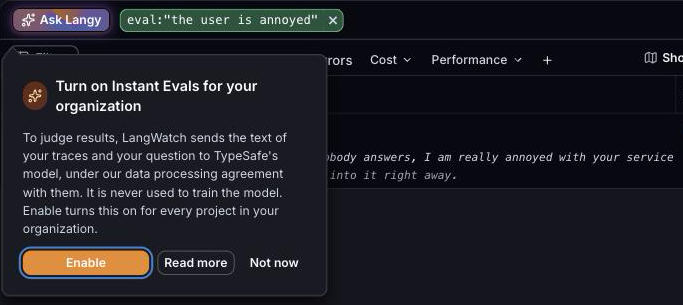
Instant Evals are turned on per organization
Instant Evals send the text of your traces and your question to a model that judges them, so your organization now has to turn them on first. If you are an admin you get an Enable button with an explanation of where the text goes, and if you are not, you are told to ask your admin. On Enterprise and self-hosted you contact us instead.
Developer seat
- You can give developers a Developer seat, which owns a personal project and nothing shared, so they can send their coding agent traces without using one of your Full seats. Developer seats show on the plan page and are not capped.
- You can also choose which seat people get when they join by email or SSO. It is Full unless you change it, and invitations are not affected.
Self-hosting
- You can restrict who signs up:
SIGN_UP_MODE=invite_onlyonly lets invited addresses create an account, andSIGN_UP_ALLOWED_DOMAINSlimits sign-up to your email domains. Sign-up stays open if you set neither, so upgrading changes nothing. - The images no longer call third parties by default, and the self-hosting docs list every outbound connection and how you turn each one on.
- Single sign-on works better on self-hosted: Entra ID and SAML sign-ins link to the accounts your colleagues already have, and they are sent straight to your connection when it is the only one.
Notes
- This covers LangWatch 3.19.0 through 3.20.1, with typescript-sdk 1.19.0 and skills 1.5.0.
- Scenario: the judge now returns a verdict and its reasoning for each criterion, and criteria you write as "fail if X" or "the agent must not X" pass when X did not happen.
- Traces: you can filter with
has:feedbackandhas:annotation, and costs below a tenth of a cent show their value instead of $0.0000. - LangWatch AI Gateway: parallel tool results are merged correctly on Bedrock.
- Docs: there is now one Voice Agents page under agent testing.