
← Changelog
Instant Evals in the Trace Explorer, and Files in Datasets
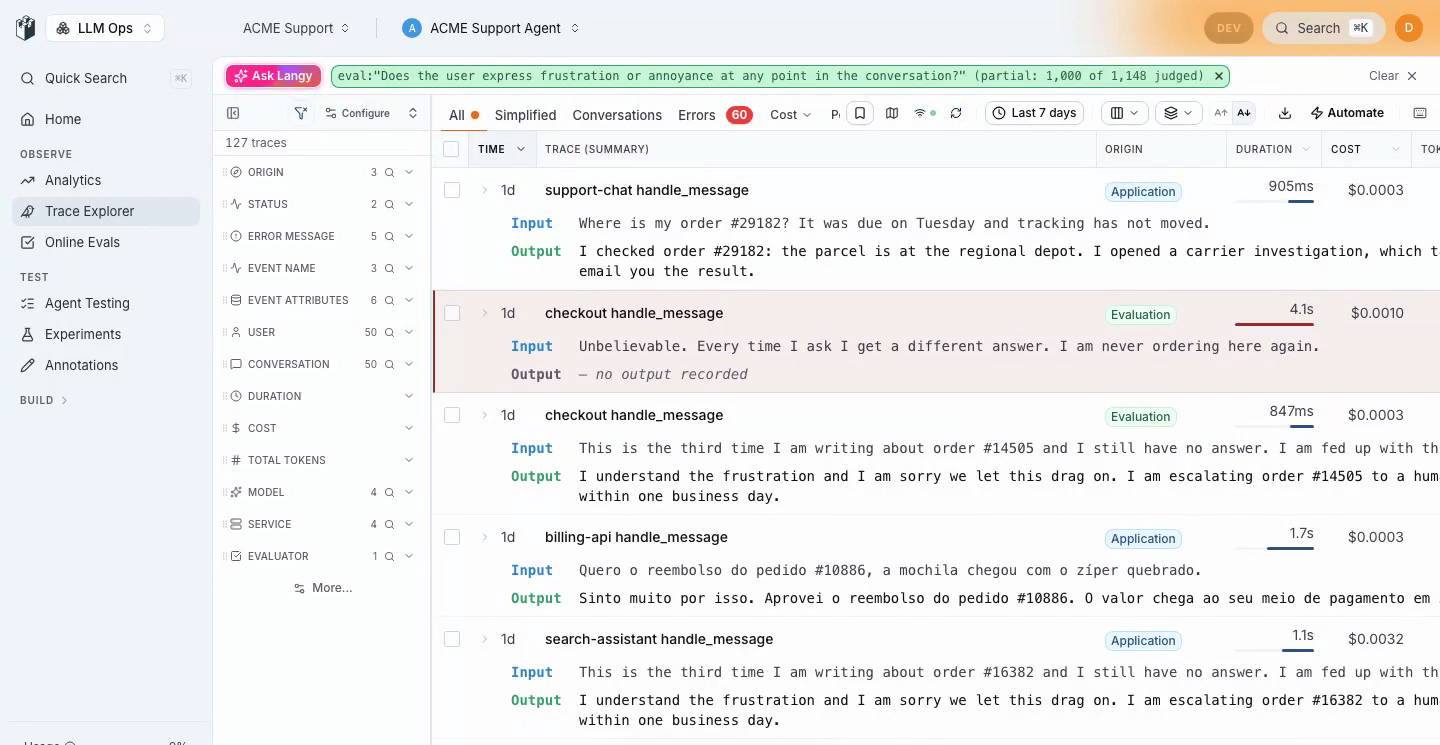
Type a question into the Trace Explorer search bar and press Enter. If no filter can answer it, an Instant Eval judges the traces for you and the matches fill the table as they come in.
LangWatch Team · September 27, 2026 · 3.18.0
What You Can Do Now
Instant Evals in the Trace Explorer search bar
The search bar now waits for Enter, and what you typed decides what runs. Filters run as filters, phrases are searched as phrases, and a question that no filter can express, like "does the user sound frustrated", becomes an eval:"..." chip backed by an Instant Eval, so you can combine it with every other chip in the bar.
- Runs under $0.50 start on their own, and anything above that asks first. The progress bar counts up while matches appear page by page, and Stop ends the run where it is.
- The run id goes in the URL, so a reload or a shared link reuses the verdicts instead of paying for them again.
- Force the target with
eval.conversation,eval.traceoreval.llm. - A "Searched as" strip shows what your words turned into, with one click back to the words.
- The sidebar counts, the header, the pagination line and Langy now read the same number, which they did not before.
Langy drives the Trace Explorer
- Ask Langy to find traces and it opens the Explorer and fills in the filters while you watch, then answers with the number on the page.
- When traces are only a means to another task, Langy stays where you are and answers with cards, plus a link that opens the exact view it used.
- Ask Langy for a scenario from a failing trace and it invents the identifiers the scenario needs instead of copying the customer's, and the card it creates has a Run against my agent button.
Files and images in datasets
- Upload an image or a file straight into a dataset cell, or enter a URL. The new File column type takes any file up to 20 MB, except HTML, SVG and JavaScript.
- Map a File column to the new File prompt input and it reaches the model as an attachment: PDFs as file parts, audio as audio input, images as images, and text or JSON inlined with the file name as a heading.
- Map an image or file column to an HTTP agent, a connected agent, a code agent or a workflow and it arrives as a base64 data URL, even when the cell holds an external URL, so your agent never receives a link it cannot open.

Connected self-hosted
- Licensed self-hosted installs can call LangWatch-hosted services, the Instant Evals judge and managed models included, with usage metered and capped against the license.
LANGWATCH_CONNECT_DISABLED=trueturns it off whatever the license says. - The license arrives, renews and resizes over a sync, or through an activation code, instead of a key pasted by hand.
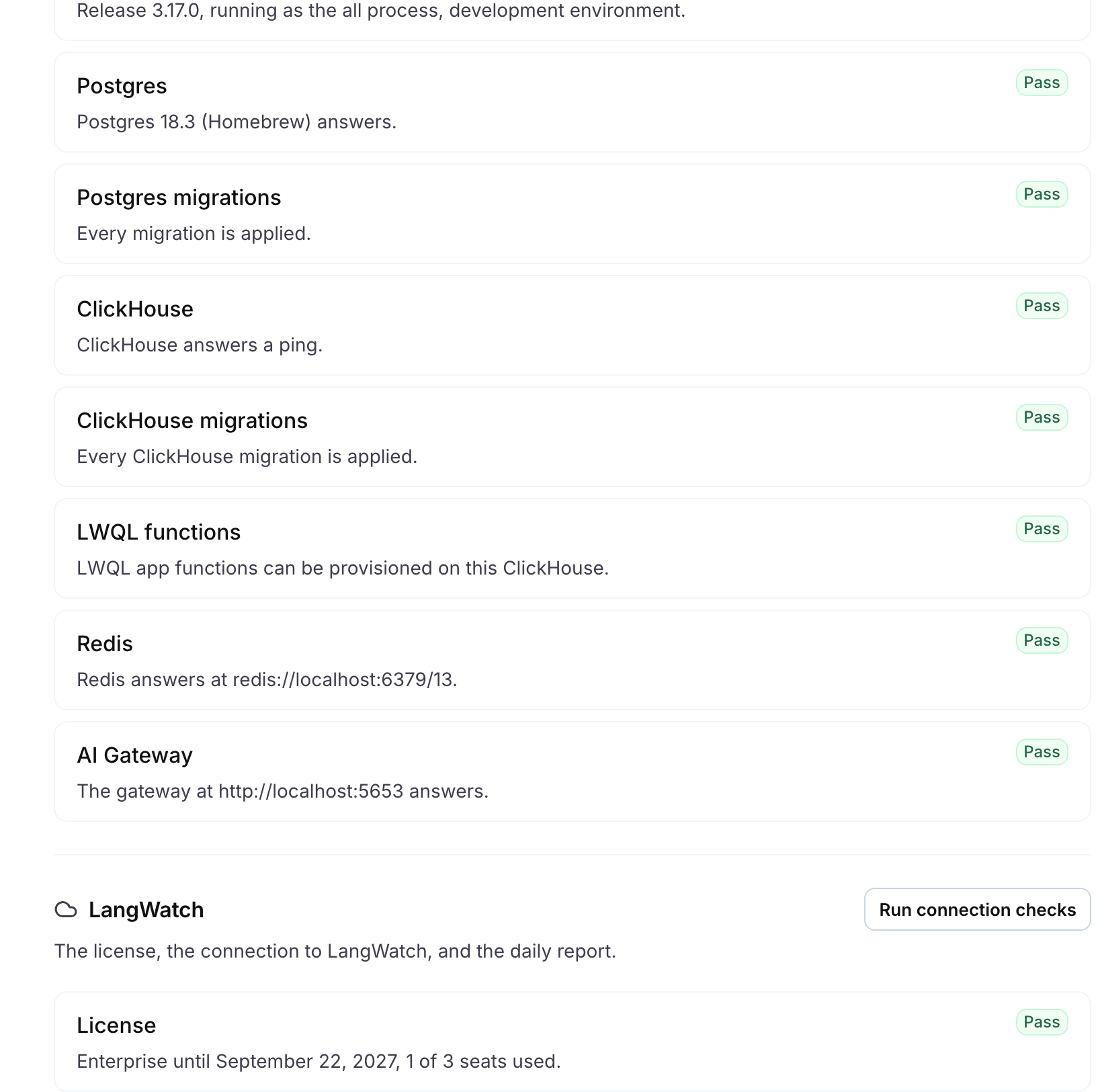
- Settings, Checkup lists every dependency with a pass or fail, from Postgres and ClickHouse migrations to the gateway and the license, and
langwatch doctorruns the same checks from the terminal. It also shows every field of the daily usage report, and lets you switch parts of the report off.
Notes
- LangWatch 3.18.0, with fixes from upgrading a 3.16 Helm install on EKS and from a fresh 3.18 install.
- Scenario: judge criteria map by key, a verdict waits for the trace to stop changing before judging, the simulated user retries an empty model answer, and criteria the judge could not decide show as Inconclusive instead of failed.
- Connected agents: running a teammate's personal development agent is refused naming the owner, and the SDK banner tells you how to share one.
- CLI:
--projectworks on every command,scenario get,update,deleteandruntake a name as well as an id, and six refusals now say what they mean. - Trace links in REST responses, Slack, email and reports open the trace in one read instead of several.
- Docs: a new LiteLLM Proxy guide, under Model Providers.
- Shipped with typescript-sdk 1.16.0, 1.17.0 and 1.18.0.