
Langy Notifications and Tool Calls for LLM Judges
Langy can now notify you in the browser when it needs you, even with the tab closed, and your LLM judges now see the tool calls in a trace instead of only its input and output.
What You Can Do Now
Langy browser notifications
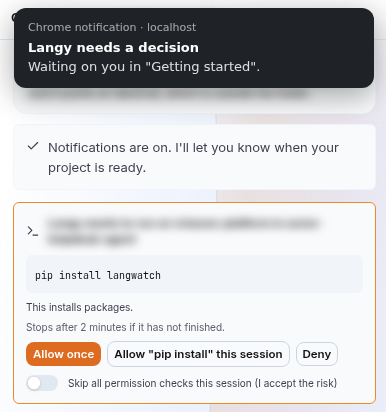
Turn on notifications in Langy and it tells you when a long task finishes or when it is waiting for your answer. LangWatch sends them from the server, so you get them with the tab closed, the laptop asleep or the browser restarted. Clicking one opens that conversation, and you get none for the conversation you are already looking at.
LLM judges see tool calls
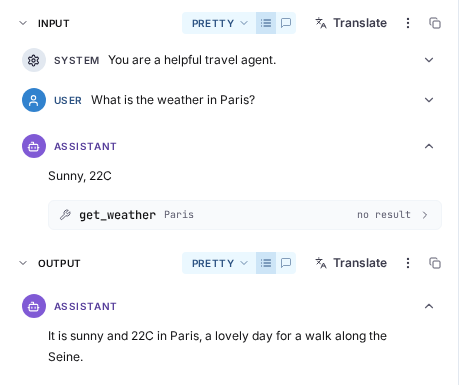
If you have not set your own mapping, your LLM-as-a-judge evaluators now read the whole trace, tool calls and their results included, instead of only the trace input and output. For example, a check like "fail if the total in the reply differs from what the quote tool returned" used to be judged without the tool result, so the judge guessed it. Now it reads it.
- Long traces are shortened to fit the judge model's context window instead of being skipped, and judges with a larger context window get more of the trace.
- Monitors you created through the API or the CLI without a mapping are no longer skipped. They get the same defaults.
- If you saved a mapping, LangWatch keeps using it as it is.
Instant Evals as the judge model
If your organization has turned on Instant Evals, you can pick Instant Evals as the model of any LLM-as-a-judge evaluator, whether it answers yes or no, gives a score or picks a category. The model picker only offers it when your project can use it.
Voice on the LangWatch AI Gateway
If you build a voice app where each user has their own key, the gateway now holds your provider keys, checks every call against your budgets, records what it costs while it runs and ends it when a budget runs out.
- You can use the OpenAI Live and Realtime APIs, ElevenLabs text to speech and speech to text, and streaming on the speech and transcription routes.
- Speech to text passes every option through to the provider, so speaker labels (
diarized_json) and plain-text answers work. - If your app calls the gateway from the browser, you can allow your origins with
LW_GATEWAY_CORS_ALLOWED_ORIGINS. It is off by default. - The new consumer voice app cookbook shows which route to use for which feature.
Per-team budgets on the LangWatch AI Gateway
You can now go from one gateway budget to one budget per team from the terminal. langwatch projects move <project> --team <team> moves a project to another team, and the gateway uses that team's budget right after.
- Organization API keys work on the budget routes, and if your key lacks a permission you get a 403 that tells you which one.
- An API key that is not tied to one project can list every virtual key it has access to.
Governance projects
Governance projects now show your developers' coding agent sessions, not only their traces. Projects that read every personal project, or projects you picked, also show each member's whole history instead of only what happened after you created the governance project.
Traces
- Traces from the Claude SDKs and the Claude API count tokens and cost once per request. They used to count them two or three times, because the same usage arrives on several spans.
- Claude tool spans now show their output, the cost of cache writes and reads is right, and attributes up to 8 MiB are kept whole instead of being cut at 256 KB.
- Serialized LangChain messages show as chat messages in the trace instead of raw JSON, including traces you sent before this change.
Joining your colleagues
If you sign up with an address whose domain matches an existing organization and you decline to join it, LangWatch no longer asks you again during onboarding. You can still change your mind with the "Join ... instead" link under the create-organization step, which names the organization.
Notes
- No new LangWatch release this week; these changes are on LangWatch Cloud now and reach self-hosted installs with the next release.
- Hosted MCP server: sessions survive our deploys, so your MCP client no longer has to sign in again after one. Clients set up with the old
/sseURL work again, and project viewers can connect a client. - LangWatch AI Gateway: Claude Code with an OpenAI model behind
/v1/messagesno longer fails after a tool call with "encrypted content item_id did not match". - Vertex AI: judges, the playground, workflows and scenarios that use a Vertex AI provider failed between 14 and 16 October and work again.
- Self-hosting: Instant Evals on a self-hosted install now depend only on your license, not on the
RELEASE_INSTANT_EVALSflag.