
Setup and Teardown Hooks for Agent Tests
Your connected agent can now create the test data a scenario needs before the first turn and clean it up after the last, so your agent tests no longer depend on data that happens to exist.
What You Can Do Now
Setup and teardown hooks for agent tests
If you connect your agent with connectAgent, you can declare a setup hook and a teardown hook on it. LangWatch calls setup before the first turn of every scenario run, and whatever it returns becomes the run's state, so your agent, the simulated user and the judge all see it. Teardown runs after the last turn with that same state, so you can delete what setup made.
shopAssistant.scenario.setup(async (run, params) => {
  const customer = await createTestCustomer({ tier: params.loyalty_tier });
  return { customerId: customer.id };
});

shopAssistant.scenario.teardown(async (run, state) => {
  await deleteTestCustomer(state.customerId);
});
Both hooks run in your own process, the one that already answers your agent's turns, so they can use your database and your internal APIs. The run page shows the state setup returned and what teardown returned. If setup fails, the run is marked "Not scored" instead of failed, and teardown still runs.
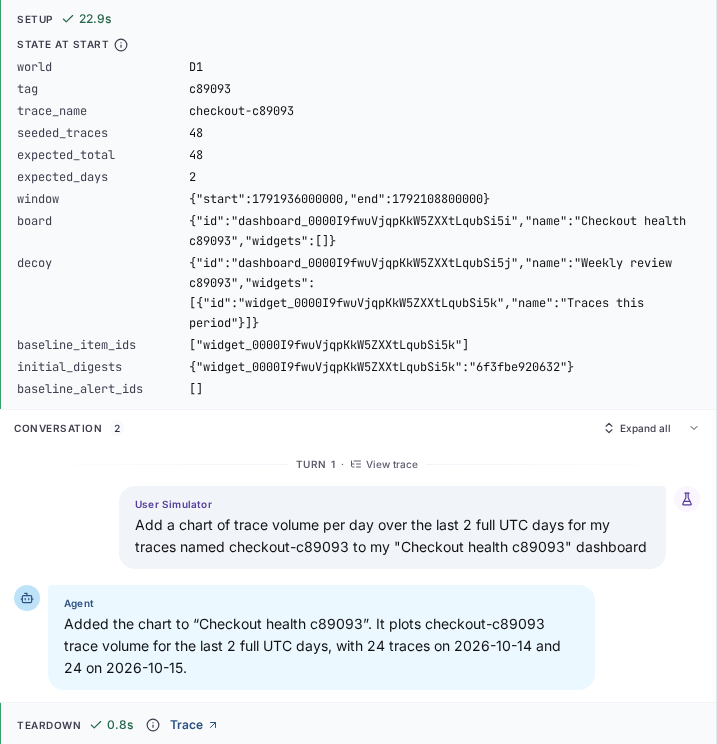
The hooks need TypeScript SDK 1.20.0. See Setup and teardown hooks for the arguments and timeouts.
Monitors pause when their evaluations keep failing
If at least 90% of an online evaluation's runs in the last hour end in an error, with at least 50 runs, LangWatch now pauses it, so a broken evaluator endpoint stops failing on every message you send. Your organization's admins get an email with the failure rate and the most common error, and the list shows "Paused automatically" with the reason.
A failed verdict is a normal result and never counts toward this. Turn the monitor back on once you have fixed the cause.

When the evaluator service itself is briefly down, for example during a deploy, your evaluations now wait and try again for up to two hours instead of failing straight away. The trace shows which attempt it is on and when the next one is.
GitHub Copilot sessions
If you send GitHub Copilot CLI or VS Code Copilot Chat traces to LangWatch, each conversation now shows up as a session in Sessions, with its context and token cost, the same as Claude Code and Codex sessions.

Governance projects show analytics
The charts, the Analytics pages and Sessions in a governance project now read the projects it governs, so you see the usage and cost of every member project in one place. Before, they read only the governance project's own data, which is empty.
Smaller fixes
- Experiments now charge cached prompt tokens at the provider's cache rates, so a mostly cached prompt no longer shows close to its full uncached cost. Runs from before this fix keep their old cost.
- Langy asks you to confirm before it deletes anything.
- When a question about a time range finds nothing, Langy now tells you how old your newest data is.
- You can add Doubleword as a model provider with just an API key.
Notes
- LangWatch 3.21.0 is out for self-hosted installs. It includes everything since 3.20.1, including the rebuilt architecture, so read the release notes before you upgrade.
npx @langwatch/servernow downloads a prebuilt app for your platform instead of building it on your machine. It needs Node 24 or newer, and on first run it asks whether to use the bundled Postgres, Redis and ClickHouse or your own.- TypeScript SDK 1.20.0 installs in about 8 seconds instead of 31, takes 60 MB instead of 159 MB, and no longer downloads cloudflared. It sends traces as gzipped OTLP/protobuf, about 20 times fewer bytes than JSON.
@opentelemetry/apiis now a peer dependency, so install it next tolangwatchif your app does not have it yet. - LangWatch AI Gateway on self-hosted: with
BLOCK_LOCAL_HTTP_CALLS=false, a custom provider on a private address now works, and the Helm valuegateway.security.extraCACertsConfigMaplets the gateway trust your private certificate authority. - The Ragas evaluators work again.