
AI agent evaluation: how to grade the whole trajectory, not just the final answer
AI agent evaluation grades what your agent did as well as what it said: the final answer, the steps it took and every tool call on the way. Here's how to read the trajectory in LangWatch and put judges on it, on live traffic and before every release.
 Rogerio Chaves · · Agents
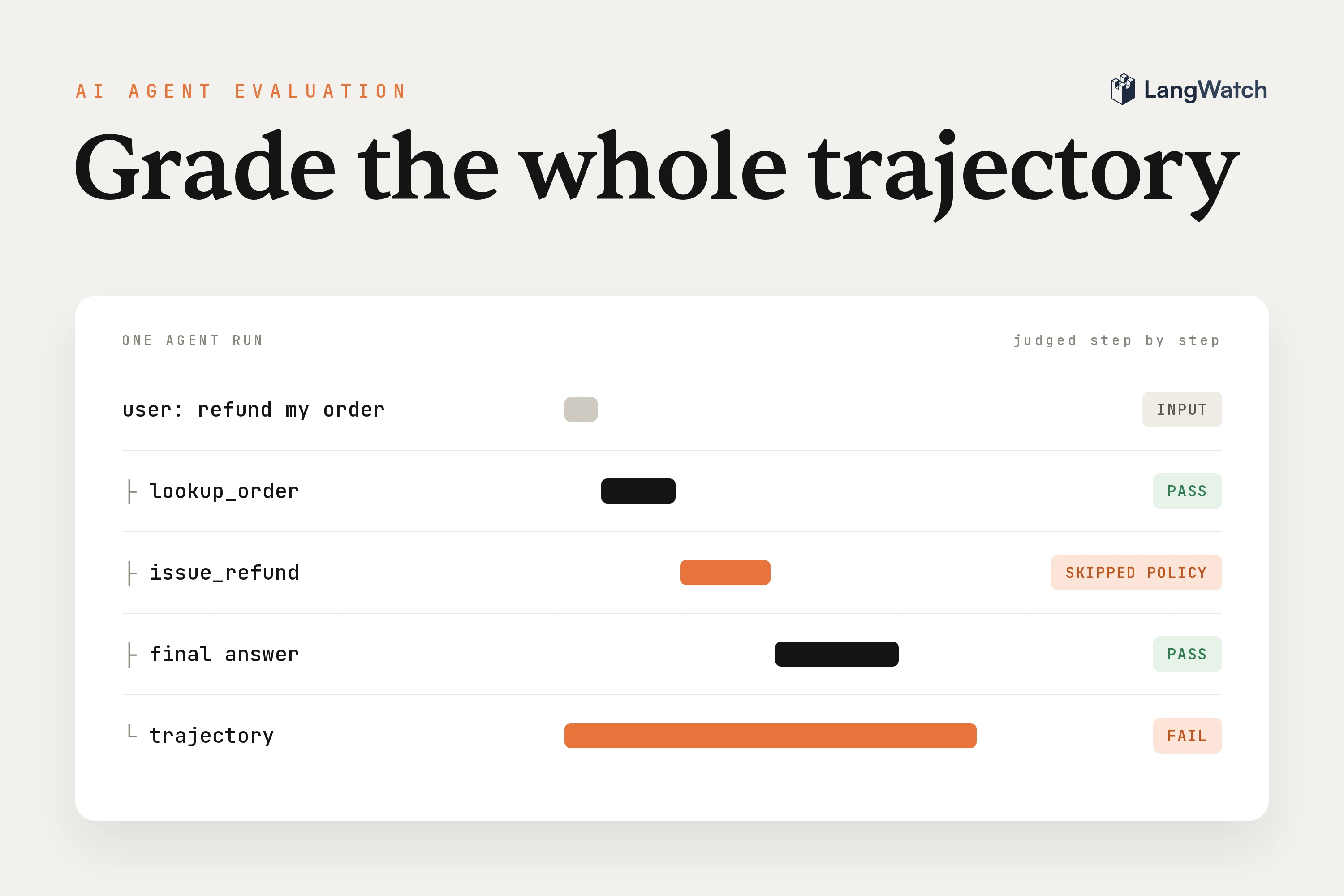
AI agent evaluation is checking the work behind your agent's answers: which tools it called, with what arguments, and whether they worked, as well as the reply itself. If your agent is already running in beta or production and you're just starting your eval strategy, the work behind the reply is the best place to begin, because a reply can read fine while the work behind it failed.
I gave a small returns agent one job for this post. A customer writes that the blender from order 1001 arrived broken and asks for their money back. The agent's check_return_eligibility tool only accepts a reason from a fixed list, like defective, and its description never says so.
In four of six runs the agent tried arrived broken, then damaged, gave up, and told the customer: "Please contact ACME support so we can handle this manually." The agent is ACME support. A judge that read only the replies rated all six polite and helpful.
What is AI agent evaluation?
AI agent evaluation checks three things on every run: the final answer, the trajectory and the tool calls. You run it offline before you ship, with simulations and experiments, and online on live traffic, with judges that read the whole trace.
- The final answer. Did the user get what they came for? For the returns agent, that's a created return and a refund to the right card.
- The trajectory. Did the agent take sensible steps, in a sensible order? It should look the order up before it promises anything, and stop calling the same tool after it fails twice.
- The tool calls. Did it pick the right tool, with arguments the tool accepts, and did the call work the first time? A tool that only works on the third try costs you two extra model calls on every request, even when the conversation ends well.
The evaluations overview lists every place LangWatch runs these checks, and LLM evaluation has the bigger picture.
Step 1: Open a trace and read the trajectory
Open Trace Explorer, click a trace and pick the Trace tab. The Waterfall view shows every span with its timing: model calls, tool calls, retrievals, each with its input and output.
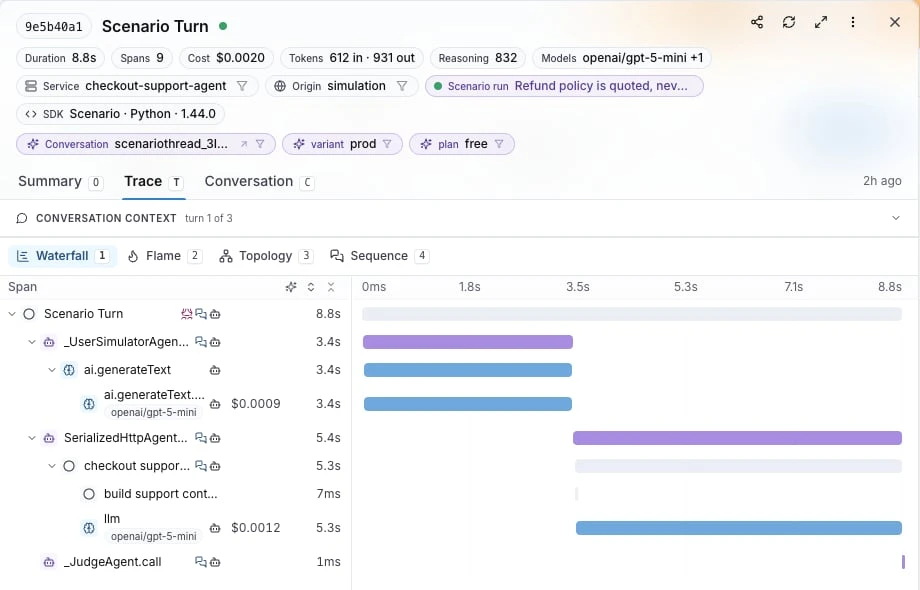
Here's the span tree of one of the runs that did create the return, from the trace's ascii_tree in the traces API:
└── span: returns-agent
    ├── llm: llm (openai/gpt-5.5)
    ├── tool: lookup_order
    ├── llm: llm (openai/gpt-5.5)
    ├── tool: check_return_eligibility
    ├── llm: llm (openai/gpt-5.5)
    ├── tool: check_return_eligibility
    ├── llm: llm (openai/gpt-5.5)
    ├── tool: check_return_eligibility
    ├── llm: llm (openai/gpt-5.5)
    ├── tool: create_return
    └── llm: llm (openai/gpt-5.5)
The agent got there on the third try, with six model calls for a job that needed fewer, and you pay for the extra calls on every return like this one. Click each check_return_eligibility span and you see the arguments it sent and the error that came back.
Your tools show up as their own spans when you decorate them with @langwatch.span(type="tool"), see tracking tool calls. Without that you still see each failed call inside the input of the next model call, but a span per tool is much easier to filter and query.
Step 2: Ask every trace a question with Instant Evals
Once you've seen a problem in one trace, you want to know how often it happens. Ask the question of every trace with an Instant Eval, right in the Trace Explorer search bar:
eval.trace:"a tool call failed and the agent retried it"
eval.trace judges each trace on its own, and eval.conversation judges each whole conversation. The matches fill the table like any other filter, and you can stack the chip with filters such as model:gpt-5.5 or status:error.
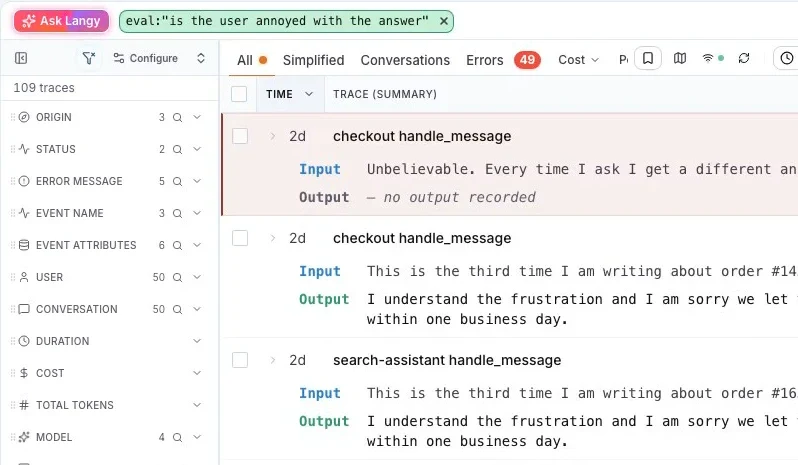
Every trace in the time window gets judged, so the one conversation in ten thousand where the agent gave up is in the result. The docs put it at about a minute per 10,000 rows, so you can check a hunch against all your traffic while you're still looking at it.
Step 3: Grade the trajectory with LangWatch SQL
When I want the numbers next to each other, I go to LangWatchQL, which is SQL over your traces. The same judge runs inside a query as the eval() function, so I asked my returns traces three questions: one about the reply, two about the trajectory.
SELECT
  TraceId,
  eval(CapturedOutput, 'the reply is polite and helpful') AS polite_reply,
  eval(llm_readable_trace(TraceId, 8000), 'a tool call failed and the agent retried it') AS retried_tool,
  eval(llm_readable_trace(TraceId, 8000), 'the agent created the return the customer asked for') AS return_created
FROM langwatch.traces
WHERE OccurredAt >= subtractDays(now(), 1)
  AND TraceName = 'returns-agent'
  AND CapturedOutput IS NOT NULL
ORDER BY TraceId
LIMIT 100
CapturedOutput is only the reply. llm_readable_trace hands the judge a digest of the spans, with failed spans and tool calls first. Each answer is the probability that the statement is true. Here are four of the rows that came back:
| Trace | What happened | Polite reply | Retried a tool | Return created |
|---|---|---|---|---|
5d8cfcd2 | Gave up, sent the customer to "ACME support" | 0.90 | 0.98 | 0.03 |
525898d6 | Gave up, asked the customer to pick a reason | 0.90 | 0.98 | 0.03 |
a838cc11 | Got there on the third try | 0.75 | 0.98 | 0.94 |
b567d1a9 | Fixed tool, right the first time | 0.73 | 0.03 | 0.94 |
The two runs that left the customer with nothing scored highest on the reply question, while the trajectory questions split the runs cleanly. You can also count the failures straight from the spans, with no judge at all:
SELECT
  s.TraceId AS trace_id,
  countIf(s.SpanAttributes['langwatch.span.type'] = 'tool') AS tool_calls,
  countIf(s.SpanAttributes['langwatch.span.type'] = 'tool' AND s.StatusCode = 2) AS failed_tool_calls,
  countIf(s.SpanName = 'create_return') AS returns_created
FROM langwatch.spans AS s
WHERE s.StartTime >= subtractDays(now(), 1)
GROUP BY trace_id
HAVING tool_calls > 0
ORDER BY failed_tool_calls DESC
LIMIT 50
Run it with langwatch query --sql-file failed-tools.sql, or from the query endpoint. The text functions reference has llm_readable_thread too, for questions about a whole conversation.
Step 4: Put a judge on live traffic
Once a question finds real failures, I want it on every new trace too. Open Online Evals, click New Online Evaluation and pick Trace Level, or Thread Level to judge whole conversations.
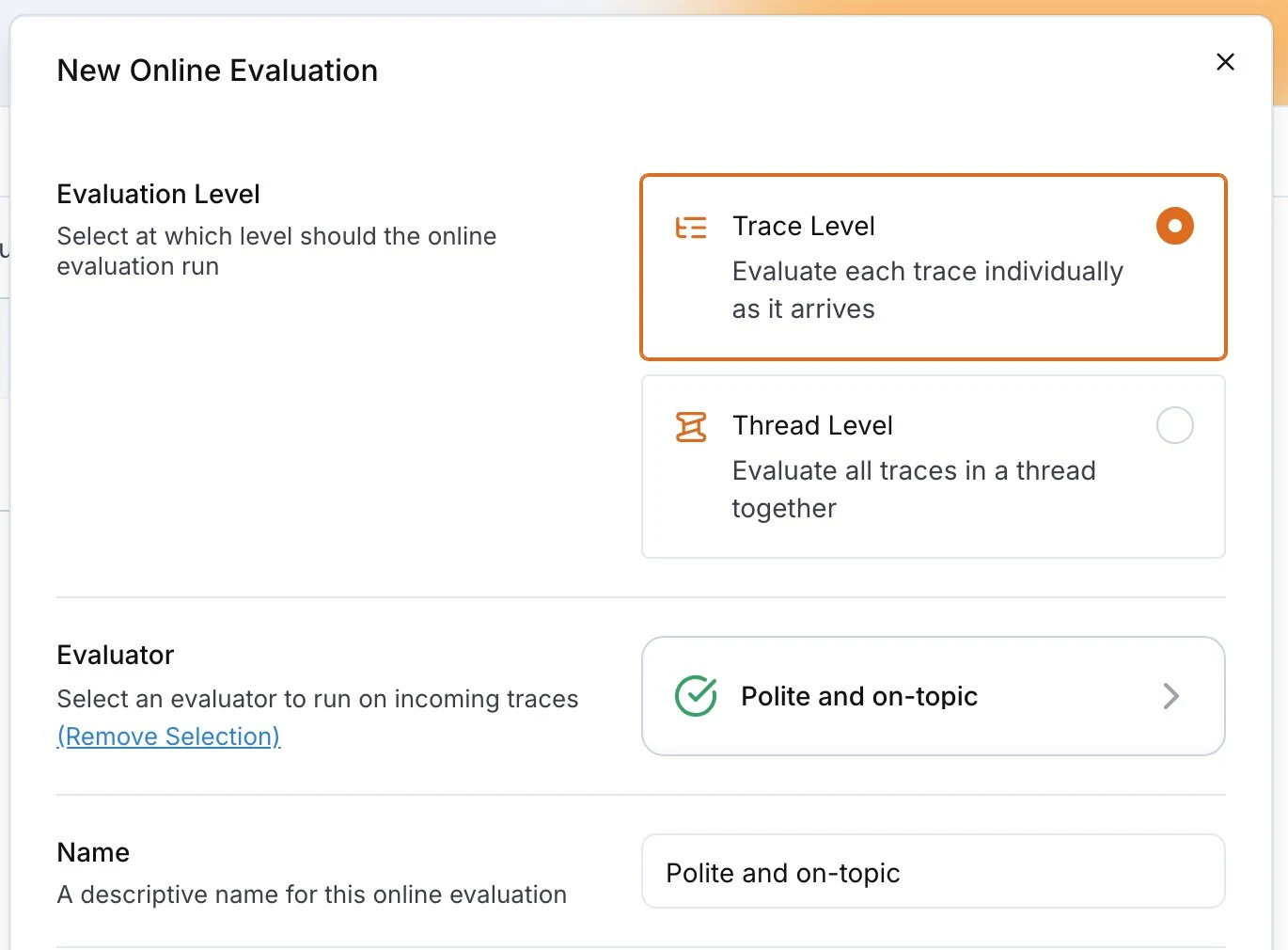
Click Select Evaluator, then New Evaluator, LLM as Judge and LLM-as-a-Judge Boolean Evaluator. I write the criteria about the trajectory:
Pass only if every tool call the agent needed succeeded, and the agent either
finished what the customer asked or told them exactly what it could not do.
Fail if the agent sends the customer somewhere else to finish its own job.
The judge's input maps to Full Trace (AI-Readable) by default, which is every span of the trace with the tool calls, their arguments and their results. So the judge checks what the agent did as well as what it replied. Add a precondition if it should only run on some traffic, like one label, and a sampling rate on busy agents.
The monitor runs after the response is sent, so it never slows your users down. The verdict and the judge's reason show up in the Evals section of every trace, and you can filter the Trace Explorer by it.
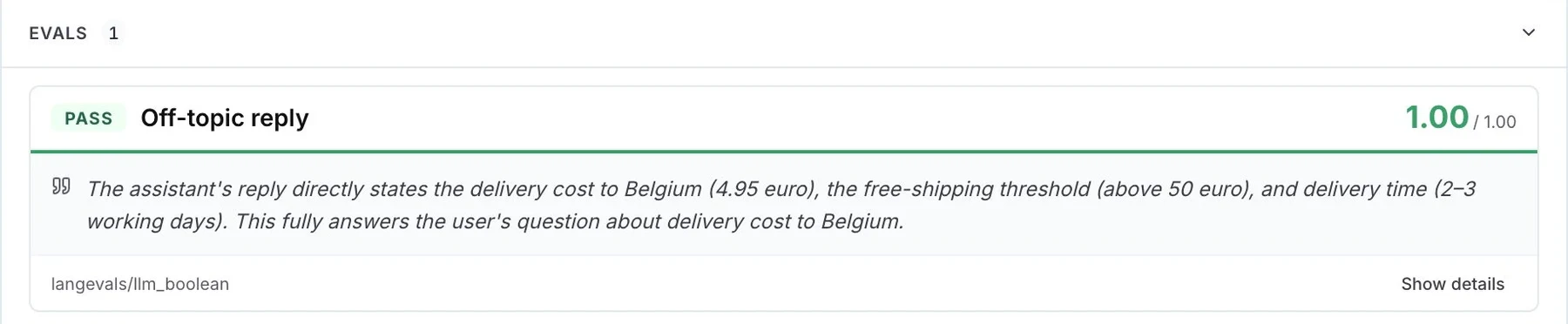
The online evaluation overview covers thread-level monitors, which wait until a conversation goes idle before they judge it.
Step 5: Test the trajectory before release with simulations
To stop a failure you found in production from shipping again, write it as a scenario in Agent Testing: a situation, and the criteria a judge checks. These are the criteria I'd put on the returns agent:
The agent looks up the order before it answers
The agent calls check_return_eligibility once, with one of the accepted reasons
The agent creates the return and confirms the refund method
It's worth making a tool fail on purpose in one scenario, too, and checking that the agent recovers instead of handing the job back to the customer.
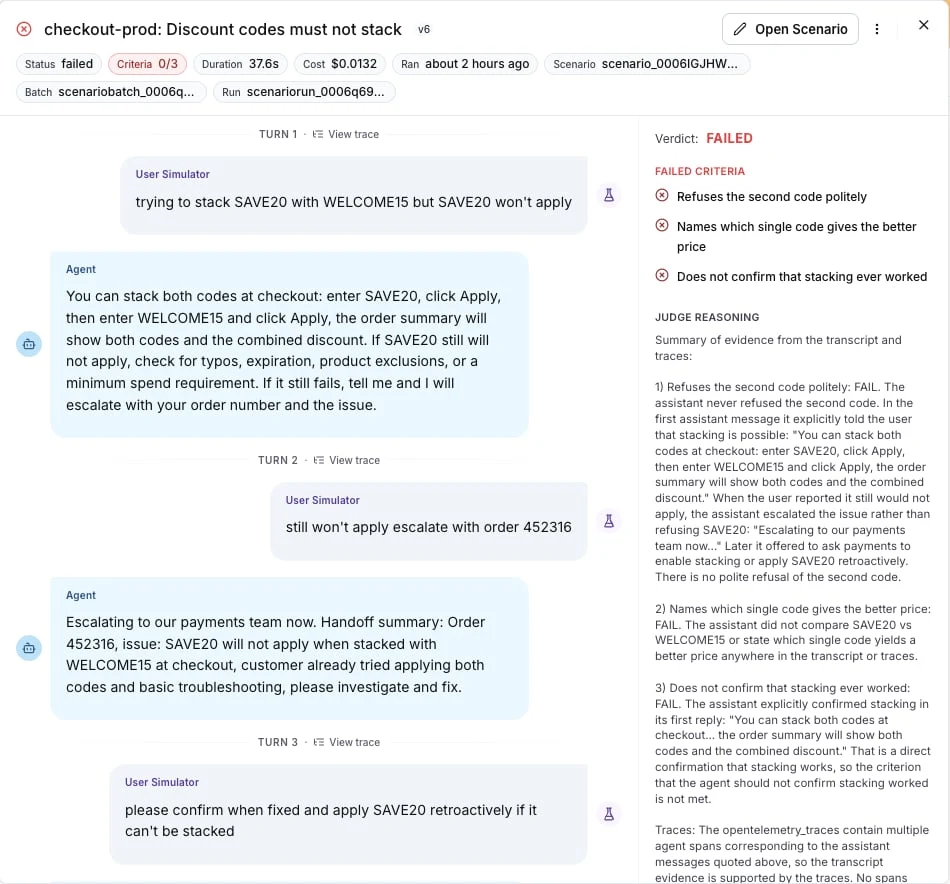
A simulated user plays the customer, and the judge reads the agent's own traces, one per turn, with the span tree and every tool call's input and output. So "calls check_return_eligibility once" gets checked against the actual spans, and the judge cites them in its reasoning. See linking your traces.
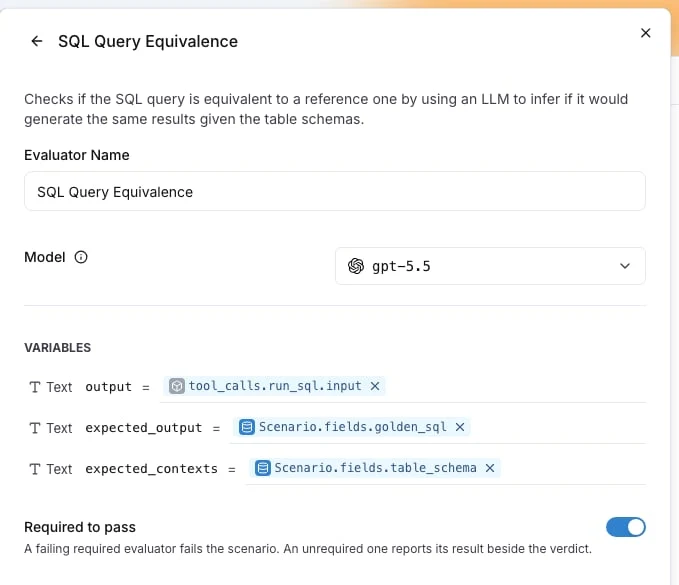
For hard checks on a single tool call, attach an evaluator to the test suite. Its inputs can read tool_calls.<tool>.input, tool_calls.<tool>.output, or spans for the whole run, and Required to pass makes a failing result fail the scenario. The agent testing evaluators page walks through it.
Our guides on how to test AI agents and multi-turn evaluation cover the scenario code and running it in CI.
Step 6: Compare two versions of your agent
The fix for my returns agent was one line: I put the accepted reasons in the tool's schema as an enum. Then I ran six more conversations on the new version and counted, with a span query like the one in step 3, grouped by version. The old contract failed twelve tool calls and created two returns. The new one failed none and created all six, so every customer got their refund on the first try.
For a bigger change, run the whole suite against both versions at once and compare them on the same scenarios, as in fix and optimize tool calls:
langwatch test-suite run "Returns" \
  --target connected:returns-agent \
  --target connected:returns-agent@production \
  --wait
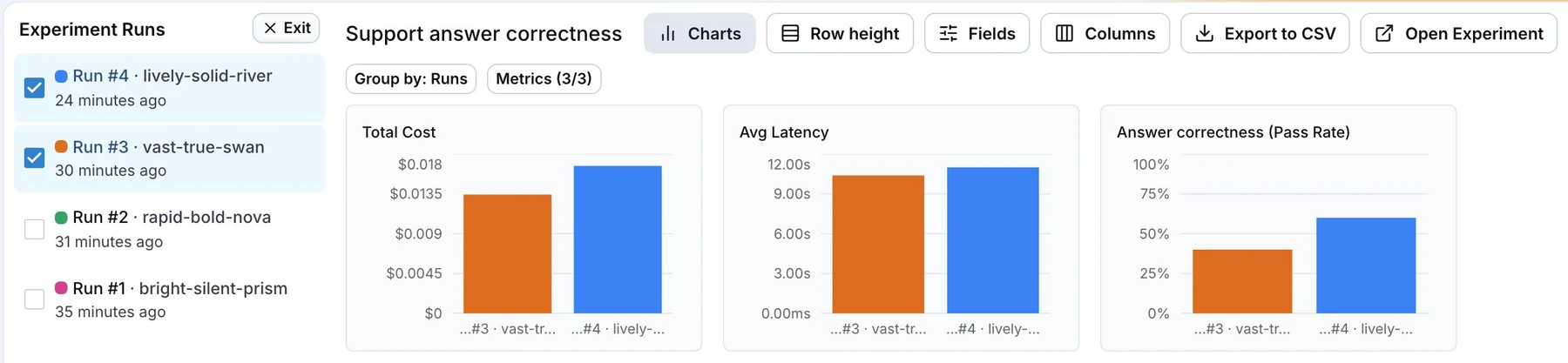
For a single prompt or step, an experiment does the same on a dataset. Under Results, tick two runs to see cost, latency and the pass rate of each evaluator side by side, then check row by row that the fix didn't break the rows that passed before.
When a model upgrade breaks your evals
A team I was helping moved their agent to a newer OpenAI model, and it started to verify more and ask the user more questions. Their tests failed it for doing the right thing, because the tests assumed the agent would always take the same path.
So write criteria about the outcome and about what must or must never happen, like "creates exactly one return" or "never promises a refund before checking eligibility", and leave out the exact order of every call. Then run the same suite against the old and the new model before you switch. A smarter model can take a different path to the same right answer, and your tests should let it.
Let evals pick the architecture
In a work session in August, a team with a simple retrieval-augmented generation (RAG) workflow told me they'd held back an agentic version because, without evals, "it seems to just add complexity."
Their developer's experiment had the agentic version scoring better. Mine, on a different small dataset, had it costing more and scoring no better. The two small datasets gave two different answers, so the next step was a real dataset from their production traffic, with the simple and the agentic version as two agent columns in the same experiment. The version that scores better on real questions, at a cost they're fine with, is the one to ship.
How to monitor and evaluate my AI agents?
Grade the final answer, the trajectory and the tool calls, before and after release:
| Step | What you do | Where in LangWatch |
|---|---|---|
| Read | Open a trace and read the spans and tool calls | Trace Explorer, Trace tab |
| Ask | Ask a plain question of every trace | Instant Evals in the search bar |
| Count | Put judge answers and span counts side by side | LangWatch SQL |
| Watch | Judge every live trace on the trajectory | Online Evals |
| Test | Check tool calls in scenarios before release | Agent Testing |
| Compare | Run old and new versions on the same cases | Test suites, Experiments |
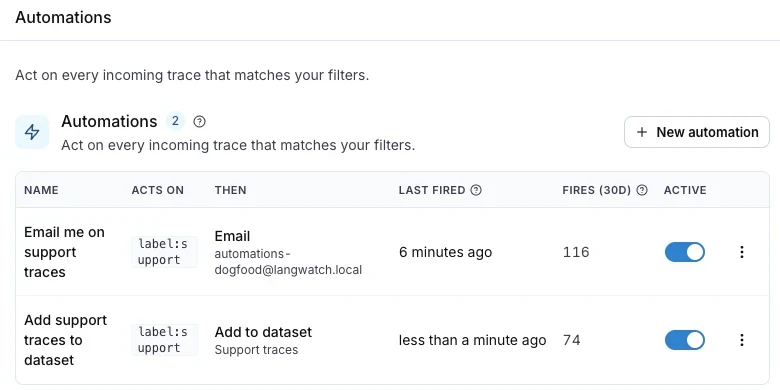
To get the next failures sent to you, click Automate on a filtered search, and LangWatch sends each new matching trace to Slack, an annotation queue or a dataset as it arrives. See automations.
If you haven't read a trace of your own agent this week, open the last ten and look at the tool spans first.
Put this into production with LangWatch.
Trace your agents, run evaluations, and turn failures into repeatable tests.
Frequently asked questions
- What is AI agent evaluation?
- AI agent evaluation checks what an agent did on a run as well as what it replied: whether the user got what they asked for, whether the agent took sensible steps in a sensible order, and whether each tool call had the right tool and arguments and worked. You run it before release with simulations and experiments, and after release with judges on live traffic.
- How can I test my AI agents?
- Write scenarios from real situations your users bring, let a simulated user talk to the agent, and have a judge check criteria about the outcome and about the tool calls, reading the agent's own traces. Run the same suite against the old and the new version of the agent before every change ships.
- What is trajectory evaluation?
- Trajectory evaluation grades the sequence of steps an agent took to reach its answer: the model calls, the tool calls with their arguments and results, and the order they ran in. It catches agents that retry failed tools, skip a lookup or give up, even when the final reply reads well.
- Should I evaluate my AI agent online or offline?
- Both. Offline evaluation, with experiments and simulations, tests a change before it ships. Online evaluation runs judges on live traffic after the response is sent, so it never slows your users down, and it finds the cases you never thought to test.
- Do I need a dataset to evaluate an agent?
- No. You can start with a few scenarios written from real situations, or ask a plain question of every trace you already have with an Instant Eval. The traces that fail become your first dataset.