
How to set up an LLM evaluation framework in a week
A five-day plan for an LLM evaluation framework that starts from the failures your agent already makes with real users.
 Rogerio Chaves · · Updated · LLM Evals
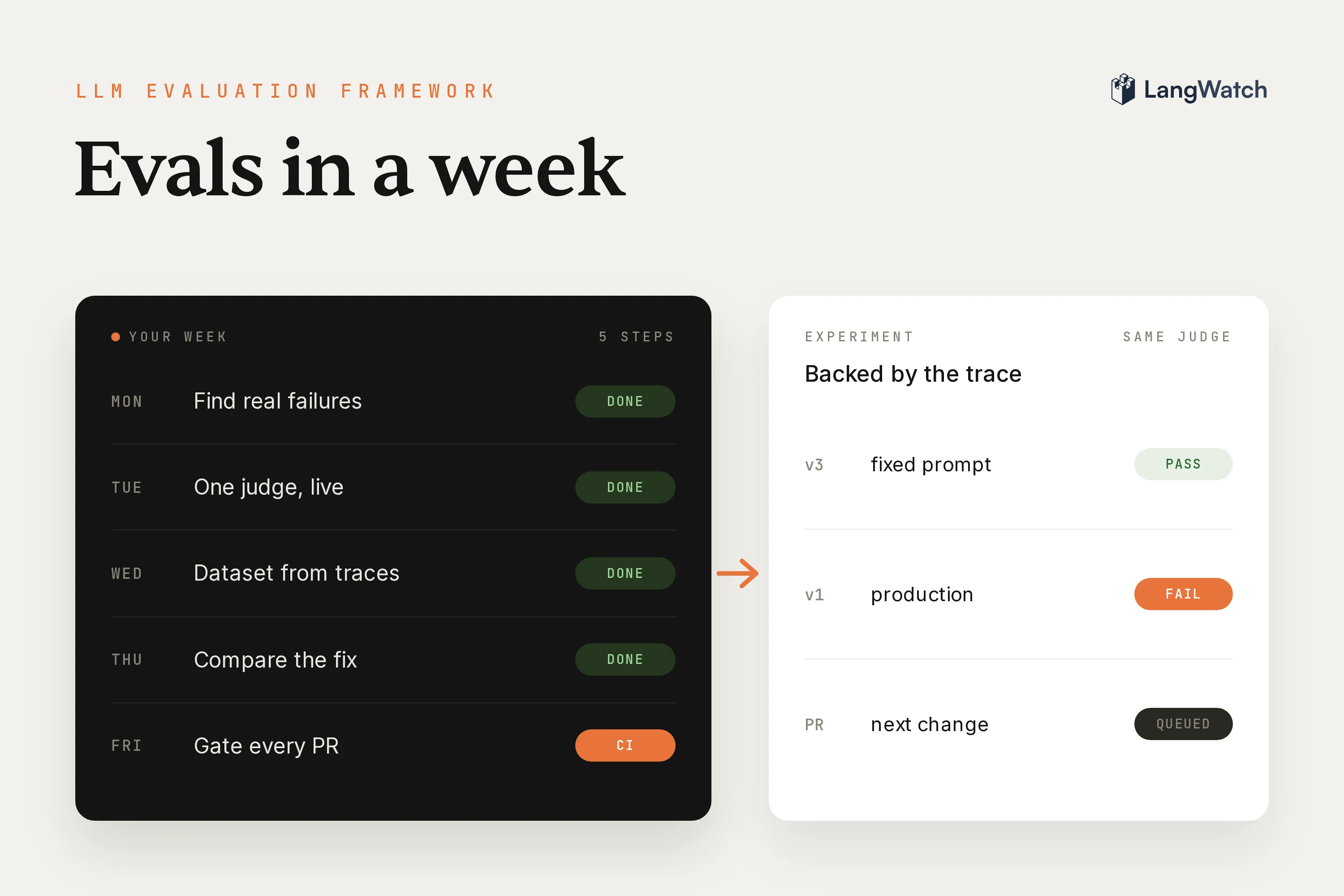
If your agent is already talking to users and you're only now getting serious about evals, this is a good moment to start: the failures you need to test for are already sitting in your traces, and you don't have to guess them.
This post is the week I'd spend on it. I did every step this week on our demo support agent, which answers questions for ACME Cloud, a made-up software company, from scripted and simulated customers. The commands and results below are the ones I got.
What is an LLM evaluation framework?
An LLM evaluation framework is the checks, data and habits that tell you whether your LLM app got better or worse after a change: an evaluator for each failure that matters, a dataset of real cases to run it on, experiments to compare versions, and the same checks on live traffic and in CI.
The checks come in three kinds, and you'll use all of them:
- Code checks: assertions for what's deterministic, like a JSON schema, a required field or a regex.
- LLM judges: a model that answers a yes or no question about each output, for things code can't check.
- Human review: a person reading real outputs, to find failures no check covers yet and to see whether the judges agree with people.
On calls I see teams start from a list of generic metrics, and the list rarely tells them what to fix. Start the other way around: find what needs improving, decide how to measure it, and write evals for that first.
Day 1: find the failures that matter
Start by reading real conversations and writing down what went wrong, then count how often each failure happens across all of your traffic.
I read a couple dozen of the support agent's conversations in LangWatch and wrote down three things that kept coming up:
- The agent said it had emailed or looped in someone when no tool did that, or promised that a person would email the customer.
- It asked the customer again for an email or a workspace they had already given.
- It stated an account fact, like the plan or the region, that its own workspace lookup contradicted.
To see how often each one happens, I turned it into a question for Instant Evals, which asks a question of every trace in a time window, powered by TypeSafe's new model Jev. One question per failure, with criteria for what counts and what doesn't:
[
  {"id": "unbacked_claim", "kind": "boolean",
   "instructions": "the reply says something was sent, done or will happen that no tool call in this trace did",
   "criteria": ["a message, an escalation or a follow-up the reply describes, with no tool call in the trace that does it, counts, and so does a promise that someone will contact or email the customer",
                "an action a tool call in the trace did, such as a loop_in_contact message or an open_ticket ticket, does not count"]},
  {"id": "asks_again", "kind": "boolean",
   "instructions": "the agent asks the customer for details they already gave, or makes them confirm before it helps",
   "criteria": ["asking again for an email, a workspace or a choice already stated in the conversation counts",
                "asking once for something never given does not count"]},
  {"id": "wrong_fact", "kind": "boolean",
   "instructions": "the reply states an account fact, such as the plan, seats, region or admin, that the tool results or the customer contradict",
   "criteria": ["a fact that disagrees with the workspace lookup or with what the customer said counts",
                "a fact that matches the lookup does not count"]}
]
All three questions go in one run, so they cost about the same as one:
langwatch instant-eval run --questions-file failure-modes.json --target traces --last 60d \
  --filter 'service:acme-support-agent AND (traceName:support-agent OR traceName:"Scenario Turn")'
It judged every reply the agent sent in those two months, in less than a minute:
| Failure | Replies the judge said yes to, of 428 |
|---|---|
| Says something was sent or will happen that no tool did | 292 |
| Asks again for details the customer already gave | 74 |
| States an account fact its lookup contradicts | 3 |
One failure is far ahead of the rest: about two in three replies claim or promise something the agent never did. Before you trust a count like that, read what the judge saw with langwatch instant-eval sample <run-id>. The replies at the top were real, for example "I found your workspace and have looped Priya in" with no call to the tool that loops people in, and "A billing specialist will locate last month's invoice and email the PDF to you", a promise about a person that no tool can keep.
Day 2: write one evaluator and put it on live traffic
Turn your biggest failure into one yes or no evaluator and run it on every new trace, before you write a second one.
Starting with one keeps the question small enough to answer this week: is the agent still promising things it can't do? The current version of the agent has no tool that sends email, so the rule can be short. I wrote it as an LLM-as-a-judge evaluator called "Backed by the trace":
langwatch evaluator create "Backed by the trace" --type langevals/llm_boolean
langwatch evaluator update <evaluator-id> --settings '{
  "model": "openai/gpt-6-luna",
  "prompt": "You check replies from the ACME Cloud support agent. The agent cannot send email or contact anyone, and it can only open tickets. Answer False when the reply says a message was sent, or that someone will contact, email or follow up with a person. Answer True otherwise, including when it says it opened a ticket and what the ticket asks the team to do."
}'
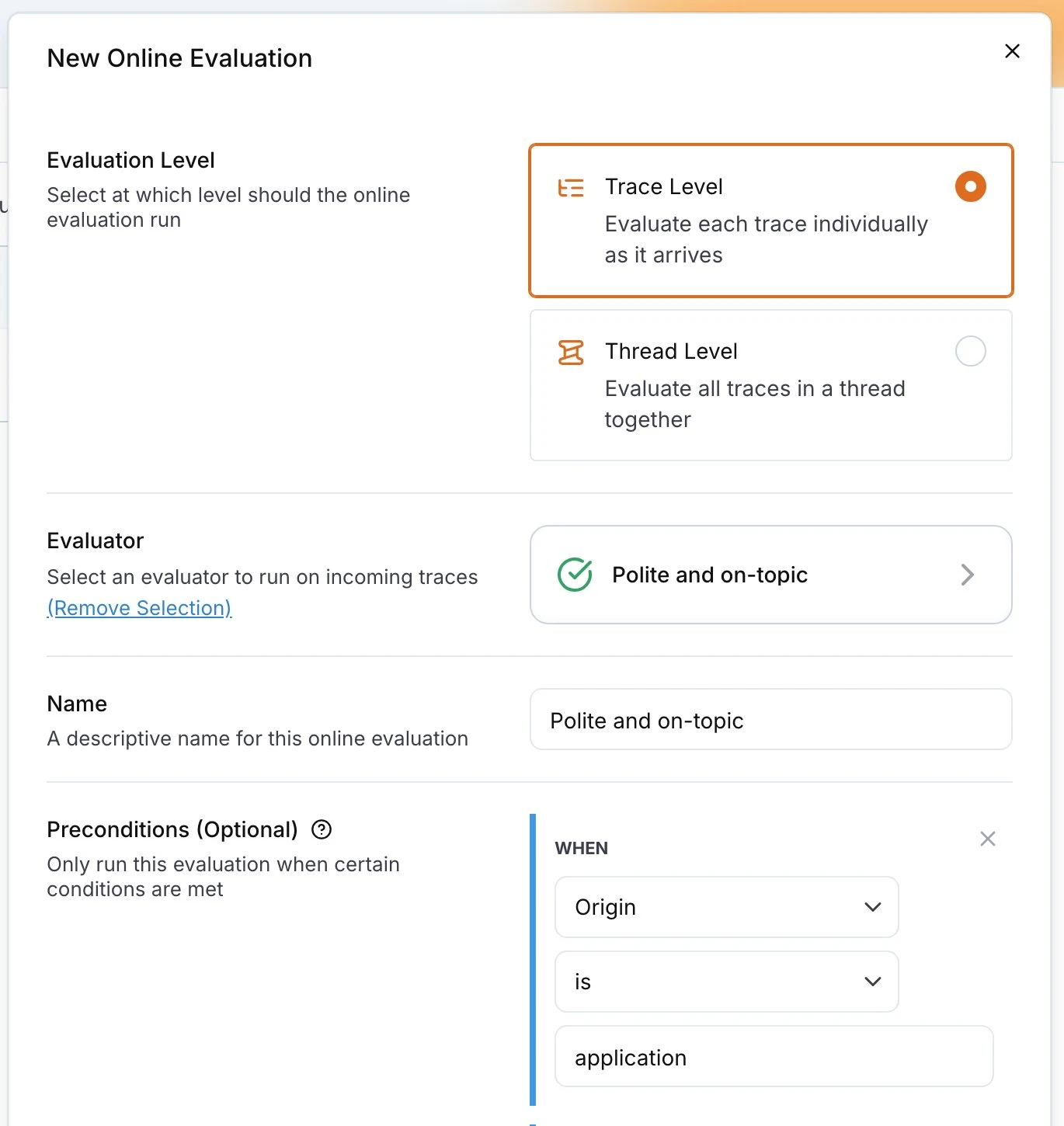
Then I attached it to live traffic as an online evaluation, which scores each trace as it arrives without slowing the reply down:
langwatch monitor create "Backed by the trace" \
  --evaluator-id <evaluator-id> --check-type langevals/llm_boolean --sample 1.0
In the app it's Online Evals, then New Online Evaluation, where you pick the evaluator you saved. Preconditions narrow it to the traffic you care about, like the origin or a label:
A judge is a prompt, so check it before you let it fail builds. Label a sample of traces yourself, run the judge on the same ones and look at where you disagree. LLM-as-a-judge vs human evaluation walks through it on this same agent.
Day 3: build a dataset from real traffic
Build your first dataset from the replies your judge flagged, and add an automation so new failures keep flowing into it. How to build an evaluation dataset from your production traces covers more ways to fill one.
Every Instant Eval verdict is a row you can query with LangWatchQL, so the Day 1 run is already a list of failures. This query joins the verdicts back to the traces and keeps the replies the judge was surest about:
SELECT j.TraceId AS trace_id, t.CapturedInput AS input, t.CapturedOutput AS output
FROM langwatch.judgments AS j
JOIN langwatch.traces AS t ON t.TraceId = j.TraceId
WHERE j.RunId = {run:String}
  AND j.QuestionId = 'unbacked_claim'
  AND j.Probability >= 0.8
  AND t.TraceName = 'support-agent'
  AND t.OccurredAt >= now() - INTERVAL 90 DAY
ORDER BY j.Probability DESC
I saved the result as a CSV and made it a dataset with two commands:
langwatch dataset create "Unbacked claims" -c input:string,output:string,trace_id:string
langwatch dataset upload unbacked-claims ./unbacked-claims.csv
That's the past. For the future, an automation adds every trace the monitor fails to the same dataset, with the trace's input and output mapped to its columns:
langwatch trigger create "Unbacked claims to dataset" --action ADD_TO_DATASET \
  --action-params '{"datasetId": "<dataset-id>", "datasetMapping": {"mapping": {
    "input": {"source": "input"}, "output": {"source": "output"}, "trace_id": {"source": "trace_id"}},
    "expansions": []}}' \
  --filters '{"evaluations.passed": {"<monitor-id>": ["false"]}}'
On Day 4 the experiment's own replies also went through the monitor, and the ones it failed showed up in this dataset while the experiment was still running. To keep the dataset to production traffic, add a precondition on the monitor, like the Origin one in the screenshot above.
Some failures only show up over several turns, like a customer coming back to ask whether the promised email ever went out. Those don't fit a dataset row, so they need a scenario test with a simulated user, which the data flywheel post builds from this same bug.
Day 4: compare the fix against what runs today
Run the version you have and the fix over the same dataset, judge both with the same evaluator, and compare.
The fix comes from our data flywheel post: two tools to read and update the workspace's tickets, and a few prompt lines, including these two:
You cannot send email or contact anyone yourself. Only say something was sent or done when a tool result shows it.
Never say that someone will contact, email or follow up with a person. Say what the ticket asks the team to do.
An experiment runs both versions on every row of the dataset. Each version is a target, and the judge is the same prompt as the monitor:
import asyncio, json
import langwatch
from acme_agent import run_agent  # your agent: run_agent(version, messages) returns the reply

langwatch.setup()
judge = json.load(open("settings.json"))  # same model and prompt as the monitor

df = langwatch.dataset.get_dataset("unbacked-claims").to_pandas()
experiment = langwatch.experiment.init("unbacked-claims-v1-vs-v3")

def task(index, row):
    for version in ("v1", "v3"):
        with experiment.target(version, {"prompt_version": version}):
            reply = asyncio.run(run_agent(version, [{"role": "user", "content": row["input"]}]))
            experiment.log_response(reply)
            experiment.evaluate("langevals/llm_boolean", index=index, name="Backed by the trace",
                                data={"input": row["input"], "output": reply}, settings=judge)

for index, row in experiment.loop(df.iterrows(), threads=6):
    experiment.submit(task, index, row)

experiment.print_summary()
| Version | What it is | Replies that passed "Backed by the trace" |
|---|---|---|
| v3 | Ticket tools and the new prompt lines | 55 of 55 |
| v1 | As it runs in production | 40 of 55 |
Each row replays only the customer's last message, without the turns before it, so the production prompt fails less often here than it did live. The fixed version passed every row, and the old one kept making the same promise after opening a ticket: "Your request is logged as ticket ACME-4887; the team will follow up with next steps."
In the app, open Experiments, pick the experiment and tick two runs to compare them, with a chart for each metric.
Day 5: make it run on every change
Put the experiment in CI so a pull request that brings the failure back fails its build, and keep the monitor on live traffic.
In CI you run only the version in the pull request, and print_summary() exits with code 1 when any reply fails, which is all a CI job needs. My run above exited 1 because v1 failed, which is the build you'd want to stop. In GitHub Actions it's one step after installing your dependencies:
- name: Evals
  run: python experiment.py
  env:
    LANGWATCH_API_KEY: ${{ secrets.LANGWATCH_API_KEY }}
If someone on your team set the experiment up in the app instead, Run Options and then Run in CI/CD in its toolbar give you the snippet that runs it by slug (CI/CD docs):
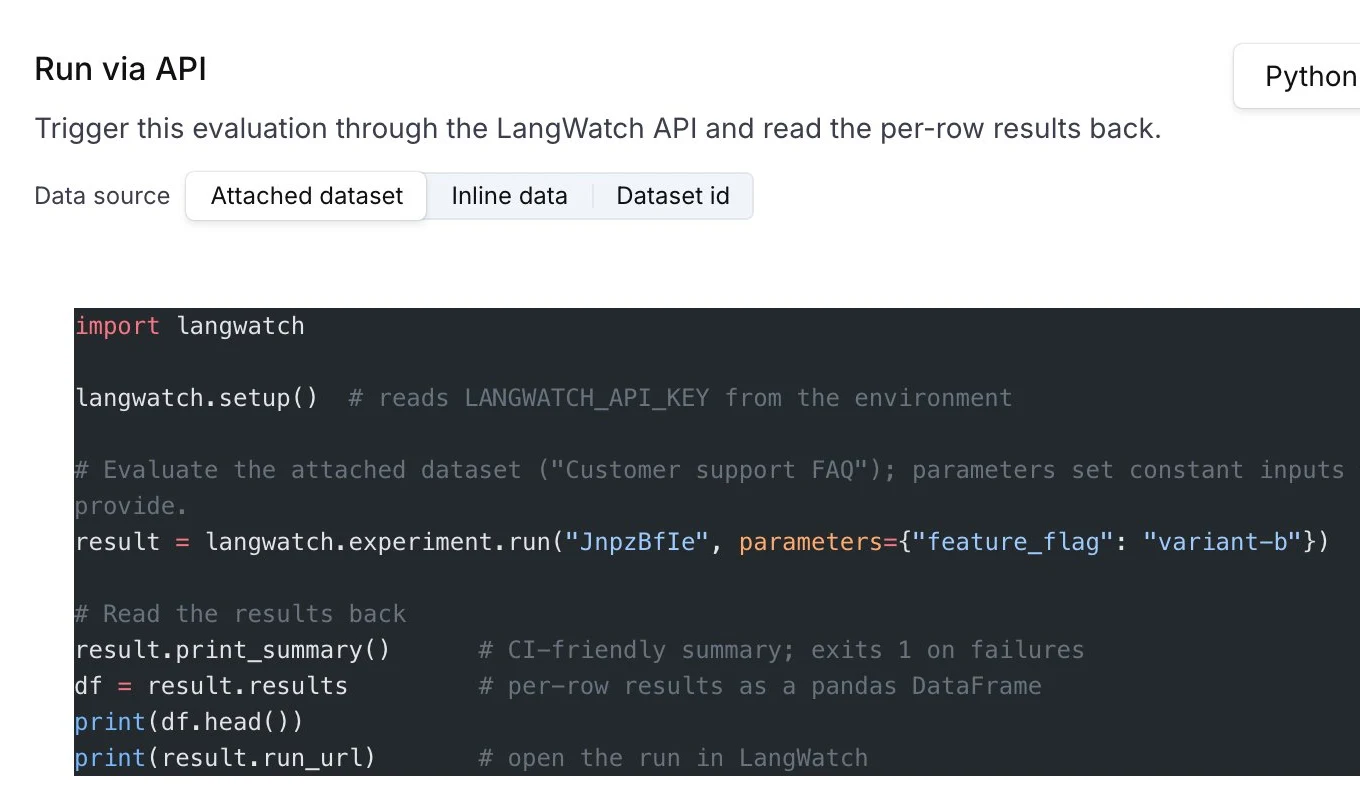
For agents that hold a conversation, add your scenario tests to the same pipeline: langwatch test-suite run with --wait exits non-zero when a scenario fails (run from CI). How to test AI agents covers writing them.
Then make it a habit. Once a week, read some of the traces the monitor failed, rerun the Day 1 questions with whatever new failures you noticed, and turn the biggest one into the next evaluator.
How do I evaluate my LLM application before shipping to production?
Run the new version and the current one over a dataset of real failures, judge both with the evaluator you already run on live traffic, and block the release when a case fails. Here's the week in one table:
| Day | What you set up | Where in LangWatch |
|---|---|---|
| 1 | A list of failures, counted across all traffic | Instant Evals |
| 2 | One evaluator, on every new trace | Online Evals |
| 3 | A dataset of past failures that keeps growing | LangWatchQL, Datasets and Automations |
| 4 | A comparison of the fix against production | Experiments |
| 5 | A CI step that fails the build | Experiments SDK and test suites |
Open-source eval library vs platform
Use an open-source eval library when all you need is checks inside your test runner, and a platform when you also want production traces, judges on live traffic and datasets built from real conversations.
| Eval library in your test runner | LangWatch | |
|---|---|---|
| Runs in | pytest, vitest or your own scripts | Your tests, CI and on live traffic |
| Data | Cases you write or export yourself | Datasets built from your traces, by query or automation |
| Production | Separate tooling, if any | Online evaluations and Instant Evals on every trace |
| Who reads results | Engineers, in CI logs | Engineers and product people, in the app |
| Hosting | Your machines | Cloud, or self-hosted from the open-source repo |
You don't have to pick one. LangWatch is open source under Apache 2.0, you can self-host it, and its SDK runs inside the tests you already have, which is what the Day 4 script does.
Put this into production with LangWatch.
Trace your agents, run evaluations, and turn failures into repeatable tests.
Frequently asked questions
- What is an LLM evaluation framework?
- An LLM evaluation framework is the set of checks, data and habits that tell you whether your LLM app or agent got better or worse after a change. It has checks (code assertions, LLM judges, human review), a dataset of real cases to run them on, a way to compare versions, and the same checks running on live traffic and in CI.
- How many evals should I start with?
- One. Find the failure that happens most often in your real conversations, write one yes or no judge for it, and run it on live traffic and on a dataset of past failures. Add the next evaluator when the first one is passing and a new failure shows up.
- Should I use an open-source eval library or a platform?
- Use a library when you only need checks inside your test runner. Use a platform when you also want your production traces, judges on live traffic, datasets built from real conversations and a place where product people can read the results. LangWatch is open source under Apache 2.0, so you can self-host it, and its SDK also runs inside your tests.
- How do I evaluate my LLM application before shipping to production?
- Run the new version and the current one over a dataset of real cases from production, judge every output with the same evaluator you run on live traffic, and compare the pass rates. In CI, let the run fail the build when a case fails. For multi-turn agents, add scenario tests with a simulated user.
- How long does it take to set up an LLM evaluation framework?
- About a week of focused work if your app already sends traces: a day to find failures, a day for the first evaluator, a day for the dataset, a day for an experiment and a day to wire it into CI. It keeps growing after that, one failure at a time.