
How to build an evaluation dataset from your production traces
Already running your agent in beta or production? Then your users have been writing your test cases for you. Here is how to find those conversations in LangWatch, turn them into an evaluation dataset and keep it growing on its own.
 Rogerio Chaves · · LLM Evals

If your agent is already running in beta or production but you're just starting your eval strategy, this is the best moment to build a real world dataset. You don't have to make up test cases. Your users already did.
The stuff that breaks is never what you planned for: someone asks for a refund in a way the prompt never expected, a tool times out halfway through, or a user just gets more annoyed with every answer. Things happen in production, the world changes, and you want those cases back in development so they don't break twice.
Here's how I do it in LangWatch. No users yet? Start with how to start evals when you have no dataset instead.
Step 1: Search the Trace Explorer
Open Trace Explorer under Observe, type failed traces from the checkout service slower than 2 seconds in the search bar and press Enter.
You get three filter chips: status:error AND service:checkout AND duration:>2000. I always check the "Searched as" line and the sidebar counts, which split the 80 traces by model, user and conversation.
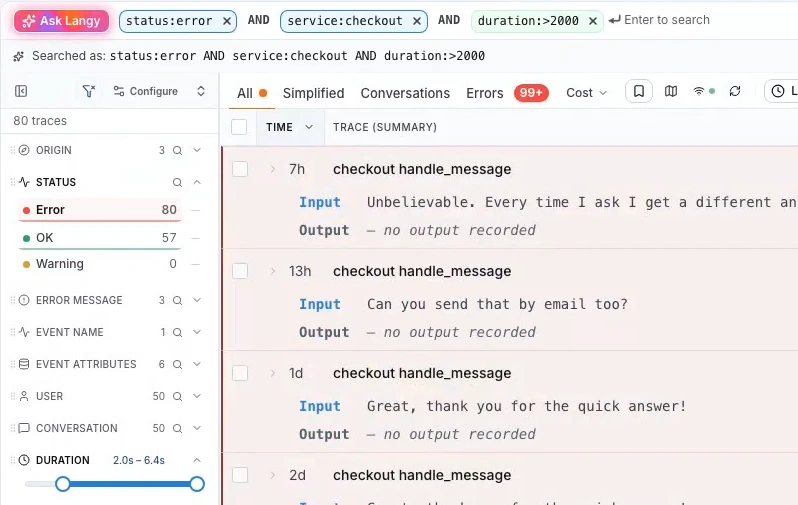
If you know the syntax you can type the filters yourself too, like model:gpt-*, has:feedback or trace.attribute.<key>:value for anything you send yourself. The query docs have every field.
Step 2: Run an Instant Eval from the search bar
To know if a user got annoyed, I just ask. Sentiment is just a question that you ask, like anything else you want to know about your agent.
Type eval:"is the user annoyed with the answer" and press Enter.
With an Instant Eval that's about a minute for ten thousand conversations, and I'm already reading the first matches before it's done.
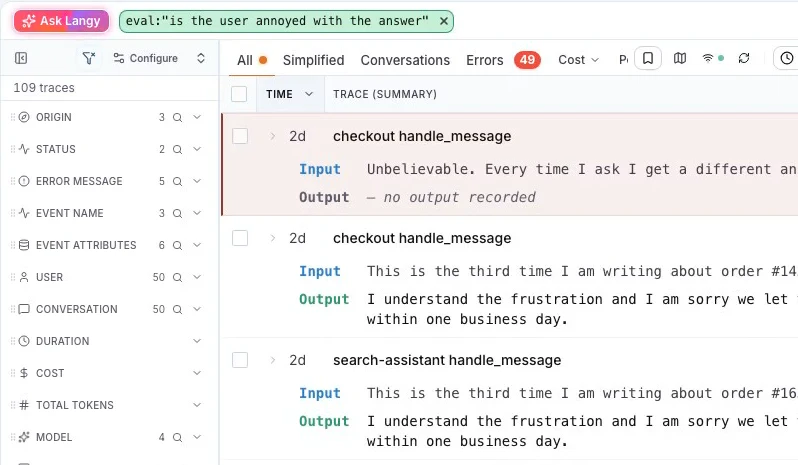
You can stack the eval chip with the filter chips, like annoyed users on the checkout service only, or on one model. I don't plan any of this ahead of time, every hypothesis I have about the agent I check against all the traffic right there.
To judge a whole conversation, a single trace or one model call, write eval.conversation, eval.trace or eval.llm instead of eval. The run id goes in the URL, so when I send the link to someone on the team they see the same results.
Step 3: Pick the exact rows with LangWatch SQL
Then I jump to LangWatchQL, which is SQL over your traces. It's literally select star from your traces, and the verdicts from step 2 are in there too, in the judgments view.
I only want the annoyed users where the agent also hit an error, so I join the two and name input and output like my dataset columns:
SELECT
  t.TraceId AS trace_id,
  t.CapturedInput AS input,
  t.CapturedOutput AS output,
  j.Probability AS annoyed
FROM analytics.judgments AS j
JOIN analytics.traces AS t ON t.TraceId = j.TraceId
WHERE j.RunId = {run:String}
  AND j.Passed = 1
  AND t.HasError
  AND j.CreatedAt >= subtractDays(now(), 7)
  AND t.OccurredAt >= subtractDays(now(), 37)
ORDER BY annoyed DESC
LIMIT 500
Then I run it with the LangWatch command line tool (CLI) and put the rows in a dataset I call golden-set:
langwatch query --sql-file annoyed-errors.sql --param run=<run-id> \
  --projects <project-id> --format jsonl --out annoyed-errors.jsonl
langwatch dataset upload golden-set ./annoyed-errors.jsonl --if-exists append
I also put eval_category() in the query sometimes, to tag each conversation by what the user wanted. That way I can check the dataset has about the same mix of requests as our real traffic. The eval functions reference has examples.
Step 4: Add the matches to a dataset
If you'd rather click, tick the traces you want, or tick the header and use Select all matching, then click Add to dataset in the bar at the bottom.
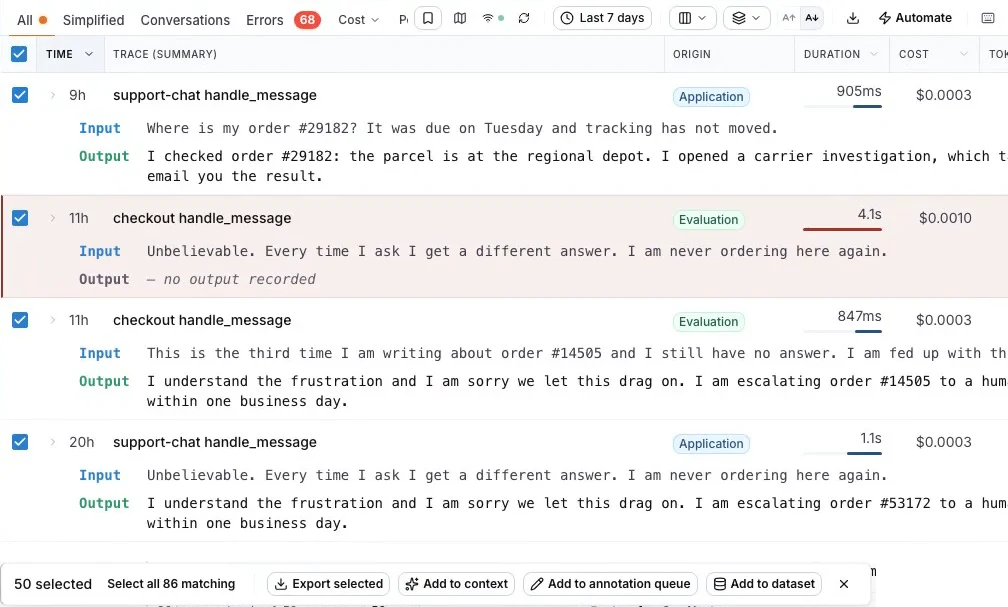
In the Add to Dataset drawer, pick a dataset or click + Create New. Under Mapping, choose Current Trace for one row per trace, or Thread for a whole conversation per row if your agent is multi-turn.
I keep narrowing the mapping down until I have exactly the fields I need, like input, output, metadata keys or spans.
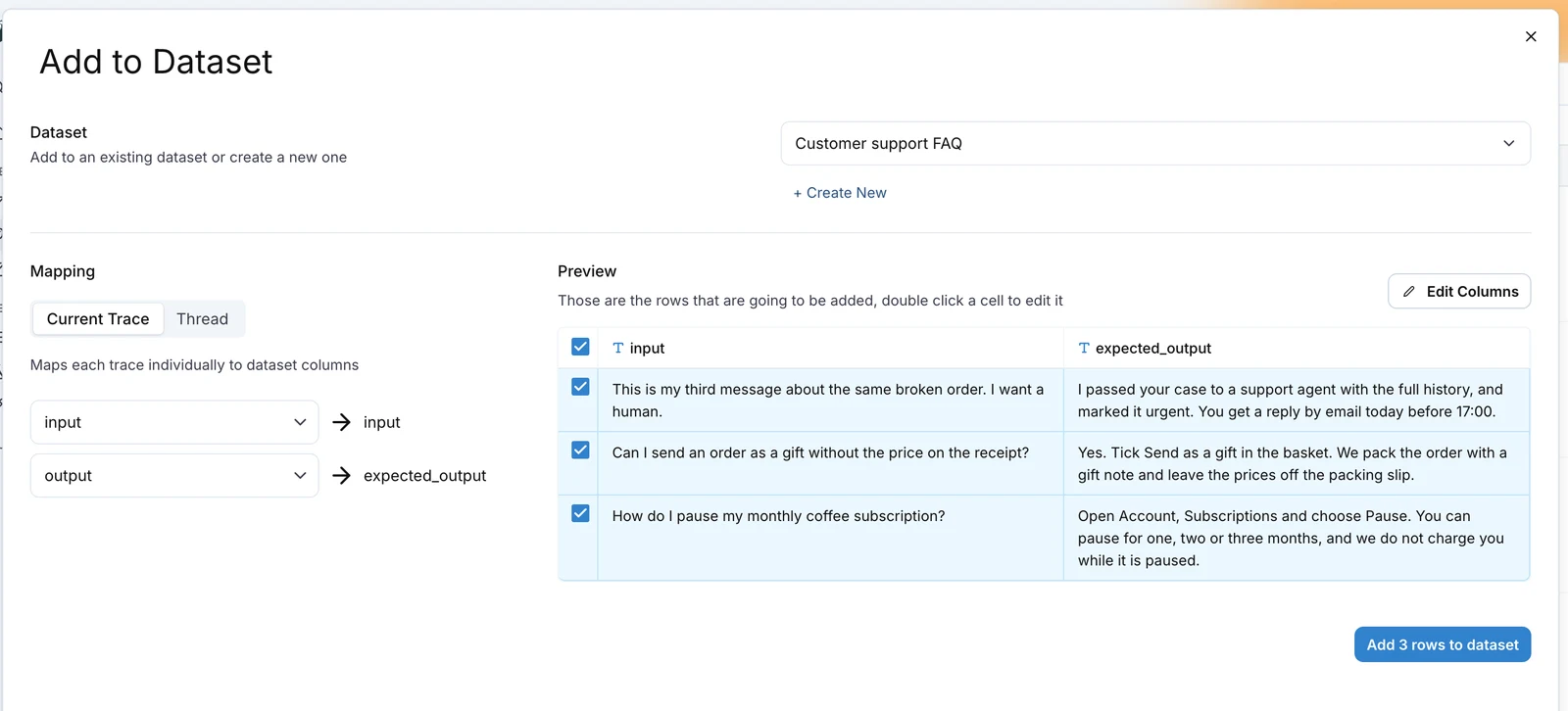
Careful with expected_output here, since the agent's answer on a bad trace is the wrong answer. Double-click the cell in the preview and write the right one before you click Add 3 rows to dataset. When it takes a domain expert to know the right answer, send the traces with Add to annotation queue instead, and the expert's corrected answers go to the dataset after review. See annotation queues.
Throw in some conversations that went well too, so you'd see it in the experiment if a fix for checkout broke order tracking.
Step 5: Create an automation from the search
Doing this by hand every week gets old fast. What I do is put the question on live traffic as an online evaluation, under Online Evals, and then filter the Trace Explorer on the traces it fails.
Then click Automate in the toolbar. Your filter is already there, so you pick Add to dataset, choose the dataset, review and save. Columns called input, output or trace_id get filled from the trace, and any other column from the metadata key with the same name.
From now on I get every annoyed customer as a new row in the dataset. You see each automation and the last time it fired on the Automations page:
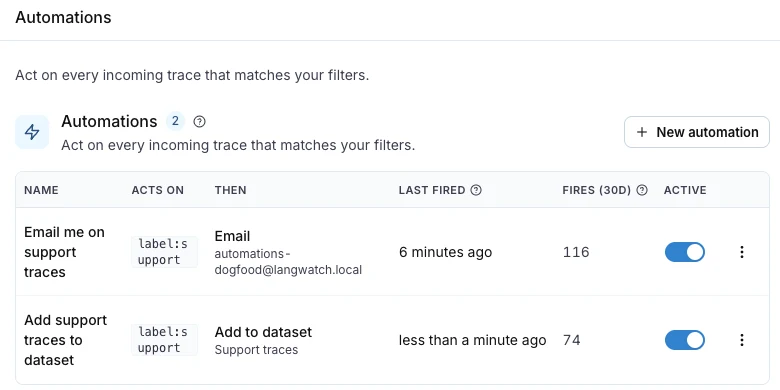
I set up the same kind of automation to ping me on Slack or by email, or to fill an annotation queue. See automations that build a dataset.
Step 6: Run an experiment on the dataset
Open the dataset and click Run experiment. In the Experiments Workbench, click Add under Prompts or Agents for your agent or a prompt, and add LLM Answer Match as the evaluator to check each answer against expected_output.
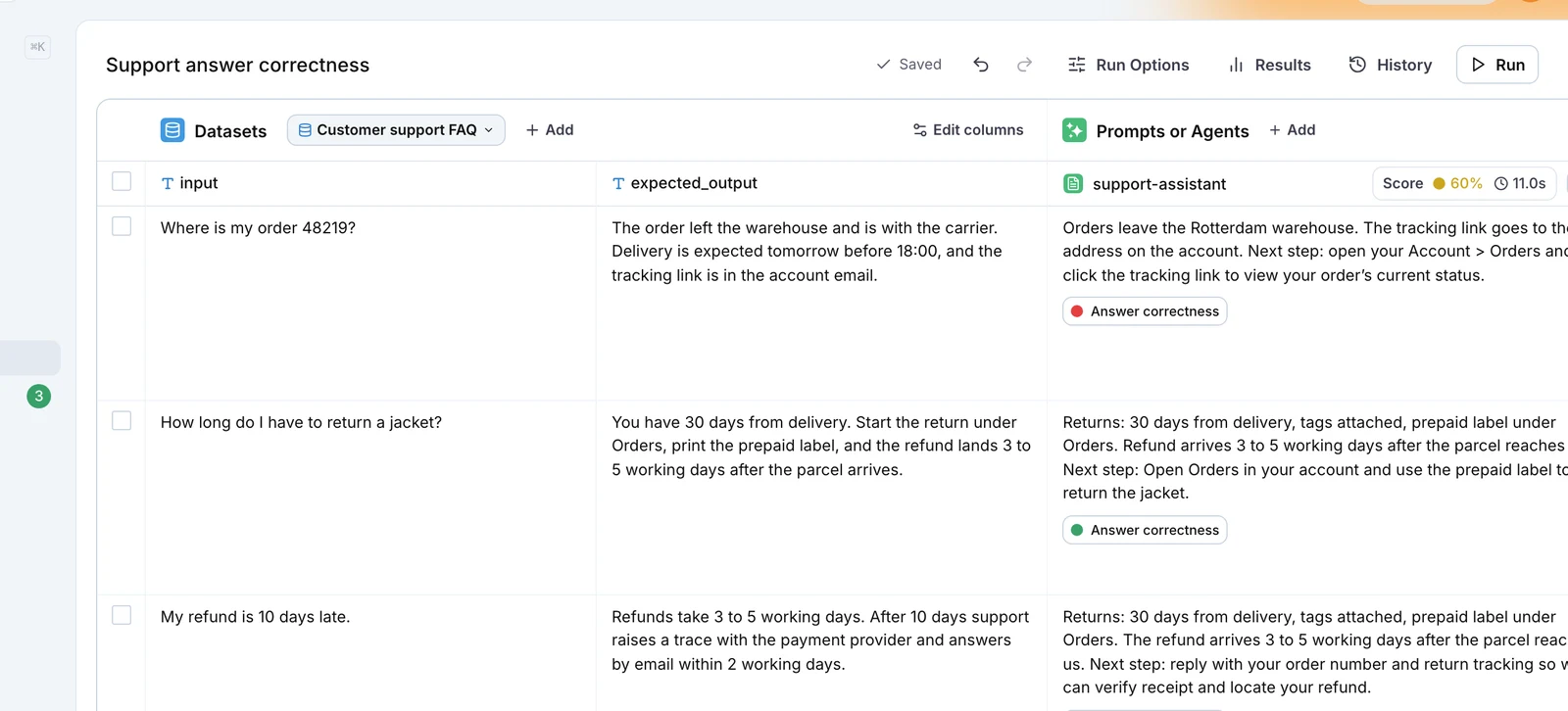
I like to put v1, v2 and v3 of the agent next to each other and compare score, cost and latency on the same rows. If v2 fixes the annoyed users and the rest still pass, I ship it. The same experiment runs from your continuous integration (CI) on every pull request too.
How do I build an evaluation dataset for my AI product?
From your production traces. A dataset is basically a list of traces with the columns your evaluator needs, so the whole loop lives in LangWatch:
| Step | What you do | Where |
|---|---|---|
| Search | Narrow your traces with filters | Trace Explorer search bar |
| Ask | Ask a plain question of every conversation | Instant Evals, same bar |
| Query | Pick the exact rows you want | LangWatch SQL |
| Save | Put the matches in a dataset | Add to dataset |
| Automate | Keep new failures coming in | Automate |
| Test | Score every change against it | Experiments |
A good first round is this week's traffic and one question in the search bar. Read the first fifty matches yourself before you set up the automation.
Put this into production with LangWatch.
Trace your agents, run evaluations, and turn failures into repeatable tests.
Frequently asked questions
- What is a golden dataset?
- A golden dataset is a set of real inputs, each with the answer you expect, that you trust enough to judge every change against. You run a new prompt, model or agent version on it and compare the scores before you ship.
- How do I build an evaluation dataset for my AI product?
- Take it from your production traces. In LangWatch, narrow the Trace Explorer with filters, ask a plain question of every conversation with an Instant Eval, select the matches and click Add to dataset. Then click Automate on the same filter, so new matching traces land in the dataset as they arrive.
- How many examples does a golden dataset need?
- Start with a few dozen rows you have read yourself and grow it from every real failure. Keep the everyday requests in it too, in about the mix your users send, so a fix for one case does not break the common ones.
- Can I use synthetic data for an evaluation dataset?
- Before launch, yes: generate rows from your docs and specs. Once real users arrive, move to production traces. Generated rows hold the situations you imagined, and real users bring the ones you did not.
- How do I keep an evaluation dataset up to date?
- Run your question on live traffic as an online evaluation, filter the Trace Explorer on the traces it fails, and click Automate with Add to dataset as the action. Every new failing trace becomes a row as it comes in.