

thread_id in their metadata: one conversation, one row. Use it when the evaluation needs the whole conversation, for example to check whether the user’s problem was resolved by the end.
Add threads to a dataset
1
Give the dataset a column for the traces
Open the dataset, click Edit columns, and add a column of type
json, for example traces. Keep a string column for thread_id if you want it in the row.2
Select the traces
Open the Trace Explorer, select traces from the
conversations you want, and click Add to dataset. You do not need to select every trace of a
conversation; LangWatch pulls the rest of each thread in the next step.
3
Switch the mapping to Thread
In the Add to Dataset drawer, click Thread under Mapping. A badge shows how many traces the selected threads hold. Map the 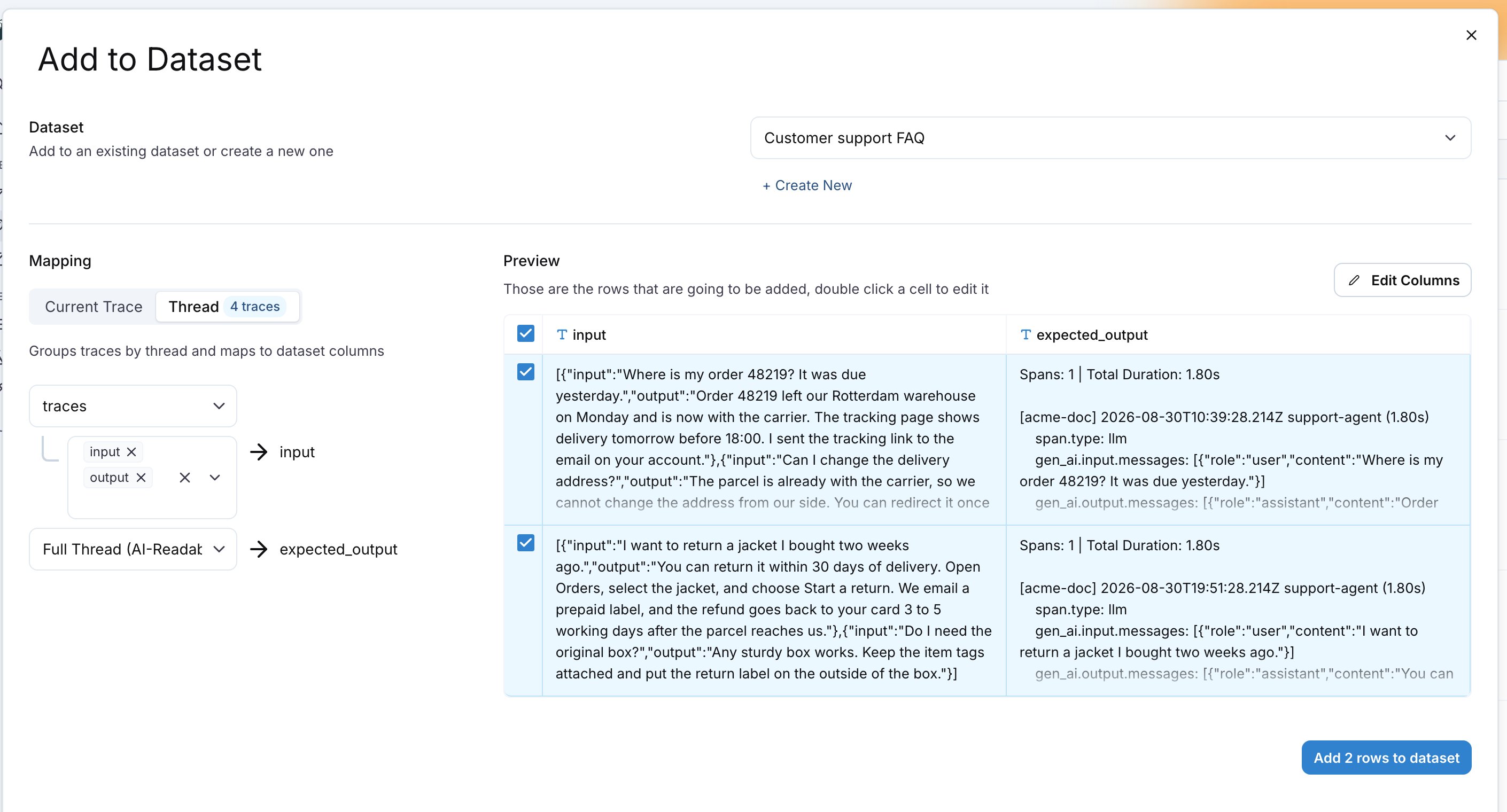
traces column to the traces source and pick the fields to keep per trace; input and output are selected by default. Map thread_id to thread_id. The traces source also fits a string column, which then holds the JSON list as text.4
Add the rows
Check the Preview, then click Add N rows to dataset. Each row is one thread; the
traces cell is a JSON list with one object per trace.thread_id are grouped into one row named no_thread.
Also check: Thread-level online evaluation to score conversations on production traffic, and Datasets for the trace mapping.