Documentation Index
Fetch the complete documentation index at: https://langwatch.ai/docs/llms.txt
Use this file to discover all available pages before exploring further.
Learn how to create your first prompt in LangWatch and use it in your application with dynamic variables. This enables your team to update AI interactions without code changes.
Get API keys
- Create a LangWatch account or set up self-hosted LangWatch
- Create new API credentials in your project settings
- Note your API key for use in the steps below
Create a prompt
LangWatch UI
TypeScript SDK
Python SDK
REST API
Use the LangWatch UI to create a new prompt or update an existing one.
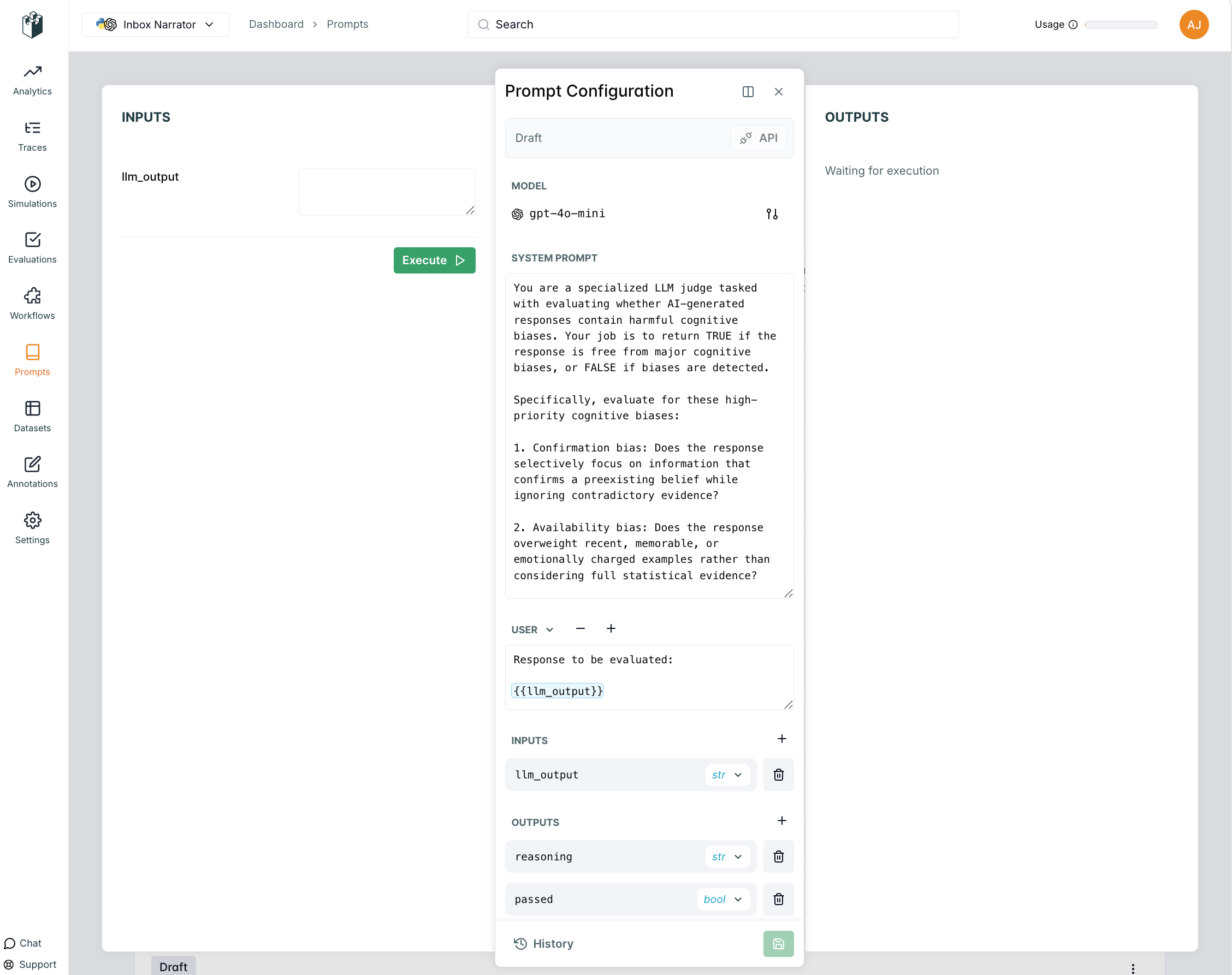
- Navigate to your project dashboard
- Go to Prompt Management in the sidebar
- Click “Create New Prompt”
- Fill in the prompt details and save
import { LangWatch } from "langwatch";
// Initialize LangWatch client
const langwatch = new LangWatch({
apiKey: process.env.LANGWATCH_API_KEY
});
// Create a new prompt
const prompt = await langwatch.prompts.create({
handle: "customer-support-bot",
scope: "PROJECT",
prompt: "You are a helpful customer support agent. Help the customer with their inquiry: {{input}}",
model: "openai/gpt-4o-mini"
});
console.log(`Created prompt with handle: ${prompt.handle}`);
import langwatch
# Create a new prompt
prompt = langwatch.prompts.create(
handle="customer-support-bot",
scope="PROJECT",
prompt="You are a helpful customer support agent. Help the customer with their inquiry: {{input}}",
model="openai/gpt-4o-mini"
)
print(f"Created prompt with handle: {prompt.handle}")
Use the REST API to create a new prompt:# Create a new prompt (this creates the prompt with an initial version)
curl -X POST "https://app.langwatch.ai/api/prompts" \
-H "Content-Type: application/json" \
-H "X-Auth-Token: your-api-key" \
-d '{
"handle": "customer-support-bot",
"scope": "PROJECT",
"prompt": "You are a helpful customer support agent. Help the customer with their inquiry: {{input}}",
"model": "openai/gpt-4o-mini"
}'
Use prompt
At runtime, you can fetch the latest version of your prompt from LangWatch using the prompt handle.
Python SDK
TypeScript SDK
REST API
import langwatch
from litellm import completion
# Get the latest prompt by handle
prompt = langwatch.prompts.get("customer-support-bot")
# Compile prompt with variables
compiled_prompt = prompt.compile(
user_name="John Doe",
user_email="john.doe@example.com",
input="How do I reset my password?"
)
# Use with LiteLLM (unified interface to multiple providers)
response = completion(
model=prompt.model, # LiteLLM handles provider prefixes automatically
messages=compiled_prompt.messages
)
print(response.choices[0].message.content)
import { LangWatch } from "langwatch";
import { openai } from "@ai-sdk/openai";
import { generateText } from "ai";
// Initialize LangWatch client
const langwatch = new LangWatch({
apiKey: process.env.LANGWATCH_API_KEY
});
// Get the latest prompt by handle
const prompt = await langwatch.prompts.get("customer-support-bot");
// Compile prompt with variables
const compiledPrompt = prompt.compile({
user_name: "John Doe",
user_email: "john.doe@example.com",
input: "How do I reset my password?"
});
// Use with AI SDK
const result = await generateText({
model: openai(prompt.model.replace("openai/", "")),
messages: compiledPrompt.messages,
experimental_telemetry: { isEnabled: true },
});
console.log(result.text);
# Get prompt by handle
curl -X GET "https://app.langwatch.ai/api/prompts/customer-support-bot" \
-H "X-Auth-Token: your-api-key"
Link with LangWatch Tracing
You can link your prompt to LLM generation traces to track performance and see which prompt versions work best. For detailed information about linking prompts to traces, see the Link to Traces page.
Python SDK
TypeScript SDK
import langwatch
from litellm import completion
# Initialize LangWatch
langwatch.setup()
# Create a trace function
@langwatch.trace()
def customer_support_generation():
# Get prompt (automatically linked to trace when API key is present)
prompt = langwatch.prompts.get("customer-support-bot")
# Compile prompt with variables
compiled_prompt = prompt.compile(
user_name="John Doe",
user_email="john.doe@example.com",
input="I need help with my account"
)
# Use with LiteLLM (unified interface to multiple providers)
response = completion(
model=prompt.model, # LiteLLM handles provider prefixes automatically
messages=compiled_prompt.messages
)
return response.choices[0].message.content
# Call the function
result = customer_support_generation()
import { LangWatch, getLangWatchTracer } from "langwatch";
import { openai } from "@ai-sdk/openai";
import { generateText } from "ai";
// Initialize LangWatch client
const langwatch = new LangWatch({
apiKey: process.env.LANGWATCH_API_KEY
});
const tracer = getLangWatchTracer("customer-support");
async function customerSupportGeneration() {
return tracer.withActiveSpan("customer-support-generation", async () => {
// Get prompt (automatically linked to trace when API key is present)
const prompt = await langwatch.prompts.get("customer-support-bot");
// Compile prompt with variables
const compiledPrompt = prompt.compile({
user_name: "John Doe",
user_email: "john.doe@example.com",
input: "I need help with my account",
});
// Use with AI SDK
const { text } = await generateText({
model: openai(prompt.model.replace("openai/", "")),
messages: compiledPrompt.messages
});
return text;
});
}
// Call the function
const result = await customerSupportGeneration();
← Back to Prompt Management Overview