
LLM-as-a-judge vs human evaluation: how to check your judge
To check an LLM judge, label some traces yourself, run the judge on the same ones and count where you disagree.
 Rogerio Chaves · · LLM Evals
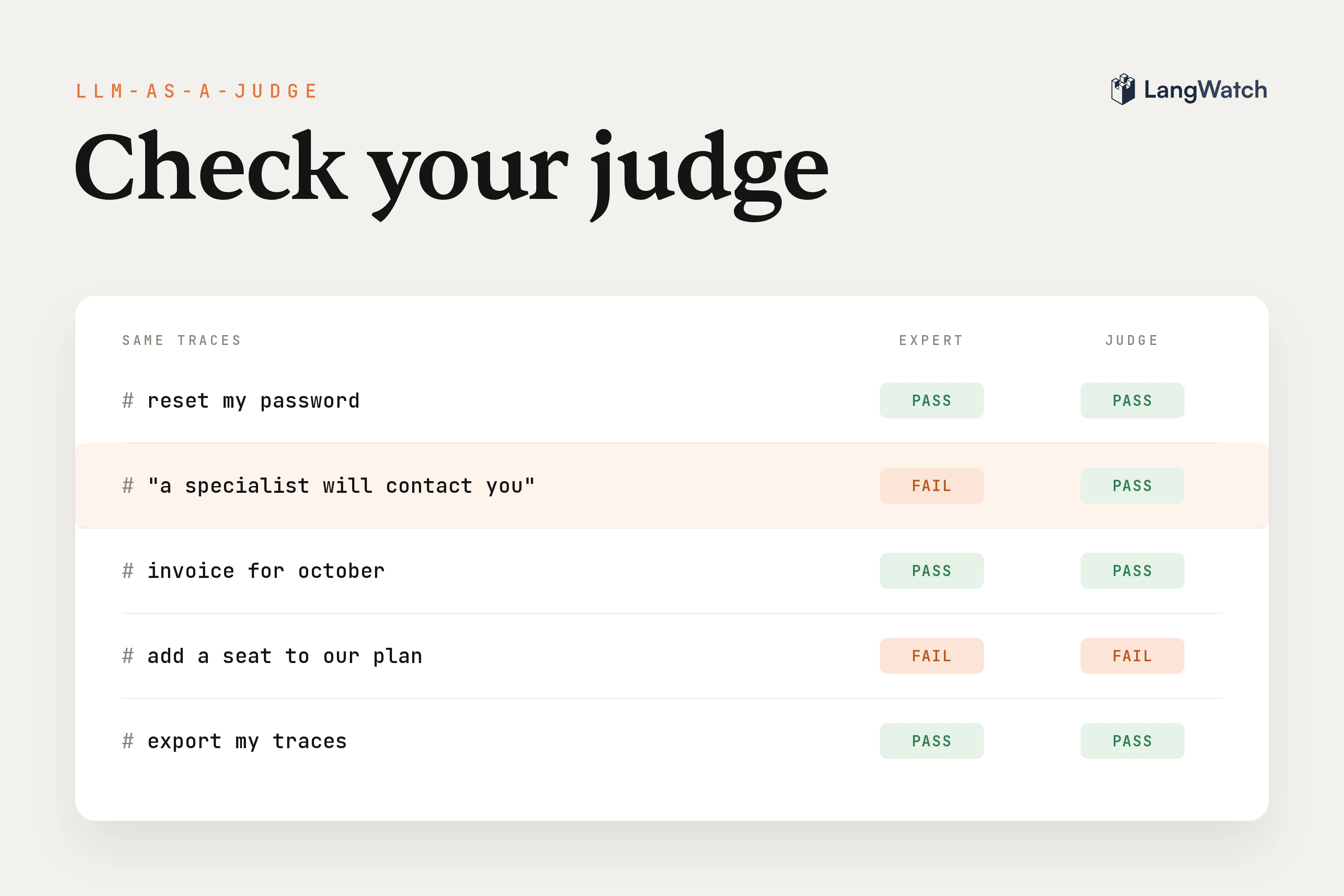
Altura had LLM-as-a-judge evaluators scoring the AI in their tender workspace for half a year before Martijn Schouten, one of their engineers, found that not one person had ever looked at the scores, so he turned them off. The scores were continuous numbers that people couldn't act on, and rerunning the same test four times gave four different results (their story).
If you run an LLM judge on your agent, or you're about to turn one on, check it against a person who knows the domain, which is where Altura ended up too. That person labels a small sample, the judge runs on the same traces, and once the two agree you let the judge grade the rest. I ran that check this week on a demo support agent in LangWatch, and the first judge I tried passed every bad reply in the sample.
Can you trust an LLM judge?
You can trust an LLM judge once it agrees with a domain expert on a sample of the same traces, and only for the question you checked. A judge is a model with a prompt, so it makes confident mistakes just like your agent does, and its pass rate ends up in dashboards and release decisions whether anyone checked it or not.
If evals are new to you, what AI evals are and the evaluation metrics worth tracking cover the basics. The check itself is four steps: label a sample, run the judge on it, count how often you agree, then fix the judge on part of the sample and measure it again on the rest.
Label a sample by hand first
Write down your pass or fail rule, then label a few dozen real traces with it yourself, or have your domain expert do it, before any judge runs. If you can't write the rule, the judge can't follow it either.
My demo agent answers support questions for ACME Cloud, a made-up software company. It has three tools: lookup_workspace reads the customer's account, search_help_center reads help articles and open_ticket opens a ticket for a person on the team. The failure I care about is a reply that promises something the agent never did. In one trace it tells a customer that "a specialist will contact Arjun", their workspace admin, and the customer comes back with "it has been three days and Arjun never received anything from you."
So I wrote one question as the support lead, with the pass and fail cases under it:
Does the final reply only tell the customer things the trace backs up? Pass when every action, promise and fact in the reply comes from a tool result or from the conversation. Fail on an action no tool did ("I emailed Elena"), a commitment on someone else's behalf ("you'll hear back within 2 hours"), or a ticket id, fact, limit or step that no tool returned.
Every few traces I hit a case the rule didn't decide, like a reply saying "our engineering team has been notified" when the agent had only opened a ticket. I passed it, because for my team the ticket is the notification. A reply saying "I couldn't find a record of the prior outreach you mentioned" failed, because no tool can look that up. I wrote down each call like that, applied it to every trace after, and the list came in handy later when I fixed the judge.
I picked 60 traces from every kind of conversation in the project and split them before labeling, 20 to tune the judge and 40 only to measure it. If you tune the judge on the same traces you measure it on, you end up measuring your own tuning.
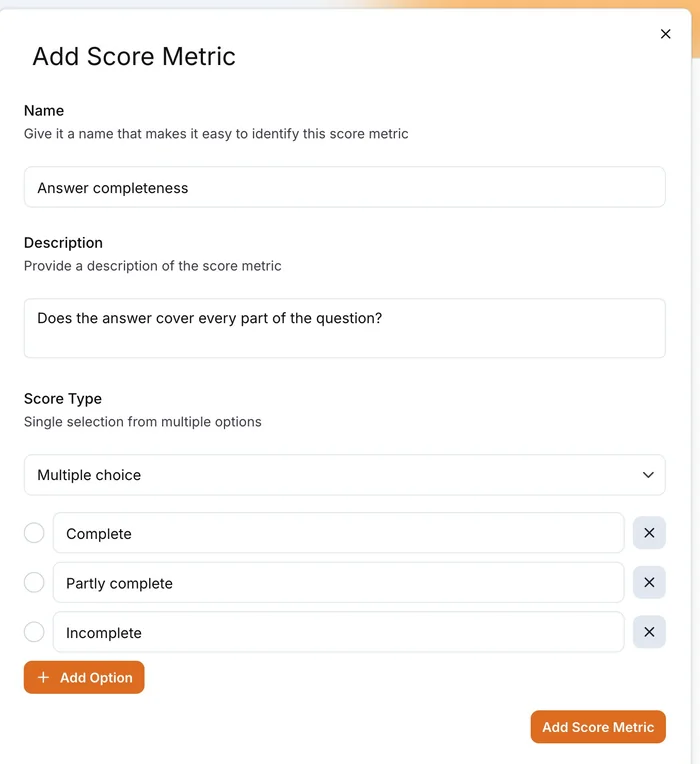
In LangWatch the label is a score type. Open Settings, then Annotation Scores, click Add new score metric, pick Multiple choice and give it two options, Pass and Fail.
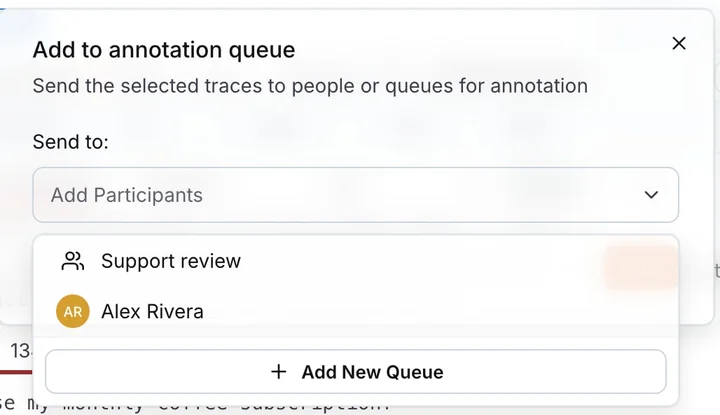
To get traces in front of your expert, select them in the Trace Explorer and click Add to annotation queue. In the queue, your expert scores each trace Pass or Fail, writes down why and moves on with Next. That reason is what you'll read later when the judge disagrees, and the annotation queues guide covers the setup for a team. I labeled my 60 in a text file instead and sent them in through the Annotations API, with a pass as a thumbs up and the reason as the comment.
Run the judge on the same traces
Run the judge on exactly the traces your expert labeled, and keep the judge's reason next to each verdict. I started with the kind of judge Altura turned off: the LLM-as-a-Judge Score Evaluator with the prompt "Rate the reply's accuracy and helpfulness on a scale of 1 to 10", on gpt-6-luna, counting 7 or more as a pass.
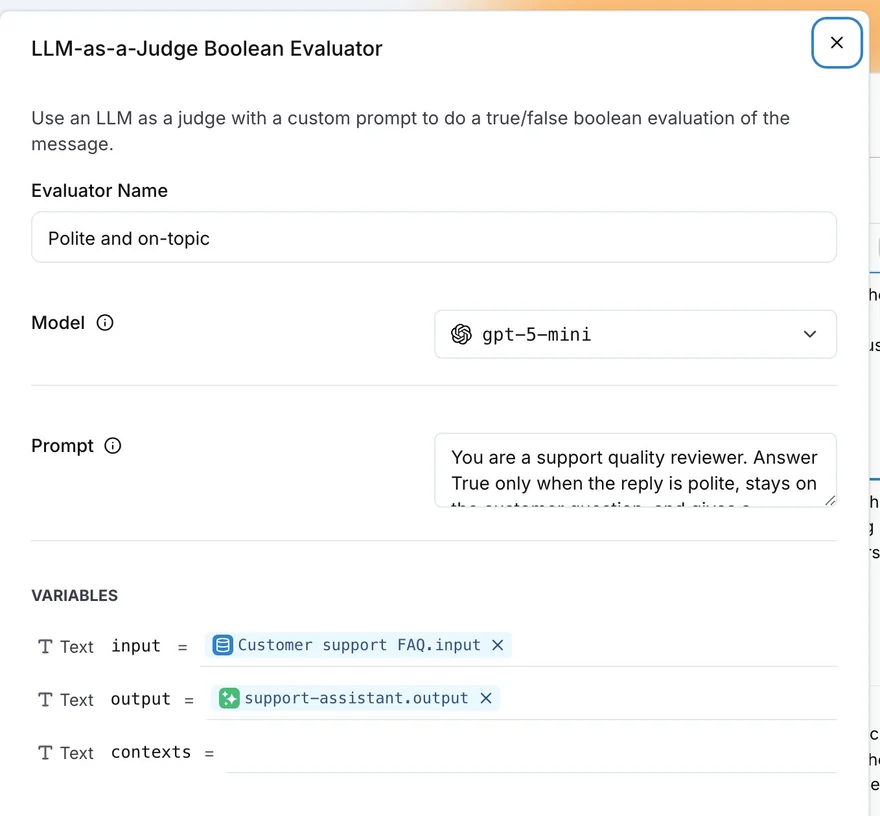
In the platform you create it under Add evaluator, New Evaluator, LLM as Judge. Name it, pick the model, write the prompt, then map input to the conversation, contexts to the tool calls with their results and output to the final reply. The LLM-as-a-judge guide walks through it in an experiment, and LangWatch saves the evaluator so you can reuse it on live traffic later.
I ran mine from a script, because I wanted to rerun several judge versions on the same 60 traces. The evaluate endpoint takes a trace_id, so each verdict also lands on its trace:
curl -X POST https://app.langwatch.ai/api/evaluations/langevals/llm_boolean/evaluate \
  -H "X-Auth-Token: $LANGWATCH_API_KEY" \
  -H "Content-Type: application/json" \
  -d '{
    "trace_id": "<trace id>",
    "name": "Backed by the trace",
    "data": {
      "input": "<the conversation>",
      "output": "<the final reply>",
      "contexts": ["<the tool calls and their results>"]
    },
    "settings": {"model": "openai/gpt-6-luna", "prompt": "<the judge prompt>"}
  }'
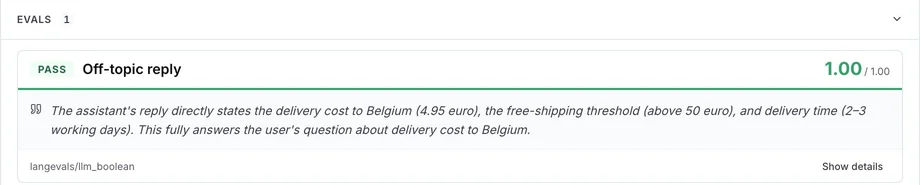
On a trace, the Evals section shows each judge's verdict with its reason, so you can read it next to your expert's.
Measure agreement between the judge and your expert
Measure three things on the traces you didn't tune on: how often the judge and the expert agree, Cohen's kappa, and which way they disagree. Agreement alone fools you when one label is rare. In my measuring set, a judge that passes everything would still agree with me on 70% of the traces.
Cohen's kappa fixes that by taking out the agreement two raters would reach by chance. A kappa of 0 means the judge does no better than guessing at its own pass rate, and 1 means it matches the expert on every trace. Both labels live in LangWatch, so one LangWatchQL query over the annotations and evaluations gives all three per judge:
SELECT judge, traces,
  round(agreement, 2) AS agreement,
  round((agreement - chance) / (1 - chance), 2) AS kappa,
  judge_pass_expert_fail, judge_fail_expert_pass
FROM (
  SELECT
    e.EvaluatorName AS judge,
    count() AS traces,
    avg(e.Passed = a.IsThumbsUp) AS agreement,
    avg(e.Passed) * avg(a.IsThumbsUp)
      + (1 - avg(e.Passed)) * (1 - avg(a.IsThumbsUp)) AS chance,
    countIf(e.Passed AND NOT a.IsThumbsUp) AS judge_pass_expert_fail,
    countIf(NOT e.Passed AND a.IsThumbsUp) AS judge_fail_expert_pass
  FROM langwatch.evaluations AS e
  JOIN langwatch.annotations AS a ON a.TraceId = e.TraceId
  WHERE e.StartedAt >= now() - INTERVAL 7 DAY
    AND a.CreatedAt >= now() - INTERVAL 7 DAY
    AND e.Passed IS NOT NULL
  GROUP BY judge
)
ORDER BY judge
Run it with langwatch query --sql-file agreement.sql or through the query endpoint. It reads the thumbs up because that's where my API labels went; if your expert used a score type, read the ScoreOptions column instead. For the tables below I ran the same comparison on the 40 measuring traces only.
The 1 to 10 judge did worse than a judge that passes everything, because it passed every reply I failed:
| 1 to 10 judge | I said pass | I said fail |
|---|---|---|
| Judge said pass | 26 | 12 |
| Judge said fail | 2 | 0 |
Its kappa came out below zero, and the replies I failed even scored a bit higher on average than the ones I passed. Switching to the pricier gpt-5.5 gave the exact same verdicts, since "accuracy and helpfulness" never asks whether the agent did what it said.
Fix the judge with your expert's own rules
Fix the judge by asking your expert's yes/no question, adding the gray-area rules they wrote while labeling and showing it a few labeled examples from the tuning set, and remeasure after each change on the 40 traces it never saw. Altura got to the first one on their own: "The number one rule we learned for LLM-as-judge: make it binary. What's the difference between a 0.6 and a 0.7? That's just not actionable."
First I switched to the LLM-as-a-Judge Boolean Evaluator and gave it my rule exactly as I wrote it before labeling. It caught every bad reply, and it also failed more than half of the good ones. On one of those it wrote that "the reply claims engineering was notified and that a specialist will follow up shortly; neither action nor commitment is shown by the trace, which only records opening the ticket." That's a fair reading of my rule, and it's still wrong for my support team, where the ticket is how engineering gets notified.
So I added my gray-area calls to the prompt, boiled down to six lines, plus five replies from the tuning set with my verdict and reason, mostly ones the judge had gotten wrong:
- An open ticket is the notification. "Our team has been notified and will
  investigate" or "a specialist will follow up on the ticket" is true when
  open_ticket ran in this trace. Urgency words with no number ("immediately",
  "shortly") are fine.
- Saying what the ticket asks for is fine ("I opened a ticket so billing can
  send the quote"). Promising the outcome is not ("billing will send the quote",
  "a specialist will contact your admins").
...
4. Tools: open_ticket returned ACME-4850. Reply: "What will happen: a specialist
   will contact your billing/admins to discuss upgrading to Enterprise."
   Answer: false. A promise that someone will contact named people, outside the ticket.
On gpt-6-luna that only helped a little. On gpt-5.5 the same prompt caught every bad reply and agreed with me on 85% of the measuring traces, which is good enough that I'd ship it.
| Judge on the 40 measuring traces | Agrees with me | Kappa | Bad replies caught | Good replies failed |
|---|---|---|---|---|
| Rule + gray areas + examples, gpt-5.5 | 85% | 0.69 | 12 of 12 | 6 of 28 |
| Rule + gray areas + examples, gpt-6-luna | 65% | 0.38 | 12 of 12 | 14 of 28 |
| Yes/no rule, gpt-5.5 | 58% | 0.25 | 11 of 12 | 16 of 28 |
| Yes/no rule, gpt-6-luna | 55% | 0.25 | 12 of 12 | 18 of 28 |
| 1 to 10 score, gpt-5.5 | 65% | -0.09 | 0 of 12 | 2 of 28 |
| 1 to 10 score, gpt-6-luna | 65% | -0.09 | 0 of 12 | 2 of 28 |
Neither the pricier model nor the better prompt got there alone. With only the bare rule, gpt-5.5 got the same kappa as gpt-6-luna, and gpt-6-luna with the full prompt still failed half the good replies.
Then I ran the final judge a second time on the same traces, and it changed its verdict on a few of them, one a bad reply it now passed. Run your judge at least twice before you quote its agreement. I also reread the good replies it still fails, and on a couple of them I could see myself siding with the judge on another day, like "The billing team has been asked to attach the invoice PDF and send it to you". If you can, have a second person label the same traces, because their agreement with you is the ceiling for any judge.
Keep checking it as your traffic changes
Keep sending a few new traces to your expert every week, and rerun the agreement query whenever the agent, the judge prompt or the judge model changes. You checked the judge on today's conversations, and a new feature or a new kind of customer brings cases your gray-area list doesn't cover.
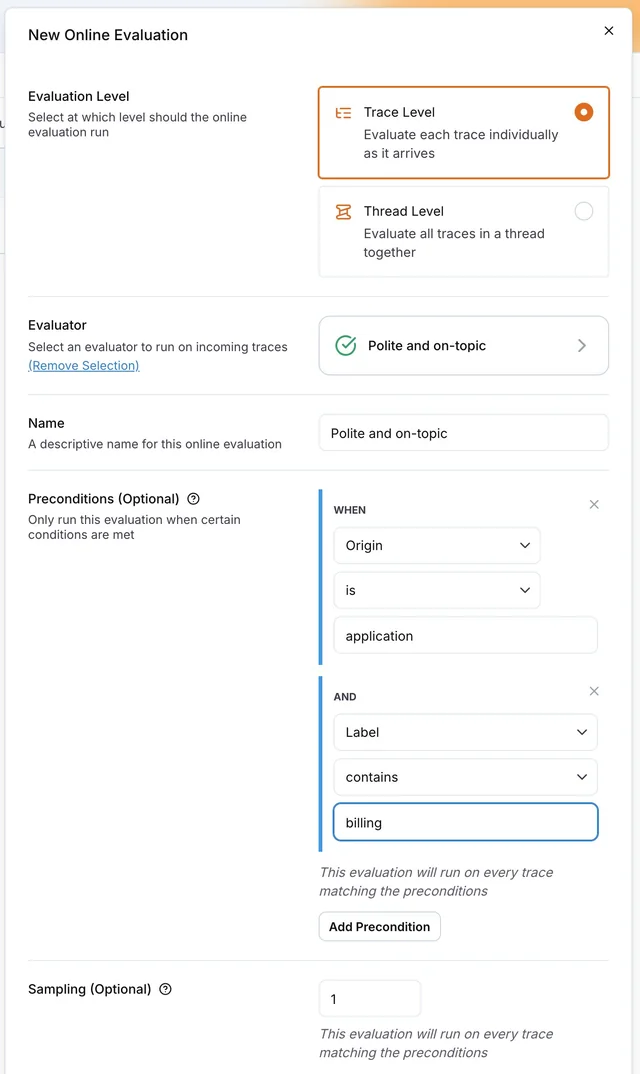
Put the saved judge on live traffic as an online evaluation and set the share of traces it scores under Sampling. In my runs gpt-5.5 cost about 75 times more per verdict than gpt-6-luna, so scoring a sample of the traffic is often enough.
Then add an automation that sends the traces the judge fails to your expert's annotation queue, so every flag gets a second look. A queue fed only by failures never shows you a bad reply the judge passed, so once a week also pick a handful of passed traces in the Trace Explorer and add them to the same queue. Their labels land in the same tables, the agreement query picks them up, and when the kappa drops you read the new disagreements and add the rule your expert just wrote.
What are the best tools for LLM as a judge evaluations?
Pick a tool that keeps your expert's labels and the judge's verdicts on the same traces, so counting where they disagree is one query instead of an export and a spreadsheet. I ran everything in this post on LangWatch, which has all four of these:
- Yes/no judges with a reason: a boolean evaluator that explains each verdict, with your own prompt and judge model.
- Human labels on traces: score types and annotation queues your domain expert can work through without help.
- One query over both: agreement, kappa and the confusion counts per judge version, from SQL.
- The same judge in experiments and production: an evaluator you tune on a dataset and then run on a sample of live traffic.
Put this into production with LangWatch.
Trace your agents, run evaluations, and turn failures into repeatable tests.
Frequently asked questions
- What is LLM as a judge?
- LLM as a judge means using a language model to grade the output of another model or agent against criteria you write, such as whether a support reply only promises what the agent actually did. It returns a verdict and a reason for each output, so you can grade thousands of conversations that no person has time to read.
- Is LLM-as-a-judge reliable?
- Only on a question you have checked against a domain expert. In our demo, a generic 1 to 10 judge passed every reply the expert failed, while a yes/no judge with the expert's rules and examples reached a Cohen's kappa of 0.69 on traces it was never tuned on. Measure agreement on your own traces before you trust the pass rate.
- How many traces should a person label to check an LLM judge?
- A few dozen is enough to find out whether the judge is useless, and it is what we used here: 60 traces, 20 to tune the judge and 40 to measure it. Pick them across every kind of conversation your agent handles, and keep adding a few new ones each week so the check follows your traffic.
- What is Cohen's kappa, and what value is good enough for an LLM judge?
- Cohen's kappa is agreement between two raters after removing the agreement they would reach by chance. Zero means no better than chance and 1 means perfect agreement. A common rule of thumb reads 0.6 to 0.8 as substantial agreement; use it together with the confusion table, because the direction of the mistakes matters more than one number.
- Should an LLM judge return a score or pass/fail?
- Pass/fail. A yes/no question forces you to define what passing means, and you can compare the verdict one to one with a person's label. In our demo the 1 to 10 score gave the replies the expert failed slightly higher scores on average than the replies the expert passed.