
LLM audit trail: who can read your agents' conversations
How to answer your security team when they ask who can read your agents' conversations, one settings page at a time.
 Rogerio Chaves · · Governance AI
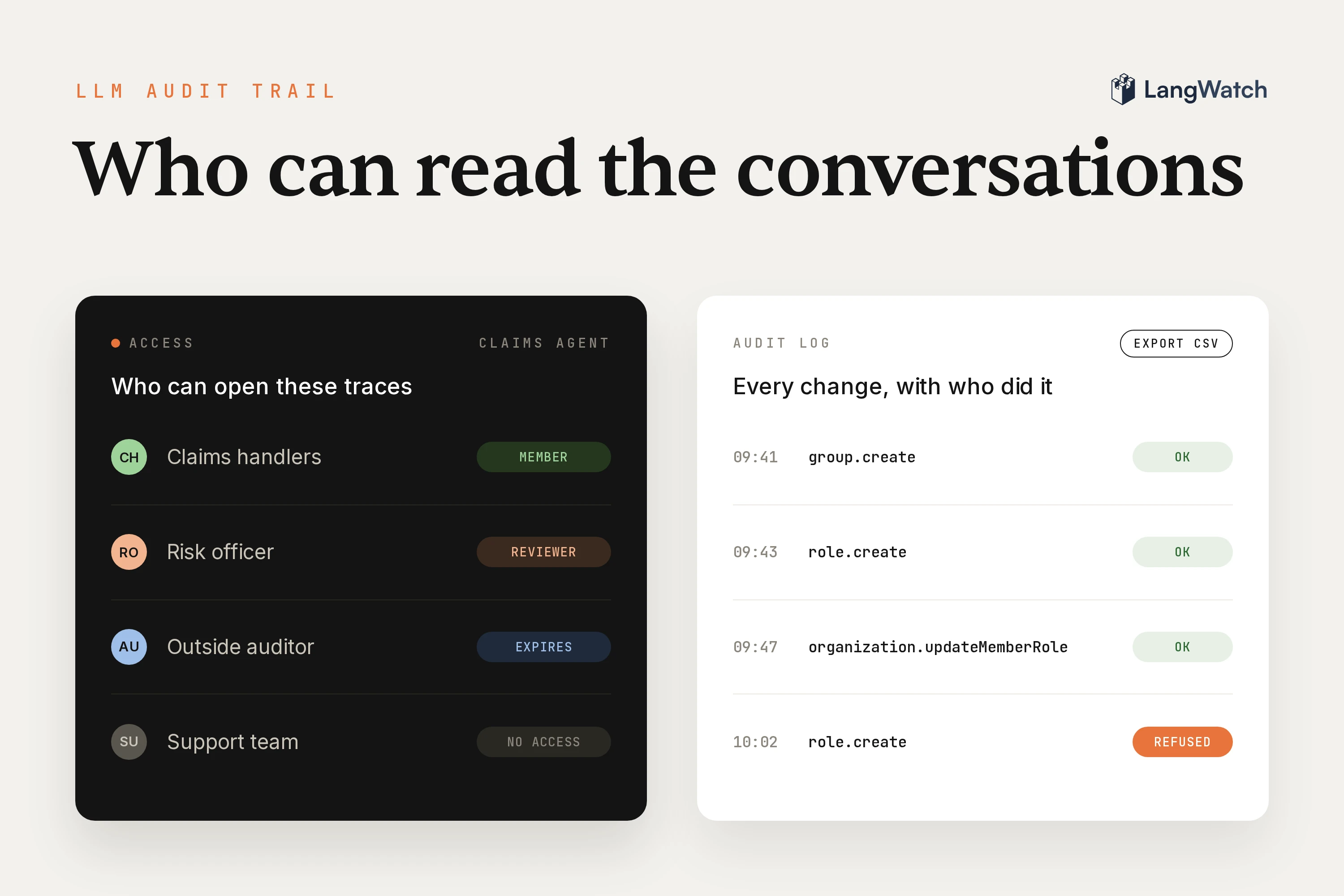
Your agents run in production, answering customers, handling claims or helping your own staff, and every conversation they have ends up stored as a trace. Then the security or data protection team sends a questionnaire a few days before a review, and it asks: who can read the conversations our agents have, what do we keep, for how long, and can we prove it? They're fair questions, because those conversations hold whatever your customers typed into the chat.
Each one has its own page in LangWatch. You can give access with roles and groups, mask or drop content in the data privacy policy, and set how long traces stay in retention. The audit log records every change to that access, ready to export.
Who can read the conversations your agents have
Anyone with a role on the project that holds the traces. When you give someone a role on a team, they get it on every project in that team, so you give each agent its own project on the team that owns it, and hand out access per team through your identity provider's groups.
Give each team its own projects
In LangWatch, an organization holds teams and a team holds projects. Your agent sends its traces to one project, so the support agent's conversations sit in a project on the Support team, and the claims agent's sit on the Claims team.
Each person gets one of three roles per team:
- Viewer reads the traces, evaluations and datasets.
- Member also builds evaluations, datasets and prompts, and sees costs.
- Admin also manages the team and its people.
A role on a single project adds access to that project and never takes away what the team role gives. You can also put people on two smaller seats: a Lite Member reads and annotates but can't change anything else or see costs, and a Developer only works in their own personal project. The access control docs list every permission.
Hand out access through your identity provider
With single sign-on (SSO), people sign in through your identity provider over SAML or OpenID Connect, at Settings > Authentication. Turn on SCIM (System for Cross-domain Identity Management) provisioning on the same page and your provider also pushes its groups into LangWatch.
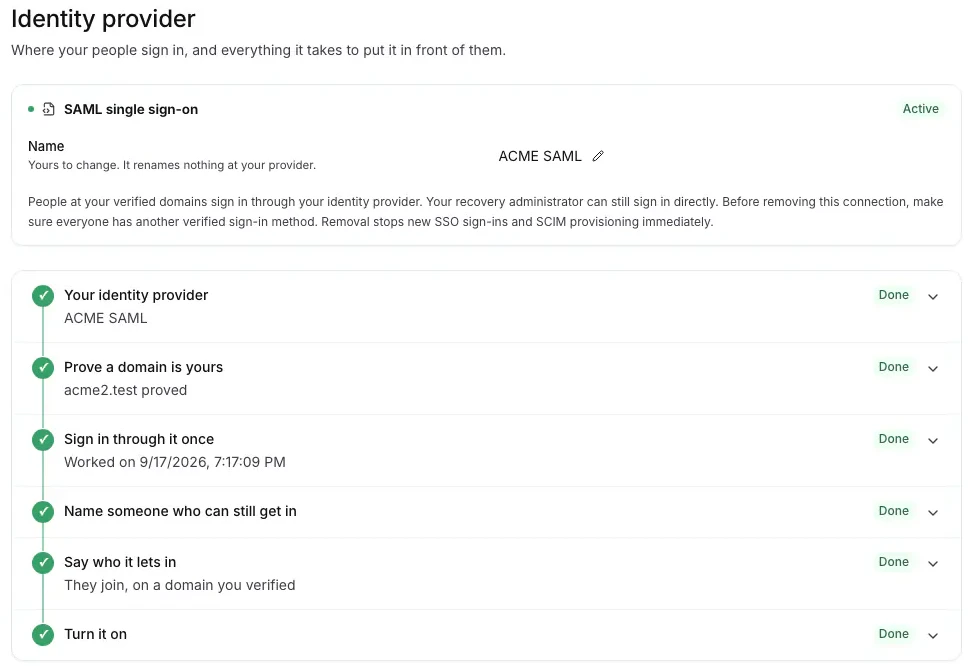
Then bind a role to each group, for example Member on the Claims team. Whoever your provider puts in the group gets that access, and whoever it takes out loses it. When someone leaves the company and your provider deprovisions them, LangWatch revokes their browser sessions and command-line tokens and removes their roles, and keeps the data they worked on.
Make a role for the people who only review
Sometimes the built-in roles don't fit. A risk officer needs to read conversations and see costs, which Viewer doesn't show, without everything else Member can do, and an outside auditor needs access for two weeks only. At Settings > Roles & Permissions you can make a custom role with exactly the actions you tick:
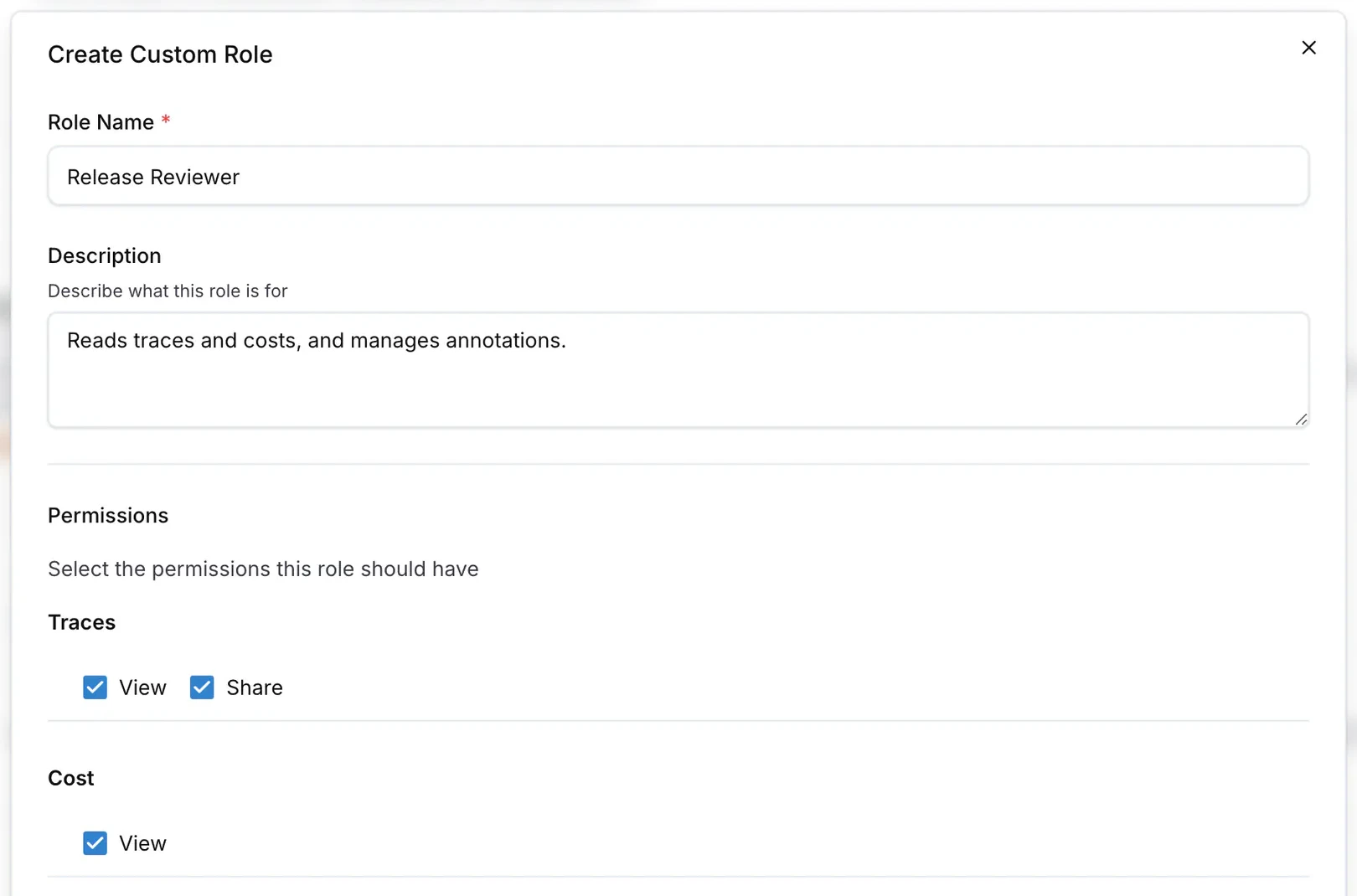
For the risk officer, tick View on traces and costs and leave Share off. Share creates a public link to a trace, and no other permission includes it, so it never comes along by accident. Then you can give the role to the risk team's group.
For the auditor, create the grant through the grants API with an expiresAt date, and the access stops on that day. You can't hand out more than you hold yourself, so a team admin can't use a custom role to raise their own access.
Send the list of who can read what
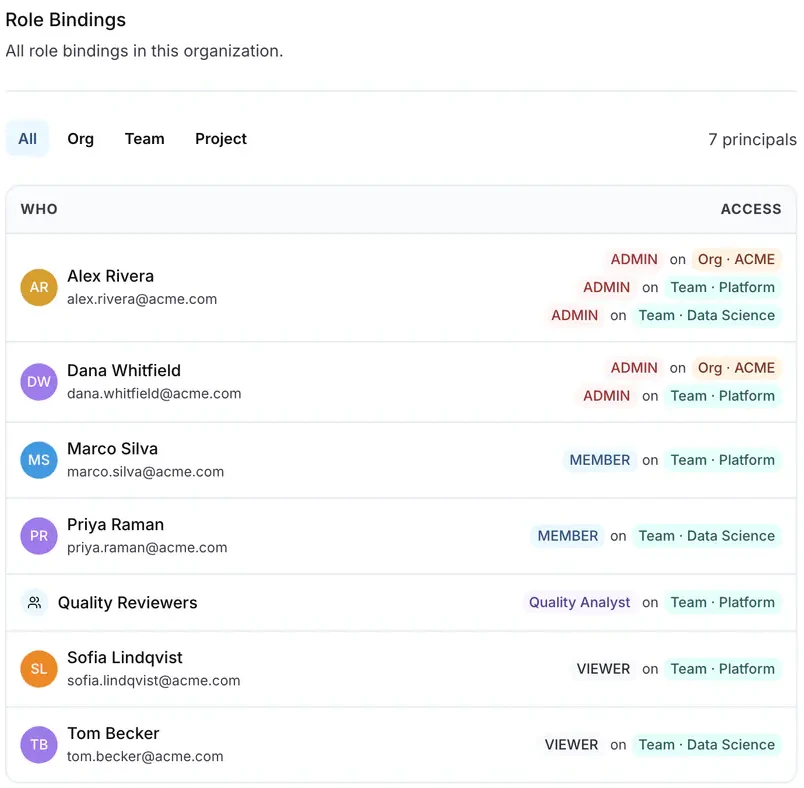
Settings > Roles > Role assignments lists every person and group with their role on each team or project, across the whole organization. That list answers the first question on the questionnaire:
What you keep, and what you never store
Whatever you let through in the data privacy policy. For input, output, system instructions and tool calls, you pick whether LangWatch stores them for everyone on the project, stores them for a smaller audience, or never stores them, and personal data gets masked before anything is saved.
Restrict or drop content per team
Open Settings > Data Privacy and add a rule for the organization, a team or a project. Each of the four kinds of content gets one of three choices:
- Captured stores it and shows it to everyone with access to the project.
- Restricted stores it and shows it only to the audience you pick, such as Admins or a group. Everyone else sees a placeholder that says who can read it.
- Dropped removes it as the trace arrives. It is never stored, and the trace keeps the tokens, cost, model and latency of every call.
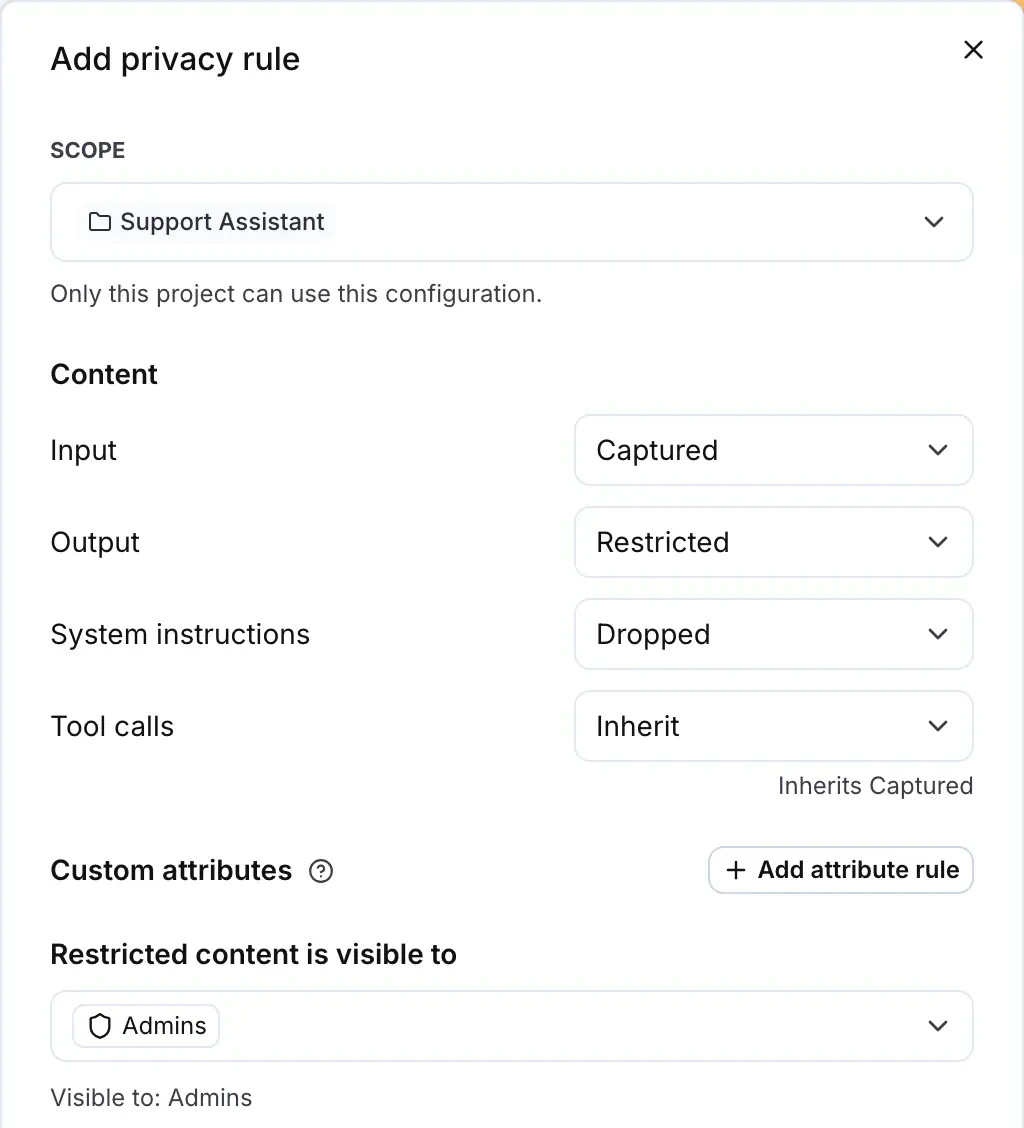
LangWatch checks Restricted every time someone opens a trace, so it also covers the conversations you stored before the rule. Dropped works on new traces, from the moment you save.
If you put the rule on the organization, every team inherits it, including teams you add later. A team or project rule only overrides the controls it sets, so the Claims team can restrict its tool calls and follow the organization on everything else. The data privacy docs show the order rules apply in.
Mask personal data before it's stored
PII (personally identifiable information) redaction replaces personal data with a typed marker as the trace arrives. An email address the customer typed into the chat is stored as [EMAIL_ADDRESS], so the real one never reaches the database.
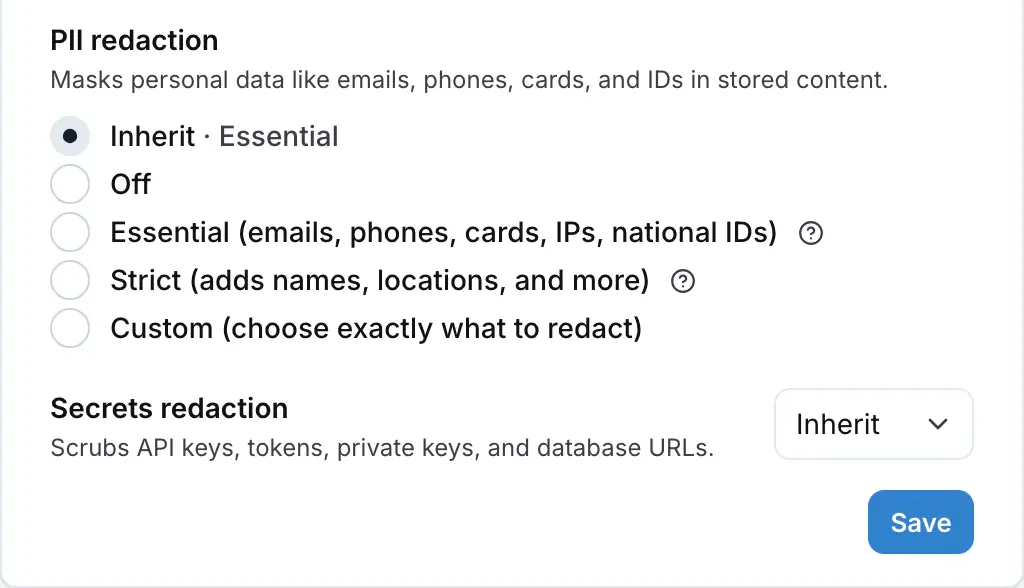
Essential is on by default and covers emails, phone numbers, card numbers, IP addresses and national ids. Strict adds names and locations, and Custom takes exactly the types you tick. Secrets redaction is on too: API keys, tokens and database URLs become [SECRET]. The PII redaction post goes deeper on what to mask and what to keep for debugging.
How long you keep agent conversations
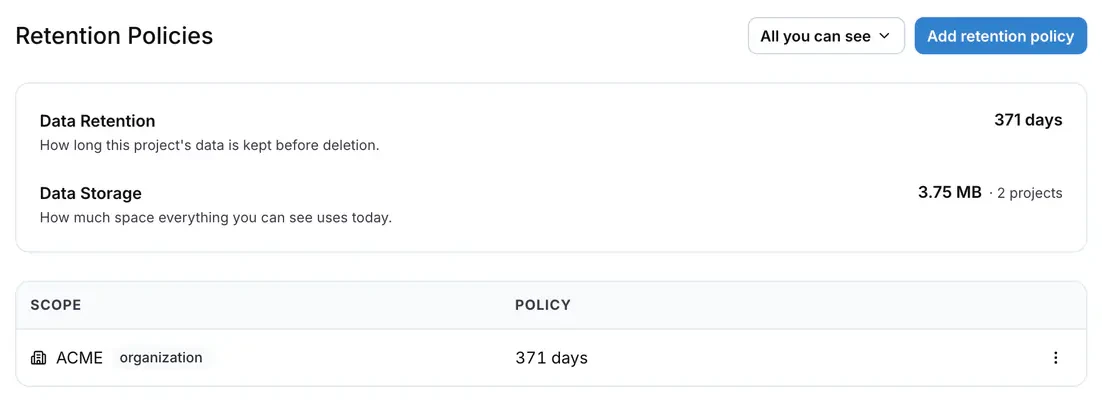
For as long as you choose per team. You can set a period per organization, team or project, for traces, scenario runs and experiment runs, and LangWatch deletes each trace once its period ends. Out of the box that's 49 days.
Open Settings > Data Retention and click Add retention policy. Pick one or more scopes and a period, and decide whether the change applies to the traces you already have too:
If your agent is a high-risk AI system under the EU AI Act, the Act asks for logs and says how long to keep them. Article 12 covers the logging itself: high-risk systems "shall technically allow for the automatic recording of events (logs) over the lifetime of the system".
Then Article 19 for providers and Article 26 for deployers say to keep those logs "for a period appropriate to the intended purpose of the high-risk AI system, of at least six months, unless provided otherwise in applicable Union or national law, in particular in Union law on the protection of personal data."
So for a team in that spot, pick a period of at least six months, such as the 1 year preset, and keep the others shorter. Whether your agent is high-risk is a call for your legal team, and our EU AI Act post walks through who is affected.
Deletion is permanent. Shortening a period leaves the traces you already have on their old period, unless you apply the change to existing data, and lengthening one never brings back what was deleted.
How do I keep an audit trail of LLM decisions for compliance?
Keep two records. The traces are the record of what your agent did: every input, output and tool call, with the model and the end user. The audit log is the record of who changed access to them, with the person, the time and the IP address.
To make the first record useful in a review, send the end user's id and the conversation's thread id with every trace. Then you can pull up every conversation of one customer when they ask what you kept about them.
The audit log is at Settings > Audit Log. It writes one row for every change to members, invites, roles, role assignments, groups, API keys, retention policies and SSO connections, including the attempts LangWatch refused, and it never deletes a row:
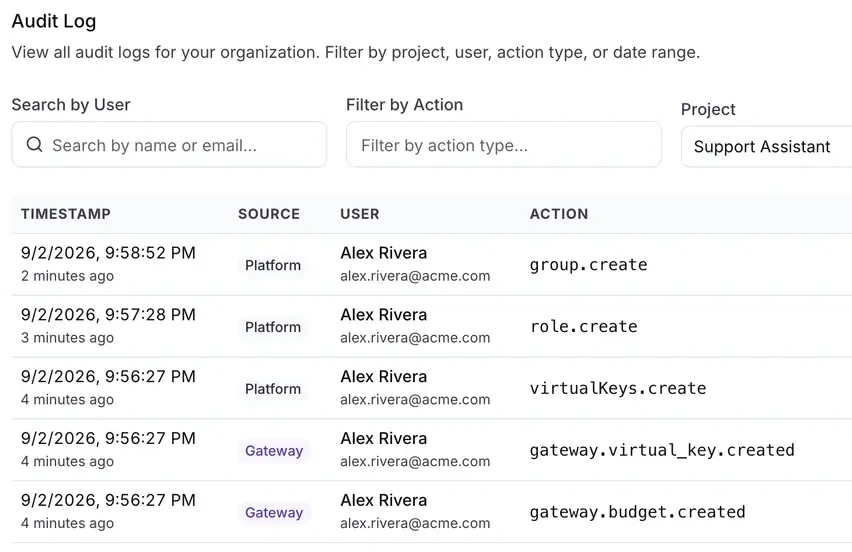
Filter by person, action, project and dates. Then click Export CSV. Every filter is in the page address, so you can send your security team the exact view. Put it next to the role assignments list and you can show who could read the conversations on any given day.
If your security team watches everything in a SIEM (security information and event management) tool, LangWatch also exports the audit log and one event per trace in the OCSF (Open Cybersecurity Schema Framework) format, without the prompt or response text.
What to send back to your security team
| Question | Where it's answered | What to attach |
|---|---|---|
| Who can read the conversations? | Settings > Roles > Role assignments | The list, plus the identity provider groups behind it |
| What do we keep? | Settings > Data Privacy | The rules per team, and the PII redaction level |
| For how long? | Settings > Data Retention | The period per team |
| Can we prove it? | Settings > Audit Log | A CSV export for the review period |
If they also ask where the conversations live, you can run LangWatch in your own cluster, or keep the traces in your own ClickHouse and S3 with the hybrid setup. The self-hosting post covers what runs where.
Put this into production with LangWatch.
Trace your agents, run evaluations, and turn failures into repeatable tests.
Frequently asked questions
- What should an LLM audit trail record?
- Two things. First, every run of your agent: the input, the output, the tool calls, the model, the cost and which end user it served, stored as a trace. Second, who can read those traces and every change to that access: role changes, new members, new API keys, retention changes. LangWatch keeps the first as traces in each project and the second in the audit log.
- How long does the EU AI Act say to keep LLM logs?
- For high-risk AI systems, Article 19(1) for providers and Article 26(6) for deployers say to keep the automatically generated logs for a period appropriate to the intended purpose, of at least six months, unless other Union or national law says otherwise, in particular data protection law. Check with your legal team whether your agent is a high-risk system, then set that period per team in Settings > Data Retention.
- What tools help with EU AI Act compliance for LLM applications?
- For the logging part, a tracing tool that stores every agent run, controls who can read it, keeps it as long as you set and records every change to that setup. LangWatch does that with traces, roles, a data privacy policy, retention per team and an audit log. The rest of the Act, such as risk management and human oversight, is your own process. Our EU AI Act post walks through who is affected.
- Can I keep an audit trail without storing personal data?
- Yes. PII redaction replaces emails, phone numbers, card numbers and other personal data with markers like [EMAIL_ADDRESS] before the trace is stored. If you can't keep the text at all, set the content to Dropped: LangWatch never stores it and keeps the tokens, cost, model and latency of every call, so the record of what the agent did stays.
- Which of these features need an Enterprise plan?
- Teams and the built-in Admin, Member and Viewer roles work on every plan, and paid plans set retention up to three months. Single sign-on, SCIM, groups, custom roles, the audit log, OCSF export and retention of a year or more come with the Enterprise plan, on LangWatch Cloud or self-hosted with an Enterprise license.