
The best prompt management tools in 2026
Prompt management tools keep your prompts versioned, tested and tied to the traces they produce. Here's how LangWatch, PromptLayer, Langfuse, LangSmith and Braintrust compare in 2026, with one real prompt change run end to end.
 Rogerio Chaves · · LLM Evals
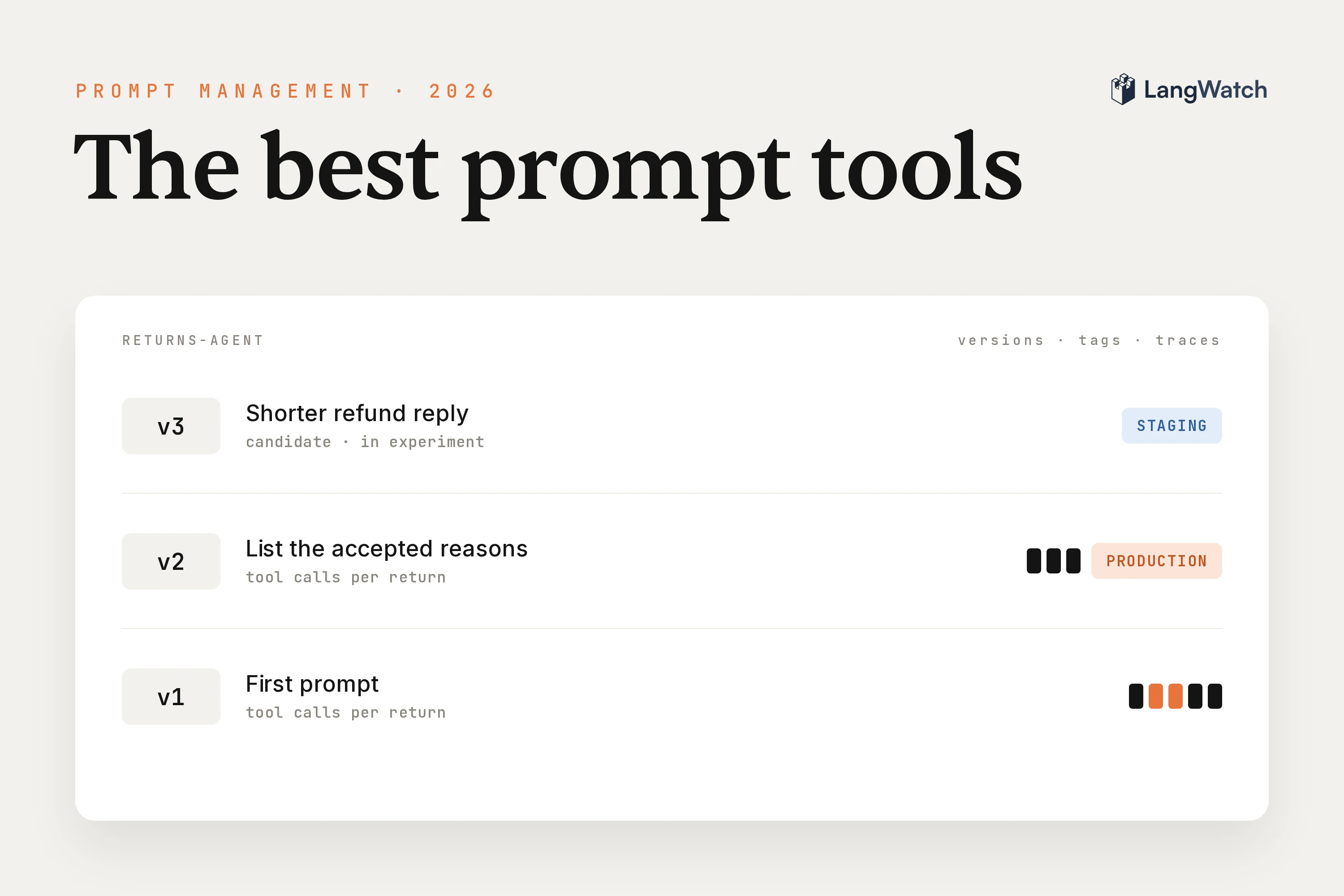
Prompt management tools keep the prompts your large language model (LLM) app or agent runs in one versioned place, so you can change a prompt, test it and know which version is live without a code deploy. If your prompts still live as strings in your code, and a one-line edit already broke something you only found in production, this is a good moment to move them.
Short answer: The best prompt management tools in 2026 are LangWatch, PromptLayer, Langfuse, LangSmith and Braintrust. All five version prompts and point environments at a version. Choose on three things: Git sync, testing a change before release, and whether every trace records the prompt version behind it.
Our returns agent, from the agent evaluation guide, failed a tool call two or three times per return on its first prompt, because the prompt never listed the return reasons the tool accepts. Version 2 of the prompt listed them, and the failed calls dropped to zero without a code deploy.
The best prompt management tools at a glance (2026)
The five tools below all keep prompt versions and point environments at one. They differ on how prompts reach Git, how you test a change before release, whether each trace records the prompt version, and where you can run them.
| Tool | Versions and environments | Prompts in Git | Test before release | Prompt version on traces | Hosting |
|---|---|---|---|---|---|
| LangWatch | Every save is a version; latest, production, staging and custom tags | Prompts command-line interface (CLI) keeps prompt files in your repo and syncs both ways | Experiments on datasets, from the platform or continuous integration (CI), plus agent tests against a prompt | Each trace records the prompt version it fetched, queryable in LangWatchQL | Cloud; free self-host from the same image as the cloud; hybrid; single sign-on and audit logs with an Enterprise license |
| PromptLayer | Release labels such as prod and staging; A/B Releases by percentage or user segment | Webhooks you connect to your own handler, both ways | Evaluations and backtests on past requests, with a CI command that fails below your score | Request logs linked to the prompt template | Cloud; self-hosting on Enterprise |
| Langfuse | Versions and labels such as production and staging | Langfuse to GitHub through a dispatch event or your own webhook server | Prompt experiments on datasets, and experiments in CI | Prompt linked to each generation, metrics per version | Cloud; MIT-licensed self-host with prompt management included |
| LangSmith | Commits with Staging and Production environments | Webhook to a server you build that commits to GitHub | Prompt over a dataset from the Playground; pytest plugin for CI | Traces in the same platform | Cloud; self-hosting as an Enterprise add-on |
| Braintrust | Every save is a version; environments on Pro and Enterprise | Define prompts in code and push them with the bt CLI | Experiments in the app; GitHub Action on every pull request | Prompt ID and version in each LLM span | Cloud; data plane in your cloud on Enterprise |
Competitor cells come from each vendor's own docs, checked on November 7, 2026.
What to look for in a prompt management tool
Look for five things: versions with tags, a way to test a change before release, Git sync, runtime fetch with a fallback, and the prompt version on every trace. For an agent in production I'd weigh the last one highest, since it shows what a change did live.
- Versions and tags. Every save becomes a numbered version with its author and message, and a tag like
productionpoints at the one that runs. Your code fetches the tag, so a release or a rollback is a tag move. - Testing before release. Run the candidate and the current version on the same dataset, with evaluators, and compare row by row. For agents, add tests with a simulated user, because what a prompt change breaks can show up several turns into a conversation.
- Git sync. Engineers want prompt changes in pull requests next to the code. Look for a command-line tool that keeps prompts as files in the repo and syncs them with the platform, so you don't build and run a webhook server for it.
- Runtime fetch with a fallback. The app fetches the prompt by tag at runtime, and a local copy keeps it working when the platform can't be reached or the network is closed.
- The prompt version on every trace. Each production trace should say which version produced it, so you can group cost, failures and evaluation results by version and see what a change did on real traffic.
What are the best prompt management tools?
LangWatch, PromptLayer, Langfuse, LangSmith and Braintrust are the strongest picks in 2026. LangWatch ties each prompt version to tests and to every production trace, PromptLayer lets domain experts edit prompts without code, Langfuse is MIT open source, LangSmith fits LangChain teams, and Braintrust pairs prompts with evals.
LangWatch
LangWatch is an open-source platform for LLM evaluation, observability and agent testing, and its prompt management connects all three to the prompt version. You edit prompts in the Prompt Playground or as files in your repository, and every trace records the version that produced it.
Step 1: Create the prompt
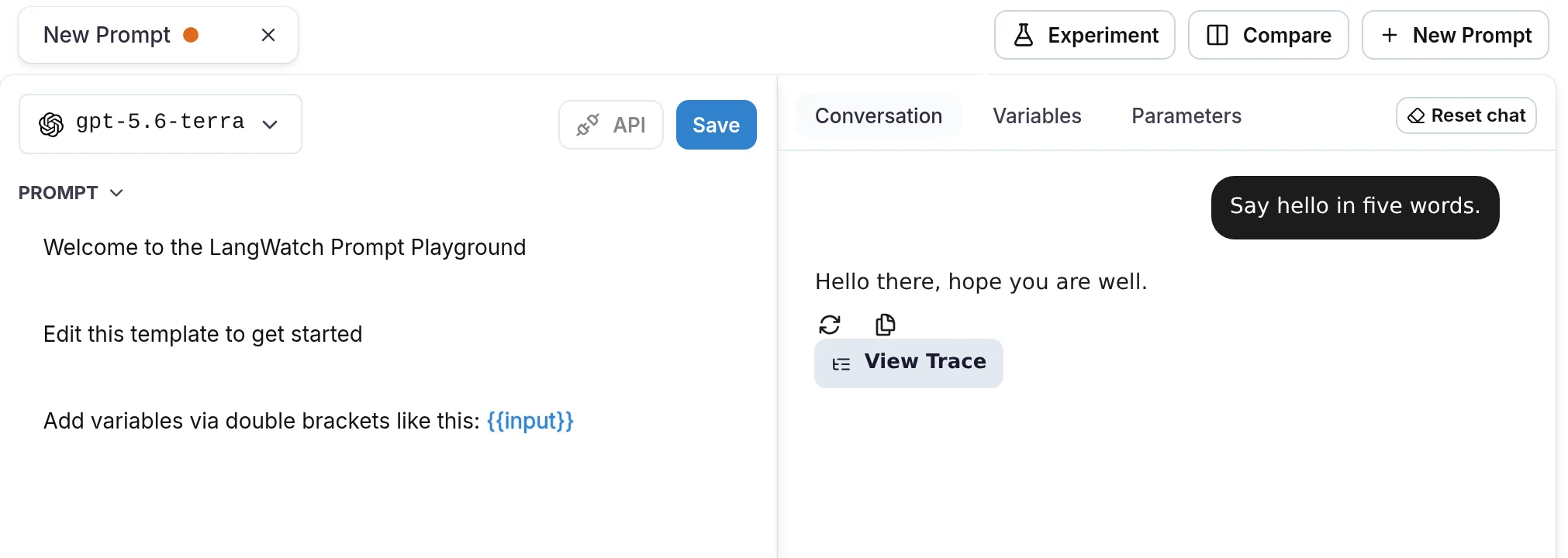
Click Prompt Management in the sidebar and then New Prompt. Pick the model, write the messages with {{variables}}, and chat with the prompt in the Conversation tab before you save. Every Save creates a new version, and API gives you the snippet to fetch the prompt from Python, TypeScript or REST.
Step 2: Keep the prompt in Git with the prompts CLI
The prompts CLI keeps prompts as YAML files, a plain-text config format, in your repository and syncs them with LangWatch both ways. Engineers review a prompt change in a pull request, and product people can still edit and test the same prompt in the Playground.
npm install -g langwatch
langwatch login
langwatch prompt init
langwatch prompt create returns-agent
init creates prompts.json, prompts-lock.json and a prompts/ folder, and adds prompts/.materialized to .gitignore. create writes prompts/returns-agent.prompt.yaml, and I put the returns agent's system prompt in it as version 1:
model: openai/gpt-5.5
messages:
  - role: system
    content: |
      You are the ACME support agent. Look up the order, check return
      eligibility, then create the return with a refund to the original
      payment method. Keep replies short.
  - role: user
    content: "{{message}}"
langwatch prompt sync
✓ Pushed returns-agent (version 1) from ./prompts/returns-agent.prompt.yaml
Commit the YAML file, prompts.json and prompts-lock.json like any other code. If the file and the platform both changed since the last sync, sync asks you which version to keep.
Step 3: Version the fix and tag it for production
Version 1 never told the agent which reasons check_return_eligibility accepts, so it tried reasons like arrived broken and damaged and failed two or three times per return before it found one that worked. I added three lines to the system prompt:
       payment method. Keep replies short.
+      check_return_eligibility only accepts one of these reasons:
+      defective, incorrect_item, not_as_expected, remorse.
+      Pick the closest one, never ask the customer to pick.
Another langwatch prompt sync pushed it as version 2. Then I assigned the production tag to version 2:
langwatch prompt tag assign returns-agent production --version 2
✓ Assigned tag 'production' to returns-agent@2 (versionId: promptversion_00029CmL3jrQfl4rjpbRr8fPuaRfc)
langwatch prompt versions returns-agent shows the history and where each tag points:
✔ Found 2 versions for "returns-agent"

Version  Tags                Message
───────  ──────────────────  ─────────────────────────────────────────────────
v2       latest, production  Synced from local file: returns-agent.prompt.yaml
v1                           Synced from local file: returns-agent.prompt.yaml
LangWatch moves latest to the newest version on every save, and you move production and staging yourself, from the CLI or with Deploy in the Playground. Rolling back is assigning production to the previous version again. Our prompt versioning guide goes deeper on tags, rollbacks and A/B tests.
Step 4: Fetch the prompt by tag at runtime
The agent asks for whatever production points at, so moving the tag changes what runs without a code deploy:
import langwatch
from openai import OpenAI

langwatch.setup()
client = OpenAI()

@langwatch.trace(name="returns-agent")
def handle(message: str):
    langwatch.get_current_trace().autotrack_openai_calls(client)
    prompt = langwatch.prompts.get("returns-agent", tag="production")
    messages = [dict(m) for m in prompt.compile(message=message).messages]
    model = prompt.model.split("/", 1)[1]  # "openai/gpt-5.5" -> "gpt-5.5"
    response = client.chat.completions.create(model=model, messages=messages, tools=TOOLS)
    ...
To pin a version instead, pass version_number=1 to the software development kit (SDK). For a build that has to run without network access, run langwatch prompt pull in your pipeline and ship the files it writes to prompts/.materialized with the app. The SDK reads a prompt from those files when they're there and calls the API only when they're missing.
Step 5: See the prompt version on every trace
Because prompts.get() runs inside a traced function, LangWatch links the prompt to the trace. Each trace's metadata carries prompt_ids: ["returns-agent:2"], and the span tree shows the prompt fetch and compile before the first model call. A run on version 1 looks like this:
└── span: returns-agent
    ├── span: PromptApiService.get
    ├── span: Prompt.compile
    ├── llm: llm (openai/gpt-5.5)
    ├── tool: lookup_order
    ├── llm: llm (openai/gpt-5.5)
    ├── tool: check_return_eligibility
    ├── llm: llm (openai/gpt-5.5)
    ├── tool: check_return_eligibility
    ├── llm: llm (openai/gpt-5.5)
    ├── tool: check_return_eligibility
    ├── llm: llm (openai/gpt-5.5)
    ├── tool: create_return
    └── llm: llm (openai/gpt-5.5)
And a run on version 2, which the agent fetched through the production tag:
└── span: returns-agent
    ├── span: PromptApiService.get
    ├── span: Prompt.compile
    ├── llm: llm (openai/gpt-5.5)
    ├── tool: lookup_order
    ├── llm: llm (openai/gpt-5.5)
    ├── tool: check_return_eligibility
    ├── llm: llm (openai/gpt-5.5)
    ├── tool: create_return
    └── llm: llm (openai/gpt-5.5)
The Prompt.compile span stores the version number, so you can group runs by prompt version in LangWatchQL, which is SQL over your traces:
SELECT
  version AS prompt_version,
  count() AS runs,
  sum(failed) AS failed_tool_calls,
  round(avg(model_calls), 1) AS avg_model_calls
FROM (
  SELECT
    s.TraceId,
    anyIf(s.SpanAttributes['langwatch.prompt.version.number'], s.SpanName = 'Prompt.compile') AS version,
    countIf(s.SpanAttributes['langwatch.span.type'] = 'tool' AND s.StatusCode = 2) AS failed,
    countIf(s.SpanAttributes['langwatch.span.type'] = 'llm') AS model_calls
  FROM langwatch.spans AS s
  WHERE s.StartTime >= subtractDays(now(), 1)
  GROUP BY s.TraceId
)
WHERE version != ''
GROUP BY version
ORDER BY version
I ran it with langwatch query --sql-file q2.sql:
✔ 2 rows in 55ms

prompt_version  runs  failed_tool_calls  avg_model_calls
──────────────  ────  ─────────────────  ───────────────
1               4     10                 6.5
2               6     0                  4
The three lines in the prompt took out the retries. Every return on version 2 runs four model calls instead of six or seven, so each one costs less, and nothing in the agent's code changed.
Step 6: Test the change before you move the tag
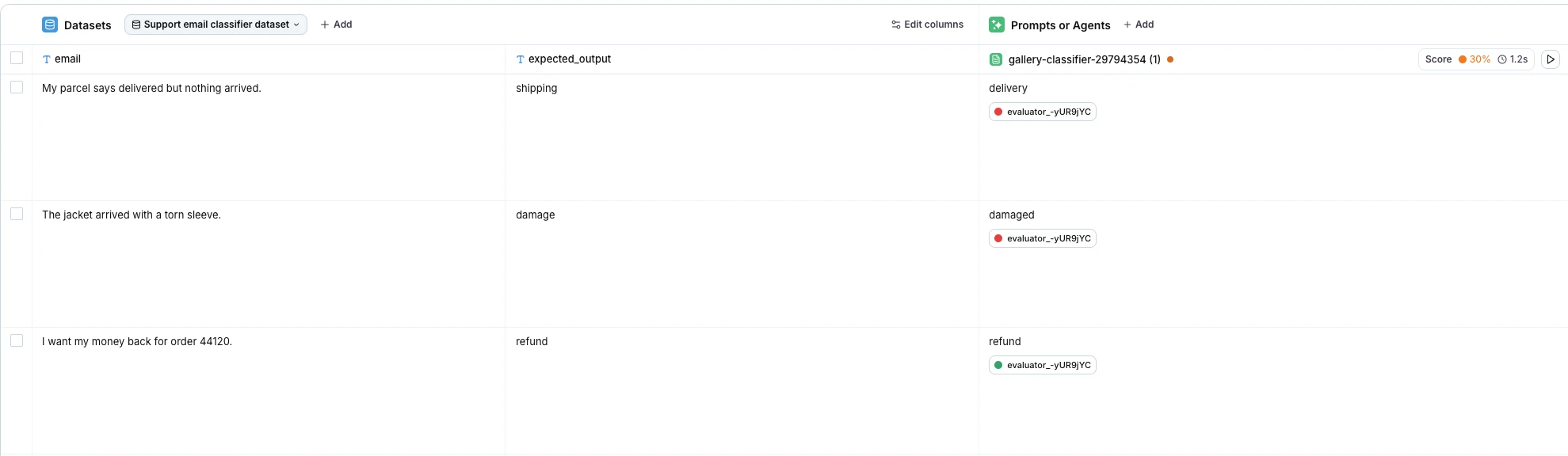
Before you move production on a real agent, run the candidate in an experiment. An experiment is a table where each row is a dataset entry and each column is a prompt, an agent or an evaluator. A prompt column runs a version from your prompt library, so you put the production version in one column and the candidate in the next, attach evaluators, and read the pass rate in each column header.
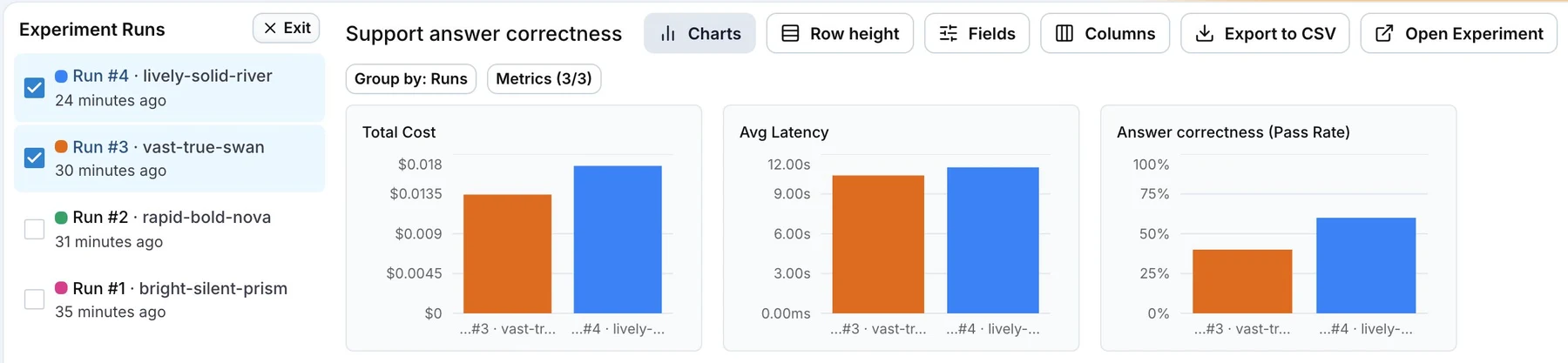
Under Results, tick two runs to compare them. You get one chart per metric, cost, latency and each evaluator's pass rate, and both outputs per row, so you can check that the change fixed the failing rows without breaking the ones that passed. The same experiment can gate a deployment from your CI pipeline.
For an agent, run agent tests against the prompt too. In the run dialog, Run against a prompt swaps the agent for Prompt to be tested, and a simulated user holds a whole conversation with it, since what a prompt change breaks can show up several turns in. How to test AI agents walks through writing those scenarios.
PromptLayer
PromptLayer is a prompt registry where domain experts edit prompts without touching your codebase. Release labels like prod and staging point at versions, and A/B Releases split live traffic between versions by percentage or by user segment, right from the platform. Its evaluations can backtest a new version on historical requests before it goes out.
Langfuse
Langfuse is open source under the MIT license, and prompt management is part of the core you can self-host for free. Prompts get versions and labels, and the SDK caches each prompt on the client, refreshes it in the background and takes a fallback prompt for when the fetch fails. Prompt experiments run your versions over a dataset in the Langfuse app.
LangSmith
LangSmith is the platform from the LangChain team. Each prompt change is a commit, and you move the Staging and Production environments between commits, with a rollback history. The SDK caches prompts in memory and has an offline mode, and the Playground runs a prompt over a dataset with evaluators, which makes it a natural pick if your app is built on LangChain.
Braintrust
Braintrust treats every save as a version and lets you define prompts in code, then push them with its bt CLI. Each LLM span records the prompt's ID and version, so you can see which version answered. The SDK caches prompts in memory and on disk and serves the last copy on a short outage, and its GitHub Action runs your evals on every pull request.
Other tools
You can also version prompts in Vellum, inside its low-code workflow builder, and in Portkey, next to its AI gateway. Humanloop shut down its platform on September 8, 2025, when its team joined Anthropic.
Which prompt management tool fits your team
Pick by who edits your prompts and what you need to know after a change ships. For agents in production I'd judge on the prompt version in every trace and a test before every release, because those two tell you what a change did before and after it ships.
- Engineers who review every change in a pull request: LangWatch's prompts CLI keeps prompts as files and syncs both ways, and Braintrust pushes prompts from code.
- Product people and domain experts who write the prompts: PromptLayer is built around them, and in LangWatch they edit, test and save versions in the Prompt Playground while engineers keep the files in Git.
- Teams that want open source they can self-host for free: Langfuse and LangWatch, each with prompt management in the free self-host.
- Teams already on LangChain: LangSmith.
- AI platform teams running agents with tools: LangWatch, because each trace carries its prompt version, LangWatchQL compares versions on real traffic, and agent tests run against a prompt before the tag moves.
If your prompts are still strings in your code, start with the prompt you change often and fetch it by tag from day one. Your next fix to that prompt then ships with a single langwatch prompt tag assign.
Put this into production with LangWatch.
Trace your agents, run evaluations, and turn failures into repeatable tests.
Frequently asked questions
- What is a prompt management tool?
- A prompt management tool stores the prompts your LLM application runs outside your code, keeps a numbered version of every change and lets you point environments like production at one version. Your app fetches the prompt by tag at runtime, so you can ship or roll back a prompt without a code deploy. Good tools also test a change before release and record on each trace which version produced it.
- Do I need a prompt management tool?
- You need one once more than one person edits prompts, or once you need to know which prompt is live and what it replaced. Prompts as strings in your code work for a prototype. When product people want to change wording without a deploy, or a prompt edit breaks something you only find in production, a tool with versions, tags and tests pays for itself quickly.
- Can I keep my prompts in Git and still use a prompt management tool?
- Yes. The LangWatch prompts CLI keeps each prompt as a YAML file in your repository, next to prompts.json and a lock file, and langwatch prompt sync pushes your changes as new versions and pulls the ones made on the platform. Engineers review prompt changes in pull requests, and product people keep editing and testing them in the Prompt Playground.
- What are the best open-source prompt management tools I can self-host?
- LangWatch and Langfuse are both open source and include prompt management in the free self-hosted version. Self-hosted LangWatch runs the same image as LangWatch Cloud, with versions, tags, the prompts CLI and experiments included, and an Enterprise license adds single sign-on, user provisioning and audit logs. Langfuse's core is MIT-licensed.
- How do I test a prompt change before it goes to production?
- Run the new version and the current production version on the same dataset, with evaluators that check the failures you care about, and compare the two runs row by row. Move the production tag only when the change fixes what you wanted without breaking rows that passed. For agents, also run agent tests with a simulated user against the new prompt.