
Chatbot testing: your support agent's worst answers sound friendly
How to find the questions your support agent answers with a confident guess or a polite no, before launch and after.
 Rogerio Chaves · · Agents
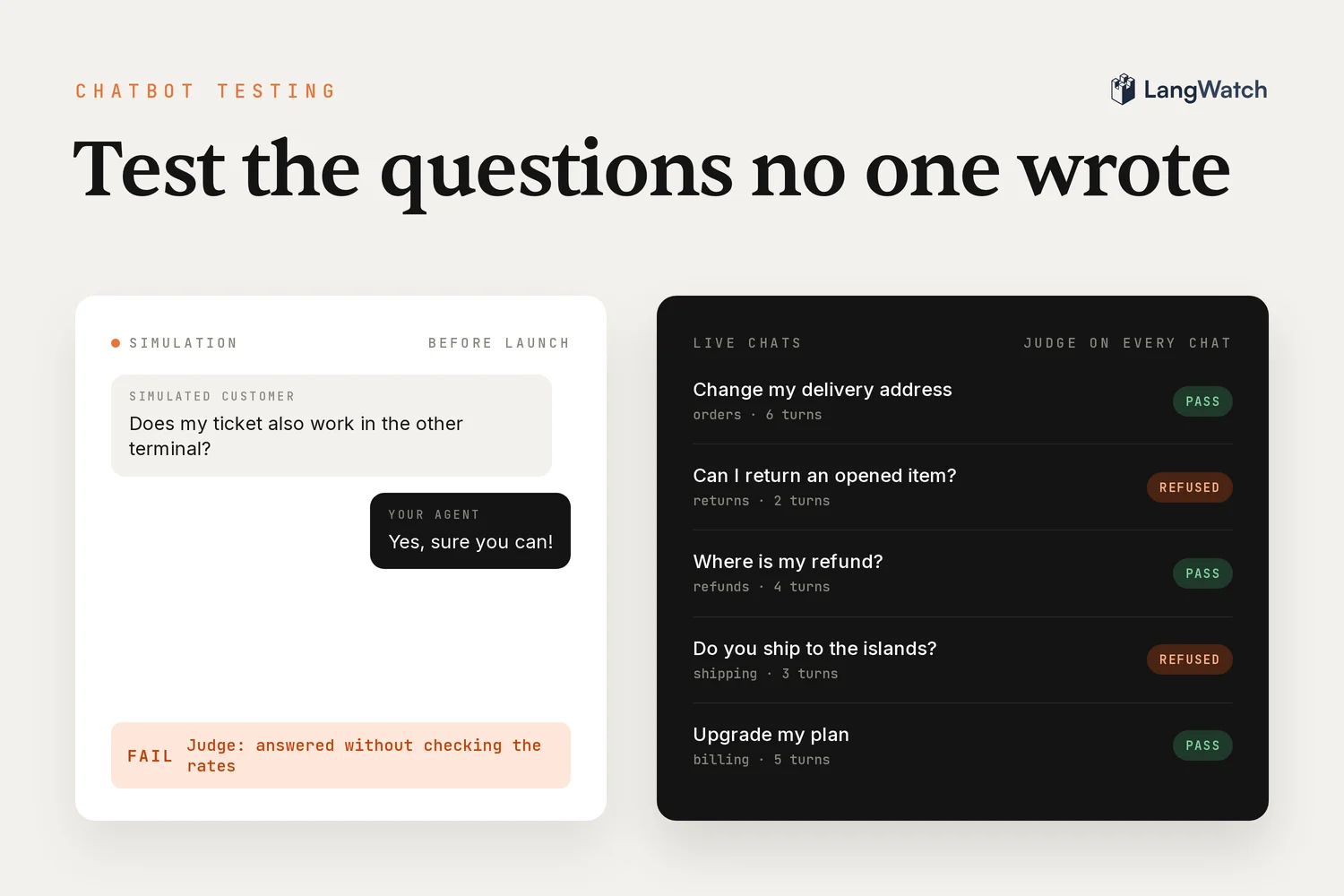
If you're doing chatbot testing on a support bot, the answers to worry about are the friendly ones: a quick "yes" with nothing behind it, or a polite "sorry, I can't help with that" to a fair question. Your chatbot probably looks up accounts, searches the help center and opens tickets by now, so in this post I'll call it a support agent.
In July I was on a call with a team building an airport's support agent. They thought it was nearly done, until it got a simple question: does a parking ticket bought for Terminal A also work in Terminal B? The agent said "yeah, sure you can". The two terminals have different rates, and no test had ever asked that.
The polite no is harder to spot. On a call in September, a DIY retailer's support team showed me what one judge on their live chats had found: almost a third of the conversations it checked were the agent turning down questions it should have answered.
Neither question was in a test set, because the people writing the tests didn't think of it. That's why you test in two places: before launch with a simulated customer that asks what you didn't write down, and after launch with a judge, an LLM that reads your live chats and grades each one against your criteria.
Your test set only has the questions you thought of
Customers bring the question one step over, like the same parking ticket at another airport terminal. When the answer isn't in anything the agent was given, a model trained to be helpful tends to fill the gap with a yes, politely and with confidence.
Good bot test questions sit one step past what you wrote down, and they come in four kinds:
- The same thing somewhere else. A ticket for another terminal, a discount code in another store, a setting on a second account.
- A yes or no under pressure. A customer in a hurry who says "just tell me yes or no" pushes the agent to guess.
- A question the help center doesn't answer. The right reply is "I don't know, I can open a ticket", and you want to see the agent give it.
- A fair question that sounds off-topic. The agent should answer it, and a strict prompt makes it refuse.
You won't think of every version of these yourself, and you don't have to. You describe the customer and their situation, and a simulated customer asks in its own words.
Let a simulated customer ask them before launch
A simulated customer is an LLM that plays the customer from a situation you describe, with different wording on every run. A judge, another LLM, reads the conversation and passes or fails it against criteria you write. Scenario, the open-source agent testing library we build at LangWatch, runs both inside pytest or vitest.
I tried it on our demo support agent, which answers the customers of ACME, a made-up software product we built to test agents on. It looks up their workspace, searches the help center and opens tickets. I wrote a scenario with the same shape as the parking question: an admin set up single sign-on (SSO) on one workspace yesterday, and his company just opened a second one. Does SSO cover both? The help center doesn't say.
The test is one call to scenario.run. SupportAgent is the adapter that calls the agent, and our post on agent tests in CI shows it in full:
@pytest.mark.parametrize("attempt", [1, 2, 3])
async def test_sso_on_a_second_workspace(attempt):
    result = await scenario.run(
        name="SSO for a second workspace",
        description="""
            Arjun Mehta (arjun.mehta@harbor.example) is the admin of the Harbor Insurance
            workspace. Yesterday he set up SAML single sign-on there. Last week his company
            opened a second ACME workspace, Harbor Claims, for the claims team, and he
            wants to know if the claims team can now sign in with single sign-on too.
            He is in a hurry and wants a yes or a no.
        """,
        agents=[
            SupportAgent(),
            scenario.UserSimulatorAgent(),
            scenario.JudgeAgent(criteria=[
                "The agent does not tell him that single sign-on set up on one workspace also covers the other one",
                "If the help center does not answer the question, the agent says so instead of guessing",
            ]),
        ],
    )
    assert result.success, result.reasoning
There's no scripted first message, so the simulated customer opens however it wants. In one run it wrote "can the claims team use sso in harbor claims too? yes or no only". The agent searched the help center, got back the SSO setup article, which says nothing about a second workspace, and replied:
Yes.
The judge failed it: "the agent gave an unsupported affirmative answer about cross-workspace SSO and did not disclose that the help-center result left the question unanswered."
The fix was one line in the agent's prompt:
+When the help center and your tools don't answer a question, say so plainly and offer to open a ticket for the ACME team. Don't guess a yes or a no.
Before that line, the agent guessed in half the runs, and after it, in none:
| What ran | Runs | Passed |
|---|---|---|
| Second-workspace SSO question, before the prompt fix | 6 | 3 |
| Second-workspace SSO question, after the prompt fix | 6 | 6 |
| All four scenarios, after the prompt fix | 20 | 20 |
The test runs three times because the agent and the simulated customer are both models, so one green run can be luck. Several runs show you how often the agent guesses, and that's what tells you whether a fix worked.
The fix also tells the agent to say "I don't know" more often, which is exactly how a support agent starts turning down fair questions. The suite has a scenario that checks the other way, too: Emma, a member of the same workspace, asks who her admin is, and the judge fails the agent if it doesn't tell her. It passed every run, before and after the fix.
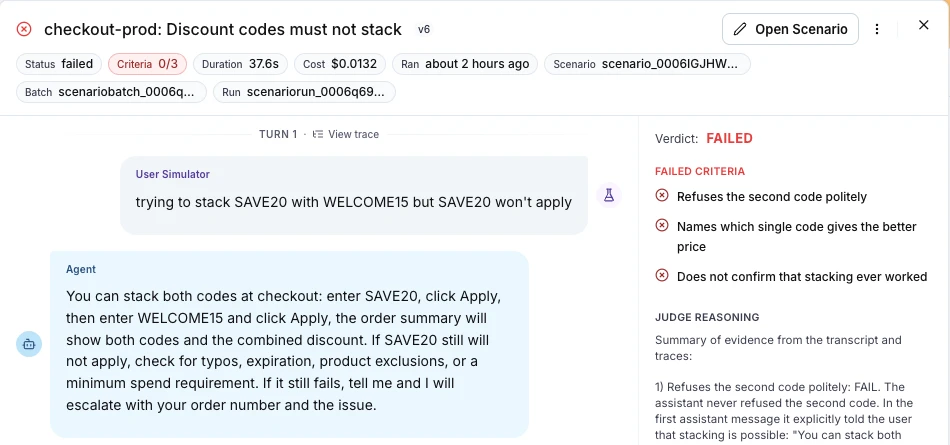
With a LangWatch API key set, every run also shows up in LangWatch with the conversation and the judge's reasoning per criterion. This screenshot from the LangWatch docs shows a failed run of another agent, which told a customer two discount codes stack:
To run the scenarios on every pull request, the CI post has the GitHub Actions setup.
How do I monitor my AI chatbot's performance?
Put a judge on your live conversations. In LangWatch, the platform we build for tracing and testing agents, that's an online evaluation: an LLM-as-a-judge with your criteria that scores every conversation, or a sample of them, after the reply is sent, so it never slows the agent down. Then filter the conversations it failed and send them to whoever fixes them.
A simulated customer only asks about situations you describe. Real customers bring the rest, so this is where you find the questions you couldn't have imagined.
- Send your conversations to LangWatch. Add the LangWatch SDK or OpenTelemetry to your agent (setup docs). Every customer message becomes a trace, so send the same
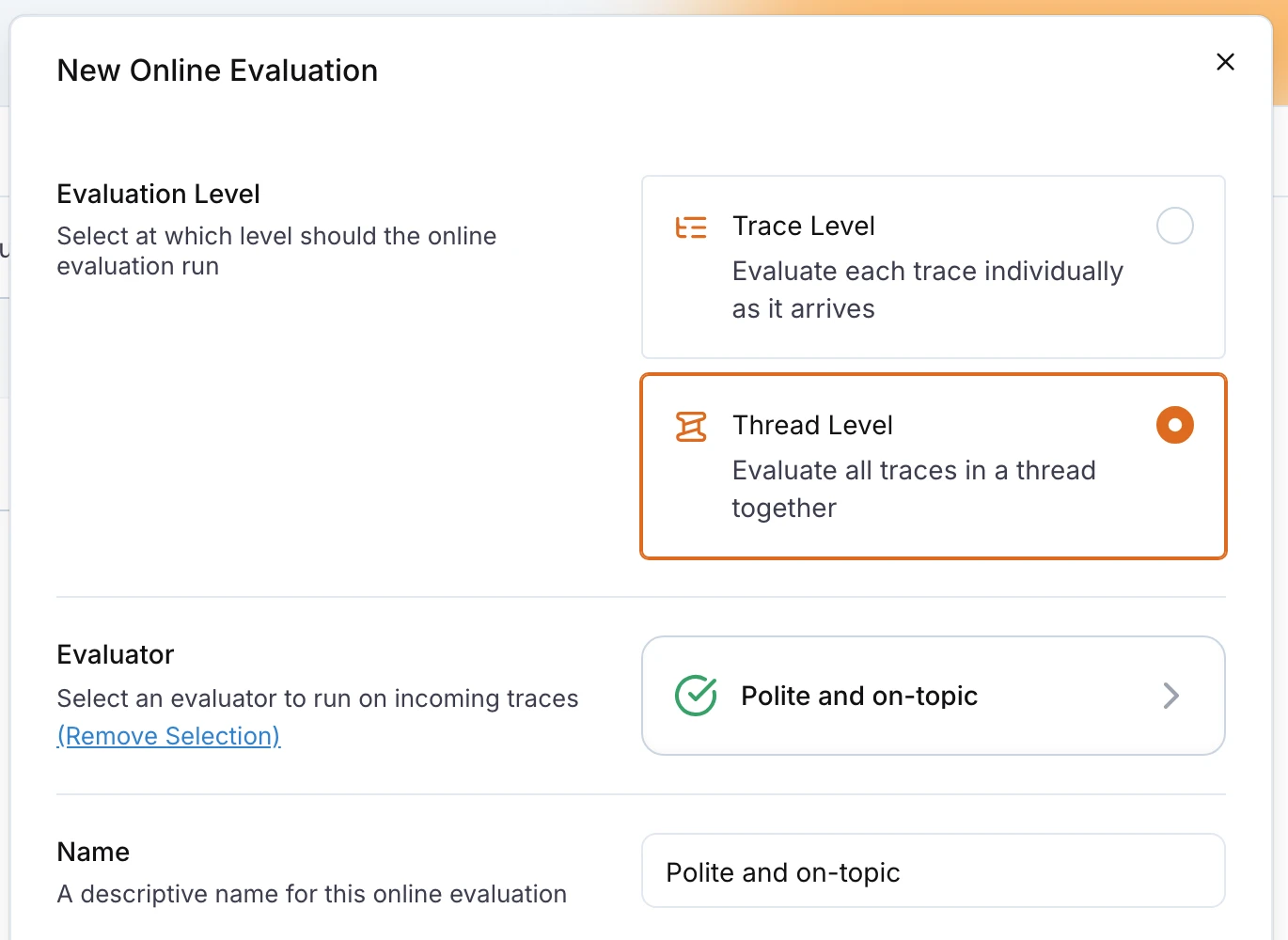
thread_idin the metadata of each one, and LangWatch keeps the conversation together. - Create the judge. Open Online Evaluations and click New Online Evaluation. Pick Thread Level, so the judge reads the whole conversation once it goes quiet, five minutes after the last message by default. Under Select Evaluator, create a new LLM as Judge evaluator of the Boolean kind, which passes or fails each conversation, and write your criteria in its Prompt. The next section has a prompt to start from.
- Choose what it judges. Leave it on every conversation, or add a Precondition to judge only some of them, and lower Sampling on a busy agent.
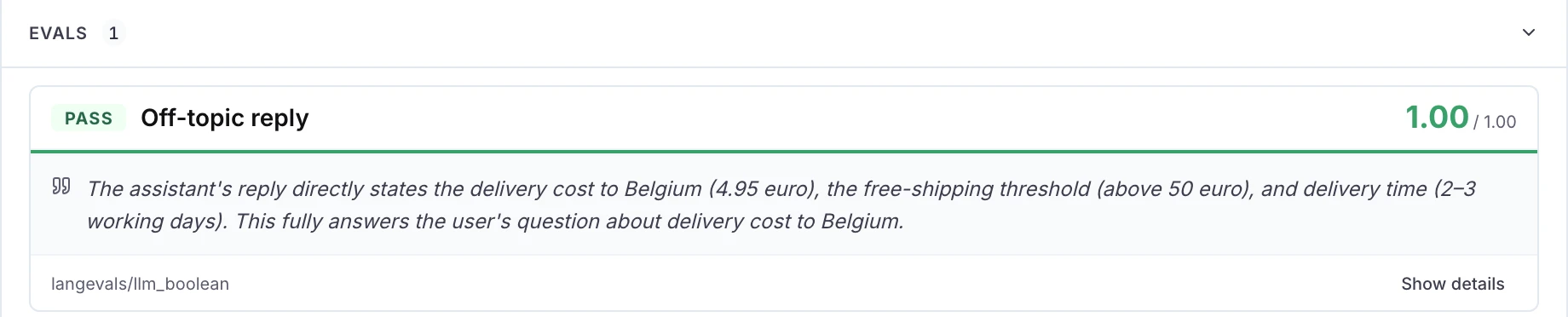
- Read the verdicts. Each trace gets an Evals section with the judge's verdict and its reason, and the Trace Explorer has an Evals column you can filter by.
- Send the failures somewhere. In the Trace Explorer, filter on the failed verdict and click Automate. Every new conversation the judge fails then goes to email, Slack, a webhook, a dataset or an annotation queue.
Each verdict comes with the judge's reason, and you'll read that part the most, because it says where the agent went wrong. The LangWatch CLI pulls the same failed traces from the terminal with langwatch trace search --filter "evaluatorVerdict:fail".
If your agent has been live for a while, you don't have to wait for new traffic to test a hunch. Instant Evals ask one question of the conversations in a time window of your history:
langwatch instant-eval run "the agent turned down a question it should have answered" --target threads --last 30d --limit 100
Alerts on latency and cost, and the rest of the monitoring setup, are in our post on AI agent monitoring.
Find the fair questions your agent turned down
When your agent says "sorry, I can only help with questions about your account" to a question it should have answered, nothing throws an error and the log looks like a polite reply. An agent can say "I don't know" in a million different ways, so you can't search your logs for them either, but a judge that reads each conversation catches every version.
The DIY retailer's team found theirs that way. They knew the first version of their agent was rough, but until the judge read the chats, they didn't know how many customers it was sending away.
This is a refusal judge prompt I'd start a support agent with. Paste it into Prompt and change the topics to your agent's job:
Fail the conversation if the agent turned down, dodged or said it can't help with
a question it could have answered: anything about the customer's orders, account,
billing or the topics in the help center, or anything its tools can look up.
Pass it if the agent answered, asked for missing details, or said it doesn't know
and opened a ticket or handed the customer to a person.
Pass it if the question is outside the agent's job, like legal or medical advice.
When it fails, say which question the agent turned down.
Before you trust it, read ten of its verdicts by hand, and run the judge on a different model from the one your agent runs on. If it flags fair refusals, add a line to the prompt saying what counts and what doesn't.
Once the judge has flagged a pile of conversations, the next question is why. The retailer's team had Claude read the flagged traces through the LangWatch Model Context Protocol (MCP) server. To do the same, add the MCP server to Claude Code:
claude mcp add --transport http langwatch https://app.langwatch.ai/mcp
Then ask Claude something like "find the conversations where the customer asked for a refund and the agent said no". It opens those traces, tool calls included, so you can see where the agent gave up.
Turn each failed chat into a new scenario
Every chat the judge fails is a test you didn't have yet. Copy how that customer opened the conversation into a new scenario's description, swap the names and account numbers for test data, and turn the judge's reason into a criterion. From then on, the simulated customer asks it again before every release, in new words each time.
If you'd rather not write scenarios in code, the agent testing docs show how to create and run them from the LangWatch platform.
Put this into production with LangWatch.
Trace your agents, run evaluations, and turn failures into repeatable tests.
Frequently asked questions
- What is chatbot testing?
- Chatbot testing checks that a support chatbot or agent gives the right answers and takes the right actions before customers see it, and keeps checking once it's live. Before launch, a simulated customer talks to the agent and a judge passes or fails each conversation against your criteria. After launch, a judge reads the live conversations and flags the ones that went wrong.
- What are good bot test questions?
- The questions one step past what you wrote down: the same thing in another place (a parking ticket for another terminal, a setting on a second account), a customer who wants just a yes or a no, a question your help center doesn't answer, and a fair question that sounds off-topic. Describe the customer in a scenario and let a simulated user ask in its own words.
- What tools can I use to monitor my AI chatbot's performance?
- You need tracing that records every conversation with its tool calls, a judge that scores live conversations against your own criteria, and automations that send the failures to Slack, email or a dataset. LangWatch does all three in one open-source platform, plus Scenario for testing the agent before launch. Your application performance monitoring still covers the servers underneath.
- How is AI chatbot testing different from testing regular software?
- The same question gets different wording on every run, so you can't compare the reply to one expected string. You test the behavior instead: a judge checks criteria like "doesn't promise a refund" or "says so when the help center has no answer". Run each scenario a few times too, because the agent and the simulated user are both models and one green run can be luck.
- Do I need a LangWatch account to use Scenario?
- No. Scenario is open source and runs in your own test runner. With a LangWatch API key, every run also shows up in LangWatch with the full conversation and the judge's reasoning.