import langwatchimport pandas as pd# Load your datasetdf = pd.read_csv("my_dataset.csv")# Initialize a new experimentevaluation = langwatch.experiment.init("my-experiment")# Wrap your loop with evaluation.loop(), and iterate as usualfor idx, row in evaluation.loop(df.iterrows()): # Run your model or pipeline response = my_agent(row["question"]) # Log a metric for this sample evaluation.log("sample_metric", index=idx, score=0.95)
import { LangWatch } from 'langwatch';// Initialize the SDKconst langwatch = new LangWatch();// Your datasetconst dataset = [ { question: "What is 2+2?", expected: "4" }, { question: "What is the capital of France?", expected: "Paris" },];// Initialize evaluationconst evaluation = await langwatch.experiments.init("my-experiment");// Run evaluation with a callbackawait evaluation.run(dataset, async ({ item, index }) => { // Run your model or pipeline const response = await myAgent(item.question); // Log a metric for this sample evaluation.log("sample_metric", { index, score: 0.95 });});
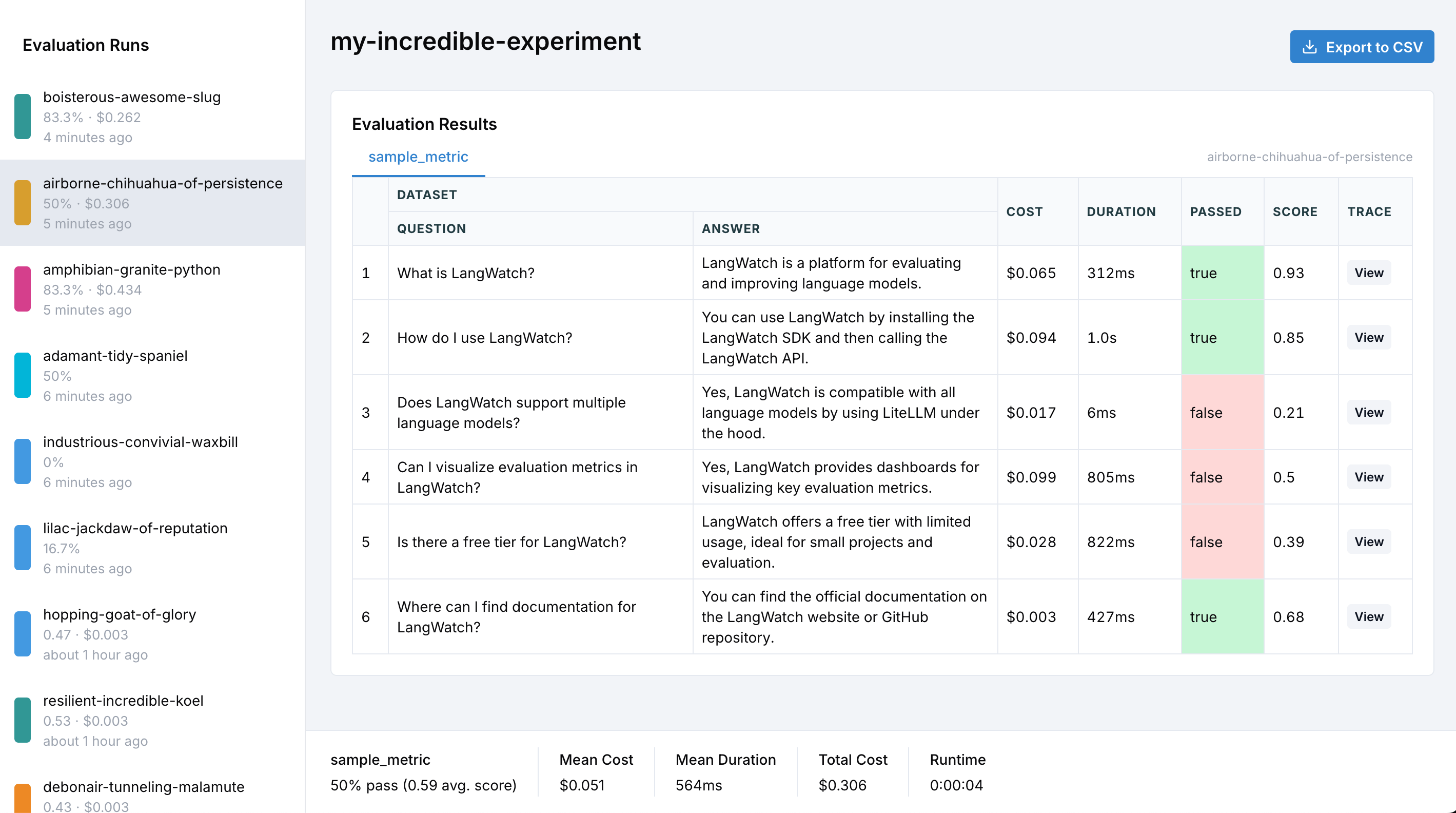
That’s it! Your evaluation metrics are now being tracked and visualized in LangWatch.
When comparing different models, prompts, or configurations, use targets to organize your results.
Both SDKs provide a target() / withTarget() context that automatically captures latency and enables context inference.
Python
TypeScript
Use evaluation.target() for automatic latency capture and context inference:
evaluation = langwatch.experiment.init("model-comparison")for index, row in evaluation.loop(df.iterrows()): def compare_models(index, row): # Evaluate GPT-5 with automatic latency tracking with evaluation.target("gpt5-baseline", {"model": "openai/gpt-5"}): response = call_openai("gpt-5", row["question"]) evaluation.log_response(response) # Store the model output # Target is auto-inferred inside target()! evaluation.log("accuracy", index=index, score=calculate_accuracy(response, row["expected"])) # Evaluate Claude with automatic latency tracking with evaluation.target("claude-experiment", {"model": "anthropic/claude-4-opus"}): response = call_anthropic("claude-4-opus", row["question"]) evaluation.log_response(response) evaluation.log("accuracy", index=index, score=calculate_accuracy(response, row["expected"])) evaluation.submit(compare_models, index, row)
evaluation.target() automatically captures latency, creates isolated traces per target, and enables context inference so log() calls don’t need explicit target parameters. Use log_response() to store the model’s output.
Alternatively, use the target parameter directly with evaluation.log():
Use withTarget() for automatic latency capture and context inference:
const evaluation = await langwatch.experiments.init("model-comparison");await evaluation.run(dataset, async ({ item, index }) => { // Run targets in parallel with automatic tracing const [gpt5Result, claudeResult] = await Promise.all([ evaluation.withTarget("gpt5-baseline", { model: "openai/gpt-5" }, async () => { const response = await callOpenAI("gpt-5", item.question); // Target and index are auto-inferred inside withTarget()! evaluation.log("accuracy", { score: calculateAccuracy(response, item.expected) }); return response; }), evaluation.withTarget("claude-experiment", { model: "anthropic/claude-4-opus" }, async () => { const response = await callAnthropic("claude-4-opus", item.question); evaluation.log("accuracy", { score: calculateAccuracy(response, item.expected) }); return response; }), ]); // Latency is automatically captured from each withTarget() span console.log(`GPT-5: ${gpt5Result.duration}ms, Claude: ${claudeResult.duration}ms`);});
withTarget() automatically captures latency, creates isolated traces per target, and enables context inference so log() calls don’t need explicit target or index parameters.
With tracing enabled, you can click through from any evaluation result to see the complete execution trace, including all LLM calls, prompts, and intermediate steps.
For an evaluation comparing GPT-4 and Claude with a faithfulness evaluator:
index,question,expected,gpt-4_model,gpt-4_output,gpt-4_cost,gpt-4_duration_ms,gpt-4_faithfulness_score,gpt-4_faithfulness_passed,claude_model,claude_output,claude_cost,claude_duration_ms,claude_faithfulness_score,claude_faithfulness_passed0,What is 2+2?,4,openai/gpt-4,The answer is 4,0.0012,1250,0.95,true,anthropic/claude-3,2+2 equals 4,0.0008,980,0.92,true1,Capital of France?,Paris,openai/gpt-4,Paris is the capital of France,0.0015,1100,0.98,true,anthropic/claude-3,The capital of France is Paris,0.0010,890,0.97,true
You can run SDK experiments in your CI/CD pipeline. The print_summary() method outputs a structured summary and exits with code 1 if any evaluations fail:
import langwatchexperiment = langwatch.experiment.init("ci-quality-check")for idx, row in experiment.loop(dataset.iterrows()): response = my_llm(row["input"]) experiment.evaluate("ragas/faithfulness", index=idx, data={...})# This will exit with code 1 if any evaluations failedexperiment.print_summary()
See CI/CD Integration for complete examples with GitHub Actions, GitLab CI, and more.