Scope determines where your prompts are accessible and how they can be shared across your LangWatch projects and organization. Understanding scope is crucial for effective prompt management and team collaboration.
Overview
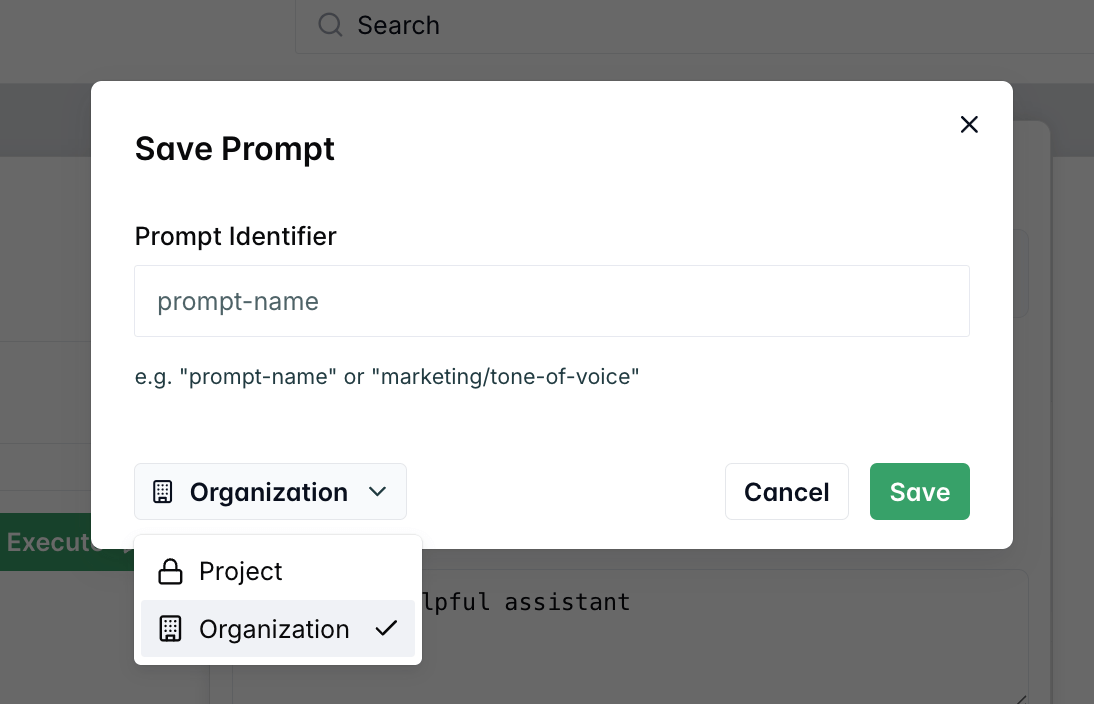
Every prompt in LangWatch has a scope that defines its visibility and accessibility:
- PROJECT scope - Prompts accessible only within a single project
- ORGANIZATION scope - Prompts shared across all projects in your organization
Project Scope (Default)
Project scope is the default setting for all new prompts. Prompts with project scope are:
- Isolated to a single project
- Private to project members only
- Independent from other projects
- Fully controlled by the project team
Example: Project-Scoped Prompt
{
"id": "prompt_abc123",
"handle": "internal-chatbot",
"scope": "PROJECT",
"projectId": "proj_456",
"organizationId": null
}
This prompt is only accessible within proj_456 and cannot be seen or used by other projects.
Organization Scope
Organization scope makes prompts available across all projects in your organization. Organization-scoped prompts are:
- Shared across all organization projects
- Collaborative for cross-project teams
When to Use Organization Scope
- Brand guidelines and company voice
- Legal compliance prompts (privacy policies, terms of service)
- Common workflows used across multiple projects
- Shared knowledge and best practices
- Standard operating procedures
Example: Organization-Scoped Prompt
{
"id": "prompt_def789",
"handle": "company-brand-voice",
"scope": "ORGANIZATION",
"projectId": "proj_456",
"organizationId": "org_123"
}
This prompt is accessible to all projects within org_123 but can only be modified by the original project (proj_456).
Scope Management
Creating Scoped Prompts
UI
TypeScript SDK
Python SDK
REST API
- Navigate to Prompt Management
- Click “Create New Prompt”
- Fill in prompt details
- Select Scope from the dropdown:
- Project - Only visible in current project
- Organization - Visible across all organization projects
- Save your prompt
import { LangWatch } from "langwatch";
const langwatch = new LangWatch({
apiKey: process.env.LANGWATCH_API_KEY
});
// Create project-scoped prompt (default)
const projectPrompt = await langwatch.prompts.create({
handle: "project-specific-bot",
scope: "PROJECT", // Default, can be omitted
prompt: "You are a project-specific assistant...",
// ... other fields
});
// Create organization-scoped prompt
const orgPrompt = await langwatch.prompts.create({
handle: "company-guidelines",
scope: "ORGANIZATION",
prompt: "You represent our company brand...",
// ... other fields
});
import langwatch
# Create project-scoped prompt (default)
project_prompt = langwatch.prompts.create(
handle="project-specific-bot",
scope="PROJECT", # Default, can be omitted
prompt="You are a project-specific assistant...",
# ... other fields
)
# Create organization-scoped prompt
org_prompt = langwatch.prompts.create(
handle="company-guidelines",
scope="ORGANIZATION",
prompt="You represent our company brand...",
# ... other fields
)
# Create project-scoped prompt
curl -X POST "https://app.langwatch.ai/api/prompts" \
-H "Content-Type: application/json" \
-H "X-Auth-Token: your-api-key" \
-d '{
"handle": "project-specific-bot",
"scope": "PROJECT",
"prompt": "You are a project-specific assistant...",
"messages": [...],
"inputs": [...],
"outputs": [...]
}'
# Create organization-scoped prompt
curl -X POST "https://app.langwatch.ai/api/prompts" \
-H "Content-Type: application/json" \
-H "X-Auth-Token: your-api-key" \
-d '{
"handle": "company-guidelines",
"scope": "ORGANIZATION",
"prompt": "You represent our company brand...",
"messages": [...],
"inputs": [...],
"outputs": [...]
}'
Changing Prompt Scope
A prompt handle that is unique within a project might not be unique across projects in an organization.
When you change the scope of a prompt, you might need to change the handle to avoid conflicts.
To change prompt scope:
- Navigate to the prompt in Prompt Management
- Click the scope dropdown
- Select the new scope
- Confirm the change
- Save the prompt
Only prompt owners can change scope.