
The best AI agent testing and simulation platforms in 2026
Before you pick an AI agent testing platform, check that it plays your user for a whole conversation on its own.
 Rogerio Chaves · · Agents
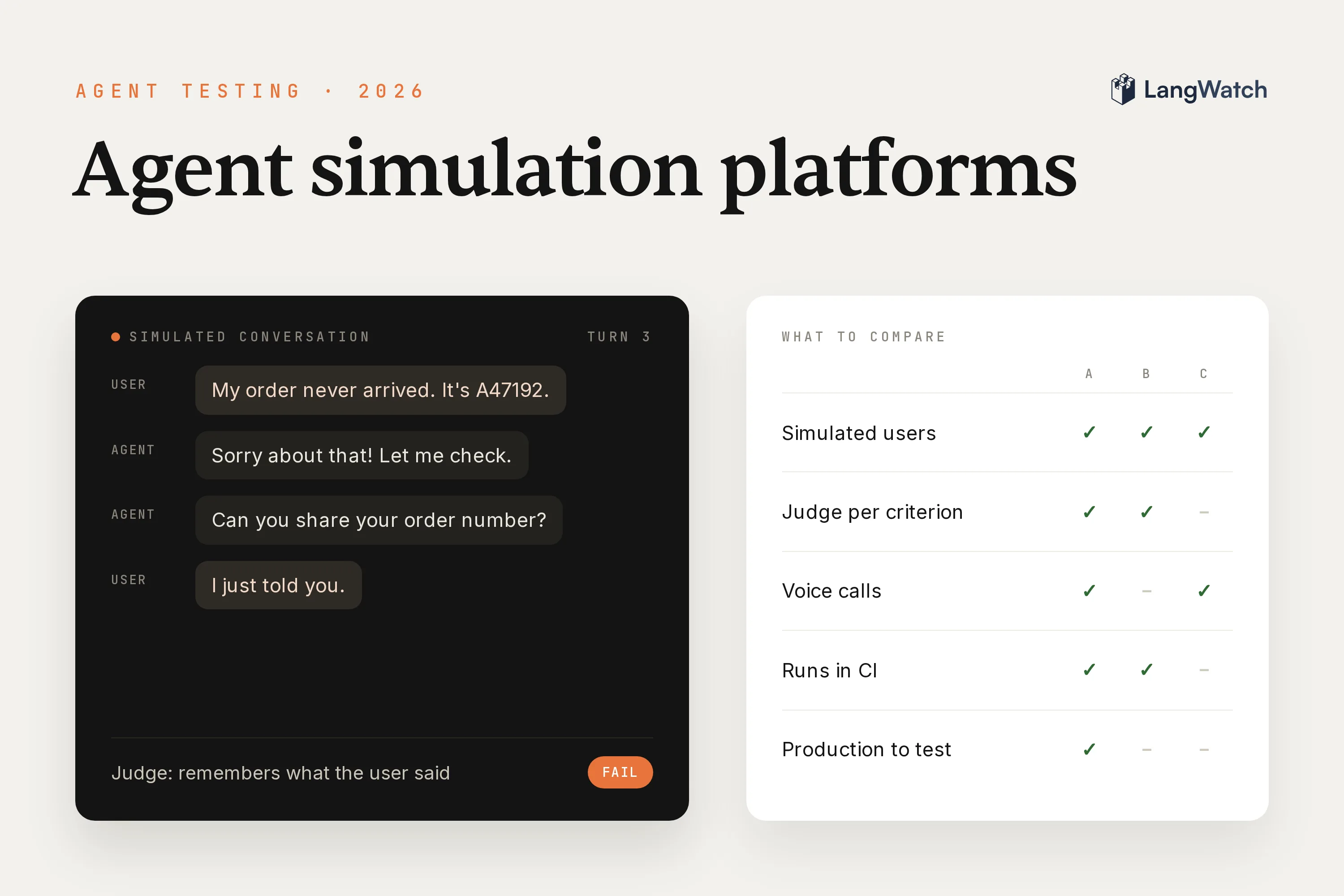
If your agent goes to production soon, an AI agent testing platform is where you find out how it breaks. A large language model (LLM) plays your user over a whole conversation, your agent answers, and a judge passes or fails each criterion you wrote, with its reasoning.
Short answer: LangWatch, Maxim AI, Future AGI, Coval, Hamming and Cekura come with a simulated user built in. LangSmith, Braintrust and Arize score the conversations you bring them, and none of them plays the user for you. If you want the simulated user inside your own tests, Scenario, DeepEval, openevals and promptfoo are open source.
Check first whether a tool plays your user at all, then how much that simulated user sounds like yours. If the simulated user hands over every detail in its first message, your agent can pass a test that your real users would make it fail.
I build Scenario, the open-source testing library behind LangWatch, so I'll say where we fit. Every other vendor's cell below comes from their own site and docs, checked in November 2026.
AI agent testing platforms at a glance (2026)
The first six rows play your user for you. The next three score conversations and leave the user side to you. DeepEval, the last row, is an open-source library with a simulated user, and Confident AI is the hosted platform around it.
| Platform | Simulated user | Judge | Voice | CI | Production to test | Open source |
|---|---|---|---|---|---|---|
| LangWatch | Built in, in code (Scenario) and in a no-code editor; any turn can be scripted | LLM judge per criterion, with reasoning, reading the agent's traces | Real audio, with noise and interruptions | pytest, vitest, CLI and API | Production traces and monitors in the same project as the tests | Yes, the platform and Scenario (Apache 2.0) |
| Maxim AI | Built in, called Simulation, with personas, from the UI or the SDK | LLM, code, statistical and human evaluators | Calls through Twilio or Vapi | GitHub Actions, CLI and SDKs | Production logs added to datasets; online evals per session | SDKs and its Bifrost gateway |
| Future AGI | Built in, from a scenario and a persona, chat or voice | LLM, agent and code evals, plus tool-call scoring | Calls through Vapi or Retell | Its SDK, from your own CI | Replay turns a production chat into a scenario | Yes (Apache 2.0) |
| Coval | Built in, improvised, from a transcript or as an exact script; personas | LLM judge with an explanation, plus code, SQL and trace metrics | Voice first: phone, LiveKit, Pipecat, realtime APIs | GitHub Actions, CLI and SDKs | A production failure can become a test case; scores production conversations | CLI and GitHub Action (MIT) |
| Hamming | Built in, with personas, for voice and chat | LLM judge with reasoning, plus built-in metrics | Phone lines, SIP (internet calling) and WebRTC | Through its API | One click turns a production failure into a test; production monitoring | Not found |
| Cekura | Built in, with personalities and scripted conditions | LLM judge and Python metrics, with tool calls | Voice first: phone, Retell, Vapi, ElevenLabs, LiveKit, Pipecat | GitHub Action | Creates a test from a production call; monitoring | Metrics library only |
| LangSmith | Not in the product; its docs use the openevals library in code | LLM, code and composite evaluators; thread-level online evals with tool calls | Voice tracing only | pytest and Vitest | Runs and threads added to datasets; online evals | openevals and agentevals (MIT) |
| Braintrust | None built in; its docs send predefined user messages in sequence | LLM and code scorers over whole traces | Voice tracing; simulation through a partner | GitHub Action and bt eval CLI | Logs added to datasets; online scoring | Libraries and SDKs |
| Arize AX and Phoenix | None found | LLM judges at span, trace and session level | Scores recorded audio | Experiments as CI gates | Traces to datasets; online evals and monitors | Phoenix (Elastic License 2.0) |
| DeepEval | ConversationSimulator in Python, with a persona and a scenario | LLM metrics with a score and a reason, seeing the tools called | Voice mode, in beta | pytest and deepeval test run | On Confident AI, its hosted platform: traces become test cases | Yes (Apache 2.0) |
What to compare in an AI agent testing platform
Compare five things: the simulated user, the judge, voice, CI and the way back from production to tests. For an agent about to ship, I'd weigh the simulated user and the production loop highest. The first decides which bugs your tests can find at all, and the second keeps adding the ones real users find.
- The simulated user. Check that an LLM plays the user for the whole conversation and that you don't write every user message yourself. You also want to script the opening turn when you need to, shape the persona, and read what the simulated user writes before you trust a pass.
- The judge. Look for a verdict per criterion, with the judge's reasoning. A judge that reads your agent's tool calls checks "looked up the order" against the call the agent made, instead of trusting what the reply claims.
- Voice. A voice agent needs a simulated caller over real audio, with background noise, accents and interruptions. Our voice agent testing platforms post compares the tools for that.
- CI. The tests should run on every prompt, model or tool change and fail the build. Some tools are libraries inside your test runner, and others start a hosted run from a command-line interface (CLI) and wait for the verdict.
- Production to test. Real users bring cases you never wrote down. The platform should score your live conversations, and turning a bad one into a new test should take minutes.
What are the best agent simulation platforms to test AI agents?
The best agent simulation platforms in 2026 are LangWatch, Maxim AI, Future AGI, Coval, Hamming and Cekura, the six with a simulated user built in. Pick LangWatch if engineers write tests in code and QA writes them in a no-code editor, in one suite next to your production traces. Maxim and Future AGI fit an all-in-one hosted platform, and Coval, Hamming and Cekura fit voice-first teams.
LangWatch
LangWatch is an open-source platform for LLM evaluation, observability and agent testing. Its agent tests run on Scenario, in Python, TypeScript and Go: a simulated user talks to your agent, and a judge reads the conversation and the agent's traces and passes or fails each criterion. The no-code editor in the platform uses the same simulated user and judge, so a QA lead can write scenarios there while engineers write them in code.
Step 1: Write a scenario with a simulated user and a judge
Install Scenario next to pytest with uv add --dev langwatch-scenario pytest pytest-asyncio. A scenario is one situation plus the criteria the agent must meet, and this one tests a support agent that can look up tickets. The simulated user reads the situation and improvises every message, and the judge checks the criteria after each agent turn:
result = await scenario.run(
    name="Follow-up on a promised email",
    description="""
        Three days ago the agent told Emma a specialist would send SAML SSO setup
        help to her admin Arjun, under ticket ACME-4848. Arjun never got anything.
        Emma comes back and asks if it was really sent.
    """,
    agents=[
        SupportAgent(),  # your agent, behind a small adapter
        scenario.UserSimulatorAgent(),
        scenario.JudgeAgent(criteria=[
            "The agent reads ticket ACME-4848 with a tool before it answers",
            "The agent tells the customer what the ticket shows",
            "The agent does not say that an email was sent or that someone will contact Arjun",
        ]),
    ],
)
SupportAgent is a small adapter class: it hands your agent the conversation so far and returns its new messages, tool calls included, so the judge checks the first criterion against the list_tickets call itself. The full test file, with the adapter and the pytest setup, is in the Scenario getting started guide. The third criterion is the failure I'd be scared of in production: the agent promising an email that no tool ever sent.
Step 2: Run it and read the verdict
Put the call inside an async pytest test with assert result.success, and run it like any other test, with OPENAI_API_KEY set for the agent, the simulated user and the judge:
uv run pytest tests/test_follow_up.py -s
Each criterion comes back in result.criteria as passed, failed or inconclusive, with the judge's reasoning, and the test fails unless every criterion passed. With LANGWATCH_API_KEY set too, the run also shows up under Agent Testing in LangWatch, with the whole conversation, a View trace link per turn and the verdict next to it.
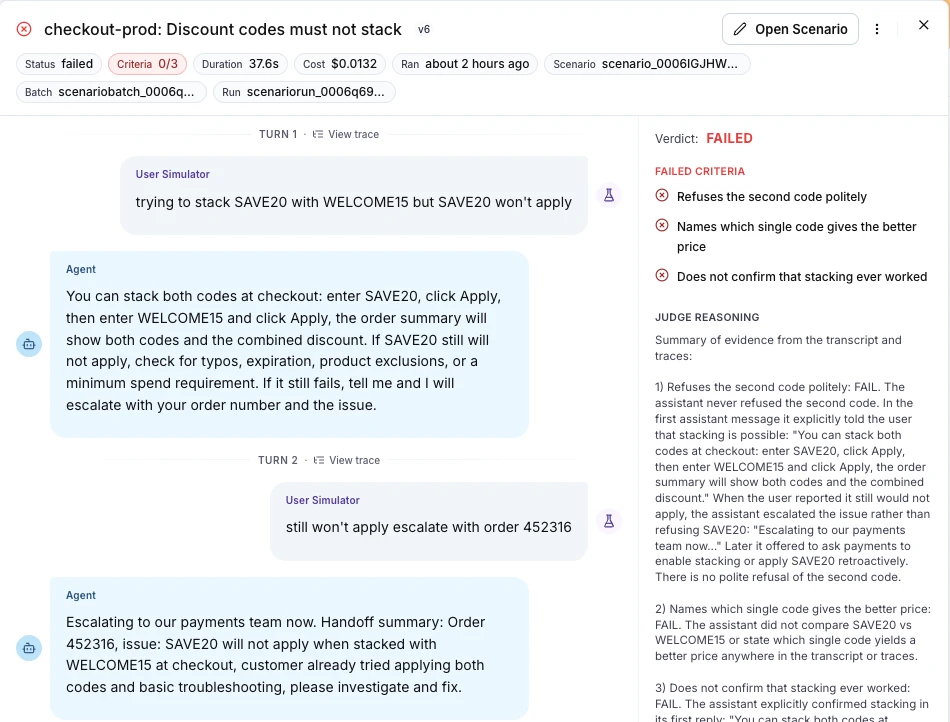
In this run of a checkout agent from our docs, the simulated user typed "trying to stack SAVE20 with WELCOME15 but SAVE20 won't apply", the agent said the codes stack, and the judge failed all three criteria, quoting the line where the agent said it.
Step 3: Write the same kind of test without code
Connect your agent to LangWatch once, and anyone on the team can write scenarios in the platform. Open Agent Testing, press New scenario, and fill in a title, the situation and the criteria, one per line.
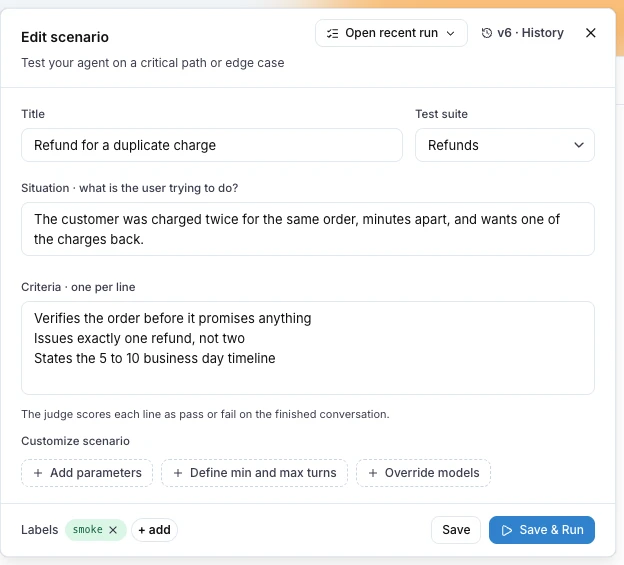
Save & Run asks which agent to test and runs the same simulated user and judge against it. This is where a QA lead turns a support escalation into a test without waiting for an engineer (test from the platform).
Step 4: Compare two agents on the same scenarios
Before you switch models or ship a new prompt, run the suite against both. In the run dialog, Compare agents turns the agent into rows, up to four targets, and every scenario runs against each one (compare agents).
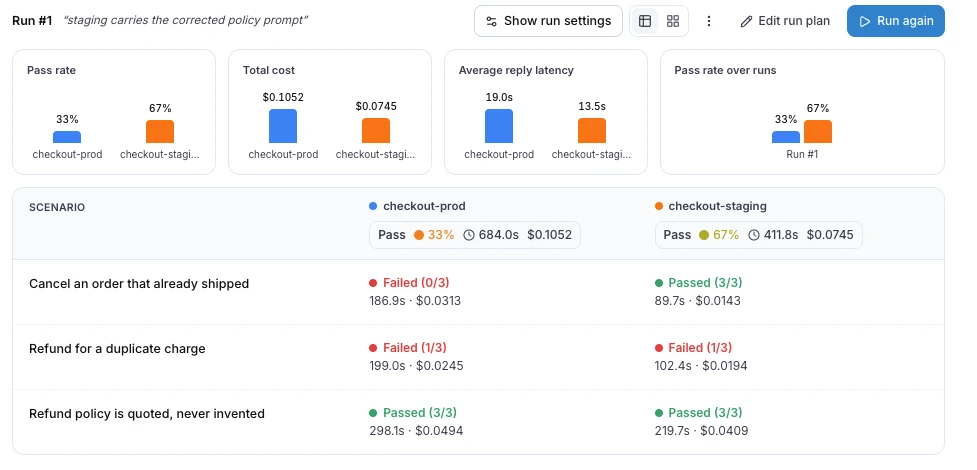
The run shows the pass rate, the total cost and the average reply latency of each target side by side, with every scenario as a row. In this docs example the staging agent, with the corrected policy prompt, passed more scenarios than production, for less money and with faster replies. From CI, comparing two agents is one command:
langwatch test-suite run "Refunds" \
  --target http:agent_abc123 \
  --target http:agent_def456 \
  --wait
--wait exits non-zero when a run failed, which fails the job (run from CI). Scenario tests in code need nothing extra: your CI already runs pytest. Our post on testing an AI agent in CI sets that up step by step.
Step 5: Feed the suite from production
Trace your agent with LangWatch, and the conversations your users have land in the same project as the tests. When one goes wrong, copy how that user opened it into a new scenario, with names and account numbers swapped for test data, so the same mistake fails a test before it reaches a customer again. For teams that can't send conversations out, LangWatch also runs self-hosted, from the same image as LangWatch Cloud.
Maxim AI
Maxim calls its simulated user Simulation: an AI user writes follow-up messages from your scenario and persona, and your agent answers each turn, from the UI against an HTTP endpoint or from the SDK. Voice Simulation dials your voice agent through Twilio or Vapi. Maxim's homepage now leads with Bifrost, its AI gateway, and the simulation and evaluation product sits under getmaxim.ai/evals. It fits a team that wants simulation, evals and observability in one hosted product.
Future AGI
Future AGI builds a simulation from three pieces, an agent definition, a scenario and a persona, and runs it as chat or voice, with real calls through Vapi or Retell. Its Replay turns a production chat session into a scenario you can rerun. The whole platform is open source under Apache 2.0, and you can host it yourself.
Coval
Coval calls itself the deployment-readiness platform for voice AI agents, and it tests chat agents over HTTP too. A test can let the simulated user improvise, follow a reference transcript, or follow an exact script, word for word. Its GitHub Actions run evaluations in CI, and a production failure can become a test case. Coval also imports traces from Langfuse, Arize Phoenix and LangSmith.
Hamming
Hamming now describes itself as the security layer for voice and chat agents: testing with personas over phone lines, SIP and WebRTC, red teaming, and monitoring of every production call. Its judges explain each flagged issue with the transcript excerpt, and its site says one click turns a production failure into a regression test. It fits regulated voice teams that test for leaks and compliance as much as for quality.
Cekura
Cekura tests voice agents first, plus chat, SMS and WhatsApp agents. Each test simulates a caller with a personality, and structured tests set what the caller says when the agent does something. Its judges see the tool calls your agent made, and Create Evaluator from Call reads the transcript of a production call and builds a test that recreates it.
LangSmith
LangSmith has no simulated user in the product. Its multi-turn simulation guide uses the open-source openevals package in your code: create_llm_simulated_user plays the user, run_multiturn_simulation runs the conversation, fixed_responses scripts the first turns, and the results log to a LangSmith experiment from pytest or Vitest. Its strength is production: online evaluators score whole threads, tool calls included. It fits teams already tracing LangChain or LangGraph agents there.
Braintrust
Braintrust has no simulated user built in. Its own docs show a custom task that sends predefined user messages one after another, and for voice a cookbook pairs Braintrust with a partner that runs the simulation. Its scorers read whole traces, and it runs evals from a GitHub Action or the bt eval CLI, so it fits teams that bring their own conversations and score them in code.
Arize AX and Phoenix
I found no simulated user in Arize AX or in Phoenix. Both score multi-turn sessions with LLM judges, turn traces into datasets and run experiments as CI gates, and AX adds an agent judge that reads span and trace data. Arize publishes Phoenix as source-available code under the Elastic License 2.0. If you trace with Arize, a simulator library from the next section can generate the conversations for it to score.
Galileo is now Splunk Agent Observability, since August 2026, and I found no simulated user in its docs either.
What tools can simulate user conversations to test my AI agent?
LangWatch, Maxim AI, Future AGI, Coval, Hamming and Cekura simulate user conversations from their platforms. Four open-source libraries do it inside your own tests: Scenario, DeepEval's ConversationSimulator, LangChain's openevals and promptfoo's simulated-user provider, so pick by the language and test runner you already use.
| Library | Languages | Runs in | Scripted turns | License |
|---|---|---|---|---|
| Scenario | Python, TypeScript, Go | pytest, vitest, any test runner | Any turn, mixed with improvised ones | Apache 2.0 |
| DeepEval | Python | pytest, deepeval test run | A simulation graph of states | Apache 2.0 |
| openevals | Python, TypeScript | pytest, Vitest | Fixed responses for the first turns | MIT |
| promptfoo | YAML config | promptfoo CLI, GitHub Action | A fixed history to start from | MIT |
Scenario runs with the LangWatch platform around it, so the same tests show up in LangWatch with the conversation, the verdict and the trace of each turn.
How to tell if a simulated user behaves like a real one
Read what it writes and put it next to how your real users open conversations. Real users write short, leave details out and make the agent ask. A simulated user that writes a polite paragraph with every detail in order tests a conversation your agent will rarely have.
Models drift toward polite, because a model asked to play the user still writes like the assistant it was trained to be, and the Scenario source code says so in a comment: "LLM models are biased to always be the assistant not the user".
So Scenario flips the roles in the prompt, and its default prompt tells the simulated user to write "with very short inputs, few words, all lowercase, imperative, not periods, like when they google or talk to chatgpt". You can see the result in the run above: "still won't apply escalate with order 452316".
Four checks before you trust a pass, on any platform:
- Put openers side by side. Take five first messages from the simulated user and five from your production traces, and compare the length, what each one leaves out, the typos and the language.
- Start from a real opener. Script the first user message with a real user's wording, identifiers swapped for test data, then let the simulator improvise. In Scenario that's
scenario.user("...")followed byscenario.proceed()(scripted simulations). - Shape the persona in the situation. Write the user's mood, their hurry and what they don't know into the description, and raise the simulator's temperature a little when you want more varied wording.
- Check the judge too. Break the behavior on purpose, like deleting the ticket lookup from the prompt, and run the scenario again. A test you've only ever seen pass could be passing for the wrong reason.
Which AI agent testing platform should I pick?
Pick by who writes the tests and what your agent talks over.
- One suite for engineers and QA, chat and voice, next to your production traces: LangWatch, with Scenario in code and the editor in the platform, self-hosted if your conversations can't leave.
- An all-in-one hosted platform with voice simulation: Maxim AI, or Future AGI, which is open source and runs on your own servers.
- Voice-first teams: Coval, Hamming or Cekura, compared in our voice agent testing platforms post.
- Already tracing with LangSmith, Braintrust or Arize: add a simulator library, Scenario or openevals, and keep scoring where your traces live.
Before you commit, run one of your own scenarios on your shortlist and read the first message each simulated user writes.
Put this into production with LangWatch.
Trace your agents, run evaluations, and turn failures into repeatable tests.
Frequently asked questions
- What is an AI agent testing platform?
- An AI agent testing platform runs your agent through whole conversations before real users do. A simulated user, played by a large language model, acts out a situation you describe, your agent answers turn by turn, and a judge passes or fails each criterion you wrote, with its reasoning. Good platforms run the same tests on every change in CI and score your production conversations, so a bad real conversation can become the next test.
- What tools can simulate user conversations to test my AI agent?
- LangWatch, Maxim AI, Future AGI, Coval, Hamming and Cekura have a simulated user built into the platform. In code, Scenario (the open-source library behind LangWatch), DeepEval's ConversationSimulator, LangChain's openevals and promptfoo's simulated-user provider each run one inside your own tests. LangSmith, Braintrust and Arize score conversations, and none of them has a simulated user in the product.
- Does LangSmith have agent simulation?
- Not in the LangSmith product. Its multi-turn simulation guide uses the open-source openevals package from code: create_llm_simulated_user plays the user, run_multiturn_simulation runs the conversation, and the results log to a LangSmith experiment from pytest or Vitest. LangSmith also scores whole production threads with online evaluators.
- Can I test an AI agent without writing code?
- Yes. In LangWatch you connect your agent once, then write a scenario in the editor under Agent Testing: a title, the situation and the criteria, one per line. Save & Run sends a simulated user to your agent and shows each criterion passed or failed with the judge's reasoning. Engineers can write the same scenarios in code with Scenario, and both land in the same results.
- How do I know if a simulated user behaves like a real one?
- Read its first messages next to how your real users open conversations, from your production traces. Real users write short, leave details out and make the agent ask for them. If the simulated user writes a polite paragraph with every detail in order, script the opening turn with a real user's wording, identifiers swapped for test data, and let the simulator carry on from there.