
LLM cost optimization starts with cost per customer
The number that tells you where to cut your LLM bill is each customer's cost per conversation your agent resolved.
 Rogerio Chaves · · Agents
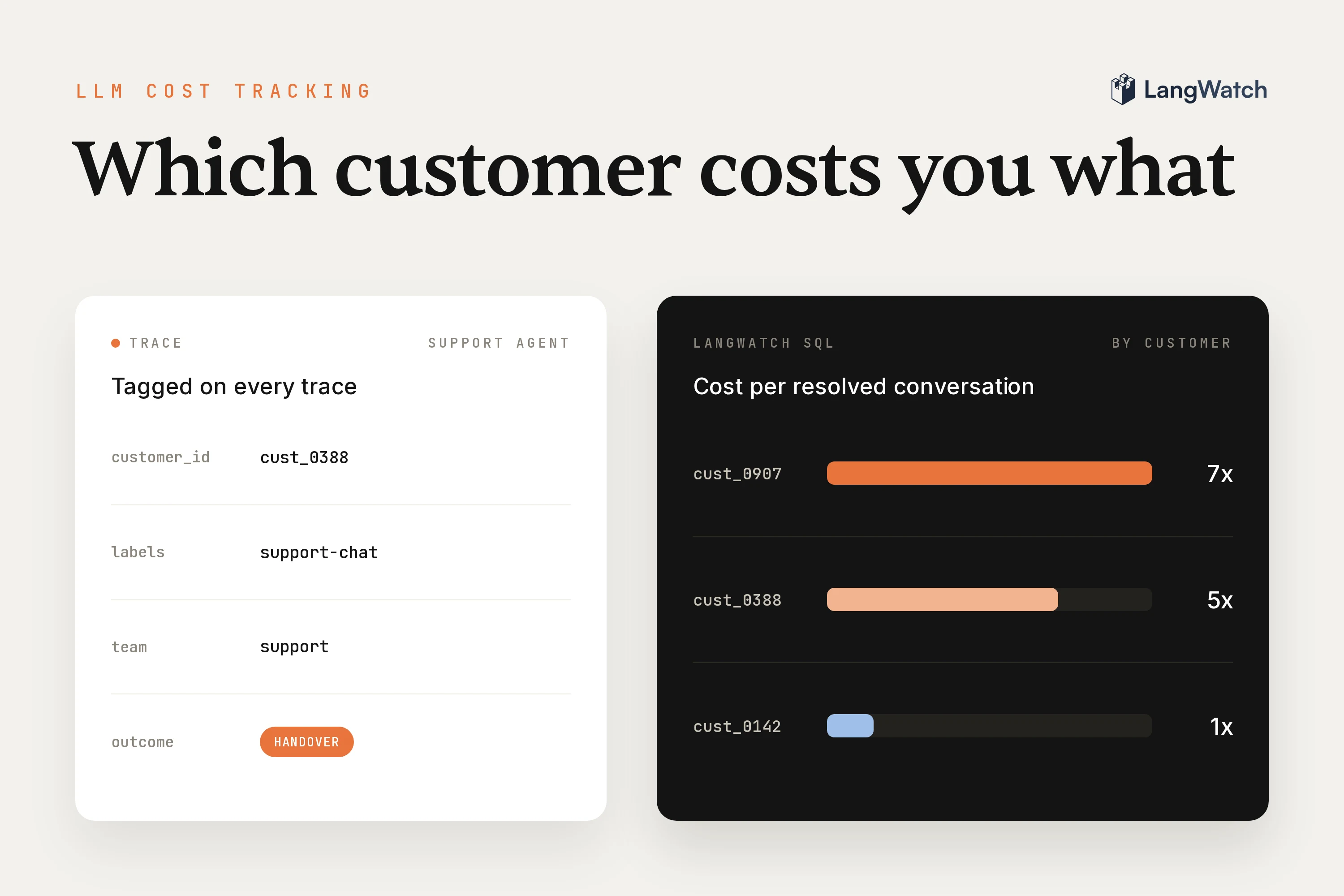
Your LLM bill went up this month, and the provider's usage page shows a total per model and per day. The provider has never heard of your customers or your features. So it can't tell you which of them made the calls, and that's exactly what everyone asks when the number jumps.
So LLM cost optimization starts with tagging. It's a few lines of code. Put the customer, the feature and the team on every trace, and cost per customer becomes a query. Add how each conversation ended, and you also see what you pay for each problem your agent actually solved.
I set this up this week on a small support agent, with LangWatch, our platform for monitoring and testing agents. One customer looked ordinary per conversation, and cost about five times as much as the cheapest one once I counted only the conversations the agent resolved.
What are the best tools to track LLM token costs per feature or customer?
Use an LLM observability platform, like LangWatch, that records the cost of every LLM call and lets you group it by fields you send yourself, like the customer id and the feature. Add an AI gateway for budgets that block or warn before the spend happens. LangWatch does both, and it's what I use below.
Whatever you pick, check that it has these four things:
- Cost per call from the real token counts. Input, output, cached and reasoning tokens, times prices that are up to date. LangWatch keeps a registry of more than 350 models with prices checked every day, and you add your own negotiated or self-hosted prices in Settings > Model Costs (how LangWatch computes cost).
- Your own tags on every trace. Customer, user, conversation, feature, plus anything else you care about, like the team or how the conversation ended.
- A way to find and a way to sum. A filter to pull up one customer's traces, and SQL to add up cost by customer, feature or outcome.
- Budgets and alerts. A limit that blocks or warns before the spend, and an alert when a customer's cost crosses a line you set.
Tag every trace with the customer, the feature and the team
My demo is a support agent for a made-up project-management app, on gpt-6-luna, in Python with the LangWatch SDK. Each customer message is one trace, and this is the part that tags it (the Python guide covers installing the SDK and starting a trace):
langwatch.get_current_trace().update(metadata={
    "customer_id": customer_id,   # the account that pays you
    "user_id": user_id,           # the person typing
    "thread_id": thread_id,       # the conversation
    "labels": ["support-chat"],   # the feature
    "team": "support",            # the team that owns the feature
})
On the last turn the agent adds "outcome": "resolved", or "handover" when it passes the conversation to a person. A handover also runs a second feature, ticket-summary, which writes a short ticket for the person who picks it up, tagged team: "success".
LangWatch treats customer_id, user_id, thread_id and labels as built-in fields, so they show up as filters and in analytics. team and outcome are your own metadata, and you can query them just the same. In TypeScript or plain OpenTelemetry, the known fields are the span attributes langwatch.customer.id, langwatch.user.id, gen_ai.conversation.id and langwatch.labels (metadata and labels).
My OpenAI client talks to the LangWatch AI Gateway instead of OpenAI: the base URL is https://gateway.langwatch.ai/v1 and the API key is a gateway virtual key. Each call also sends the customer id in the X-LangWatch-End-User-Id header. Cost tracking works without the gateway; you need it for the per-customer budget further down.
Then I ran eleven conversations from three made-up customers:
cust_0142asks short how-to questions, like "can i export a board to csv?"cust_0388asks billing things outside the refund policy, like money back for seats it paid for in August, or deleting the whole accountcust_0907pastes 40 lines of error logs into the chat and goes back and forth about a failed import
Find one customer's traces in the Trace Explorer
The search bar on top of the trace list in LangWatch takes filters. The first line finds one customer's traces, the second finds every ticket summary, and the third finds the calls of cust_0907 that cost more than 0.0002 USD:
customer:cust_0388
label:ticket-summary
customer:cust_0907 AND cost:>0.0002
Open any trace for its cost, its tokens and the full conversation. cust_0907's problem is easy to see there: the logs it pasted in the first message go back to the model, inside the history, on every turn after it.
Query cost per customer with LangWatch SQL
Filters find traces. To add them up, use LangWatch SQL: read-only SQL over views of your data, like trace_metrics, which has one row per trace. The views sit on ClickHouse, so you write ClickHouse functions like countIf and uniqExact. This query counts each customer's conversations, their cost, how many the agent resolved, and the cost per resolved conversation:
SELECT CustomerId AS customer, uniqExact(ConversationId) AS conversations,
  sum(TotalCost) AS cost_usd, countIf(MetadataOutcome = 'resolved') AS resolved,
  sum(TotalCost) / nullIf(countIf(MetadataOutcome = 'resolved'), 0) AS cost_per_resolved_usd
FROM langwatch.trace_metrics
WHERE OccurredAt >= subtractDays(now(), 30) AND CustomerId IS NOT NULL
GROUP BY customer
ORDER BY cost_per_resolved_usd DESC
MetadataOutcome is the outcome you sent. I saved it as cost.sql and ran langwatch query --sql-file cost.sql (querying your data has the options). On my demo, with the time window set to the run, it returned:
| Customer | Conversations | Resolved by the agent | Cost (USD) | Cost per resolved conversation (USD) |
|---|---|---|---|---|
| cust_0907 | 3 | 2 | 0.001471 | 0.000736 |
| cust_0388 | 4 | 1 | 0.000514 | 0.000514 |
| cust_0142 | 4 | 3 | 0.000319 | 0.000106 |
The amounts are tiny because it's eleven conversations on a cheap model, so compare the customers with each other and ignore the totals.
cust_0907 costs the most on every count, which you'd spot on any cost chart: long conversations that resend the pasted logs on every turn. You'd miss cust_0388. Its total sits close to cust_0142's, but the agent resolved only one of its four conversations, because a refund after 14 days, a seat change and an account deletion all have to go to a person.
Cost per resolved conversation
Here's each customer next to the cheapest one, cust_0142, first per conversation and then per conversation the agent resolved:
| Compared with cust_0142 | cust_0142 | cust_0388 | cust_0907 |
|---|---|---|---|
| Cost per conversation | 1x | 1.6x | 6x |
| Cost per resolved conversation | 1x | 5x | 7x |
Per conversation, cust_0388 looks fine. Per resolved conversation it costs five times what cust_0142 does, and only cust_0907 costs more. Its handovers paid for a support turn and a ticket summary each, and then a person still had to do the work. That part isn't in the table.
So the token bill alone can't tell you where to cut. A cheaper model would take a little off every row. For cust_0388 the money goes into conversations the agent can't finish, so the question there is whether those requests should reach the agent at all, or whether the agent should get the tools to finish them. For cust_0907 the fix is the context you resend. We wrote more about this metric in cost per successful task.
In my demo the agent decides what "resolved" means. If you'd rather have a judge decide, run an online evaluation that checks whether each conversation was resolved, and join its verdicts from the trace_evaluation_checks view instead of using MetadataOutcome.
Cost by feature and team
For cost by feature, group the same query by label instead of customer. arrayJoin(Labels) AS feature turns each label of a trace into its own row, and any(MetadataTeam) AS team adds the team that owns it:
| Feature | Team | Calls | Cost (USD) | Average input tokens |
|---|---|---|---|---|
| support-chat | support | 15 | 0.001809 | 752 |
| ticket-summary | success | 5 | 0.000495 | 405 |
ticket-summary only runs when the agent hands a conversation over, so its whole cost comes from handovers, and it goes on the success team's line. That's the split your finance lead wants when they ask which team spends what.
To watch this over time, make a custom graph in LangWatch analytics with the total cost grouped by Customer ID or by Label. You can put an alert on that graph: you pick a series, like one customer's cost per day, and a threshold, and LangWatch tells you when it crosses it.
Set a budget before the bill arrives
Alerts fire after the money is spent. To stop the spend before it happens, put a budget on the LangWatch AI Gateway, which checks every request before it reaches the provider. Open AI Gateway > Budgets, click New budget, and pick what it applies to, the window, the limit in USD and what happens at the limit:
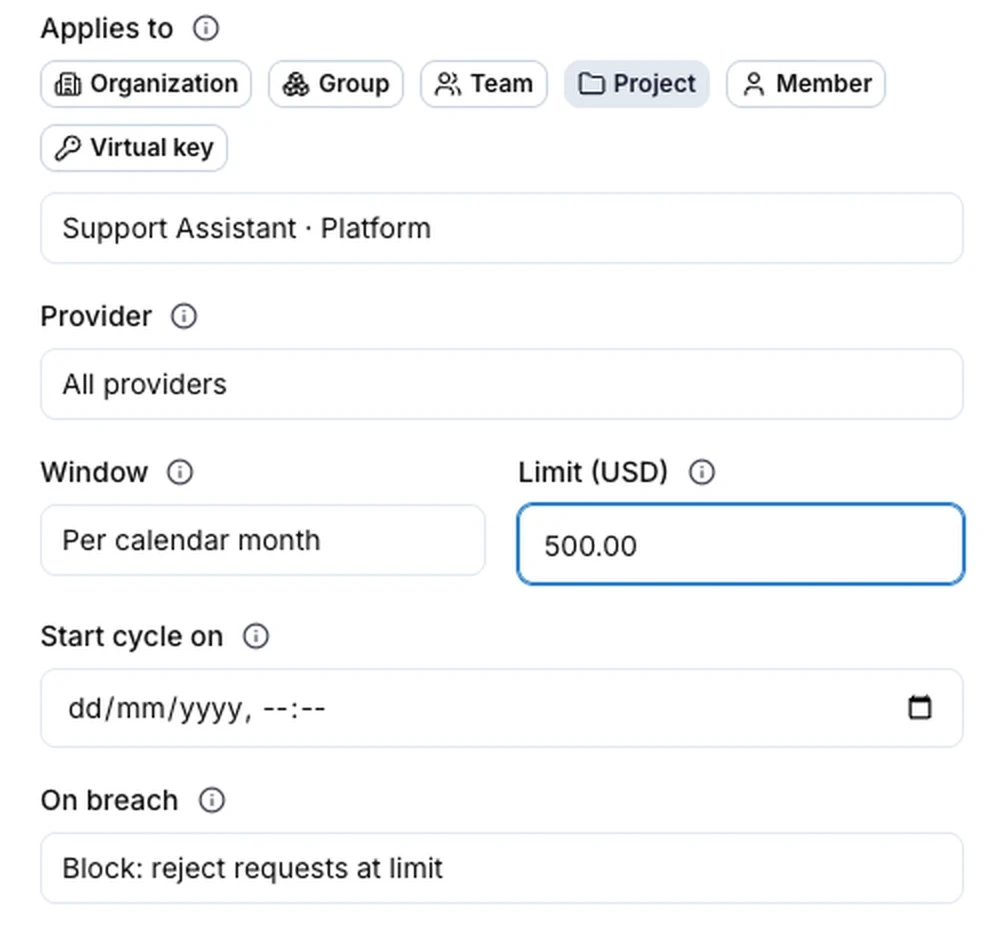
Block rejects requests at the limit with HTTP 402 budget_exceeded. Warn keeps serving them and adds an X-LangWatch-Budget-Warning header, and both send that header from 80 percent of the limit, so your code can react early. The Budgets page lists what each budget spent against its limit:
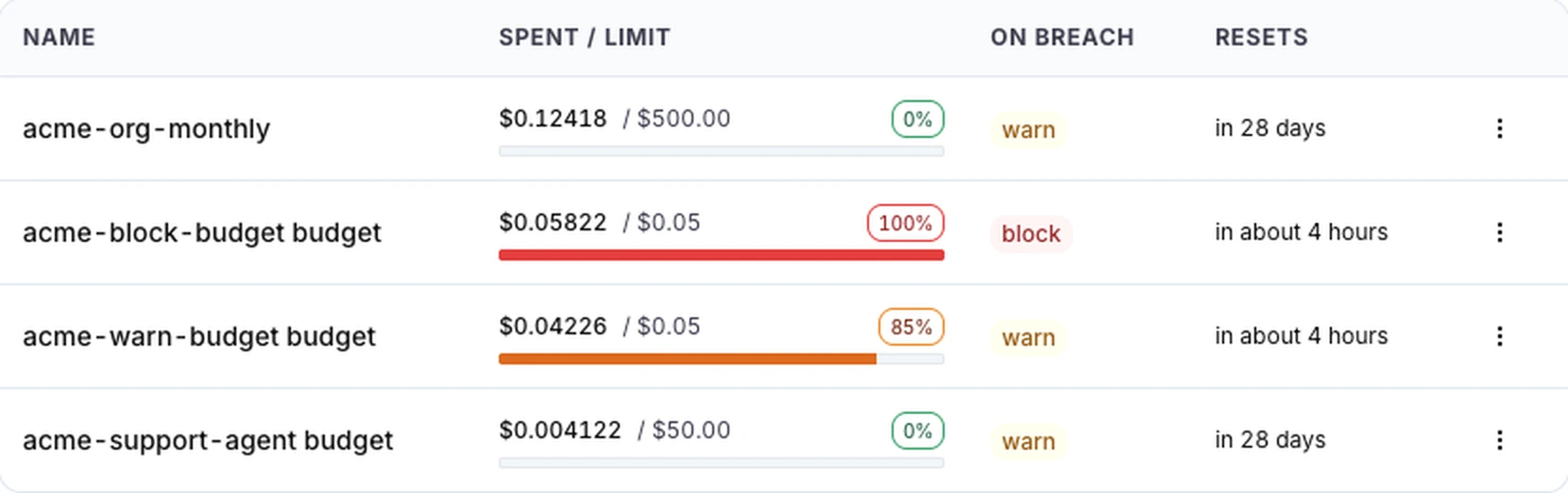
For a budget per customer, my demo already sends the customer id in the X-LangWatch-End-User-Id header. Create a budget with the scope attributed_user on your virtual key or project, over the budgets API. Then every customer id that comes through gets its own limit for the window. When one of them hits it, the 402 carries "budget_scope": "attributed_user", so your app can tell that customer's limit apart from the whole key's. The budgets docs have the request and the other scopes.
How do I reduce LLM API costs in production?
Test a cheaper model against your own test suite first, and keep it only where the pass rate holds. Then cut turns, cut the context you resend every turn, and keep the fixed part of the prompt first so the provider's prompt cache applies. Check each change with the same test suite before you keep it.
Switching the model changes the cost the most, and it's also the change most likely to break your agent. In LangWatch, one comparison run sends every scenario of your suite to the same agent on two models. This one is from our docs, a returns agent on gpt-5 and on gpt-5-mini:
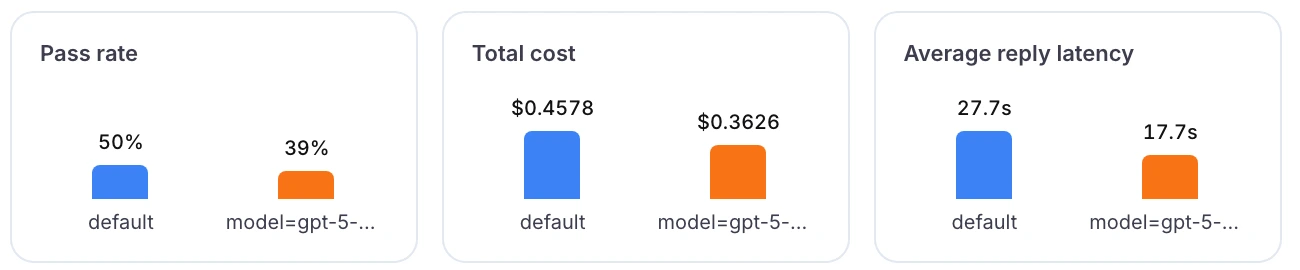
| gpt-5 (default) | gpt-5-mini | |
|---|---|---|
| Pass rate | 50% | 39% |
| Total cost (USD) | 0.4578 | 0.3626 |
| Average reply latency | 27.7 s | 17.7 s |
| Total cost divided by pass rate (USD) | 0.92 | 0.93 |
gpt-5-mini cut the total cost and the reply time, and it failed more scenarios. Per passed scenario it cost about the same, so on that suite the cheaper model saves nothing per task it finishes.
After the model, in order of effect:
- Turns. Every turn you avoid takes a whole prompt off the bill (reduce turns).
- Context size. You pay for the system prompt, the tool list and the history on every turn. Compare the input tokens of the first and the last call of a long conversation to see how much of the bill is resent context.
- Prompt caching. Providers charge cached input tokens at a fraction of the price. Keep the fixed part of the prompt first and identical across calls, and check the cached tokens LangWatch shows on each call.
- Provider. Some models are sold by more than one provider, at different prices.
On my demo, the next change I'd make is for cust_0907: keep the pasted logs in the first turn only, send a short summary of them after that, and run the support agent's tests again to check it still fixes the import.
Put this into production with LangWatch.
Trace your agents, run evaluations, and turn failures into repeatable tests.
Frequently asked questions
- What are the best tools to track LLM token costs per feature or customer?
- You need a tool that records the cost of every LLM call and lets you group it by fields you send yourself, like a customer id and a feature name. An LLM observability platform such as LangWatch tracks the cost per trace and answers the grouping with filters and SQL, and an AI gateway such as the LangWatch AI Gateway adds budgets per customer, team or key that block or warn before the spend happens. The provider's own bill can't split by customer, because it only sees your API key.
- How do I track LLM costs per customer?
- Send the customer id with every trace. With the LangWatch Python SDK, call langwatch.get_current_trace().update(metadata={"customer_id": ..., "labels": ["your-feature"]}) inside the traced function; in TypeScript or OpenTelemetry, set the langwatch.customer.id and langwatch.labels attributes. LangWatch computes the cost of each call from the model and the token counts, so cost per customer is a filter in the Trace Explorer or a GROUP BY in LangWatch SQL.
- What is cost per resolved conversation?
- It's the total cost of a customer's or a feature's conversations divided by the conversations your agent finished without handing them to a person. It shows what you pay for each problem actually solved. A customer whose requests keep going to a person can look cheap per conversation and be expensive per resolved one, and the person's time comes on top.
- How do I reduce LLM API costs in production?
- Test a cheaper model first, with a comparison run of your test suite, and keep it only where the pass rate holds. Then cut turns, trim the context you resend every turn (system prompt, tools, history, pasted logs) and keep the static part of the prompt first so the provider's prompt cache applies. Check every change with the same test suite before you keep it.
- How do I set an LLM budget per customer?
- Route your LLM calls through the LangWatch AI Gateway and send the customer id in the X-LangWatch-End-User-Id header. A per-end-user budget, created over the budgets API, then gives each customer their own limit per window, and blocks with HTTP 402 or warns with a header from 80 percent.