

What a budget is
A budget is a spend cap in USD on one scope over one window. The gateway checks every request against every budget that applies to it. Ablock budget at its limit rejects the request. A warn budget lets it through and adds a warning header.
Spend is counted after the provider answers, from the token counts the provider reports and the LangWatch pricing catalog. Requests the gateway rejected and requests that failed at the provider add no cost.
Create a budget
Open AI Gateway > Budgets and click New budget. The drawer has these fields: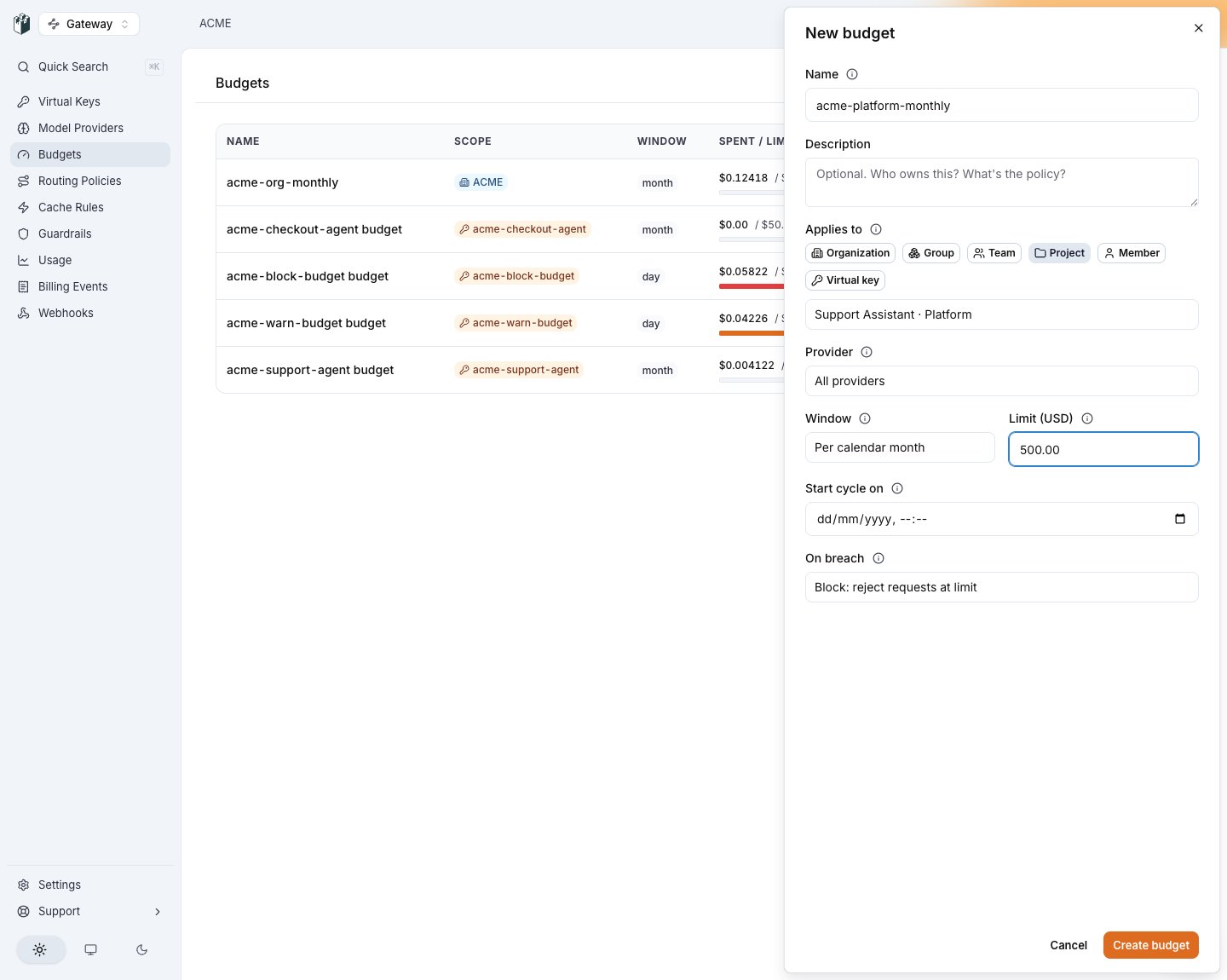
The New budget drawer: Applies to with the six scope types, the provider filter, the window, the limit, the cycle anchor and On breach.
gateway_budget_scope_unreachable and offers Create it anyway. Use it when you provision the budget before the keys.
Per-end-user budgets are created over the API. See Per end user.
Scopes
One request is checked against all of them. For example, a request on key
acme-support-agent in project support of team platform counts against the key’s, the project’s, the team’s and the organization’s budgets, and against the principal and group budgets when the key has a principal.
A group budget gives each member their own allowance: a 10, and one member’s spend never counts against another. It applies only to keys with a principal. Telling members apart needs the ClickHouse spend ledger, so a deployment that reads budget spend from Postgres only refuses the create with group_budget_requires_clickhouse. An attributed_user budget is refused the same way.
Per end user
Anattributed_user budget is a template on one virtual key or one project: each distinct end user seen there gets the limit per window. You create one budget, and buckets appear per end user on first spend.
X-LangWatch-End-User-Id header, then the X-Litellm-End-User-Id header, then the OpenAI user body field. A voice session keeps the end user of the request that created it, and every usage report of that session counts against that end user. While such a budget is active on the key, a request with no end-user id is rejected with HTTP 400 end_user_required.
Read one user’s spend and caps with GET /api/gateway/v1/end-users/:id/spend. See Billing and spend events.
Block and warn
The 402 body is an OpenAI-shaped error with the budget in
error.meta:
budget_scope tells your application which allowance ran out: attributed_user is the end user’s own cap, virtual_key is the tenant’s cap.
The warning header lists every budget at or past 80 percent as scope:percent, comma separated, for example X-LangWatch-Budget-Warning: project:84,virtual_key:100. A provider-filtered budget appears as scope/provider_id:percent.
A block budget with a Provider filter removes that provider from the request’s provider chain instead of rejecting the request. The request is rejected only when no provider is left.
Two webhook events fire once per period: gateway.budget.threshold_crossed at 80 percent and gateway.budget.breached at the limit, on warn budgets too. See Webhooks.
How far past a limit spend can go
A budget is checked before a request and debited after it, so spend can pass the limit by a bounded amount:- One request. A request admitted under the limit is served in full, whatever it costs.
- Requests in flight. Requests admitted at the same moment are each checked against the spend recorded so far.
- The refresh. The gateway reads budget spend from a configuration bundle refreshed every 60 seconds, so a key can serve for up to one minute after it crosses the limit.
Voice and realtime sessions
A voice call is one admission that bills for as long as it runs. It is checked when the session is created and debited while it runs: each usage report is its own debit, so budgets see a call in progress.
The next session create on a key past its limit answers HTTP 402 in all three cases.
Two settings keep a client-metered session small: a short credential lifetime on the mint (
expires_after.seconds for OpenAI; an ElevenLabs token lasts 15 minutes and opens one socket) and max open sessions on the key, which caps how many calls it holds at once. See Realtime voice.
Windows and cycles
The cycling windows (minute, hour, day, week, month) roll on the calendar in UTC: a day resets at 00:00, a week on Monday 00:00, a month on the first.
Set Start cycle on (cycle_anchor_at on the API) to roll from your own date instead. Anchored on the 17th at 09:00, every period starts on the 17th at 09:00. A monthly anchor past the 28th clamps into shorter months. The anchor is fixed at creation; total and manual refuse one with gateway_budget_cycle_anchor_invalid.
total never resets. manual accrues until you reset it:
attributed_user budget, add ?end_user_id=<id> to reset one end user’s bucket.
See the spend
AI Gateway > Budgets lists every budget with its spent amount against its limit, its window, its breach mode and its next reset.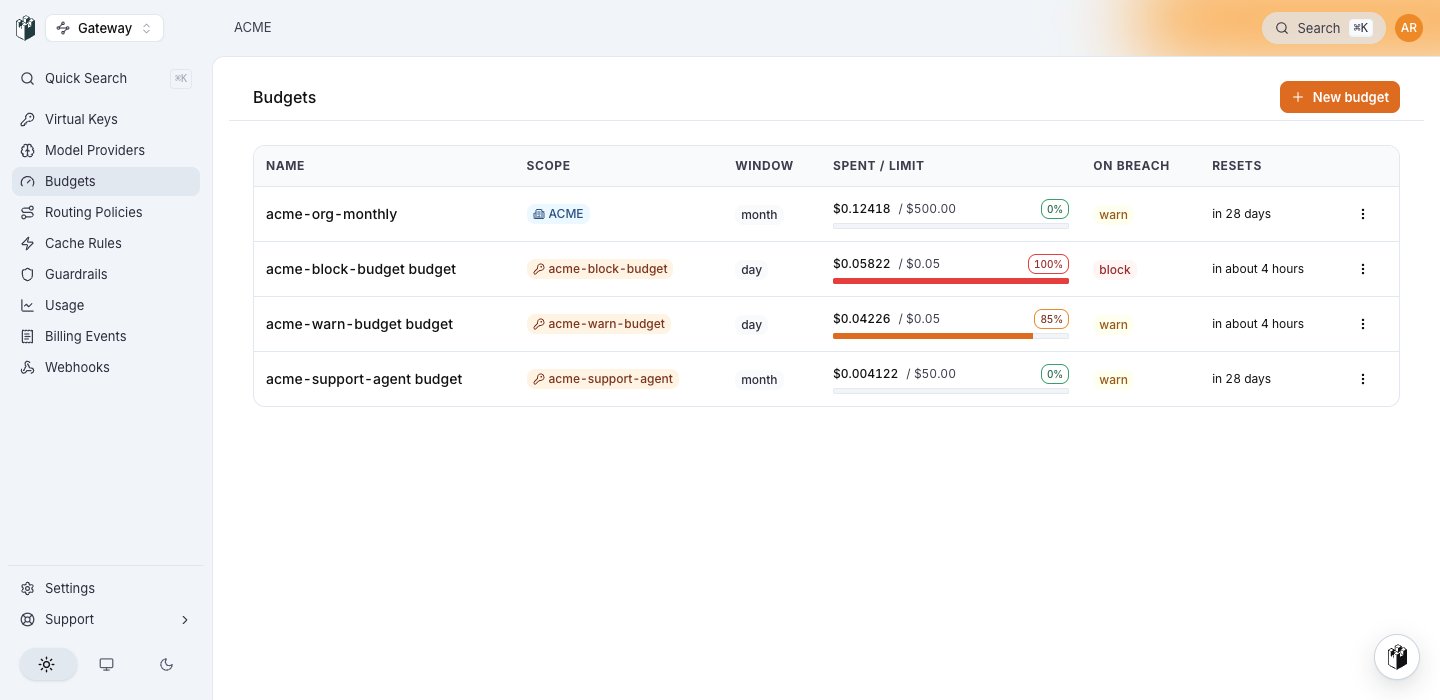
AI Gateway > Budgets: spent against limit per budget, the window, the breach mode and the next reset. The block budget is at 100 percent, the warn budget at 85.
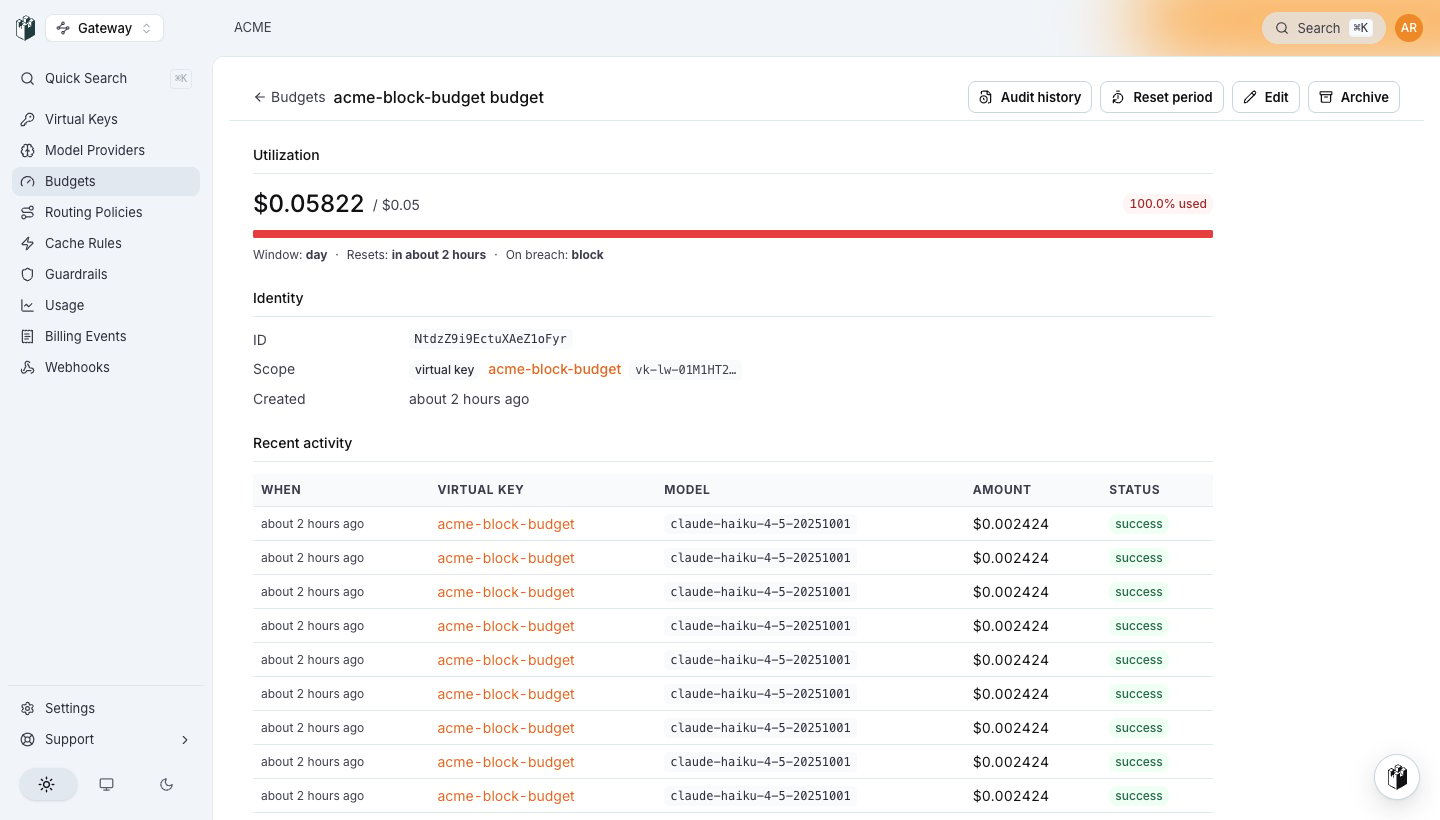
A breached block budget opened: $0.05822 spent of a $0.05 daily limit, 100 percent used, the next reset, and under Recent activity the requests that spent it.
Manage budgets from the CLI
create takes --scope organization|team|project|virtual-key|principal|group with the matching --organization, --team, --project, --virtual-key, --principal or --group <id>, plus --provider-key <id> and --cycle-anchor-at <rfc3339>.
Manage budgets over REST
Field by field: Budgets API reference. A virtual key’s own budget can also be set inline on the key: see Virtual keys.