

What a virtual key is
A virtual key is the credential your application presents to the gateway in place of a provider API key. A virtual key is like a virtual credit card that you can attach a budget to: it belongs to a project, a team, an organization or one person, it reaches only the providers you allow, and you can rotate, disable or revoke it without touching the provider account. The provider keys stay in LangWatch, under Settings > Model Providers. Your application never sees them.Create a virtual key
Open AI Gateway > Virtual Keys and click New virtual key. The drawer has these fields: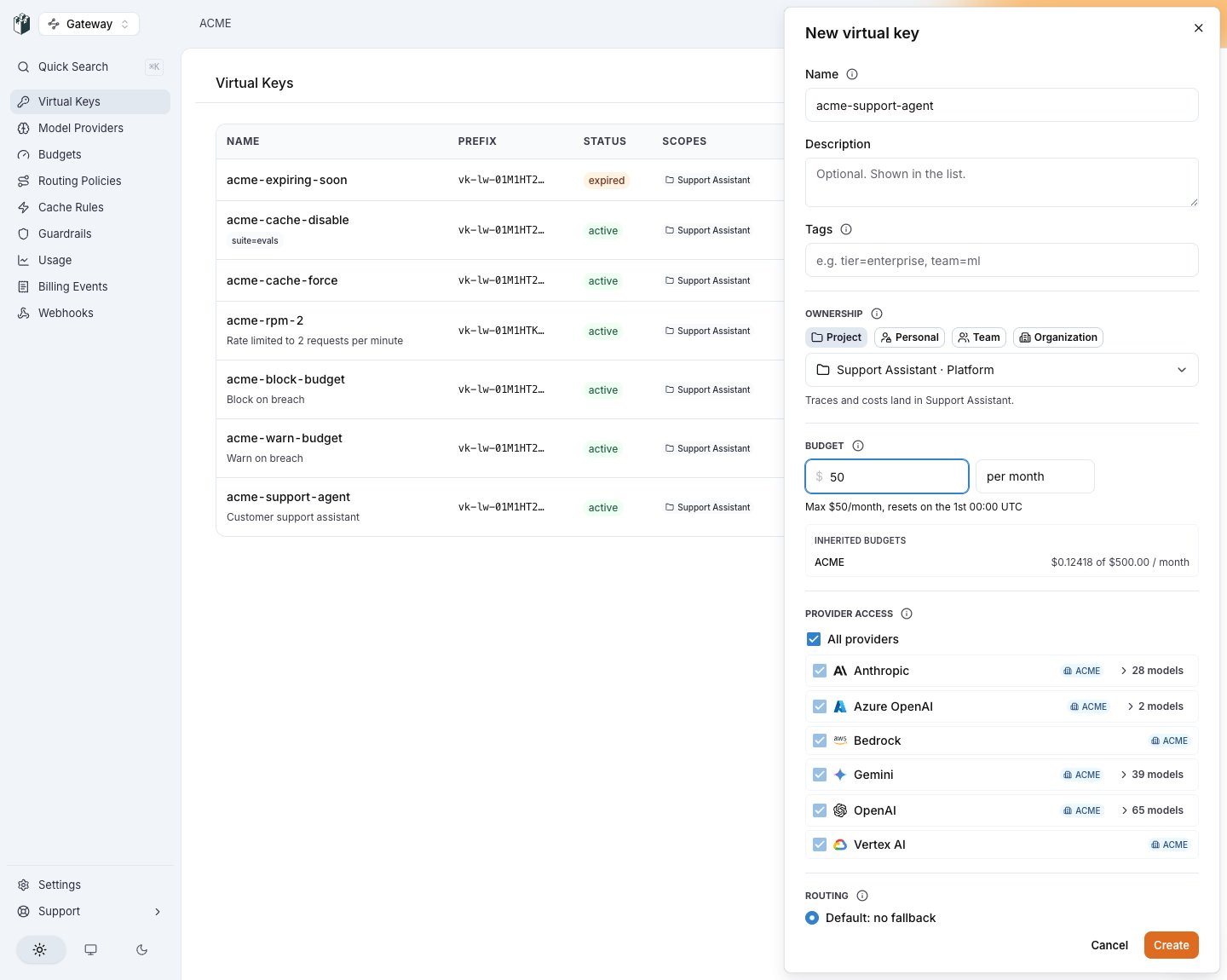
The create drawer. Inherited budgets lists the organization budget that already applies to a project key.
vk-lw-01HZX9N.
All providers means the key reaches every provider its scopes can see, including providers you add later. An explicit selection stays as picked until you edit the key.
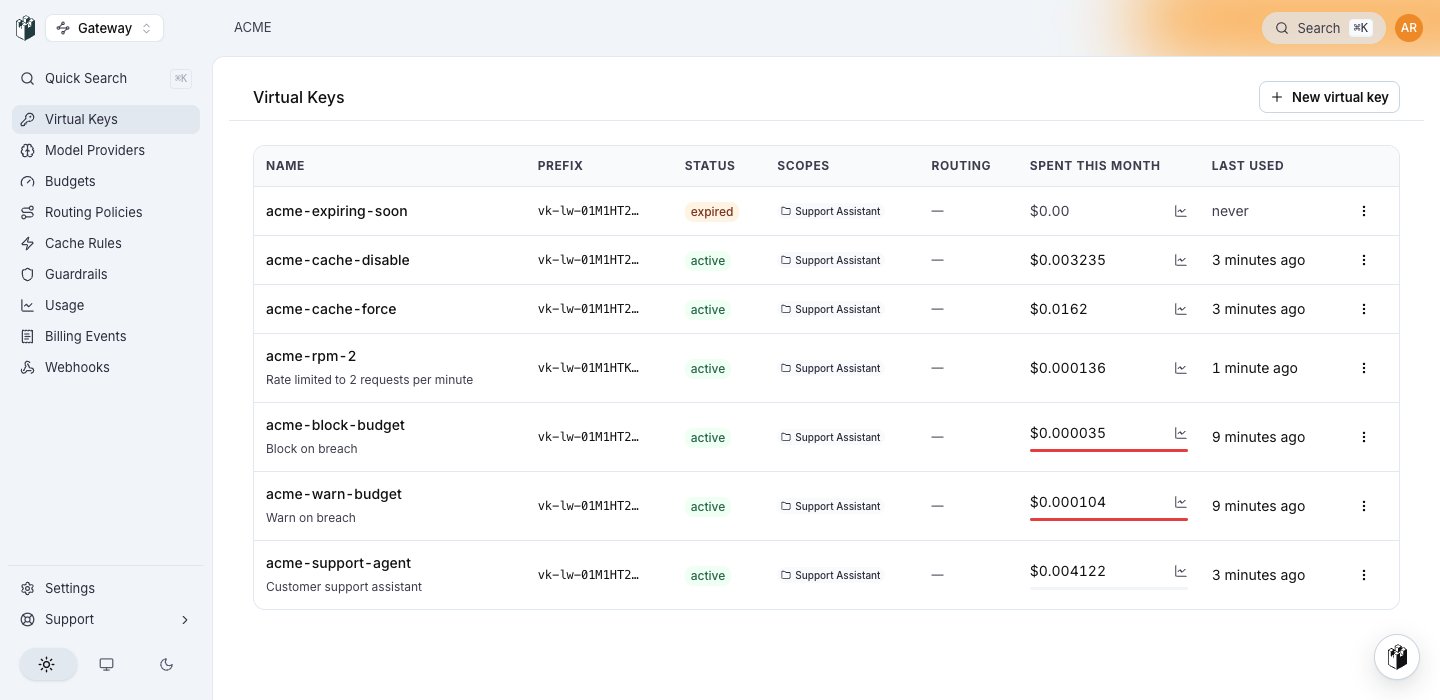
The Virtual Keys list: name, prefix, status, scopes, routing, spend this month and last use. A red bar under the spend marks a key past a budget.
Ownership and scopes
Ownership decides who can see and manage the key, which providers it reaches and where its traces and costs land.
A key reaches the provider credentials configured on its scope and above it: a project key sees the project’s, the team’s and the organization’s credentials.
A personal key carries a principal, the person behind it. Personal and group budgets apply to keys with a principal. You always see your own personal keys; seeing other people’s personal keys needs
virtualKeys:viewOtherPersonal.
The key format and how to send it
A key isvk-lw- followed by a 26-character Crockford base32 ULID, 32 characters in total. The prefix makes keys easy to find with secret scanners. LangWatch stores an HMAC-SHA256 hash of the secret and the first 13 characters for display.
Send the key in one of these headers:
Edit a key
Open the key from the list and click Edit. Ownership is read-only after creation. The edit drawer has the create fields plus two sections:
The drawer also shows a Cache control section. The gateway does not read it: caching is set by cache rules, which match on model, key or tag.
The same settings are the
config object on the API (PATCH /api/gateway/v1/virtual-keys/:id) and in vk update <id> --config-json: modelsAllowed, providersAllowed, rateLimits, fallback, realtime and guardrailAttachments. Model aliases are set on the routing policy, not on the key. See Model aliases.
Guardrails and cache rules attach to keys from their own pages. See Guardrails and Cache control.
The key detail page shows the spend of the last 30 days, the provider chain in the order it is tried, and the configuration in effect.
Rotate, disable, expire and revoke
A secret the gateway does not know, for example a mistyped one, gets 401
invalid_api_key. The 24-hour rotation grace is fixed. A revoked key cannot be rotated.
Each transition emits a webhook event: gateway.virtual_key.created, gateway.virtual_key.rotated, gateway.virtual_key.disabled, gateway.virtual_key.enabled and gateway.virtual_key.revoked. See Webhooks.
Manage keys from the CLI
Thelangwatch CLI has a virtual-keys command group, alias vk. It uses the LANGWATCH_API_KEY environment variable.
vk create also takes --scope org:<id>, --scope team:<id>, --trace-project <id>, --routing-policy <id>, --routing-mode none|fallback_all|policy, --principal-user <user_id> and --providers-allowed <ids>. vk update <id> changes the name, description, scopes, trace project, routing and budget, with --clear-description, --clear-trace-project, --clear-routing-policy and --clear-budget to unset them, and --config-json <json> or --config-file <path> to set the key’s configuration.
Manage keys over REST
The management API lives under/api/gateway/v1 and takes a LangWatch API key in the X-Auth-Token header.
{ "virtual_key": { "id": "vk_..." }, "secret": "vk-lw-..." }. Send an Idempotency-Key header to make the create safe to retry: a replay returns the original response, including the secret. To do that, LangWatch keeps the first response for 24 hours, encrypted with AES-256-GCM under the deployment’s CREDENTIALS_SECRET, and deletes it when it expires. A replay carries the X-Idempotent-Replay header. Send a different key for every distinct create, and treat the key itself as a secret.
Field by field: Virtual keys API reference. Roles and permissions: RBAC.