
Instant Evals on Your Own Decision Model, and Observability for Pi and Grok CLI
Every organization can now run Instant Evals on a decision model with its own provider key, and pi and Grok CLI sessions show up in LangWatch next to Claude Code and Codex. Datasets, agents and evaluators also keep a version history you can compare, restore and pin to.
What You Can Do Now
Instant Evals on your own decision model, for every organization
Any organization can now run Instant Evals on a decision model with its own provider key, picked in Settings > Model providers > Default models. Before, LangWatch had to switch this on for you. Judgements on your own key are not billed by LangWatch: your provider bills you for them directly.
There are more decision models to pick from: Gemini Decision 1 on your AI Studio key, TypeSafe Jev 1.14, the Azure OpenAI Decisions API and Microsoft Decision 1 on your own Azure resource, Jev 1.14, Microsoft Decision 1 and Liquid d1.1 through OpenRouter, and Fireworks Rune.
The picker now lists only the models that will run for your project, so a model whose provider key is missing no longer shows up as an option that does nothing. See Instant Evals on your own model.
Observability for your Pi and Grok CLI sessions
Run langwatch pi or langwatch grok and your sessions show up in LangWatch next to Claude Code and Codex, with model calls and their cost, tool runs, and the repository and branch each session worked on. Each Grok turn also shows up as a trace in the Trace Explorer. See pi and Grok CLI.
Dataset version history
LangWatch now saves a version of a dataset a few minutes after you stop editing it, and again each time an experiment run starts on it. You can also save one by hand from the History drawer and give it a name.
From the History drawer you can open an old version's rows, compare it with the current content row by row, and restore it. A restore saves the current content as a version first, so you can always go back.
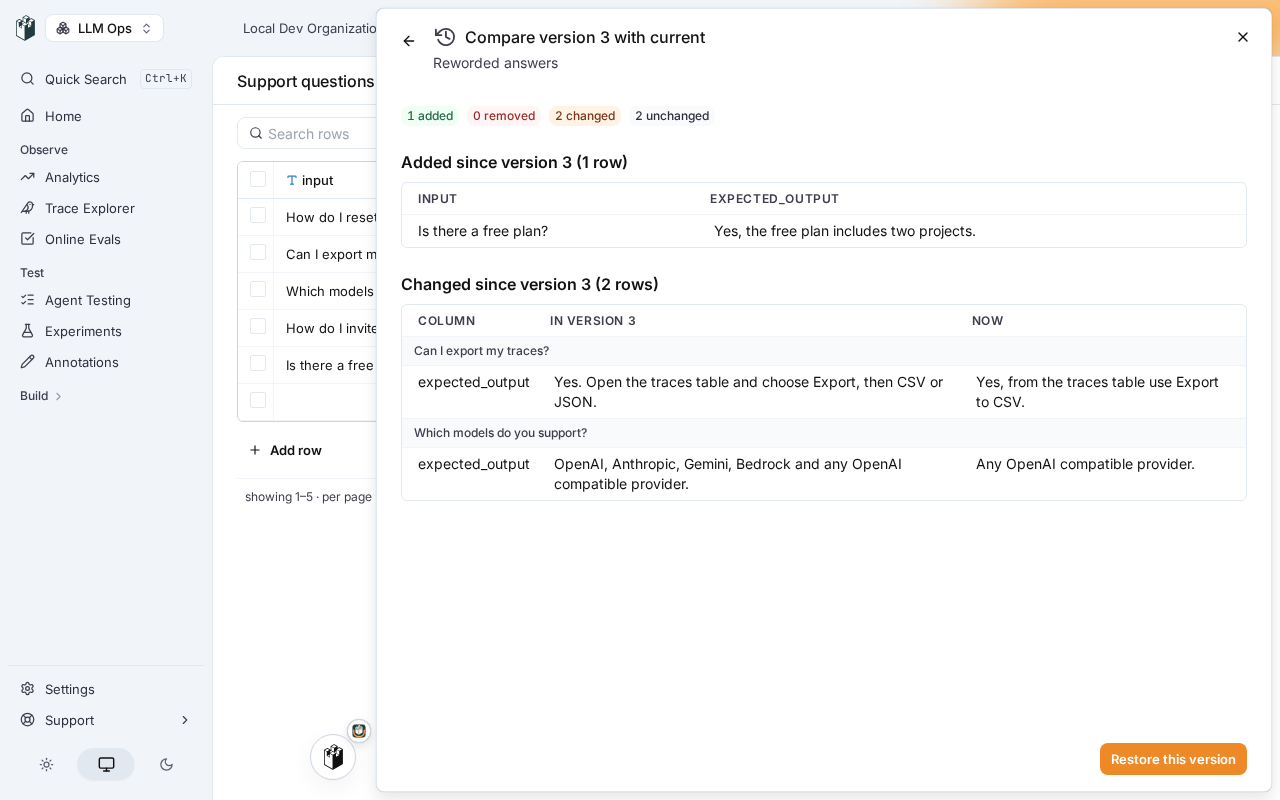
To run an experiment on a fixed version, pick it under Dataset version in the dataset tab's menu, or pass --dataset-version to langwatch experiment run. The run API and both SDKs take dataset_version too, and each run in the sidebar shows the dataset version it read.
LangWatch keeps every version from the last 24 hours, then one per day for 30 days, then one per week. Versions that are named, pinned or used by an experiment run are always kept.
Versions and deploy labels for agents and evaluators
Every time you save an agent or an evaluator, LangWatch now records a new version, the same way it does for prompts. Open its history to see each version with who made it and when, then choose Deploy to point a label such as production or staging at one of them.
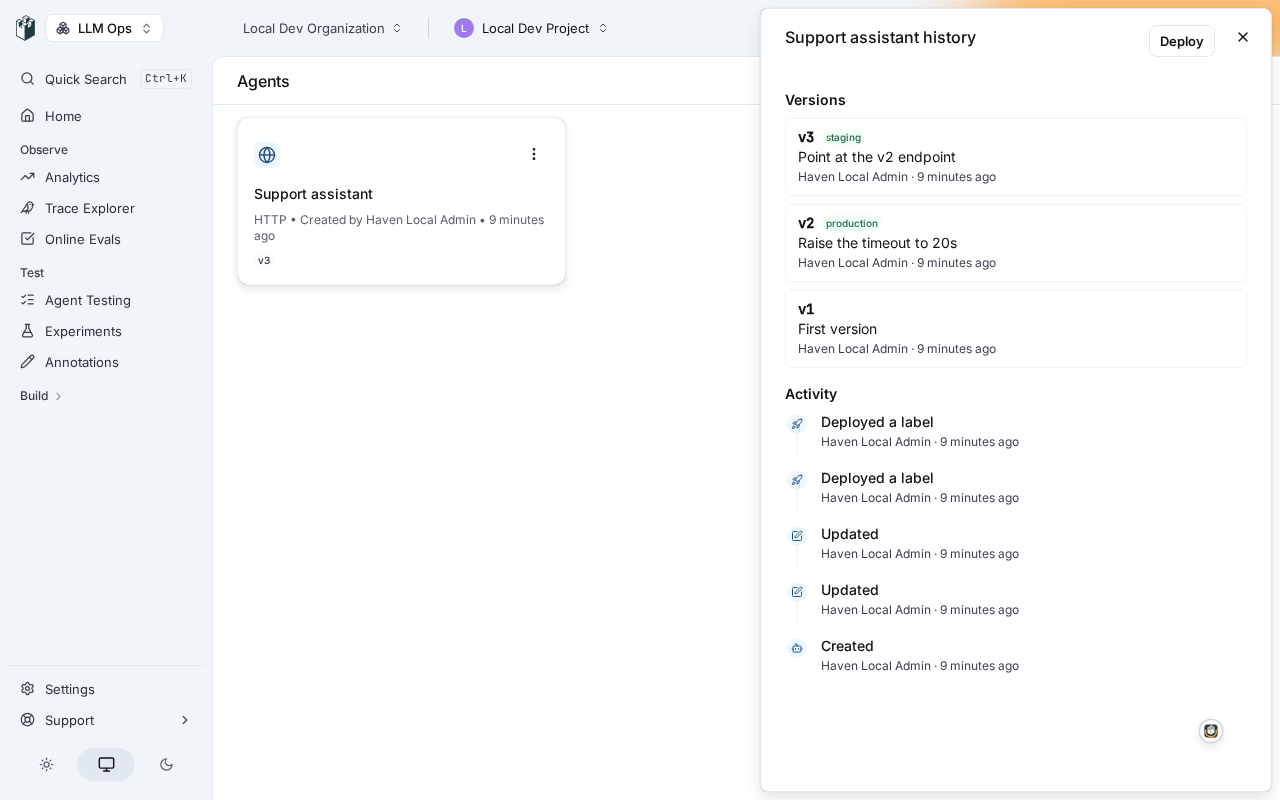
Online evaluations, LangWatch AI Gateway guardrails and experiment agent targets each get a Deploy label picker. Pin an online evaluation to production and it keeps running the evaluator settings you deployed while you go on editing the evaluator.
You can also read an agent or an evaluator at a label or a version from the REST API, the CLI, TypeScript SDK 2.2.0 and Python SDK 2.0.0. Moving a label needs the new agents:deploy or evaluators:deploy permission. See Versions and deploy labels.
Sync datasets and evaluators from your repository
POST /api/dataset now takes the rows along with the columns, so a script creates a dataset in one call. Python SDK 2.0.0 adds upsert_records(..., key="case_id"), which edits the rows whose key already exists, adds the new ones and leaves the rest alone, so running the same sync twice changes nothing.
POST /api/evaluators now creates custom code and workflow evaluators too, not only the built-in ones, and so does langwatch.evaluators.create(..., type="code") in Python SDK 2.0.0. See Programmatic access to datasets and Saved evaluators.
Agent registry
On the Enterprise plan, the governance agent registry lists every agent LangWatch can see in your organization: agents defined in your projects, agents listed by ingestion sources such as Databricks Genie and Copilot Studio, and agents seen in your traces in the last 30 days. A traced agent that matches no listed one is marked as a shadow agent.
Read the registry with an organization API key over REST or as an ARD v0.91 manifest, follow its change feed, or subscribe a webhook to governance.agent.* to hear about each new, changed or removed agent. See Agent registry.
Pick the model that judges your scenarios
Default models has a new Judge column. It sets the model your scenario runs use to decide whether a scenario passed, per organization, team or project. Leave it empty and the judge keeps using your Default model, as before.
Smaller changes
- Experiment runs that use an agent through a deploy label show the version the label pointed at when the run started and the concurrency it ran with, as badges such as
production · v4andConcurrency 1. - Better API Key rotation: click a key in Settings > API keys to see its owner, scope, permissions, expiry and last use, then choose Rotate to give it a new secret, shown once, while it keeps its name and permissions. New keys default to No expiration. See API keys.
- On LangWatch Cloud, a new Settings > Usage page shows your plan, this month's events by day and by project, and your seats. At the seat limit, someone who signs in through your SSO waits for an admin or a member with the new Billing role to approve a seat.
- Paid plans can set data retention to 3 months.
- The organization menu has a New organization entry, and Settings has its own Teams & projects entry under Users.
- A dataset with many columns keeps each column at least 160px wide and scrolls sideways, instead of squeezing thirty columns down to a few letters each.
- Langy folds the tool calls that failed along the way into its work record, so a turn that recovered no longer looks broken. Open a failed row to see the command, its output and its exit code.
- A governance ingestion source you disable now refuses new data and stays disabled, until you turn it back on.
Notes
- LangWatch 3.22.0 and 3.23.0 are out for self-hosted installs. 3.23.0 includes agent and evaluator versions, dataset version history, and pi and Grok sessions. Everything else in this entry is in 3.24.0, released on 18 November.
- Self-hosted fixes in 3.24.0: installs on 3.20.x can upgrade to 3.21 and later again, a connected install with an expired licence now receives its renewal, you can replace a licence without removing it first, and SSO sign-in no longer hangs behind a proxy that refuses your identity provider.
- App servers no longer stop answering file storage (S3) requests after a few hours of running.
- Python SDK 2.0.0 is a major release.
langwatch.dashboardsnow points at the new Dashboards API, so if you use it to manage your analytics reports, switch tolangwatch.analytics_reports.