

langwatch grokstarts Grok and sets up the connection on the first run. Use it on a machine you work on.langwatch instrument grokwrites the same setup and exits. Use it on a machine where people start Grok from a terminal, or when the telemetry must go to a team project.
Before you start
- Install the Grok CLI.
- Install the LangWatch command-line tool:
npm install -g langwatch - Create an account at app.langwatch.ai, or run your own instance with
npx @langwatch/server.
Run Grok through the wrapper
config.toml, not in the environment, so its model calls cannot go through the LangWatch AI Gateway: LangWatch receives telemetry only, and Grok keeps your own plan and keys.
The wrapper also writes a hook file to ~/.grok/hooks/langwatch.json, so every session reports the repository, branch and worktree it ran in. Grok runs global hooks only in a folder it trusts: accept its trust prompt at startup, or run /hooks-trust. A session in a folder you have not trusted still reaches LangWatch, without a repository or branch.
Everything else is unchanged: langwatch grok accepts the same flags as grok and returns the same exit code.
If
GROK_HOME is set, the hook file goes to the hooks folder inside that directory instead.Set up a machine without starting Grok
langwatch instrument grok writes the connection and exits. A plain grok run on that machine then sends its telemetry to LangWatch. This is the setup for a shared machine where people start Grok from a terminal, for a machine image, or for a configuration management run.
- A
grokfunction in your shell start file, which applies the LangWatch settings togrokruns and to no other command. The file is~/.zshrc,~/.bashrc, or~/.config/fish/config.fish. Grok reads its export settings from the environment only, so a plaingrokrun reports only through this function. - The hook file in
~/.grok/hooks/.
grok without it gets no LangWatch settings and sends no telemetry. For those, set the variables from Manual OpenTelemetry setup in that process’s environment.
The shell function needs zsh, bash or fish. On Windows, start Grok with
langwatch grok each
time instead.Choose where the telemetry goes
Pass one scope flag, and one only:
The wrapper accepts the same flags:
langwatch grok --project acme-app pins the project and then starts Grok. --project and --personal are LangWatch flags; LangWatch removes them from the command line before Grok reads it.
Remove the setup
What you get in LangWatch
Open your personal page at/me, or open the project you pinned Grok to.
- Sessions: one row per Grok session, with the repository, branch and worktree it ran in. A subagent gets a row of its own, linked to the session that started it.
- Turns: each prompt, the response, and every tool call with its arguments and its result.
- Cost: the amount per session, from the cost Grok reports.
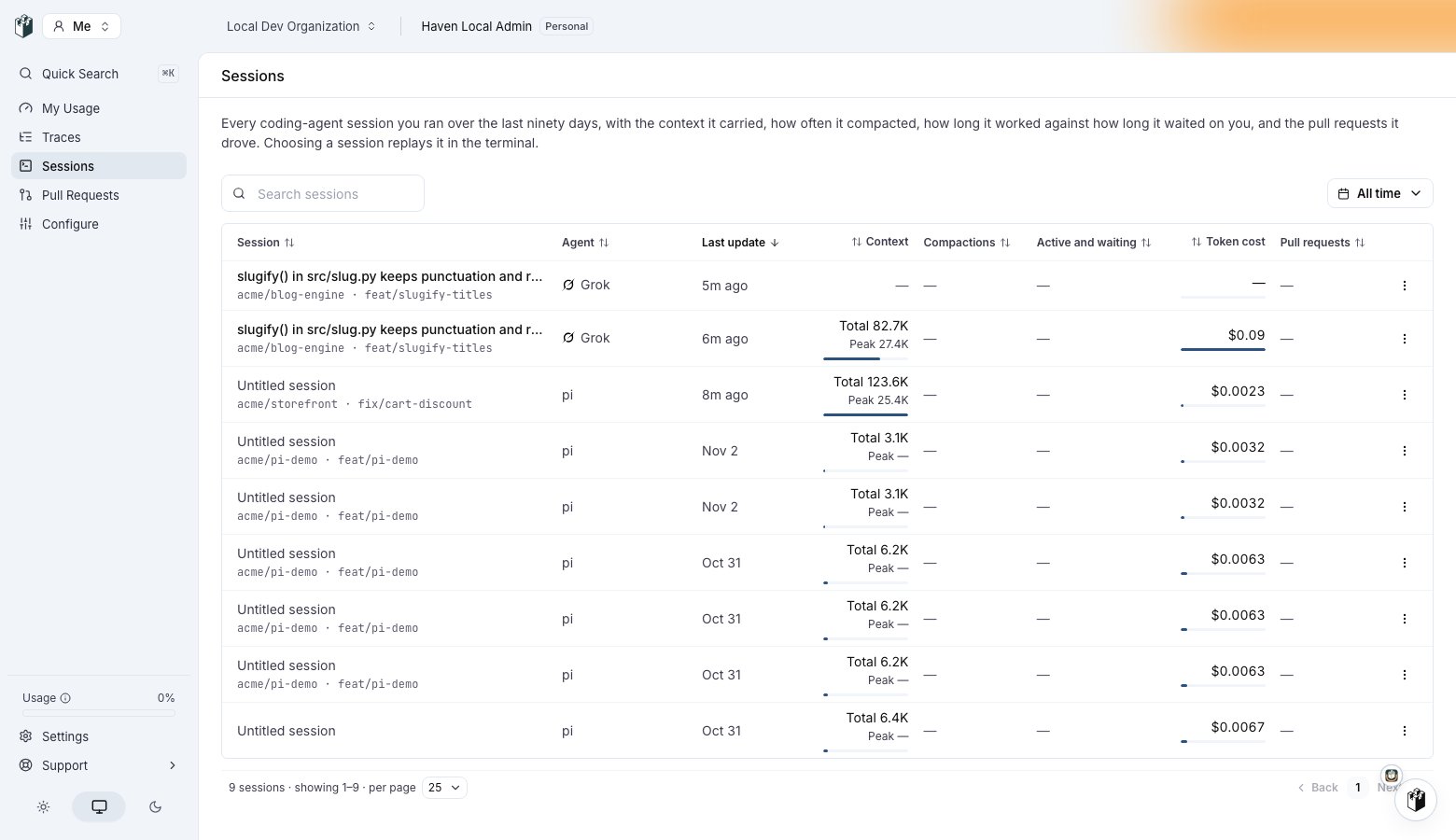
Grok sessions in the sessions list. Each row is named after its first prompt and shows the repository and branch the hook file reported, the context it carried and its cost.
Content and privacy
The setup switches on Grok’s four content settings: prompts, responses, tool details and tool content. That is what makes a turn readable. To keep content out of storage, set the content categories to Drop in the data privacy policy: the strip happens at ingestion, before storage, and tokens, cost, model and timing survive. Who can open a stored session’s content is covered on Privacy.Troubleshooting
No telemetry arrives in LangWatch
No telemetry arrives in LangWatch
Open a new terminal. The
grok function is read from the shell start file when a shell begins, so a terminal that was already open does not have it.Grok exports no telemetry unless GROK_EXTERNAL_OTEL=1 is set. The wrapper and the shell function both set it; a grok run outside either does not report.Sessions arrive without a repository or branch
Sessions arrive without a repository or branch
Grok has not trusted the folder, so it skipped the LangWatch hook. Accept the trust prompt at startup, or run
/hooks-trust in that folder.The wrapper reports that the hook file is not a LangWatch file
The wrapper reports that the hook file is not a LangWatch file
A file of your own named
langwatch.json already sits in Grok’s hook folder: ~/.grok/hooks/, or hooks inside GROK_HOME when that is set. LangWatch never overwrites it, and sessions report no repository while it is there. Rename your file, then run langwatch grok again.The command reports that it could not write the shell start file
The command reports that it could not write the shell start file
The shell is not zsh, bash or fish. Start Grok with
langwatch grok each time, which needs no
start file.The telemetry goes to the wrong workspace
The telemetry goes to the wrong workspace
Run
langwatch instrument grok --project <id-or-slug> to move it to a team project, or langwatch instrument grok --personal to move it back to your own.Authentication errors
Authentication errors
Check that the key is live and that the header reads
Authorization=Bearer <key>. An ingest key can write telemetry and no other requests, so a key that works for ingestion still fails on other endpoints.On a machine with a login, run langwatch login --device again to refresh the session.Manual OpenTelemetry setup
Use this when you cannot install the LangWatch command-line tool. Set the variables below before you start Grok. They are the oneslangwatch instrument grok writes for you.
ik-lw-…), which can create telemetry and no other requests. Keep a full project API key (sk-lw-…) out of the configuration of a coding agent: it can read and change your project data, and a coding agent has no use for that.
For a self-hosted instance, replace the endpoint with the address of your instance followed by /api/otel. Set any of the four OTEL_LOG_* lines to 0 to keep that kind of content on your machine. Leaving OTEL_LOG_ASSISTANT_RESPONSES out is not enough: it then follows OTEL_LOG_USER_PROMPTS.
The hook file runs the LangWatch command-line tool, so a manual setup reports no repository or branch.