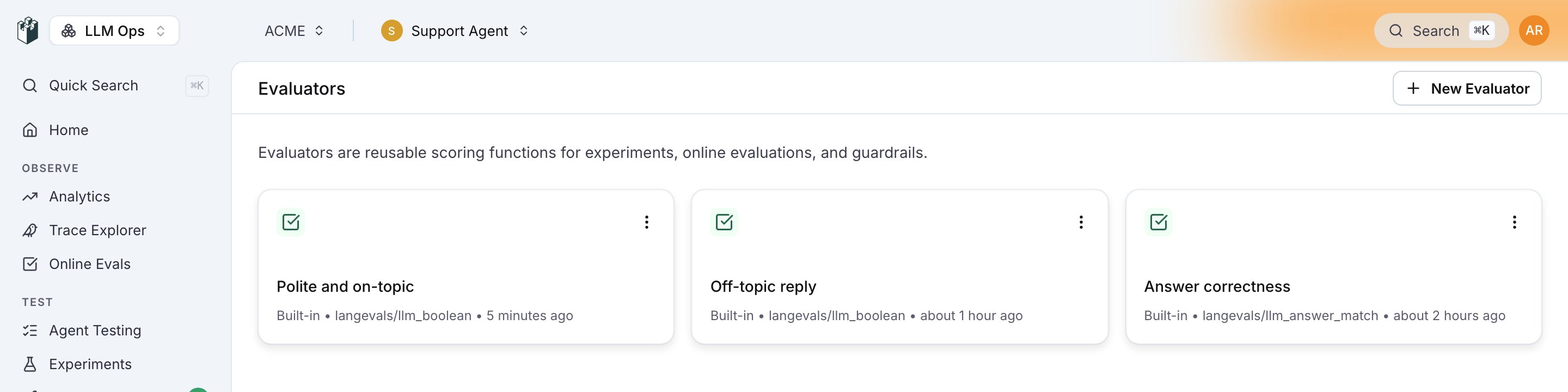
Saved evaluators are pre-configured evaluation setups that you create on the LangWatch platform. Once saved, you can reuse them anywhere—in experiments, monitors, guardrails, or via the API—without reconfiguring settings each time.
When to use Saved Evaluators:
  • You want to reuse the same evaluation configuration across multiple places
  • You prefer configuring evaluators via UI rather than code
  • You want non-technical team members to create and manage evaluations
  • You need consistent evaluation settings across your team
See also:

Creating a Saved Evaluator

Via the Platform UI

  1. Go to Evaluations in your LangWatch project
  2. Click New Evaluator
  3. Select the evaluator type (e.g., LLM Boolean, PII Detection)
  4. Configure the settings (model, prompt, thresholds, etc.)
  5. Give it a descriptive name and save
Creating a saved evaluator

Via the Evaluators Page

You can also manage saved evaluators from the dedicated Evaluators page at /{project}/evaluators.

Using Saved Evaluators

Saved evaluators are referenced using the evaluators/{slug} format, where {slug} is the unique identifier assigned when you create the evaluator.

Finding Your Evaluator Slug

  1. Go to your saved evaluator on the platform
  2. Click the menu → Use via API
  3. Copy the slug from the code examples

In Experiments

import langwatch

df = langwatch.datasets.get_dataset("my-dataset").to_pandas()

experiment = langwatch.experiment.init("my-experiment")

for index, row in experiment.loop(df.iterrows()):
    output = my_llm(row["input"])

    # Use your saved evaluator
    experiment.evaluate(
        "evaluators/my-tone-checker",  # Your saved evaluator slug
        index=index,
        data={
            "input": row["input"],
            "output": output,
        },
    )

In Online Evaluation

import langwatch

@langwatch.span()
def my_llm_step(user_input: str):
    output = my_llm(user_input)

    # Use your saved evaluator
    result = langwatch.evaluation.evaluate(
        "evaluators/my-tone-checker",  # Your saved evaluator slug
        name="Tone Check",
        data={
            "input": user_input,
            "output": output,
        },
    )

    return output

As Guardrails

import langwatch

@langwatch.span()
def my_llm_step(user_input: str):
    # Use your saved evaluator as a guardrail
    guardrail = langwatch.evaluation.evaluate(
        "evaluators/my-safety-check",  # Your saved evaluator slug
        name="Safety Check",
        data={"input": user_input},
        as_guardrail=True,
    )

    if not guardrail.passed:
        return "I can't help with that request."

    return my_llm(user_input)

Via cURL

# Set your API key
API_KEY="$LANGWATCH_API_KEY"

# Call your saved evaluator
curl -X POST "https://app.langwatch.ai/api/evaluations/evaluators/my-tone-checker/evaluate" \
     -H "X-Auth-Token: $API_KEY" \
     -H "Content-Type: application/json" \
     -d @- <<EOF
{
  "name": "Tone Check",
  "data": {
    "input": "your input text",
    "output": "your output text"
  }
}
EOF

Saved vs Built-in Evaluators

AspectBuilt-in EvaluatorsSaved Evaluators
Slug formatprovider/evaluator (e.g., ragas/faithfulness)evaluators/{slug} (e.g., evaluators/my-checker)
ConfigurationIn code via settings parameterPre-configured on platform
ReusabilityCopy settings across codeReference by slug anywhere
ManagementIn codebaseIn LangWatch platform UI
Team accessDevelopers onlyAnyone with platform access

Best Practices

Naming Conventions

Use descriptive, consistent names for your saved evaluators:
  • tone-checker-formal
  • pii-detection-strict
  • answer-quality-v2
  • test1
  • my-evaluator

When to Save an Evaluator

Save an evaluator when you:
  • Use the same configuration in multiple places
  • Want to manage settings from the UI
  • Need non-developers to configure evaluations
  • Want to version control evaluation criteria separately from code

Overriding Settings

You can override saved evaluator settings at runtime:
experiment.evaluate(
    "evaluators/my-llm-judge",
    index=index,
    data={...},
    settings={
        "model": "openai/gpt-4o",  # Override the saved model
    },
)

Next Steps