How to use these evaluators:
- Built-in Evaluators - Use directly in your code with the slug (e.g.,
ragas/faithfulness) - Saved Evaluators - Configure on the platform and reuse via
evaluators/{slug} - Custom Scoring - Send your own evaluation scores
Evaluators API Reference
Full API documentation for running evaluations programmatically.
Evaluators List
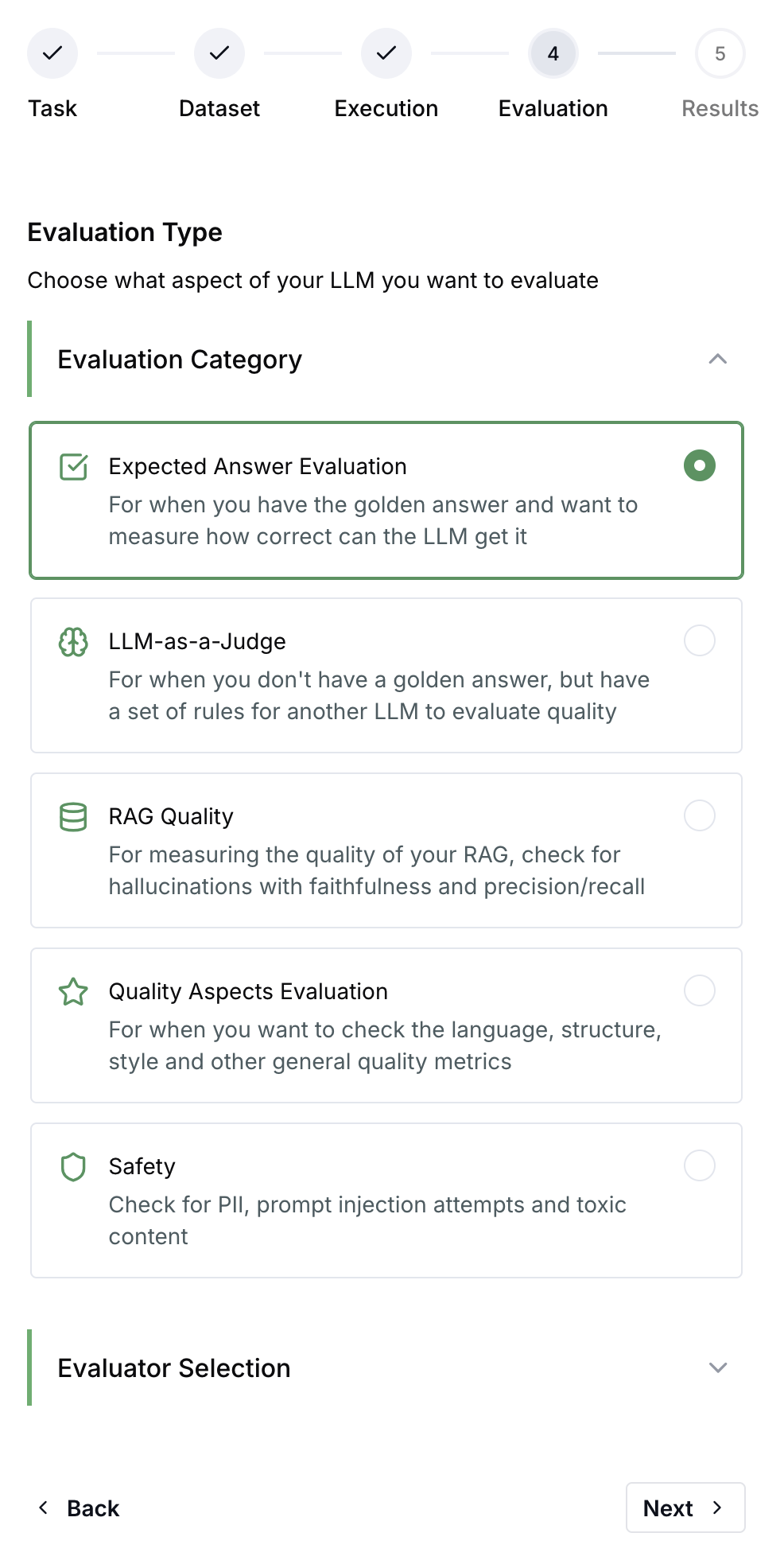
Expected Answer Evaluation
For when you have the golden answer and want to measure how correct the LLM gets it| Evaluator | Description |
|---|---|
| Exact Match Evaluator | Use the Exact Match evaluator in LangWatch to verify outputs that require precise matching during AI agent testing. |
| LLM Answer Match | Uses an LLM to check if the generated output answers a question correctly the same way as the expected output, even if their style is different. |
| BLEU Score | Use the BLEU Score evaluator to measure string similarity and support automated NLP and AI agent evaluation workflows. |
| LLM Factual Match | Compute factual similarity with LangWatch’s LLM Factual Match evaluator to validate truthfulness in AI agent evaluations. |
| ROUGE Score | Use the ROUGE Score evaluator in LangWatch to measure text similarity and support AI agent evaluations and NLP quality checks. |
| SQL Query Equivalence | Checks if the SQL query is equivalent to a reference one by using an LLM to infer if it would generate the same results given the table schemas. |
LLM-as-Judge
For when you don’t have a golden answer, but have a set of rules for another LLM to evaluate quality| Evaluator | Description |
|---|---|
| LLM-as-a-Judge Boolean Evaluator | Use the LLM-as-a-Judge Boolean Evaluator to classify outputs as true or false for fast automated agent evaluations. |
| LLM-as-a-Judge Category Evaluator | Use the LLM-as-a-Judge Category Evaluator to classify outputs into custom categories for structured AI agent evaluations. |
| LLM-as-a-Judge Score Evaluator | Score messages with an LLM-as-a-Judge evaluator to generate numeric performance metrics for AI agent testing. |
| Rubrics Based Scoring | Rubric-based evaluation metric that is used to evaluate responses. The rubric consists of descriptions for each score, typically ranging from 1 to 5 |
RAG Quality
For measuring the quality of your RAG, check for hallucinations with faithfulness and precision/recall| Evaluator | Description |
|---|---|
| Ragas Context Precision | This metric evaluates whether all of the ground-truth relevant items present in the contexts are ranked higher or not. Higher scores indicate better precision. |
| Ragas Context Recall | This evaluator measures the extent to which the retrieved context aligns with the annotated answer, treated as the ground truth. Higher values indicate better performance. |
| Ragas Faithfulness | This evaluator assesses the extent to which the generated answer is consistent with the provided context. Higher scores indicate better faithfulness to the context, useful for detecting hallucinations. |
| Context F1 | Balances between precision and recall for context retrieval, increasing it means a better signal-to-noise ratio. Uses traditional string distance metrics. |
| Context Precision | Measures how accurate is the retrieval compared to expected contexts, increasing it means less noise in the retrieval. Uses traditional string distance metrics. |
| Context Recall | Measures how many relevant contexts were retrieved compared to expected contexts, increasing it means more signal in the retrieval. Uses traditional string distance metrics. |
| Ragas Faithfulness | This evaluator assesses the extent to which the generated answer is consistent with the provided context. Higher scores indicate better faithfulness to the context, useful for detecting hallucinations. |
| Ragas Response Context Precision | Uses an LLM to measure the proportion of chunks in the retrieved context that were relevant to generate the output or the expected output. |
| Ragas Response Context Recall | Uses an LLM to measure how many of relevant documents attributable the claims in the output were successfully retrieved in order to generate an expected output. |
| Ragas Response Relevancy | Evaluates how pertinent the generated answer is to the given prompt. Higher scores indicate better relevancy. |
Quality Aspects Evaluation
For when you want to check the language, structure, style and other general quality metrics| Evaluator | Description |
|---|---|
| Valid Format Evaluator | Allows you to check if the output is a valid json, markdown, python, sql, etc. For JSON, can optionally validate against a provided schema. |
| Lingua Language Detection | This evaluator detects the language of the input and output text to check for example if the generated answer is in the same language as the prompt, or if it’s in a specific expected language. |
| Summarization Score | Measure summary quality with LangWatch’s Summarization Score to support RAG evaluations and AI agent testing accuracy. |
Safety
Check for PII, prompt injection attempts and toxic content| Evaluator | Description |
|---|---|
| Azure Content Safety | This evaluator detects potentially unsafe content in text, including hate speech, self-harm, sexual content, and violence. It allows customization of the severity threshold and the specific categories to check. |
| Azure Jailbreak Detection | Use Azure Jailbreak Detection in LangWatch to identify jailbreak attempts and improve safety across AI agent testing workflows. |
| Azure Prompt Shield | This evaluator checks for prompt injection attempt in the input and the contexts using Azure’s Content Safety API. |
| OpenAI Moderation | This evaluator uses OpenAI’s moderation API to detect potentially harmful content in text, including harassment, hate speech, self-harm, sexual content, and violence. |
| Presidio PII Detection | Detects personally identifiable information in text, including phone numbers, email addresses, and social security numbers. It allows customization of the detection threshold and the specific types of PII to check. |
Other
Miscellaneous evaluators| Evaluator | Description |
|---|---|
| Custom Basic Evaluator | Configure the Custom Basic Evaluator to check simple matches or regex rules for lightweight automated AI agent evaluations. |
| Competitor Blocklist | Detect competitor mentions using LangWatch’s Competitor Blocklist evaluator to enforce content rules in AI agent testing pipelines. |
| Competitor Allowlist Check | This evaluator use an LLM-as-judge to check if the conversation is related to competitors, without having to name them explicitly |
| Competitor LLM Check | This evaluator implements LLM-as-a-judge with a function call approach to check if the message contains a mention of a competitor. |
| Off Topic Evaluator | Detect off-topic messages using LangWatch’s Off Topic Evaluator to enforce domain boundaries during AI agent testing. |
| Query Resolution | This evaluator checks if all the user queries in the conversation were resolved. Useful to detect when the bot doesn’t know how to answer or can’t help the user. |
| Semantic Similarity Evaluator | Allows you to check for semantic similarity or dissimilarity between input and output and a target value, so you can avoid sentences that you don’t want to be present without having to match on the exact text. |
| Ragas Answer Correctness | Computes with an LLM a weighted combination of factual as well as semantic similarity between the generated answer and the expected output. |
| Ragas Answer Relevancy | Evaluates how pertinent the generated answer is to the given prompt. Higher scores indicate better relevancy. |
| Ragas Context Relevancy | This metric gauges the relevancy of the retrieved context, calculated based on both the question and contexts. The values fall within the range of (0, 1), with higher values indicating better relevancy. |
| Ragas Context Utilization | This metric evaluates whether all of the output relevant items present in the contexts are ranked higher or not. Higher scores indicate better utilization. |
Quick Start
Using a Built-in Evaluator
Use any evaluator from the list above directly in your code:Running Evaluations via UI
You can also run evaluations through the Experiments Workbench without writing code: